dsh-bottom-cost
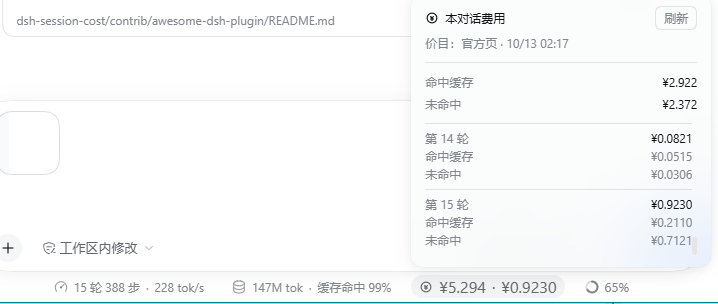
A session cost chip for DeepSeek Harness: it sits in the same row as the built-in stats pills under the composer and answers "what has this conversation cost" and "what did the last turn cost" at a glance, splitting the spend into cache-hit and cache-miss parts.
Install
Option 1 — install it from the DSH UI (simplest)
- Open 插件 → 添加插件 (Plugins → Add plugin) in the sidebar;
- Type either one:
- the package name
dsh-bottom-cost— works everywhere, including the official desktop client (which can only install npm sources), or - the repository URL
https://github.com/LanFeng97/dsh-bottom-cost— works ondsh web; the market resolves it to a tarball from codeload, so a flaky network can fail it;
- the package name
- Click 安装 (Install), then restart DeepSeek Harness as its banner tells you to (close the running
dshprocess and start it again, e.g.dsh web).
The host half is a Node module, so a config reload alone will not import it — that restart is not optional. Once restarted, open the UI and the chip is there; no page refresh needed.
Updating later is explicit. An installation pins the exact version (the profile ends up with "dsh-bottom-cost": "0.5.1"), so a new release reaches you when you press 更新 (Update) in the plugin manager — nothing changes under you in between.
Option 2 — let your AI install it
Paste this whole block into any AI that can read and write your machine (an agent inside DSH, Claude Code, Codex — anything):
Install the DSH plugin at https://github.com/LanFeng97/dsh-bottom-cost into my DeepSeek Harness:
clone the repo, run `node tools/install.mjs`, and tell me when I need to restart DSH.
Option 3 — from the plugin market (once listed)
DSH plugins are distributed as packages; look for dsh-bottom-cost in dshmarket. Until it is listed, use option 1 or 2.
Option 4 — from source (developers)
For hacking on it, or for a non-default profile:
git clone https://github.com/LanFeng97/dsh-bottom-cost
cd dsh-bottom-cost
node tools/install.mjs              # copy into the profile's node_modules + append one loader line
node tools/install.mjs --dry-run    # print what it would do, write nothing
node tools/install.mjs web          # target another profile (default: desktop)
It is idempotent — re-run it after a git pull to sync an update — and it resolves your DSH home the way the harness does ($DSH_HOME, then ~/.dsh). This route needs a restart too. After that, changing lib/client.js only needs a page refresh; changing lib/index.js still needs a restart.
The plugin has no runtime dependencies at all (its shape validation is a ~90-line file it ships, lib/shape.js), so this route installs nothing from the network. That is also why it installs by copy rather than a directory junction: a junction gets realpath-resolved back into the clone, so any future bare import of a third-party package would fail to resolve there at load time.
Cannot install or cannot uninstall? Read this first
The desktop client can only install npm sources. On the official desktop app, pasting a GitHub URL into "add plugin" may simply not install — that is the client's install boundary, not your network (its own message says so: "This desktop client can only install plugins published to npm"). Install by npm package name instead.
A flaky network breaks the GitHub source. Behind that box is pnpm: it resolves owner/repo to a commit, then downloads a tarball from codeload.github.com, and the resolve step has a 6-second timeout. A hiccup fails the install; retrying usually gets through.
Do not mix the two install routes (important). Once you installed through the plugin manager / market, do not also run tools/install.mjs (and do not have an AI run it) — and vice versa. The script appends its own loader row to the profile's cordis.patch.yml, while the plugin manager declares the same component too. With the same component declared in two layers, the manager refuses to disable or uninstall it:
卸载失败:其他配置仍在使用这个组合包的组件,请先停用它们
(An uninstall failed: another configuration still uses this bundle's components — disable those first.)
Its "disable" toggle cannot suppress the other layer either, which is why a disabled plugin keeps working and survives a restart.
What to do (in order):
Open
<DSH install dir>/dsh/profiles/<profile>/cordis.patch.ymland delete this whole block (comment line plus the threeinsertlines):# dsh-bottom-cost: ... - insert: - id: ui-session-cost name: 'dsh-bottom-cost'Fully quit and restart DSH (a page refresh is not enough);
Back in the plugin manager, disable and uninstall now work;
If it then says the profile patch cannot uniquely address the row, a second declaration exists somewhere else — send me that profile's
cordis.patch.ymland I will give you the exact edit.
One-line self-check (in <DSH install dir>/dsh/profiles/<profile>/):
grep -n "dsh-bottom-cost" cordis.patch.yml package.json
A hit in package.json = installed by the manager (normal). A hit in cordis.patch.yml too = the two-layer problem above.
How to read the UI
In the screenshot: the bottom line is the stats row under the composer — ◎ ¥5.294 · ¥0.9230 is this plugin, sitting in the same row as the built-in 15 轮 388 步 · 228 tok/s (session stats) and 147M tok · 缓存命中 99% (token usage) pills, with the context meter at the far right. Above it is the expanded panel.
Clicking a Turn N heading jumps the conversation to that turn: it read-only drives the built-in turn rail on the right, so a turn that is not loaded yet gets paged in by the app itself before landing. When it cannot locate the turn, the panel says so at the bottom instead of failing silently.
Each turn also shows which model it used, right of the turn number (v4-pro, v4-flash, …; only the deepseek- prefix is trimmed, a turn that mixed models lists them side by side, and hovering reveals the full ids).
The sun (or moon) at the right of the title row is a light/dark switch that applies to this plugin's content only: both the panel and the cost chip in the stats row flip to the other palette, and the app's global theme is untouched. The icon shows the current mode (sun = light, moon = dark), and the colours come from the two official theme definitions — so each mode matches the rest of DSH while being the opposite of it. When the chip is on the opposite theme it gets its own themed background, since near-white text on the light stats row would otherwise be unreadable.
The chip in the stats row
◎ ¥2.922 · ¥0.4877
  ↑ left                ↑ right
this conversation's     the latest turn's
total spend             spend
- The left number is what this conversation has cost so far; the right number is what the most recent turn cost. Both update live as the conversation goes on.
- With nothing billable yet, the chip is hidden — the same "no content, no render" behaviour as the built-in stats pills.
Click the chip and the panel opens upward
- Fixed header: the conversation's total spend, split into cache-hit and cache-miss (
¥1.609and¥1.313in the screenshot). Those two always add up to the total on the chip — the identitytotal = hit + missholds by construction, not by rounding luck. - Scrolling list: every turn's spend, three rows each — total / cache-hit / cache-miss (turns 7 and 8 in the screenshot). It starts at the newest turn; scroll up to walk back through earlier ones.
- The scrolling window is exactly two turn blocks tall — you came here to see this turn and the previous one, and the panel does not have to grow tall for that.
The 刷新 (Refresh) button, top right
It is about the price list used for pricing, not about re-counting your conversation. Clicking it makes the host fetch the official Chinese price page, parse its 12 unit prices and validate every one, then show you the diff first (which line changed, from what to what) — nothing is applied until you click 采用 (Apply). That extra step exists because DeepSeek publishes no machine-readable price API, only a human-facing docs page, so parsing it can fail; a bad parse applied silently would corrupt every number you look at.
The panel's second line — 价目:官方页 · 10/13 02:17 — tells you which price list is active and when it was fetched. If it says 价目:内置表, no fetch has happened yet and the built-in table shipped with the plugin is in use.
Do you need to click it often? No. Once when the official prices change. After you apply, the whole conversation is instantly re-priced (money is computed in the browser from the active price list; history stores only token facts), so you never end up with two generations of prices mixed into one ledger.
Where the numbers come from
Only the official DeepSeek routes have a published price list, so only they produce money:
| Hit spend | cache-read tokens × hit price |
| Miss spend | (uncached input + cache-write) × miss price + output tokens × output price |
| Peak / off-peak | Beijing time Mon–Fri 09:00–12:00 and 14:00–18:00 are peak (double price); weekends and Chinese public holidays are off-peak all day |
| When it is priced | At the instant each call happened, taken from the session event's own timestamp — so replaying months-old history is priced with the tariff of that moment, not today's |
| Other providers | Never guessed at ¥0: they show as unpriced, and the panel reports how many calls were unpriced |
Scope is the current conversation's own turns. A subagent is a different session and is deliberately not folded in, so the chip's numbers line up one-to-one with the turns you can see.
It is an estimate, not a bill
Prices are estimated from token counts and the published tariff. The plugin never reads your balance, never touches credentials, and cannot see what DeepSeek actually deducted.
deepseek-v4-pro is priced on its own official row
2026-09-14 was meant to retire Pro, serving its requests as V4.1-Flash instead; @linxin666/dsh-usage encoded that as a time fence, and this plugin copied it early on (that is where the old "the tier is disputed" section came from).
The provider then kept Pro available with billing unchanged — Pro is charged strictly on its own official row, separate from Flash. So 0.5.1 removed the fence: a deepseek-v4-pro request is always priced on its own row (miss 4.5/9.0, output 13.5/27.0), and the 按Flash档估 mark plus its summary line are gone too, since their premise no longer holds.
If you run into the old "Pro is served by Flash" claim elsewhere, note that it describes the pre-2026-09-14 plan; do not reintroduce the fence.
The full price-refresh flow
- The host fetches the official Chinese price page (
api-docs.deepseek.com/zh-cn/quick_start/pricing, which quotes CNY; the English page quotes USD and is not used). - It parses the table and validates all 12 unit prices — if any single one is missing or implausible, the whole parse is rejected.
- It shows you the diff; 采用 (Apply) commits it, 放弃 (Discard) throws it away.
The price list is stored in <DSH_HOME>/dsh-bottom-cost/pricebook.json (atomic write) and survives restarts. A failed fetch (offline, timeout, redesigned page) is reported and keeps the current prices; the built-in table remains the first-run fallback.
Capability boundary
- One outbound request, to the public docs page above, only when you click 刷新. Nothing else ever leaves the machine.
- One file written:
<DSH_HOME>/dsh-bottom-cost/pricebook.json. - The three price routes are loopback + same-origin fenced (the same guard sibling DSH plugins use).
- The host half reads no credentials, writes no session data, and runs no timers.
- The Turn N headings read-only drive the built-in turn navigation: they read the tick buttons'
aria-label(which carries the turn number) andaria-current, and invoke the tick's own click. If the rail is unavailable it falls back to thedata-chat-turnanchors on transcript rows. The plugin injects no nodes, changes no layout, and hardcodes no build-hashed class names — but if those semantic attributes ever change, jumping breaks and the panel reports the failure instead of failing silently.
Why the shape validation is hand-rolled
DSH's projection registry asks each unit for a stateSchema and a wire.viewSchema, and only ever calls .parse on them (six call sites in @deepseek-ai/dsh-session-projection; no safeParse, no optional, no refine). That contract is duck-typed, so lib/shape.js implements exactly the seven predicates this plugin needs — object, string, finite number, boolean, array, enum, nullable — in about 90 dependency-free lines.
The alternative was zod, as DSH's own dsh-token-meter uses. It is not wrong, but for this plugin it loses: the published package is 840 files / 5.86 MB (even a trimmed v4-ESM subset is 111 files / 886 KB), and the README's primary install path is a copy install that does not bring dependencies along — so shipping zod would mean either a large vendored blob, or a pnpm/network step that rewrites your profile's package.json. Hand-rolling keeps that path genuinely self-contained. It is slightly stricter than zod in one place: NaN and Infinity are rejected (they would silently poison a running total), and it is covered by the self-test suite directly — which zod, being a third-party import, could not be.
How it works
Official extension points, not DOM injection
- The chip registers into the built-in slot
conversation.composer.dock(order: 1; the shippedstatspills takeorder: 0). That slot is the stats row under the composer, adisplay:flex; gap:12pxrow, so the chip is a first-class sibling of the built-in pills — no DOM poking, no fight with re-renders. - The panel reuses
useAnchoredPositionanduseDismissOnOutsidePointerfrom@deepseek-ai/dsh-client-ui-primitives, the same pair the built-in stats dialogs use, so placement, clamping, outside-click and Esc behave identically. - All styling goes through theme CSS variables (
--dsw-*), so it follows your theme instead of hard-coding colors.
Token facts travel as a session projection
The host registers a session projection unit (sessionCost) and the browser reads it with useProjection('sessionCost'). That buys three things for free:
- History backfill. The projection registry replays a late-registered unit over the in-memory log on first touch, so after installing or restarting DSH the turns that already happened in the current conversation are folded in — the chip does not start at ¥0.
- Persistence. State rides the harness's projection checkpoint cache, so the plugin writes no data files of its own.
- Push, not polling. Values arrive on the session control stream; there is no timer and no fetch loop.
Layered so it can be tested without DSH
| File | Role |
|---|---|
lib/fold.js |
Pure fold: session events → per-turn token facts. Zero dependencies. |
lib/pricing.js |
Pure pricing: peak/off-peak clock, model→price-row decision, tokens→money. Zero dependencies. |
lib/pricebook.js |
Pure price book: built-in table, strict validation, official-page parser. Zero dependencies. |
lib/projection.js |
Thin adapter: the shape schemas + the client view. |
lib/pricebook-store.js |
Fetch, stage a candidate, apply, persist. |
lib/routes.js, lib/guard.js |
Loopback-fenced HTTP translation. |
lib/client.js |
The chip and the panel; computes money from facts × the active book. |
Tests
npm test              # node tools/selftest.mjs — 66 checks, no network
npm run test:live     # node tools/live-check.mjs — fetch the real page, parse, persist, read back
npm run test:schema   # node tools/schema-check.mjs — schema ↔ state ↔ view consistency, from the installed copy
selftest covers peak/off-peak and holiday exceptions, the parser (against a checked-in snapshot of the official page), price-book validation, re-pricing under a different book, per-bucket aggregation, replay idempotence, JSON-safe state, list trimming, the client's i18n key set, and — since the validators are now the plugin's own code — the projection schemas themselves (unknown fields stripped, wrong types rejected with a path, NaN refused).
test:schema is a different kind of check: it imports the copy that is actually installed in the profile and drives state → view → schema through it, so it catches both "the installed files can load" and "viewOf() and the view schema still agree field-for-field". That second seam broke once in development; it has its own guard now.
Compatibility
- DSH ≥ 0.2.0-rc.2 (built and verified against 0.2.0-rc.2).
- Node ≥ 20.
- No runtime dependencies. The projection schemas are validated by the plugin's own
lib/shape.js.
License
MIT © 2026 LanFeng97.
Two pieces are not original to this plugin and keep their upstream credit:
lib/holidays.js— Chinese public-holiday dates from bastengao/chinese-holidays-node (MIT).- The peak/off-peak rules and the price-row decision in
lib/pricing.js, plus the built-in table inlib/pricebook.js— same tariff interpretation as @linxin666/dsh-usage (Apache-2.0).
No runtime coupling
Both bullets above are credits only: the rules and data were copied into this plugin's source. This plugin does not import dsh-usage, and does not import any @linxin666/* package. Uninstall dsh-usage, upgrade it, rename it — this plugin keeps working. The flip side: when the official prices change, the two copies each need updating (that is what "same tariff interpretation" is warning about).
Zero runtime dependencies. Nothing to install alongside, nothing to keep in sync: the projection schemas come from the plugin's own lib/shape.js (see "Why the shape validation is hand-rolled" above).
Related
- dsh-workspace-create-dialog — the sibling plugin by the same author, for the Create Workspace dialog.
No comments yet. Be the first to write one.