macOS widgets
Infrastructure plugin: it displays another plugin's macOS widget style on the desktop. It has no widget of its own. Plugins register a widget together with their own style, the user picks which registered plugin to show in Settings → macOS Widgets, and the WidgetKit companion renders that choice.
quota-windows is the first example below, not a dependency of this plugin.
| Small | Medium | Large |
|---|---|---|
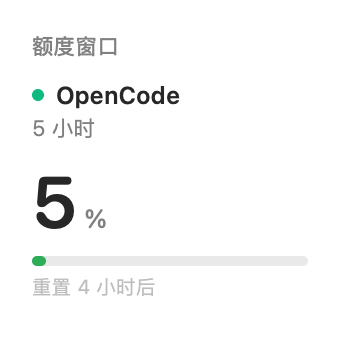 |
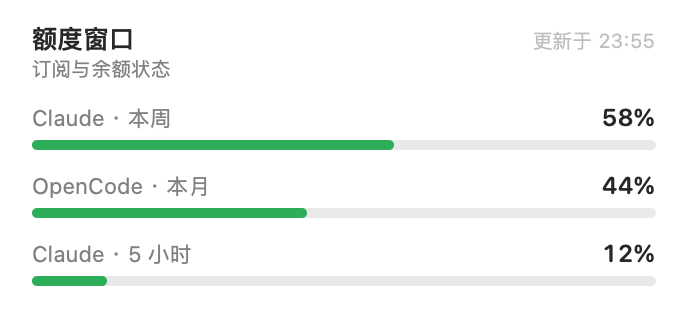 |
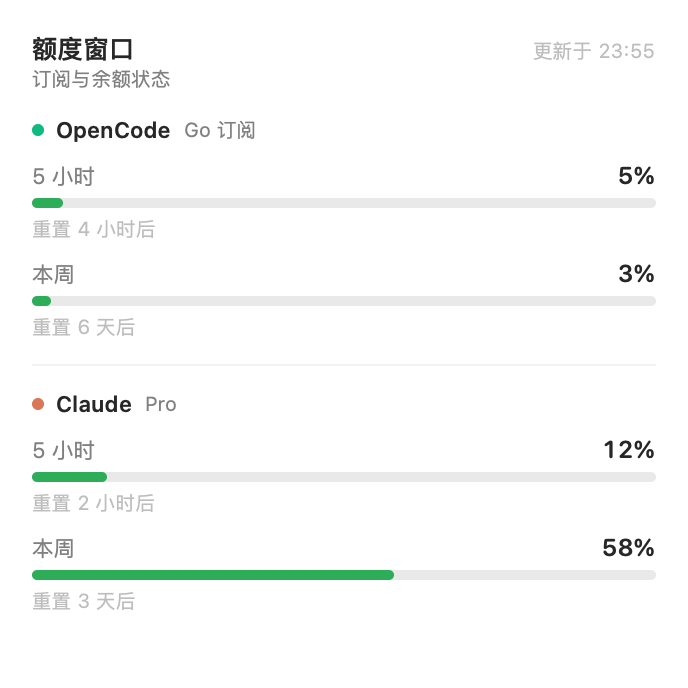 |
How it fits together
| Part | File | Role |
|---|---|---|
| Host | index.js |
Registry service ctx.macosWidgets; fixed loopback bridge on 127.0.0.1:47823 (GET /widgets, GET /widget, GET /widgets/<id>); GET /macos-widget/api/status and POST /macos-widget/api/select on the DSH host. |
| Web | client.js |
Settings → macOS Widgets: bridge status and the list of registered widgets with the current selection. |
| Native | macos/ |
SwiftUI host app plus one generic WidgetKit kind (DSH 小组件, small / medium / large) that reads the selected payload. |
The widget extension runs in the system widget host, outside the DSH page, so
it cannot use dsh-app:// or the host session cookie. The bridge is the
smallest stable surface: loopback only, GET only, no credentials.
Plugin contract
Any Host plugin registers a widget; the widget's appearance belongs to that
plugin through the style field. quota-windows is one example:
ctx.inject(['macosWidgets'], (scope) => {
  scope.effect(() => scope.macosWidgets.register({
    id: 'quota-windows',
    title: '额度窗口',
    subtitle: '订阅与余额状态',
    read: async () => ({
      title: '额度窗口',
      subtitle: '订阅与余额状态',
      updatedAt: new Date().toISOString(),
      style: { layout: 'list', accent: '#4D6BFE', background: null, showUpdated: true },
      sections: [{
        id: 'opencode',
        title: 'OpenCode',
        subtitle: 'Go 订阅',
        accent: '#10B981',
        rows: [{ label: '本月', value: 44, max: 100, unit: '%', detail: '重置 3 天后' }],
      }],
    }),
  }), 'quota-windows: macOS widget')
})
style is the plugin-owned appearance contract:
| Field | Meaning |
|---|---|
layout |
list (sections and rows) or single (one tightest value). |
accent |
Fallback #RRGGBB for section markers. |
background |
Optional #RRGGBB card background. |
showUpdated |
Whether the header shows the update time. |
Each section and row can override accent; row detail is free text. The
native side never hardcodes a provider.
Selecting the widget
Open Settings → macOS Widgets and click the plugin whose widget should appear on the desktop. The selection lives in the host bridge; the native surface picks it up on WidgetKit's next timeline refresh (15 minutes).
Install
Link the plugin into a profile and add
dsh-macos-widgettodsh.profile.bundles.Build the WidgetKit companion (Xcode +
xcodegenrequired):bash macos/build.shRestart DSH; Settings → macOS Widgets lists every plugin that registered a widget.
Desktop right-click → Edit Widgets → search
DSH Widgets→ add 「DSH 小组件」. It shows whichever plugin is selected in Settings.
Known limitations
- A plugin cannot load a WidgetKit extension at runtime; the extension ships in the companion app until DSH embeds one in its own bundle (discussion).
- The companion is ad-hoc signed for local use; distribution needs a Developer ID.
- The bridge port is fixed. The selection is persisted to
$DSH_HOME/macos-widget/selection.jsonand restored on the next Host start. - Styles are template-based (
layout+ tokens). Fully custom per-plugin views would need host-side rendering of the plugin's Web surface.
No comments yet. Be the first to write one.