dsh-tool-emoji
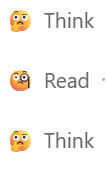
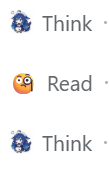
A DeepSeek Harness Web plugin that replaces the simple leading icons in tool cards with emoji, without replacing or removing any of the original card content.
Mapping
| Tool | Emoji |
|---|---|
think (reasoning row) |
🤔 |
read / web_fetch / grep / glob / web_search |
🧐 |
pwsh |
👨💻 |
edit / write / str_replace_editor |
☝️🤓 |
| Any of the above cards in the error state | 😫 |
Screenshots
Installation
# from a local checkout
dsh plugin --profile web add file:./dsh-tool-emoji

# or from GitHub
dsh plugin --profile web add git+https://github.com/LWLAymh/dsh-tool-emoji.git
Then restart the web profile:
dsh --profile web
The plugin does not hot-reload into an already-running Web process.
Uninstall:
dsh plugin --profile web remove dsh-tool-emoji
How it works
- This plugin does not register
tool.call.toolview, so it does not take over the original tool cards. - It only injects a small global stylesheet:
- hides the built-in leading SVG icon;
- renders an emoji in the same leading cell with
::before; - preserves the title, summary, diff, terminal output, expand/collapse behavior, and all other card details.
- When a mapped card is in the error state, the leading error dot is replaced with 😫 while the rest of the card stays intact.
Settings / Customization
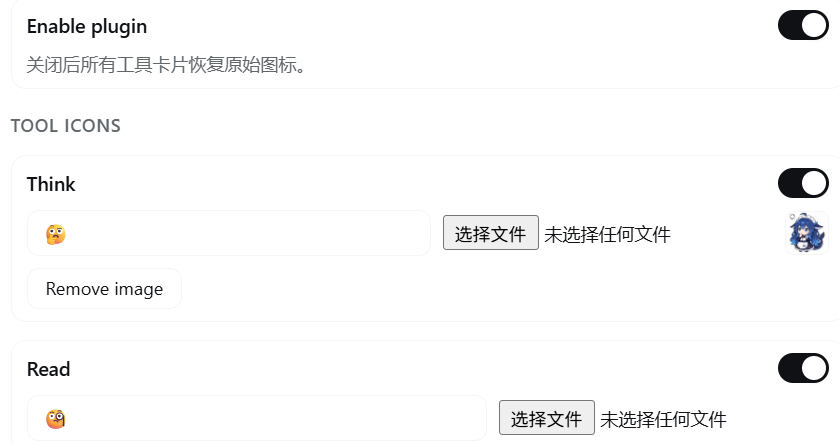
In the DSH Settings page, open Tool emoji to customize every icon without editing code:
- Enable / disable each tool icon independently.
- Enable / disable the whole plugin from the master switch.
- Custom emoji — type any emoji/text into the input field.
- Upload an image — choose a local PNG/JPEG/GIF/WebP/BMP to use as the icon (kept in
localStorage, max 1MB per image; SVG is not accepted). - Remove an uploaded image to fall back to the emoji text.
- Reset one tool or reset all back to defaults.
Changes take effect immediately on the chat page and persist after refresh.
dsh-edit-guardian compatibility
If you also use dsh-edit-guardian, it replaces the built-in rows for edit / str_replace_editor / pwsh with its own custom DOM (dshg_row).
To make the emoji apply to those custom rows too:
- Use a
dsh-edit-guardianbuild that exposesdata-toolon.dshg_row(the local dev version already does); - Reinstall
dsh-edit-guardianusing the same source you installed it from, then reinstall this plugin; - Restart the Web profile.
If dsh-edit-guardian does not have the data-tool attributes, the emoji will not be applied to edit / pwsh rows.
Customization
Edit the CSS in lib/client.js to add or change tools and emoji.
For example, to add bash:
[data-variant="bash"] > span:first-child > span:first-child svg:not([data-state]) { display:none; }
[data-variant="bash"] > span:first-child::before { content:"💻"; font-size:14px; line-height:18px; }
Notes
- The selectors rely on official source-level data attributes:
data-tool="edit"/data-tool="str_replace_editor"/data-tool="pwsh"data-variant="think"/data-variant="search"/data-variant="read"[data-disclosure-row] > span:first-child
- If a future DSH version changes these DOM structures, the CSS selectors may need to be updated.
- The plugin is Web-profile oriented; TUI/headless profiles have no leading-icon UI surface.
License
MIT
No comments yet. Be the first to write one.