dsh-message-reminder
A plugin for DSH (DeepSeek Harness). When DSH asks you a question with ask_user_question while you are looking at something else, it raises a real acrylic notification card in the bottom-right corner of your Windows desktop. Clicking the card restores and raises the DSH window and navigates back to the Session that asked.
- Draws a borderless, always-on-top acrylic window (
SetWindowCompositionAttribute+DWMWA_WINDOW_CORNER_PREFERENCE, painted withTextRenderer.DrawText), because the rendererNotificationAPI,NotifyIconballoons and WinRT toasts all failed to show a banner in this Electron shell. - Never steals focus, and the Session itself is untouched: the plugin only observes the
user-questions/requestwaterfall ({ prepend: true }) and passes the answer back to the original listener. - Stays quiet while the question card is already in front of you — the page reports "which Session is in the main view, is it visible, does it have focus" to the host.
- Host half uses Node built-ins only (
node:child_process,node:fs,node:path) and registers awebServerroute, so there are no runtime npm dependencies. - Diagnostics:
GET /message-reminder/status.
Screenshot
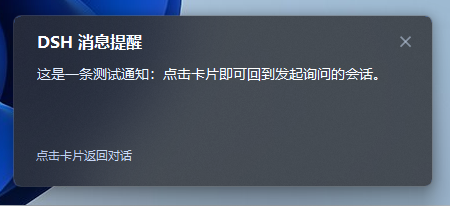
A real card raised by ask_user_question while you are looking at something else: the title comes from the plugin config, the body is the question summary, and clicking anywhere on the card restores the DSH window and returns to the asking Session.
Requirements
- DSH (DeepSeek Harness) with the Web client.
- Node.js >= 22.
- Windows 10 1803+ for the acrylic card. On macOS/Linux, or when PowerShell is unavailable, the host falls back to an in-page
Notification.
Install
Install it from the DSH plugin market (dshmarket) once the plugin is listed there, or add it to a profile by hand. Installing from a local checkout is the path that always works:
dsh plugin --profile <your-profile> add link:/path/to/dsh-message-reminder
Once the package is published to npm, the registry form works too:
dsh plugin --profile <your-profile> add dsh-message-reminder
The package declares its own bundle patch (dsh.bundle.patch), so it inserts its row into the profile when the profile loads. dsh plugin add is a pnpm add inside the profile, so make sure the package name also appears in that profile's bundle list:
// $DSH_HOME/profiles/<your-profile>/package.json
{
  "dsh": { "profile": { "bundles": ["...", "dsh-message-reminder"] } }
}
Configuration
Override by row id in your profile's cordis.patch.yml (a config block replaces the whole default block, so repeat every field you want to keep):
- id: message-reminder
  config:
    title: DSH 消息提醒                    # card title
    skipWhenViewingSession: true           # no card while the asking Session is on screen (default)
    skipWhenFocused: false                 # also skip the renderer notification while the page is focused
    windowProcessName: DeepSeek Harness    # process whose window is raised when the card is clicked
    sound: true                            # true | false | asterisk / exclamation / question / hand / beep
    notifyMode: auto                       # auto | balloon | renderer
notifyMode: balloon is the historical name of the helper-process card channel; renderer forces the page's own notification and is the easiest way to test without spawning a child process. The sound plays when the card is actually shown, so it never "beeps without a card".
Files
index.js               host half: watches questions, spawns the card, serves the SSE channel
client.js              browser half: subscribes to the channel, navigates on click
notify.ps1             the card helper script (one short-lived process per question, ASCII-only)
cordis.patch.yml       inserts the host row into the current profile
locale/{zh,en}.json    the name and description shown for the plugin
icon.svg
Known limitations
- The card only exists on Windows; every other platform uses the renderer notification.
- The blur needs
SetWindowCompositionAttributeacrylic (Windows 10 1803+). If the system rejects the call the card degrades to a solid background and everything else still works. - Some AMSI providers occasionally crash while PowerShell compiles the script; the host retries immediately (up to 5 times, ~0.1 s per failure) before falling back to the renderer notification.
- The card body is truncated at 160 characters; an over-long title is ellipsized.
- The first card is slightly slower than the rest (~1 s) because the helper compiles a small Win32 helper at startup.
License
消息提醒 (Message Reminder)
DSH 调用 ask_user_question 询问用户时,在屏幕右下角弹出一张通知卡片;点击卡片会把 DSH 窗口恢复并置顶,同时自动回到发起询问的那个会话。
效果
标题取自插件配置(默认「DSH 消息提醒」),正文是问题摘要(超过 160 字符截断);点击卡片任意位置即可回到发起询问的会话,点右上角 ✕ 只关掉卡片。
行为
| 时机 | 行为 |
|---|---|
DSH 调用 ask_user_question,且页面不在该会话(或窗口已最小化) |
在工作区右下角(内缩 18px)弹出毛玻璃卡片并播放提示音,标题默认 DSH 消息提醒,正文为问题摘要(多个问题时附带「共 N 个问题」),底部提示「点击卡片返回对话」 |
DSH 调用 ask_user_question,但页面正显示该会话且窗口是当前活动窗口 |
不弹卡片、不响:问题卡片已经在用户眼前的输入区里 |
| 点击卡片 | 把窗口恢复并置顶,然后把页面导航回发起询问的会话并展开待回答的问题卡片 |
| 点击右上角 ✕ | 忽略这条通知:卡片关闭,不置顶、不跳转;询问仍在原地等待回答 |
| 弹出 / 关闭 | 从屏幕右边缘滑入(约 260ms,ease-out-back,过冲约 20px 后回弹到位);点击或 ✕ 后向左滑出关闭(约 150ms) |
| 问题被回答 / 被取消 | 卡片随辅助进程一起消失 |
会话本身与询问流程完全不受影响:插件只是观察 user-questions/request,并把决定继续交给原来的应答者。卡片不会抢焦点,鼠标悬停时描边变亮、✕ 出现底衬。
滑动只改窗口位置(15ms 一帧的 Timer 插值),刻意不用透明度淡入:淡入需要分层窗口,会和 DWM 合成的 acrylic 毛玻璃打架。实测轨迹(1920 屏幕):
380ms left=1920  完全在屏幕右边缘外
400ms left=1822  滑入
480ms left=1459  过冲峰值(静止位 1482)
540ms left=1482  精确停在静止位并保持
「忽略」只是让辅助进程以退出码 0 结束(点击是 42),Host 会把这次结束归类为「已被忽略的气泡」,因此既不重试也不回退到渲染进程通知;下一次询问照常弹出。
置顶是阶梯式的
Windows 的前台锁会让 SetForegroundWindow 无声失败,所以点击后按顺序尝试并每步回验 GetForegroundWindow:
- 若最小化则
ShowWindow(SW_RESTORE),若被隐藏则SW_SHOW,再BringWindowToTop; AttachThreadInput挂到当前前台线程后SetForegroundWindow(前台锁只会让给拥有前台窗口的线程),完成后解除挂接;- 仍被拒绝则轻敲一次 Alt 再试,然后换用 shell 自己的
SwitchToThisWindow; - 仍被拒绝且窗口本来不是置顶时,用一次「短暂
HWND_TOPMOST→HWND_NOTOPMOST」把 z 序顶上来(不会把用户从未固定的窗口留在置顶状态); - 全都失败时
FlashWindowEx闪任务栏按钮,至少让用户注意到。
实测三种情形都能把窗口带到最前:最小化、被另一个已聚焦窗口盖住、正常后台。
「是否已经在看这个会话」只有页面自己知道,所以 client.js 会把「当前 mainView 的会话 + 页面是否可见 + 页面是否聚焦」上报给 Host(retainedBy.mainView),Host 在询问到来时据此决定是否弹卡片。
判定「用户看不到」用的是两个信号的与:visibilityState === 'visible'(没被最小化/切到别的标签)且 document.hasFocus()(是当前活动窗口)。Chromium 不提供遮挡信号——被别的程序完全盖住的窗口 visibilityState 仍然是 visible——所以聚焦状态是把「就在用户眼前」和「压在别的程序后面」区分开的那个信号。于是这几种情况都会提醒:
- 窗口被最小化;
- 窗口被其他程序盖住 / 用户切到别的程序;
- 窗口在另一个虚拟桌面;
- 看的是别的会话。
只有「窗口在前台、且正显示发起询问的会话」才不打扰。整条规则在 isViewingAsk() 里,配置项是 skipWhenViewingSession(设 false 则完全不抑制)。
结构
dsh-message-reminder/
├── index.js          Host 半边:监听询问、拉起卡片进程、提供 SSE 通道
├── client.js         浏览器半边:订阅通道、点击后导航
├── notify.ps1        卡片辅助脚本(每次询问一个短命进程,ASCII-only,每次按需读取)
├── cordis.patch.yml  把 Host 行插入当前 profile
├── locale/{zh,en}.json  插件卡片上显示的名称与说明
└── icon.svg
为什么这样分工
- Host 负责探测询问。
user-questions/request是一条 waterfall;插件行在所有 bundle 行之后加载,若不声明prepend: true,浏览器里回答问题的那个监听者会先返回结果,插件就永远看不到这次询问。因此 Host 以{ prepend: true }注册为最外层监听者,记录询问后用next()把回答权交回去。 - Host 负责弹窗。 渲染进程的
NotificationAPI 需要与 AUMID 绑定的开始菜单快捷方式,这个 Electron 外壳没有。实测三种系统通知机制(渲染进程Notification、NotifyIcon气泡、WinRT toast)都被 Windows 送达通知中心却从不显示横幅,因此改为绘制一个置顶窗口:窗口不受该限制。卡片本身是真毛玻璃——SetWindowCompositionAttribute(ACCENT_ENABLE_ACRYLICBLURBEHIND)提供真实的背景模糊(须先设置DWMWA_USE_IMMERSIVE_DARK_MODE才会得到深色色调),DWMWA_WINDOW_CORNER_PREFERENCE负责圆角;文字用TextRenderer.DrawText直接画在窗口自己的 Paint 里,因为任何子控件都会用自己的背景盖掉模糊。 - Client 负责导航。 Host 通过
/message-reminder/events(SSE,沿用dsh-client-hmr的通道写法)把ask/click/resolved推给页面,页面用ctx.uiWorkspace.openSession(sessionId)回到会话。渲染进程无法自行恢复/置顶窗口,这一步由辅助脚本完成。
点击上报有两条独立通道:辅助脚本退出码 42 是 Host 信任的结论,stdout 的 click 只是抢先通知。找不到可用 PowerShell、或卡片连续 5 次没能启动时,Host 会改用 channel: 'client' 让页面自己发 Notification(在 macOS/Linux 上这就是默认路径)。
配置
在 profile 的 cordis.patch.yml 里按行 id 覆盖(config 整体替换,需写全要保留的字段):
- id: message-reminder
  config:
    title: DSH 消息提醒                    # 卡片标题
    skipWhenViewingSession: true           # 页面已显示该会话时不打扰(默认开)
    skipWhenFocused: false                 # 页面聚焦时连渲染进程通知也跳过
    windowProcessName: DeepSeek Harness    # 点击卡片时要置顶的进程名
    sound: true                            # true 播放系统提示音 | false 静音 | asterisk / exclamation / question / hand / beep
    notifyMode: auto                       # auto | balloon | renderer
notifyMode: balloon 是「辅助进程卡片」这条通道的历史名称;renderer 强制使用页面自带通知,也便于在不拉起子进程的前提下测试。提示音在卡片真正显示的那一刻播放(WinForms 的 Shown),所以不会出现「响了一声但卡片没弹出来」。
诊断
GET /message-reminder/status 返回当前通道、SSE 连接数、存活的卡片进程、页面最新上报的视图状态(view)、待回答询问,以及最近的诊断记录(Host 事件与浏览器上报的事件,各带时间戳):
curl.exe -s http://127.0.0.1:19387/message-reminder/status
排查「没看到通知」时依次确认:channel、connections 是否 ≥ 1、view 是否恰好等于发起询问的会话且 visible 为真(此时按设计不弹)、diagnostics 里有没有 ask-listener → broadcast → balloon-click(其中 code: 42 即点击成功)。
已知限制
- 卡片只存在于 Windows;其他平台走渲染进程通知。
- 毛玻璃依赖
SetWindowCompositionAttribute的 acrylic(Win10 1803+),系统若拒绝该调用,卡片会退化为纯色背景,其余行为不变。 - 本机的 AMSI 提供程序偶尔会在 PowerShell 编译脚本时崩溃,辅助进程会因此来不及显示卡片就退出;Host 会立刻重试(最多 5 次,每次失败仅耗时约 0.1 秒),全都失败才回退到渲染进程通知。
- 卡片正文截断在 160 字符,标题过长时自动省略号。
- 辅助脚本启动时需编译一小段 Win32 帮助代码,首次弹出比后续略慢(约 1 秒)。
No comments yet. Be the first to write one.