AI 创作工作台 · dsh-creation-workbench


A personal creation workbench plugin for DeepSeek Harness (DSH): workspaces and conversations on the left, a canvas-style result grid on the right — powered either by a third-party image API or by your local ComfyUI workflows. Image generation is available today; image editing and video generation are the next steps on the roadmap.
DeepSeek Harness 的个人创作工作台:左侧工作区 / 会话,右侧画布式排版;支持第三方生图 API,也可以直接调用本机 ComfyUI 工作流。当前提供生图能力,图片编辑与视频生成在规划中。
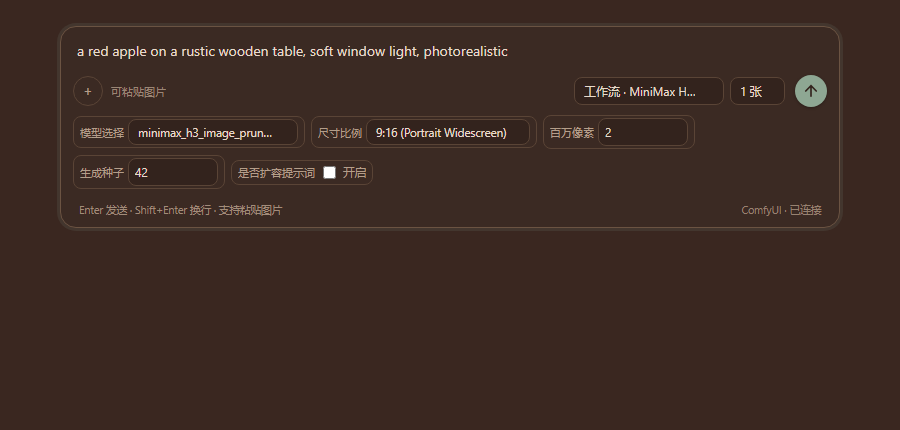
ComfyUI workflows in the composer — the exposed node inputs become wrapping controls, the prompt binds to a real text input:
Features
- Two image backends, both first-class
- Third-party APIs in OpenAI Images or xAI (Grok Imagine) dialect, including reference images and inpainting masks.
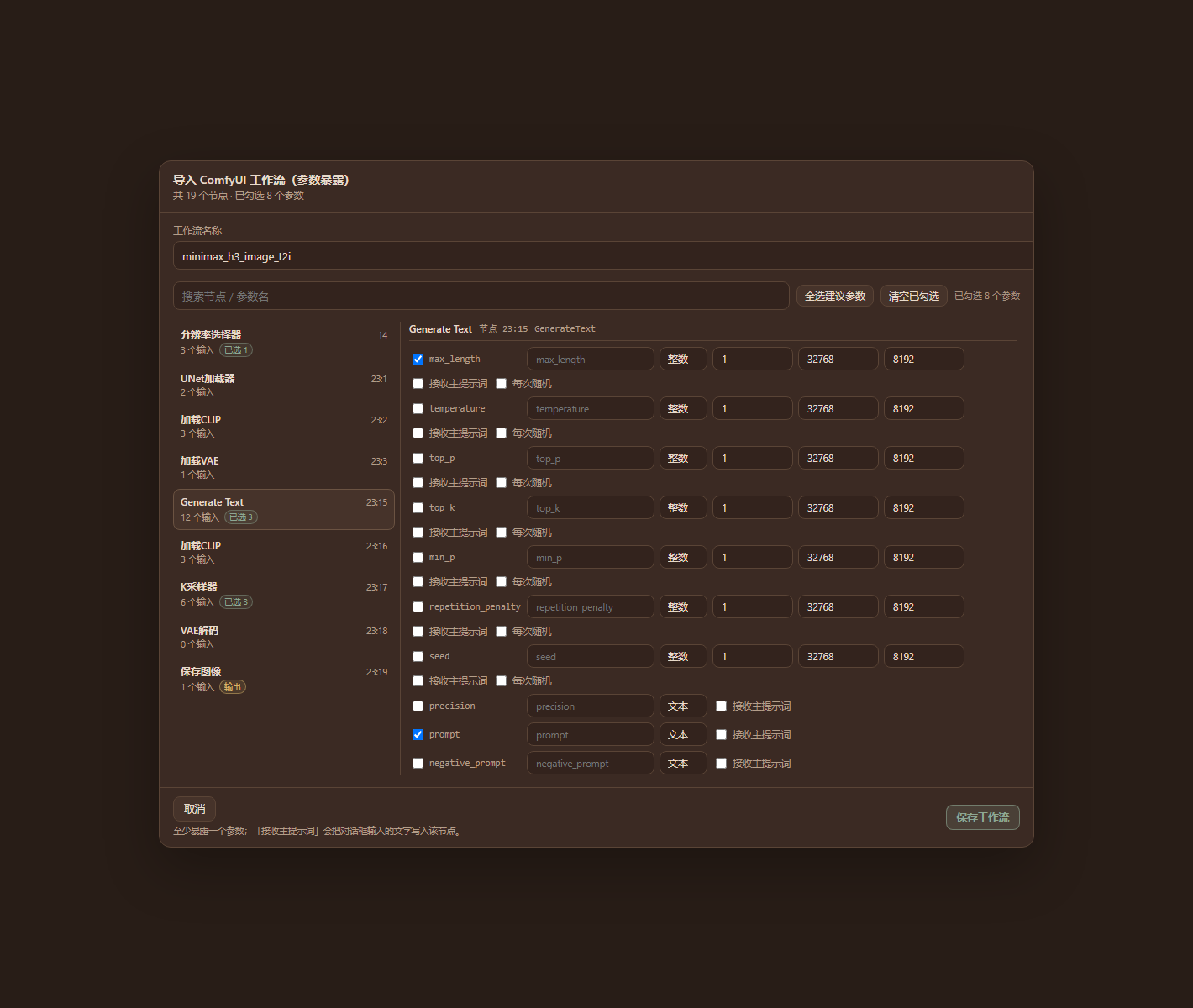
- Local ComfyUI workflows: import an API-format workflow, choose which node inputs to expose, then pick the workflow in the composer and tweak its parameters.
- Workspaces, conversations, canvas — generated images are grouped per turn and saved as
保存目录/工作区/会话/图片ID.pngon disk. - ComfyUI parameter exposure — per input: label, type (text / int / float / bool / select), min/max/step, options, default, randomize (seeds); searchable two-pane node picker.
- Inline per-generation controls — numeric params carry a 随机 toggle right in the composer, and the value that was actually drawn is shown after each run. The 张数 selector only appears when the workflow exposes a
batch_sizeinput; a workflow without it runs once per send. - Reorderable parameter row — the workflow editor shows a drag-and-drop preview of the composer row; drag the chips (or use ↑↓) to change the order in which the exposed params appear.
- Queue-aware progress & cross-session task panel — ComfyUI runs show their live queue position, and a toolbar 「任务」 panel lists running/queued jobs across all conversations with cancel buttons.
- Per-conversation drafts — unsent composer text is kept per conversation and restored when you switch back.
- Per-conversation composer state — model/workflow, params, randomize flags and 张数 are restored with the conversation, not only the prompt draft.
- Local ComfyUI jobs are not subject to the 300 s API timeout — they run until done or cancelled; queued tasks show their queue position and only running tasks count elapsed time.
- Activity tabs & workspace home — 工作区 / 资产库 / 模板 / 工作流 tabs; an empty workspace greets you with 「编辑 / 生成」 (生成图片 / 视频 / 声音 / 模型) and pre-selects the right workflow.
- Workflow categories — every ComfyUI workflow is classified (编辑 / 生图 / 生视频 / 生音频 / 生模型 or custom), shown grouped in the composer dropdown and the 工作流 tab.
- Prompt binding — one exposed text input is explicitly bound to the composer, so the prompt you type always reaches the workflow. Unbound workflows show a clickable warning instead of silently dropping the text.
- Multi-image, cancel/timeout, retry, image detail view.
- Local files — configurable image directory, save-as, open folder, copy path.
- Cost dashboard — per-model / per-tier estimate for the API backends (ComfyUI is free).
- Local proxy onboarding — detects common local proxy ports (Clash 7890/7897, v2rayN 10808/10809, iKuuu 12001/12003, …) with a CONNECT probe; the proxy only affects this plugin's API requests, never other DSH traffic.
- Agent tool
image_generate— let the conversation agent generate images directly.
Requirements
- DSH Desktop / Web
0.2.2-rc.1or newer (tested on0.2.2-rc.1). - A DSH profile with a manageable Plugins page.
- pnpm (bundled with DSH Desktop; otherwise install Node.js +
npm i -g pnpm). - Optional: a local ComfyUI instance (default
http://127.0.0.1:8188).
Install
From the Plugin Market (once listed), or directly:
# npm
dsh plugin --profile web add dsh-creation-workbench

# GitHub
dsh plugin --profile web add github:LEAFCHINA/dsh-creation-workbench
Or in DSH: Plugins → Add plugin → Install, pasting the package name, the GitHub spec, or the absolute path of the .tgz release.
To upgrade an existing install, remove the old copy first if the profile reports already-installed.
Quick start
Open AI 创作工作台 in the left sidebar → ⚙ Settings.
Pick a backend:
Third-party API — fill the API base URL (up to
/v1) and key, then pick models (or pull them from the host). Configure a proxy if your provider needs one.Local ComfyUI — set the ComfyUI address (
http://127.0.0.1:8188, no/v1) and press 检测 / Test. In ComfyUI, export your workflow with Save (API format) — the UI-format JSON is rejected on purpose — then Import workflow:- pick the inputs to expose, set their labels/types/ranges/defaults;
- bind 主提示词 → 节点 so the composer text lands in a real text input (an empty text input is suggested automatically);
- save the workflow.
In the composer choose the model or 工作流 · name, write the prompt, and send.
Generated images are saved under the configured directory and shown on the canvas; open one for details, save-as, or reveal in Explorer.
ComfyUI limits (v2.0)
- Reference images and the inpainting mask are not supported in workflow mode yet.
- Video workflows are not supported yet.
n images: if the workflow exposes abatch_sizeinput it is queued once with that batch size; otherwise the workflow is queuedntimes.
Roadmap
- Image editing — ComfyUI
LoadImageinputs exposed as reference slots (img2img / inpaint workflows), plus a unified edit entry from the image detail view. - Video generation — video assets on the canvas (poster + player), duration/fps/audio params, ComfyUI video workflows and video-capable API dialects.
- Media library — thumbnails, search and batch operations across workspaces.
Data and privacy
- Data directory:
%USERPROFILE%\.dsh\dsh-creation-workbench\(settings.json,workflows.json,images/,logs/). - Renamed in v2.0.0 (from
dsh-image-workbench): on first start the old data directory (%USERPROFILE%\.dsh\dsh-image-workbench) is copied to the new location, so workflows, settings and conversations keep working. The legacy directory is left in place as a backup. - The API key is stored in plain text on your machine only in
settings.json; the plugin never uploads it and never logs it. - Requests go only to the image API you configured or to your local ComfyUI.
- The local proxy setting applies to this plugin's API requests only.
Credits / 致谢
This plugin builds on the original AI 生图工作台 1.1.0 by 火焱 — the workspace/conversation UI, the canvas layout, the third-party image-API backend and the local-proxy onboarding all originate from that version. The ComfyUI workflow mode, the workflow parameter editor and the fixes described above were added on top of it, and the project was renamed to AI 创作工作台 / dsh-creation-workbench in v2.0.0 to cover image editing and video as well.
本插件基于 火焱 的「AI 生图工作台 1.1.0」初始版本二次开发:工作区 / 会话界面、画布式排列、第三方生图 API 接入与本地代理引导均源自该版本;ComfyUI 工作流模式、参数编辑与后续修复是在此基础上的扩展。v2.0.0 起项目更名为 AI 创作工作台 / dsh-creation-workbench,以覆盖图片编辑与视频生成。
Development
The client half is a plain classic script assembled from fragments:
client-src/*.js   # hand-written React.createElement code, no JSX, no imports
client.js         # built artifact (committed, so installs from git need no build)
scripts/build-client.mjs  # concatenates client-src in filename order
scripts/check.mjs         # build freshness + syntax + dsh manifest checks
npm run build:client   # rebuild client.js from client-src/
npm run check          # verify the repo is consistent
npm test               # host e2e + regression + client smoke (mock ComfyUI, no DSH needed)
The host half lives in host/*.js and is hot-reloaded by DSH: editing host/main.js changes the loaded revision, which re-imports the other host modules on the next request.
License
MIT — see LICENSE.
No comments yet. Be the first to write one.