DSH Compact Lane
A compact conversation view for DeepSeek Harness.
Keep the answer in focus. Expand the work behind it when you need it.
English · 简体中文
Quick start · Use with DSH · Development · Compatibility
DSH 0.2.1-rc.2 · React 18 · Cordis 4 · Apache-2.0
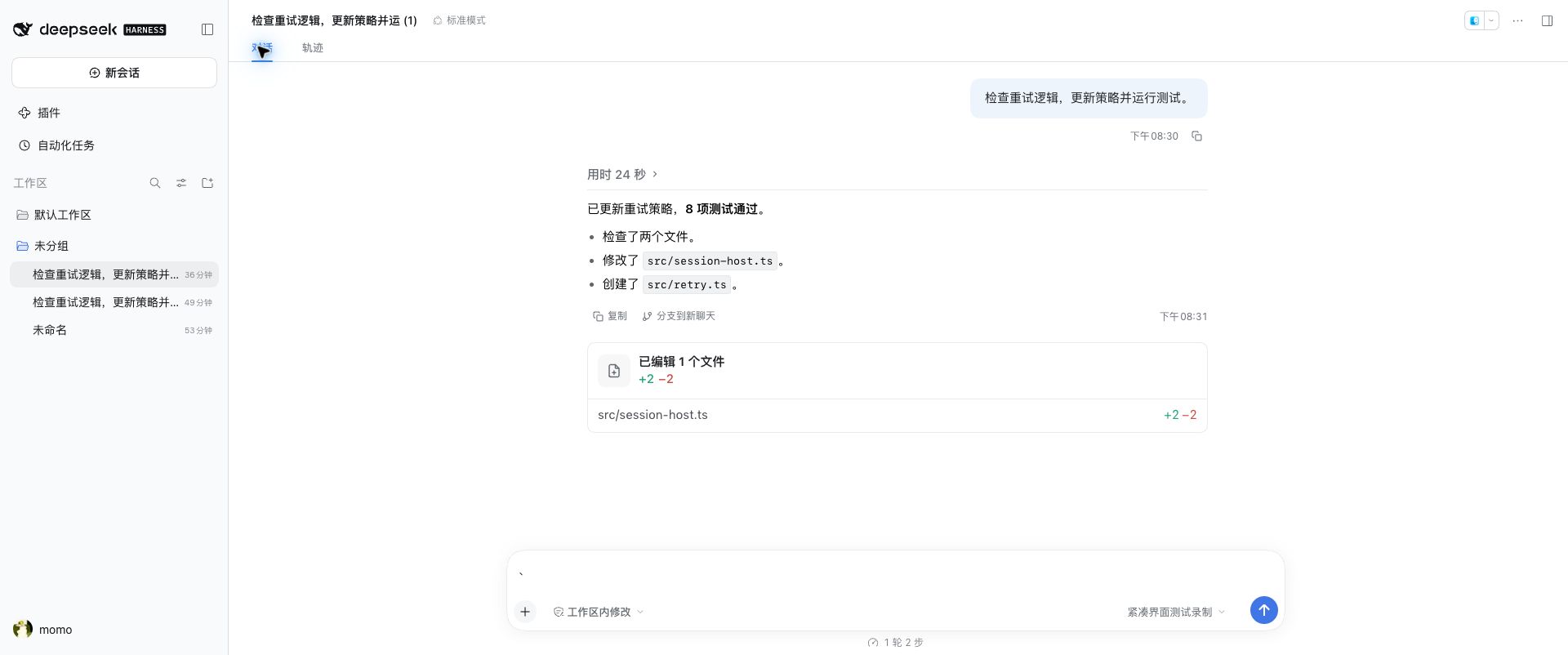
Captured in the real DSH host with a local replay fixture. Click to view full size.
DSH Compact Lane is a standalone Cordis plugin that brings Vela's compact conversation layout to DeepSeek Harness. It takes over the existing Chat / 对话 view; disabling it restores the host view. The screenshot shows sample replay content, including its sample test results.
What changes
- A quieter conversation. Reasoning and tool activity fold into a process row, with tool groups organized by assistant message. Expand them to inspect commands, results, checklists, and subagent entries.
- Fold or don't. Settings → 紧凑对话 switches tool-call display between 折叠 (the default: the process row and tool groups start closed) and 不折叠 (they start open and can still be closed by hand). A change applies to the open conversation immediately.
- Colored tool icons. Each kind of tool call gets its own icon color, and the 思考 title gets a lightbulb. Settings → 紧凑对话 → 工具图标配色 turns this off, which returns every icon to a uniform gray. It is on by default and also applies immediately.
- File changes with evidence. Diff cards and file totals come from successful tool results. Multiple fragments for one file share a card; missing line numbers stay blank.
- Streaming that follows your reading. New output follows the bottom until you scroll up. Jump back to the latest output or load earlier turns while preserving your reading position.
- Familiar host controls. Keep DSH's original composer, Markdown renderer, code-block controls, file preview, reply copying, and conversation branching.
Quick start
You need Node.js ^22.19.0 or >=24.0.0, pnpm, and an installed DeepSeek Harness 0.2.1-rc.2 with dsh on your PATH. The plugin uses React 18 and Cordis 4 supplied by the host. See the DSH installation guide for host setup; this quick start loads the plugin from a local build. The package is also published on npm as dsh-compact-lane.
git clone https://github.com/KryptonGao/dsh-compact-lane.git
cd dsh-compact-lane
pnpm install --frozen-lockfile
pnpm dev
pnpm dev builds the plugin and starts DSH on port 3081, using the repository's isolated .dev-home/. Open the local authentication URL printed in the terminal, then open a session's Chat / 对话 view. Normal conversations use this development environment's own model configuration.
To inspect the UI with fixed sample data, run pnpm preview instead and select 紧凑预览 in a session. For a real streaming pipeline without a model API key, see keyless replay.
Use with your existing DSH environment
Build once, then start DSH with the overlay. Run these commands from the plugin repository:
pnpm build
dsh web --patch "$PWD/dev/overlay.yml" --no-open
This uses your current DSH environment's configuration and sessions. The overlay loads ../lib/index.js relative to dev/overlay.yml; keep the checkout and build output in place. The existing Chat / 对话 view becomes compact, without an extra compact-view tab.
The 紧凑对话 settings page saves to your DSH profile, which DSH only allows for plugins installed into it (dsh plugin --profile web add <path-to-this-checkout>). A plugin loaded through --patch stays on the default 折叠 and the page reports that the setting cannot be saved.
Stop the current server, then restart with the disabling patch applied last:
dsh web --patch "$PWD/dev/overlay.yml" --patch "$PWD/dev/disabled.yml" --no-open
For the isolated development environment, use:
DSH_HOME="$PWD/.dev-home" dsh web --patch ./dev/overlay.yml --patch ./dev/disabled.yml --no-open --port 3081
Remove the disabling patch and restart to enable the compact view again. Overlay-loaded plugins currently do not appear as switches in the host's plugin manager.
Development
All three launch commands use port 3081. Stop the previous server before switching modes. There is no hot reload: rebuild and refresh the browser after source changes.
pnpm dev— the production plugin in the isolated DSH environment, with real host sessions.pnpm preview— fixed component samples under 紧凑预览, including reasoning, grouped tools, diffs, terminals, checklists, subagents, and failure states.pnpm replay— the production view driven by the official DSH replay provider, without a model API key.
Keyless replay
Create the recorded session once, then start the replay environment:
pnpm seed
pnpm replay
Open 紧凑界面测试录制 and send any test message. The first replay turn streams reasoning, runs a printf command through the host tool pipeline, and emits a long answer. The second stays active for stop, refresh/reconnect, and scrolling checks. The replay configuration disables live model providers and the title model; it makes no model API calls.
pnpm seed -- --long creates a separate 100-turn session for pagination checks. Seed IDs are fixed; repeating a seed reports that the session already exists rather than replacing its history. The seed script also writes three demo files under dev/workspace/src/; keep personal code outside those fixture files.
Validation
Choose checks for the code you change:
pnpm typecheck
pnpm test -- tests/adapter.test.ts
pnpm build
Replace the test path with the affected adapter, integration, lifecycle, or scrolling test. pnpm test runs the plugin's full test set. Recorded browser checks and unverified cases are listed in VALIDATION.md (Chinese).
The data path is host Chat nodes → per-turn adapter snapshots → React conversation view. The plugin subscribes to host state; it does not change the host's event or persistence format.
src/
├── client.tsx       Host hooks, view registration, actions, and styles
├── integration.ts  Chat-slot override and rc.2 tab compatibility
├── adapter/        Host snapshots, tool mapping, grouping, and diffs
├── ui/             Turns, tools, retained folds, and scroll behavior
└── styles/         Scoped Vela styles and host integration rules
dev/                Preview, replay, seed workspace, and overlay configs
tests/              Adapter, integration, lifecycle, and scroll tests
Tool results are matched to assistant messages by callId. Successful meta.diffs are the source of file-change statistics; empty diffs are not reconstructed from call arguments, and failed results do not count as applied changes. Subagent navigation is offered only when the host's parent-session catalog confirms the session ID. Starting a subagent is not treated as completing it.
Vela-derived CSS is checked in and scoped to [data-dsh-compact-lane]. A normal build needs no external reference checkout. To regenerate it, provide the Vela HTML reference explicitly:
node scripts/extract-styles.mjs /path/to/compact-chat-ui.html
pnpm build
The reference must contain the vela-extracted and demo-chrome style blocks. The extractor reads that file and rewrites src/styles/vela-compact.css; it does not edit the reference. Selectors of the form :root[attr] … (the icon-color switch) are rewritten to [data-dsh-compact-lane][attr] …, so the attribute sits on the plugin root. The original extraction retained the order and values of 1,654 CSS declarations, with separately scoped dot-loader rules.
Compatibility and limits
- Host version: developed and checked against DSH
0.2.1-rc.2. Other versions are unverified; the chat-tab compatibility rule is specific to rc.2. - Browser: requires
:has(),color-mix(), container queries, andinert, with no fallback. A narrow desktop content column was checked; full mobile viewports, touch input, and other browsers remain unverified. - Appearance: the compact view currently uses Vela's light theme and Chinese UI labels. Dark/multiple themes, card mode, fold-position settings, step counts, per-tool timing, and remembered fold state are not implemented. Turn duration is shown only when real timestamps exist.
- Integration coverage: local replay covers streaming, stopping, refresh/reconnect, and scrolling. Real model networking, attachment sending, live subagent navigation, and full plugin hot-unload have not received end-to-end browser validation. See VALIDATION.md for the detailed scope.
No comments yet. Be the first to write one.