dsh-session-manager
为 DSH(DeepSeek Harness)补上会话的「彻底删除」和一份集中管理的控制台。DSH 自带的「归档」只是把这些东西留在原处、把会话从列表里藏起来;这个插件把残留一起清掉,并提供一个可以筛选、排序、批量清理的页面。
Purge DSH Sessions for good — and manage them from one console: filters, search, sort, bulk delete, with explicit guards before anything running gets killed.
- 包名 / Package:
@kissblank/dsh-session-manager - 兼容 / Requires:
dsh >= 0.2.0-rc.1 < 0.3.0-0 - 许可证 / License: MIT
中文
它能做什么
1. 会话「…」菜单里的「彻底删除…」
点开任一会话行的菜单,最下面一行(垃圾桶图标、红色、上方有分隔线)会用一个确认弹窗删除这一个会话。
2. 侧边栏「会话管理」控制台
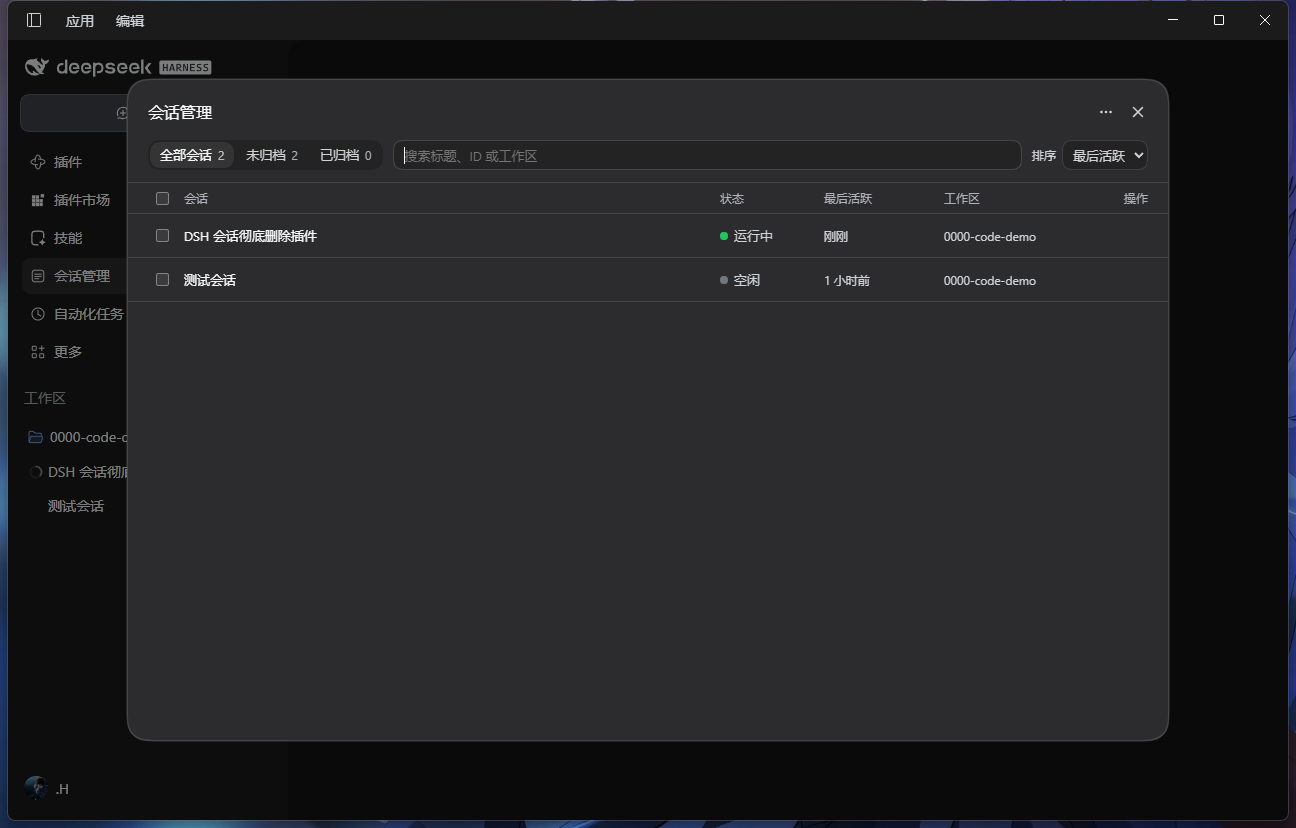
侧边栏图标栏(「插件」「自动化任务」那一列)新增一个「会话管理」入口,点开后是大尺寸独立页面:
- 顶部 Tab:全部会话 / 未归档 / 已归档,每个 Tab 带实时数量;
- 「全部」里已归档的会话灰化并带「已归档」徽标;
- 常驻搜索框(220 ms 防抖,匹配标题 / 会话 ID / 工作区名);
- 排序:最近活跃(默认)或创建时间;
- 每行:复选框、标题、状态点(运行中 / 等待交互 / 空闲)、相对时间(悬停显示绝对时间)、工作区;
- 行内悬停按钮:取消归档(中性色)、彻底删除(危险色);
- 列表虚拟滚动,Tab 与排序记在
localStorage; - 勾选后底部出现吸底栏:
已选 N 个、全选当前结果、批量彻底删除; - 切换 Tab 或改搜索词自动清空选择(防误触);
- 不同 Tab / 搜索无结果时有各自空状态文案;
- 右上角
⋯「清理」菜单:清理无主缓存、清理空工作区目录(见下)。
维护:清掉历史遗留下来的碎片
彻底删除只管「这次删的这一个」,不管以前别的方式删剩的东西。控制台右上角 ⋯ 提供两个安全清扫动作:
- 清理无主缓存:扫描投影缓存表,删掉那些「对应会话已经不存在」的记录,并把上一条路径算出来的
.json一并删掉,返回「清理了 N 项 / 释放 X」; - 清理空工作区目录:删掉
sessions/下已经完全空的工作区编码目录(以前的工作区留下的空壳)。
两者都不会碰活着的会话:前者逐条比对磁盘上仍存在的会话目录与内存会话表,后者只在目录 readdir 结果为空时才 rmdir。宿主若没有投影缓存表(或表读不出来),接口回 skipped: projection-cache-unavailable / -unreadable 而不是报错。
一次删除做了什么
宿主端按顺序执行(批量就是串行重复):
- 停止活动:走
workspace/session-stop(agent 取消当前轮次、结束该会话的 jobs),再轮询workspace/session-activity等它静下来(最多 3 秒)。 - 释放内存会话:从宿主内存会话表中移除并广播
session/disposed,所有窗口同步移除该行。 - 清理归属:从每个工作区的
sessionIdsdetach,并清掉归档、置顶记录(storages/workspace.json里的三处痕迹)。 - 删除日志目录:
<DSH_HOME>/sessions/<工作区编码>/<会话 id>/(含session.v4.jsonl.zstd、session.lock)。 - 删除投影缓存:
<DSH_HOME>/storages/session_projcache/sessions/<会话 id>.json。
浏览器端在调用宿主前先走一遍官方语义 uiWorkspace.archiveSession(id, { stopActivity: true }):停工作、把这行藏起来、若会话正开在主视图则清空主视图。
不会删:工作区里的代码与文件、其他会话、子会话、附件内容寻址库(<DSH_HOME>/cache/attachments,跨会话共享)、任何设置与凭据。
「不留痕」的边界(如实说明):storages/workspace.json.bak-* 是宿主自己的备份,里面仍可能留着该 id;磁盘未分配空间、外部备份、文件系统快照不在插件控制范围。插件没有回收站——删了就是删了。
防误杀
- 选中项里有正在运行/等待交互的会话时,确认弹窗红字提示「你选中的 X 个会话中,有 Y 个正在运行」,并出现复选框「我确认强制中断这些运行中的任务」——不勾选,红色确认按钮保持禁用;
- 一次超过 10 个会话时,还要勾「我已知晓无法恢复」;
- 确认后显示「正在停止任务 (i/n)」逐条进度,不会让界面假死;
- 单条失败不中断整批,结束后汇总失败数;成功的条目统一刷新侧边栏与归档数据。
安装
通过插件管理器的安装入口填下面任一写法:
- npm 包名:
@kissblank/dsh-session-manager(可锁版本:@kissblank/dsh-session-manager@0.3.2) - GitHub:
github:KissBlank/dsh-session-manager(可锁 tag:github:KissBlank/dsh-session-manager#v0.3.2) - 本地:填本仓库的绝对路径(开发时用,改动即时生效)
装好后重启 DSH 桌面端(不是刷新页面)。浏览器半边加载哪些包,由宿主在启动时打包成一份 boot 清单下发;新装一个包、或换过包名之后,清单里还是旧条目,页面会去拉旧路径的 client.js 并 404,插件就静默不生效。
只改本仓库代码时的生效范围不一样:改
lib/client.js(界面)刷新页面(Ctrl+Shift+R)就够;改lib/index.js(宿主服务、路由)必须重启 DSH,因为路由是在宿主启动时注册的。
包名已全小写、已发布到 npm(scope
@kissblank对应 npm 用户名kissblank);不发布也能从 GitHub / 本地路径安装。
维护与发布
CHANGELOG.md记每个版本改了什么;RELEASE.md是发布操作手册(改版本号 → 跑测试 → 提交 → 打 tag → 推送,CI 用 npm Trusted Publishing 自动发版,不需要在本地存 token)。- 改动前先跑
node test/host-smoke.mjs && node test/client-smoke.cjs;prepublishOnly也会替你跑一遍。 - 依赖宿主内部形状的地方都写了守卫(见下),DSH 升级后重跑冒烟即可发现破绽。
自测
两套离线冒烟测试(不连宿主、不碰真实数据):
node test/host-smoke.mjs     # 43 项:请求围栏、id 校验、删除顺序、只删目标目录、幂等、两种清扫的取舍
node test/client-smoke.cjs   # 98 项:五处 slot 注册、清单/批量/清扫调用、排序筛选、确认门控、渲染结构
已验证 / 未验证
- 已验证:DSH 0.2.1-rc.5 桌面端(Windows);
@kissblank/dsh-session-manager名下四处注册active: true(会话菜单第 500 行、侧栏session-console第 5 位、main的session-console、shell.overlay的 60/70 两条);宿主四条路由的各错误分支(405 / 403 / 401 / 400);单条与批量的请求/响应链路;真机删除一个会话后核对日志目录、workspace.json三处引用、投影缓存均已清除;真机跑两个清扫动作——无主缓存回「没有需要清理的内容」,空目录清扫删掉 6 个空的工作区编码目录,磁盘上只剩活跃工作区。 - 未验证:其他操作系统、其他 DSH 版本线、超大数据集的滚动性能(逻辑上支持,未压测)。
依赖的宿主内部形状
sessionPersistence.root、sessions.store(内存表 + detach())、workspaceRegistry 实体方法、sessionProjectionCache.table.delete、sessionQuery.listSessions()。每处都有守卫,某一步失败只降级;升级到 0.3 前请先跑冒烟测试。
目录
lib/index.js         宿主半边:四条 loopback 路由(purge / inventory / 两条 maintenance)+ 五步删除
lib/client.js        浏览器半边:菜单行、单条弹窗、侧栏图标、控制台、批量与确认门控、维护菜单
locale/{en,zh}.json  插件卡片标题与描述
cordis.patch.yml     挂载行
assets/icon.svg      插件图标
test/                两套冒烟测试
English
What it does
- Session menu → “Delete permanently…”: destroys one Session from its row menu behind a confirmation dialog.
- Sessions console in the sidebar icon rail: tabs with live counts (All / Active / Archived), archived rows dimmed and badged, debounced search, sorting by last activity or creation time, a virtualized list, per-row hover actions (unarchive / delete), and a sticky bulk bar with “Select all results”.
- Housekeeping from the console's
⋯menu: clear projection-cache records whose Session is gone, and remove emptysessions/<project>/folders. Neither can touch a live Session: ids are compared against the on-disk Session folders and the in-memory Session table, and a folder is only removed after an emptyreaddir.
What a deletion touches
The Host stops the Session (workspace/session-stop, up to 3 s of settling), releases the in-memory Session (broadcast to every window), detaches it from each Workspace and drops its archive/pin ids, removes its log directory under <DSH_HOME>/sessions/<project>/<id>/, and deletes its projection-cache record. Workspace files, other Sessions, attachments (content-addressed, shared), settings and credentials are not touched. There is no trash: deletion is final, and Host-owned workspace.json.bak-* backups may still mention the id.
Guards
If any selected Session is running, the dialog says how many, and its red confirm button stays disabled until you tick “I understand these running tasks will be interrupted”. More than 10 selections additionally require “I understand this cannot be undone”. Progress is reported per Session (“Stopping tasks (i/n)”), failures are collected instead of aborting the batch, and the sidebar refresh happens once at the end.
Install
Install through the plugin manager with any of these specs: @kissblank/dsh-session-manager (pin with @0.3.2), github:KissBlank/dsh-session-manager (pin with #v0.3.2), or a local absolute path. Then restart the DSH desktop app — a page reload is not enough. The Host builds the browser boot manifest (the list of client bundles) at startup; after a fresh install or a package rename it still points at the old path, the client.js request 404s, and the plugin silently does nothing. For code-only changes the scope differs: lib/client.js (UI) comes alive on a page reload, while lib/index.js (Host services and routes) needs a restart, because routes are registered when the Host starts.
Releasing
CHANGELOG.md records what changed in each version; RELEASE.md is the runbook (bump the version, run the tests, commit, tag, push — CI publishes through npm Trusted Publishing, so no token lives on the machine).
Tests
node test/host-smoke.mjs     # 43 checks
node test/client-smoke.cjs   # 98 checks
Verified on DSH 0.2.1-rc.5 (Windows desktop). Other platforms and DSH 0.3 are untested; every internal shape the plugin touches is guarded, so a failed step degrades instead of aborting the purge.
MIT © 2026 Kiss_Blank
No comments yet. Be the first to write one.