dsh-prompt-library


A Voyager-style workspace inside DeepSeek Harness — prompt library, click-to-copy formulas and conversation folders, as one native DSH plugin.
Gemini Voyager is a browser extension. This project rebuilds its portable surfaces on DSH's own plugin API, so they live in the app itself: no extension, no separate window, no browser.
English | 中文
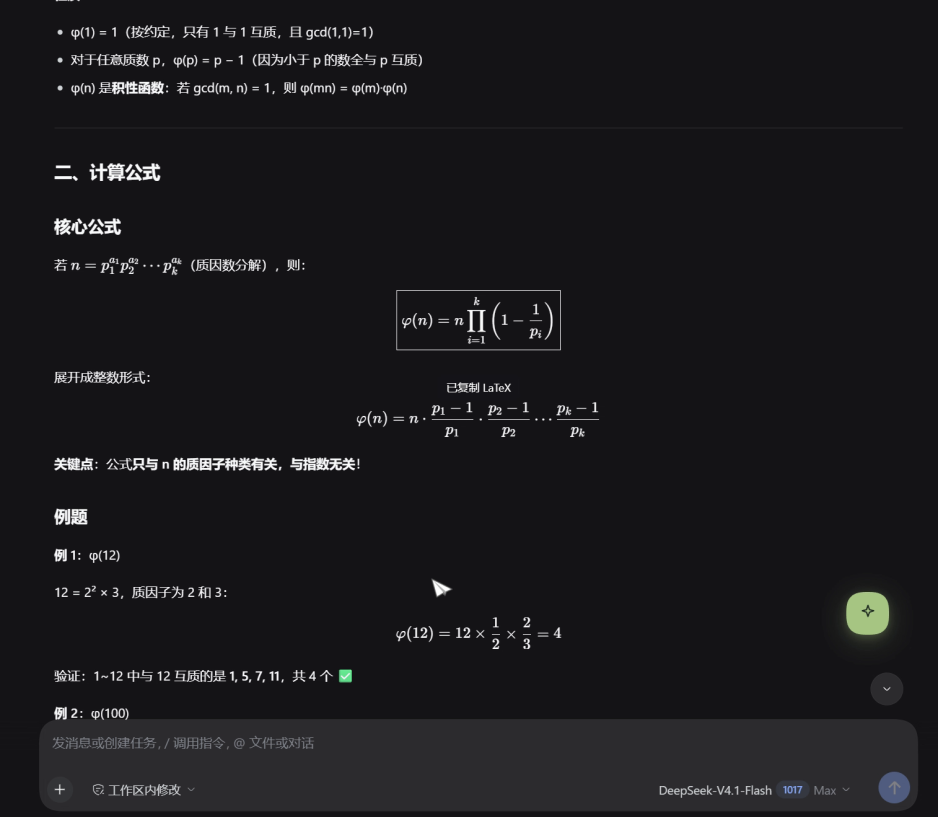
Full 33-second demo: dsh-prompt-library-demo.mp4
Features
Prompt library — the floating ball
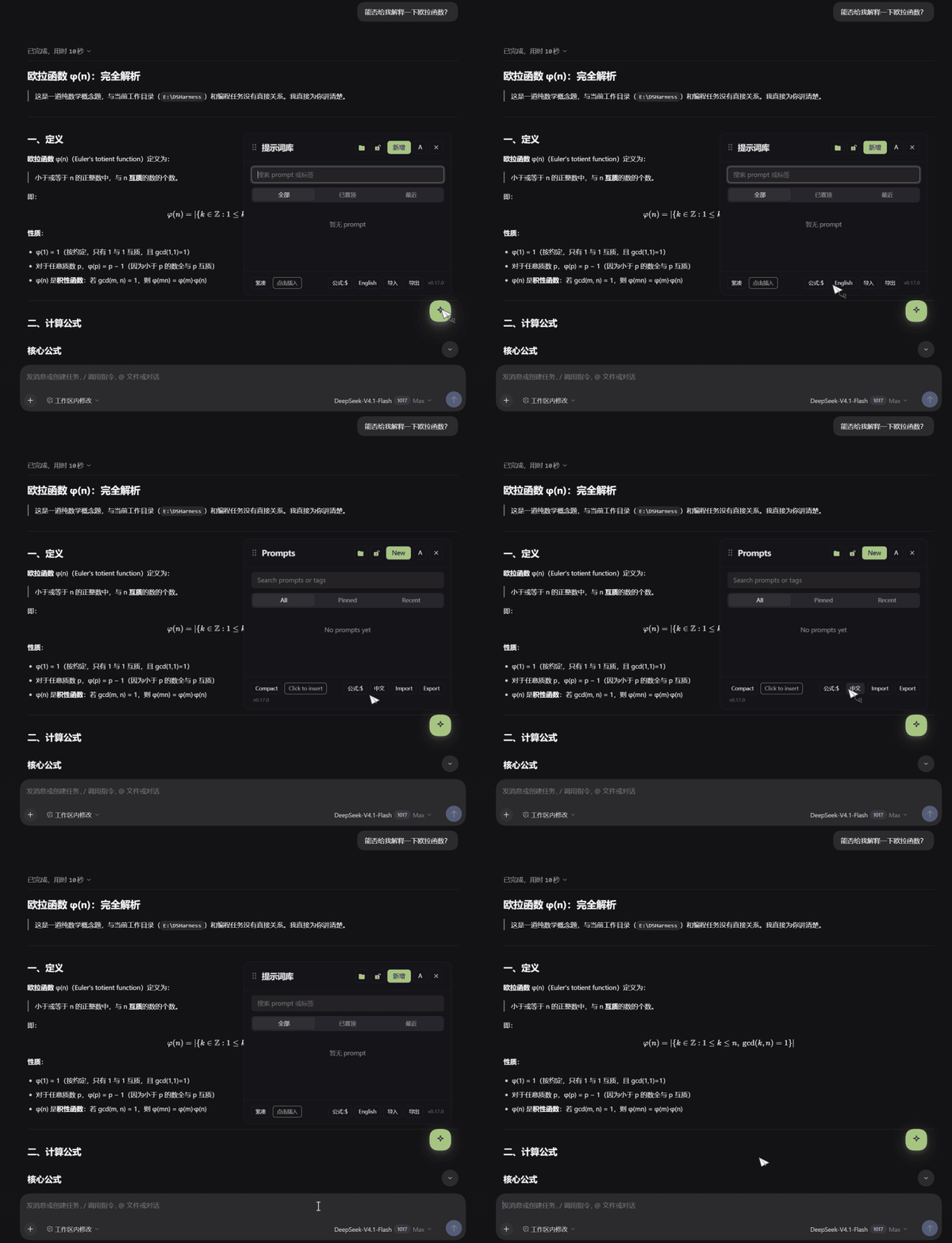
| Floating ball | 46px, draggable, remembers its position, click to open |
| Panel | 440px, anchored above the ball, clamped to the viewport, draggable header, position lock |
| Search | filters on name, body and tags as you type |
| Filters | All / Pinned / Recent, plus multi-select tag filters (AND) |
| Views | Compact (default) and comfortable |
| Ordering | pinned group with a divider; drag the grip to reorder, or focus it and press ↑/↓ |
| Preview | hover a row for 250ms to see the full markdown |
| Editing | name (required, unique) → body → tags; delete asks once |
| Variables | {{name}} placeholders open a fill card; \{{ escapes |
| Markdown | fences, headings, lists, quotes, rules, bold, inline code, links |
| Transfer | import/export in Voyager's own format (gemini-voyager.prompts.v1) |
| Extras | Chinese/English UI, click-to-insert or click-to-copy |
Quote reply
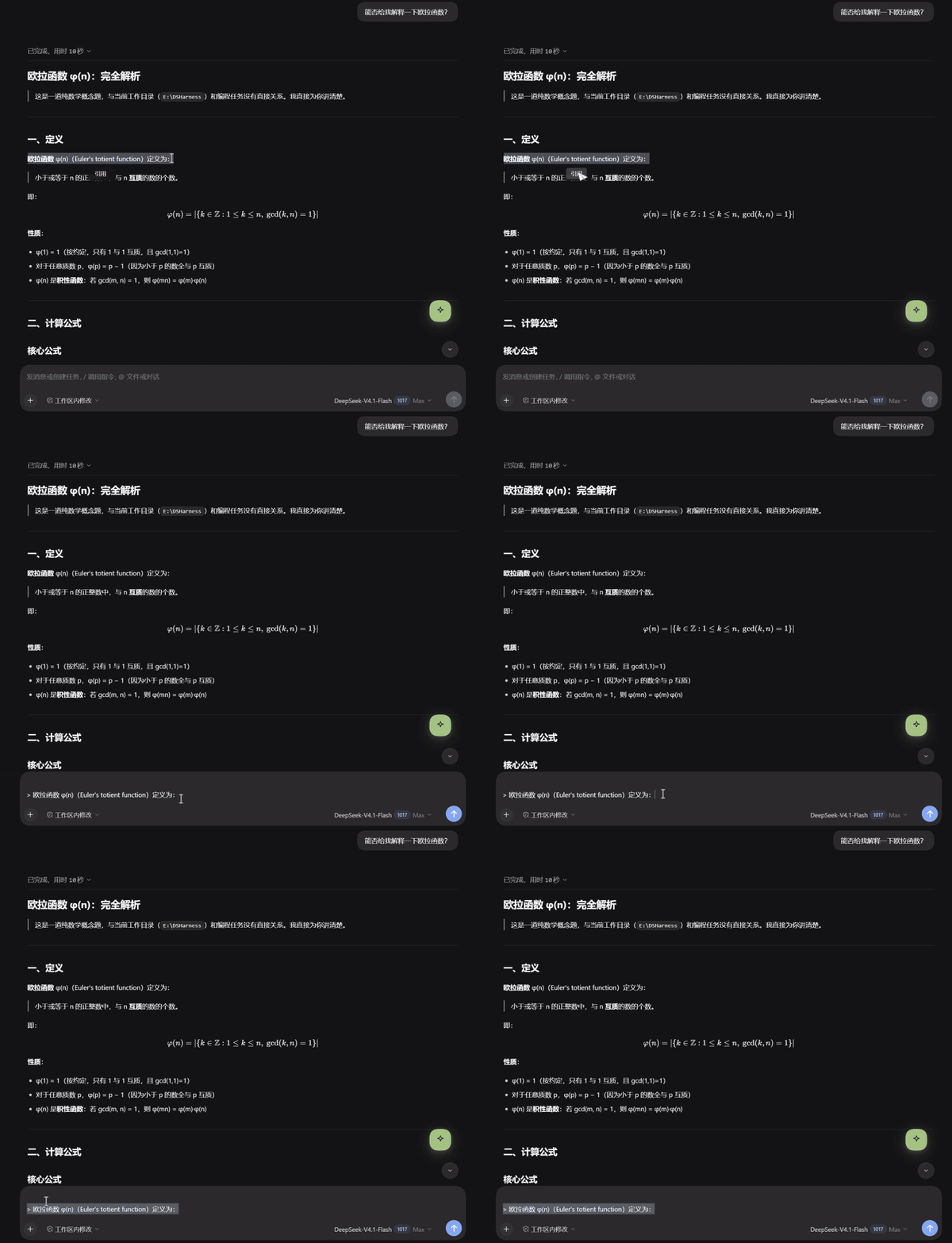
Select text anywhere in a conversation; a small toolbar appears. 引用 appends the selection to
the composer as a Markdown block quote — one > per line, with a blank line first, through DSH's own
draft API. It never simulates a keypress, so it cannot send your draft by accident.
Formula copy — click a formula
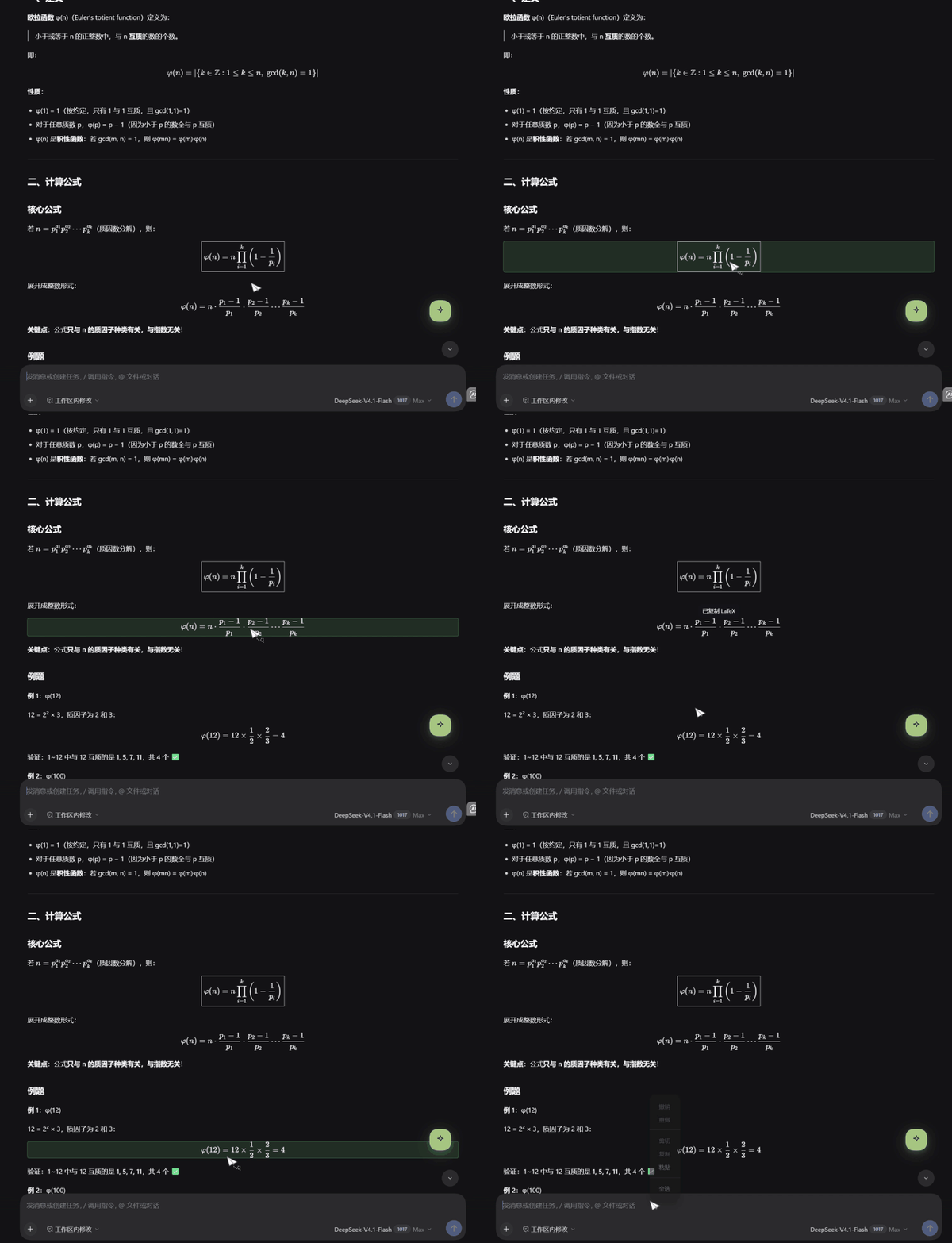
Hover a rendered formula and it highlights; click it and the LaTeX lands on your clipboard.
- Detection:
[data-math]→ms-katex→.katex/.katex-display→.math-inline - Source:
data-math→data-math-source→ KaTeX'sannotation[encoding="application/x-tex"] - Formats (footer switch):
$…$, bare LaTeX, MathML for Word,$$…$$for Notion - Inline formulas get
$…$, display formulas get$$…$$
Conversation folders — a sidebar panel
An icon in the DSH sidebar rail opens a folder page:
- Sessions come from DSH's own catalog (
ctx.sessions.list), subagent children filtered out - Chips: All / Unfiled / your folders, each with a count
- Drag a session onto a folder to file it; the chip highlights as a target
- Double-click a folder (or ✎) to rename inline
- ✕ asks once before deleting; deleting a folder unfiles its sessions and never deletes one
- Search sessions by title; rows show which folder they belong to and whether they are running
Requirements
- DeepSeek Harness 0.2.1-rc.5 or newer (Desktop or
dsh web) - Node.js 20+ on the host
Install
From GitHub (recommended):
dsh plugin --profile desktop add github:Kirby-YiBy/dsh-prompt-library
Then reload the app window. A plugin installed for the first time may only show up after a
full app restart: DSH composes the client bundle graph at boot, so a new entry is not always
picked up by a page refresh alone. Use --profile web instead of desktop for a dsh web
profile.
From a local clone (for development):
git clone https://github.com/Kirby-YiBy/dsh-prompt-library.git
dsh plugin --profile desktop add link:/absolute/path/to/dsh-prompt-library
With a link: install, keep the directory where it is — a missing target is a load error at boot.
Uninstall:
dsh plugin --profile desktop remove dsh-prompt-library
Your data stays in ~/.dsh (see below); delete those files to start clean.
Where your data lives
| File | Contents |
|---|---|
~/.dsh/prompt-library.json |
the prompt library (Voyager's PromptItem shape) |
~/.dsh/session-folders.json |
folders plus one folder id per session id |
~/.dsh/prompt-library-debug.log |
diagnostics for bug reports; safe to delete any time |
Nothing leaves your machine. There is no telemetry, no network call and no account.
How it works
A DSH plugin has two halves, and this one ships both without a build step:
| Path | Half | Role |
|---|---|---|
lib/index.js |
host (Node) | owns the two JSON stores; serves 13 routes under /dsh-prompts/api/* |
client/client.js |
browser | registers four slots: shell.overlay, conversation.input.dock, sidebar.panellist, main |
cordis.patch.yml |
bundle patch | inserts the entry into the profile's layer stack |
The client bundle uses DSH's lazy-CJS loader format (window.__ModuleLoader__.load({ id, factory }))
and takes React from the platform seed table, so the repository contains exactly what runs — no
dist/, no build script, no prepare hook.
Writes go through DSH's own draft editor (shell.draftEditor.appendDraft), never through direct DOM
editing: DSH's composer re-renders from its own model, so a DOM write would be reconciled away.
HTTP API
Exact routes, JSON, no-store. Reads are open on loopback; mutations must come from the DSH surface
(loopback, the Desktop shell's dsh-app:// origin, or Origin: null), and every other site is
refused with 403.
| Route | Method | Body | Result |
|---|---|---|---|
/dsh-prompts/api/state |
GET | — | { items, count, bootId } |
/dsh-prompts/api/add |
POST | { name?, text, tags? } |
{ item } |
/dsh-prompts/api/update |
POST | { id, name?, text?, tags?, pinnedAt? } |
{ item } |
/dsh-prompts/api/remove |
POST | { id } |
{ ok } |
/dsh-prompts/api/reorder |
POST | { ids: string[] } |
{ ids } |
/dsh-prompts/api/import |
POST | Voyager envelope, { items }, or an array |
{ added, updated, skipped, total } |
/dsh-prompts/api/export |
GET | — | Voyager envelope |
/dsh-prompts/api/folders/state |
GET | — | { folders, assignments, bootId } |
/dsh-prompts/api/folders/create |
POST | { name } |
{ folder } |
/dsh-prompts/api/folders/rename |
POST | { id, name } |
{ ok } |
/dsh-prompts/api/folders/remove |
POST | { id } |
{ ok } — unfiles its sessions |
/dsh-prompts/api/folders/assign |
POST | { sessionId, folderId | null } |
{ ok } |
/dsh-prompts/api/debug |
POST | { kind, detail } |
{ ok } |
Development
node test-client.mjs
It stubs the module loader, React and a cordis context, then asserts the four slot registrations, the
ids and keys they use, and that the composer bridge injects without throwing. There is no build step:
edit client/client.js, trigger a profile recomposition, reload the window.
Not ported
Voyager is much bigger than this. These stay in the extension, by design:
- Timeline — needs transcript scroll anchors
- Export conversation — needs the session message API
- Starred library / cloud sync — Voyager uses Google Drive; there is no matching OAuth here
- Slash
/completion — DSH's/pipeline is not open to third-party plugins
Changelog
See CHANGELOG.md — every version, including the bugs fixed along the way.
Thanks
This plugin exists because of Gemini Voyager — the original extension by Nagi-ovo and its contributors, released under MIT.
Almost everything good here is theirs: the floating ball and its drag feel, the 440px panel anchored
above it, the green brand tokens, the compact/comfortable rows, the pinning model, the
{{variable}} fill card, the four formula copy formats, and the quote-reply interaction. This
project re-implements those ideas against a different host API (DSH's slots, draft editor and session
catalog) — it is not a fork of their code.
If you find this useful, please go star the original: https://github.com/voyager-crew/voyager.
The catalogue and community around it live at https://voyager.nagi.fun.
License
MIT — see LICENSE.
No comments yet. Be the first to write one.