dsh-katt-browser
English | 中文
A DeepSeek Harness (DSH) plugin that turns the desktop app's built-in sidebar browser into an agent-controllable browser.
Structure first, screenshots last. Page state is read from the accessibility tree, DOM, worker messages and the network layer; screenshots exist only as a fallback.
Requirements
- DSH desktop app (Electron, Windows/macOS/Linux) with the sidebar browser.
- The app must be launched with a DevTools port, e.g.
--remote-debugging-port=9222. The plugin can also fall back to a DOM bridge when CDP is unavailable, but CDP is the primary and recommended path.
Architecture
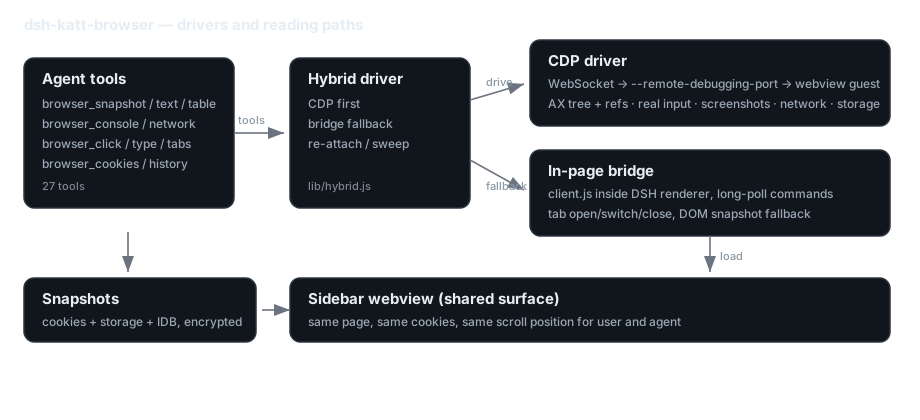
Tools talk to a hybrid driver: it attaches to the sidebar webview guest over the DevTools
protocol (WebSocket to --remote-debugging-port) and falls back to an in-page bridge when CDP
is unavailable. Account snapshots live beside the driver and are encrypted at rest.
Install
dsh plugin --profile desktop add github:Kattentions/dsh-katt-browser
Or from a local checkout:
dsh plugin --profile desktop add file:/path/to/dsh-katt-browser
Restart DSH after installing. The sidebar browser tab is the shared surface: you and the agent operate the same page, the same cookies and the same scroll position.
Configuration
- id: katt-browser
  config:
    driver: webview        # webview (default) | headless (legacy)
    cdpPort: 9222          # DevTools port used by the desktop app
    idbLimit: 50           # rows per page when snapshotting IndexedDB (500 per DB max)
    downloadDir: ''        # default folder for browser_download
    allowedHosts: []       # non-empty = allow these domains (and subdomains) only
    revealPanel: false     # true = tool calls may open the sidebar (off by default)
    cdpIdleDetachMs: 45000 # detach CDP after this many idle ms (0 = stay attached)
    instrument: true       # false = skip page instrumentation on heavy sites
What it gives the agent
Reading (no screenshots)
browser_snapshot— accessibility tree witheNrefs;detail=compactfor interactive elements onlybrowser_text— readable page text (title, body, links)browser_table— tables as headers + rowsbrowser_evaluate— run JS in the pagebrowser_console— console logs, uncaught exceptionsbrowser_network— request history (method/URL/status/MIME/duration), filterablebrowser_instrument— worker messages, fetch/XHR/WebSocket traffic, storage writes (canvas games expose state here)
Interaction
browser_open/back/forward/reloadwithwaitFor/waitMsfor SPA hydrationbrowser_click(ref or coordinates),browser_type,browser_press_key,browser_scroll,browser_hover,browser_uploadbrowser_tabs— list / switch / new / close- Dangerous clicks (delete/pay/unsubscribe…) require
confirm=true
Accounts and state
browser_cookies—list / save / load / clear / clear-site / clear-cache / profiles- Snapshots cover cookies + localStorage/sessionStorage + IndexedDB + Cache Storage, and are encrypted at rest (AES-256-GCM, key under
~/.dsh/katt-browser/profile.key) - Default is shared login state inside one workspace partition; switch accounts by loading another snapshot
browser_serve— local HTTP server for local pages (file://is blocked by the sidebar webview)browser_download— native downloads are disabled by the shell, so files are fetched in-page and written to diskbrowser_history,browser_probe,browser_page_diag— diagnostics
Screenshots
| The page the user sees | What the agent reads instead |
|---|---|
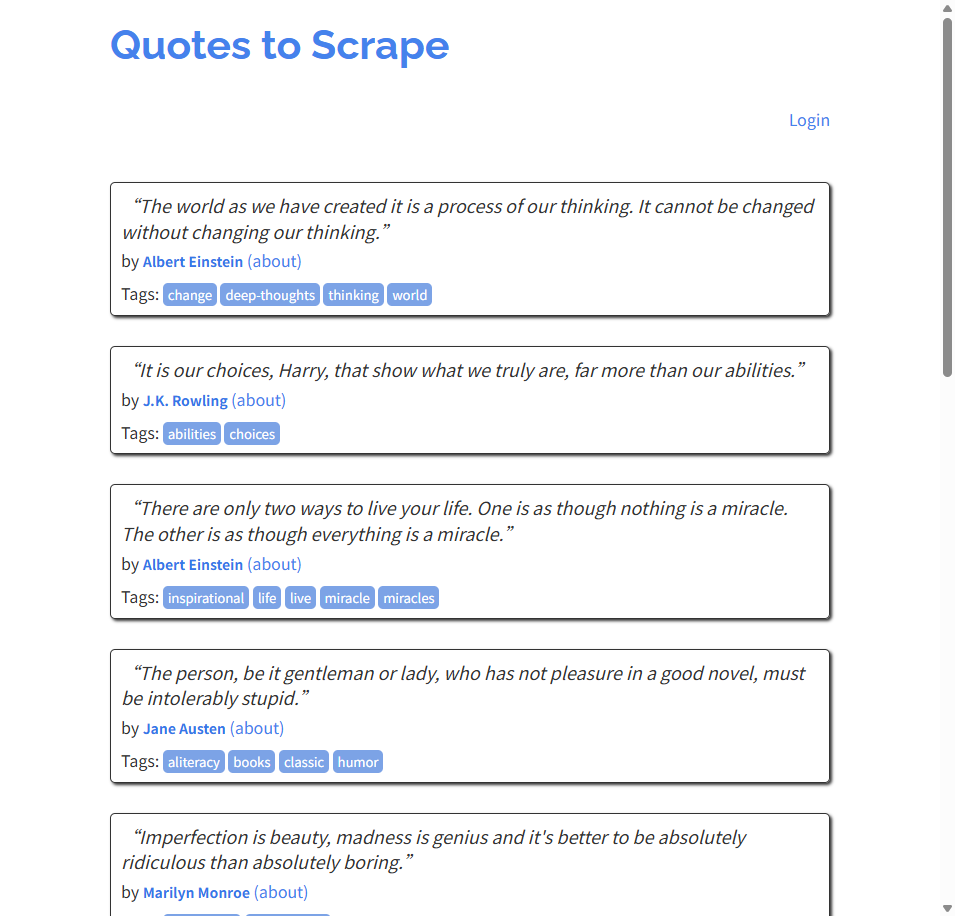 |
browser_snapshot returns roles, names and eN refs; browser_text returns readable text |
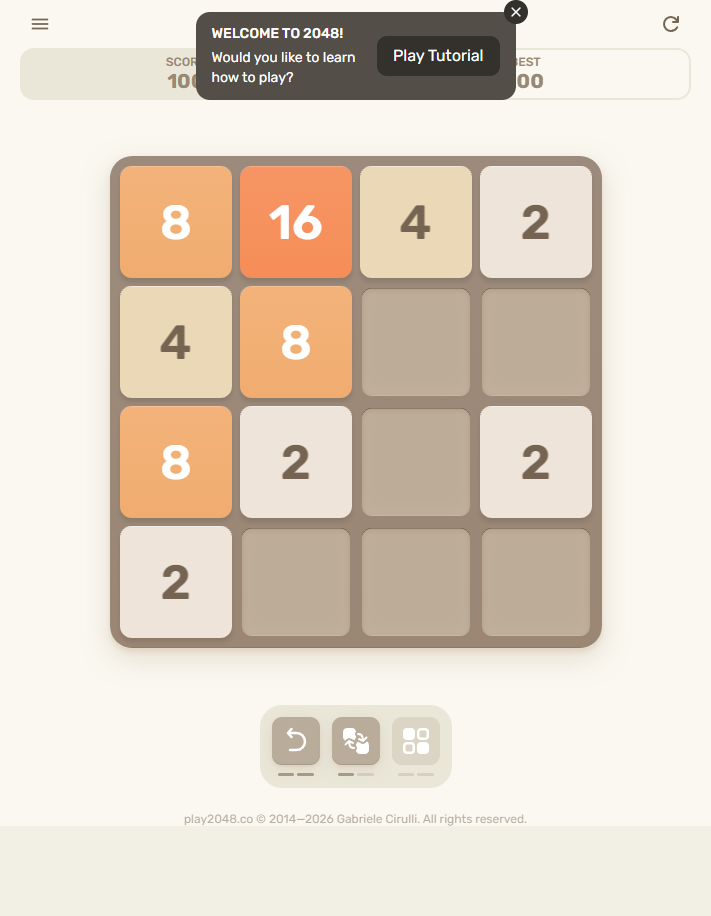
A canvas game whose state never touches the DOM: browser_instrument reads the worker messages
(score, board, move count) instead of taking a screenshot.
Performance
- Idle detach: 45 s without a browser call detaches CDP (
cdpIdleDetachMs), reconnecting on the next one. Chromium stops throttling a page that has a debugger attached, so a long-lived attachment kept the browser panel rendering at the display refresh rate. - Focus emulation is temporary: enabled for ~4 s around click/type only, instead of always on.
- Heartbeat: 8 s instead of 2.5 s, and skipped entirely when the data is unchanged or the window is hidden.
- Instrumentation: previews only JSON bodies up to 256 KiB;
instrument: falseturns the page hooks off on heavy sites.
Panel visibility (multi-workspace)
Tool calls never open or switch the sidebar on their own: the right column belongs to whichever
session you are looking at, and a call from another workspace must not pull it in front of you.
Reading (snapshot, text, console, network, cookies) and navigation work with the panel collapsed;
real mouse/keyboard input needs it open and returns a panelHidden hint instead of failing silently.
Set revealPanel: true in the config if you want tools to reveal the panel.
Known limits
file://cannot be opened; usebrowser_serve.- Native downloads are blocked by the shell; use
browser_download. - Service Worker registration itself is not restorable from a snapshot (Cache Storage content is).
- Sites that require a human (login walls, CAPTCHA, rate limits) surface a
barriershint; the user completes that step in the sidebar.
License
MIT
Usage walkthrough
# 1. read the page as structure, interact by ref
browser_open   url=https://quotes.toscrape.com/
browser_snapshot detail=compact
  [e1] link "Quotes to Scrape"   [e2] link "Login"   [e3] link "(about)" ...

# 2. click a ref (real mouse event), then re-read
browser_click  ref=43            -> https://quotes.toscrape.com/page/2/
browser_text   maxChars=400      -> title, body, links

# 3. debug a page that fails to render
browser_console  level=error     -> uncaught exceptions, console.error
browser_network  filter=api      -> GET /api/... 200 application/json 120ms

# 4. keep and switch accounts
browser_cookies save name=work   -> 17 cookies, 10 local keys, 1 IndexedDB, encrypted
browser_cookies load name=work   -> storageRestored: true
Discover / plugin market
DSH has no central marketplace; a market is a JSON index you add under Plugins → Discover → Index sources. This repo publishes one (format 1):
https://cdn.jsdelivr.net/gh/Kattentions/dsh-katt-browser@main/index.json(CDN, no redirects)https://raw.githubusercontent.com/Kattentions/dsh-katt-browser/main/index.json(fallback)
See MARKET.md. Direct install works without any index:
dsh plugin --profile desktop add github:Kattentions/dsh-katt-browser
No comments yet. Be the first to write one.