DSH Design Mode


An image-first Design Mode for DeepSeek Harness, built on the idea that everything is a plugin.
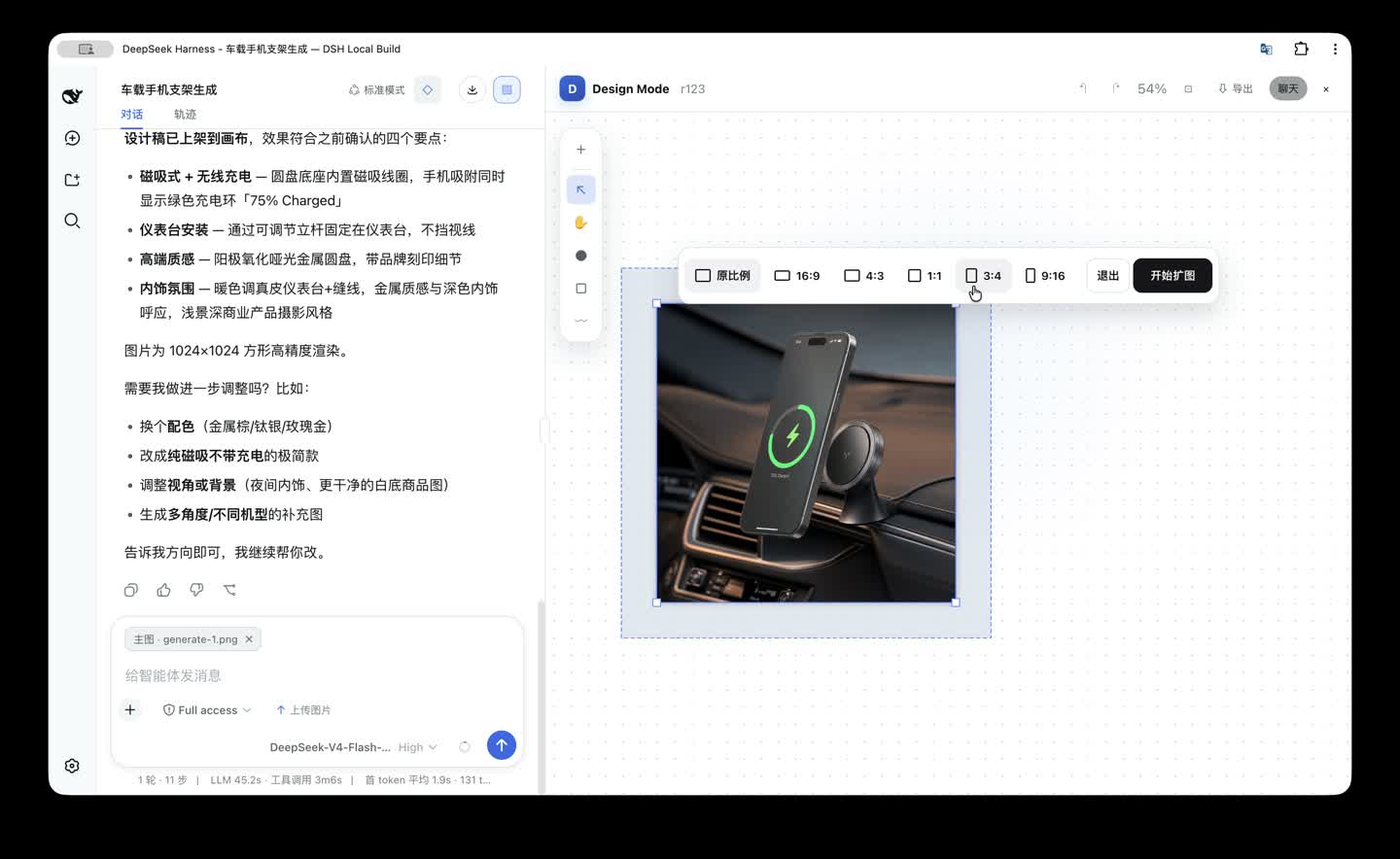
DSH Design Mode connects the native DSH conversation to an infinite canvas, guided intent clarification, focused image tools, and location-aware comments. The goal is not to put another image generator beside chat. The goal is to make the whole image workflow—from an ambiguous idea to a traceable series of edits—part of one Agent session.
Developer preview based on
dsh-v0.1.1-rc.2. This independent community project is listed under the GitHubdsh-plugintopic and is not an official DeepSeek release.
Why this exists
Powerful open design environments can expose too many choices before a new user has a clear brief. DSH Design Mode starts from ordinary language, lets the Agent clarify material ambiguity, and opens the canvas only when there is an image to work with. Experienced users still get direct tools, while new users get a guided path instead of a wall of controls.
What is included
- Intent-first entry: Design Mode can be armed and disarmed. Arming it does not open an empty canvas; sending text, an image, or both starts the workflow.
- Adaptive
ask_user: new-image requests use 3–5 sequential clarification cards. Each card provides three suggested choices plus a UI-owned “Other” input. - Infinite canvas: pan, pointer-centered zoom, selection, multi-selection, move, proportional resize, rotate, lock, hide, download, fit-to-view, and local undo/redo.
- Image-only creation: upload, paste, drop, generate, or add an existing chat image. Video generation and video controls are intentionally excluded from v1.
- Task-specific tools: background removal/replacement, erase, upscale, outpaint, OCR-assisted text editing and translation, angle change, recolor, and authorized mark removal.
- Location-aware comments: point, rectangle, and brush comments return to the native conversation. Multiple comments are processed in order so the chat remains the auditable record of every change.
- One Host-owned gateway: the UI and Agent call the same Design service, job queue, persistence layer, and provider routing.
- Private credentials:
OPENAI_API_KEYandFAL_KEYare read from the DSH credential vault and never shipped to the browser or written into the workspace. - Desktop and Web: the same profile and browser surface run in both DSH Desktop and DSH Web.
- Canvas export: PNG, PDF, standalone HTML, ZIP, and PPTX.
Demo chapters
The repository includes four compressed walkthroughs recorded from the working build:
- Enter Design Mode and start from chat
- Clarify an image request with
ask_user - Work on the canvas with object tools
- Place comments and continue the edit in chat
The interactive product story is in showcase/. Run it with npm install && npm run dev.
The editable investor/client deck is available as DSH Design Mode product introduction (PPTX).
Install from source
Requirements: Node.js ^22.19.0 or >=24.0.0, Corepack, pnpm 11.7.0, and Git.
1. Clone and install dependencies
git clone https://github.com/KaichenCurry/dsh-design-mode.git
cd dsh-design-mode
corepack enable
pnpm install
2. Build and create the isolated profile
pnpm run build
pnpm run design:install
3. Start DSH with Design Mode
pnpm run design:start
The command starts the complete DSH Web application with the design profile and opens its local URL. Use pnpm run design:start --no-open when another shell, including DSH Desktop, should open the URL. The profile adds Design Mode to the standard DSH application; it does not replace another DSH executable or change the default web profile.
4. Add provider credentials only when needed
Open Settings → Design Mode and store credentials through the write-only vault surface.
| Task | Required credential |
|---|---|
| GPT Image generation and generative editing | OPENAI_API_KEY |
| Background removal and upscale | FAL_KEY |
Canvas interaction, comments, composer context, persistence, and keyless contract tests work without provider credentials. A real provider job reports a recoverable missing-credential error until the corresponding key exists.
5. Manage or remove the profile
Useful commands:
pnpm run design:status
pnpm run design:upgrade
pnpm run design:uninstall
design:uninstall moves the profile to a timestamped recovery directory and leaves workspace .dsh/design-mode data intact.
Current v1 scope
V1 is intentionally image-only. It supports image generation, import, canvas editing, contextual tools, and location-aware comments; it does not expose video generation, video editing, or video buttons.
Architecture
Native DSH Composer
  ├─ text / images / removable Design context chips
  └─ ask_user clarification
          ↓
DSH Agent
  ├─ design_read_context
  ├─ design_generate_image
  ├─ design_edit_image
  └─ design_update_comments
          ↓
Design Job Router + per-session queue
  ├─ GPT Image: generation and generative editing
  ├─ FAL providers: background removal and upscale
  └─ OCR provider: region detection for text workflows
          ↓
Local canvas document, assets, comments, versions, and journal
The core packages are:
packages/design/design-mode: Host service, storage, provider routing, and Agent tools.packages/client/ui-design-mode: React/Konva canvas and DSH client integration.packages/bundle/design-app: optional bundle layer used by the isolateddesignprofile.
Privacy and safety
- Only assets referenced by the current job are sent to the selected provider.
- Local canvas documents and history stay in the workspace.
- Provider failures never trigger an automatic paid retry.
- Watermark/mark removal requires the user to confirm ownership or authorization.
- Do not commit
.envfiles, workspace data, or provider keys. See SECURITY.md.
Roadmap
- Strengthen real-provider success/failure smoke tests and cost-aware routing.
- Package signed Desktop installers and reproducible upgrade/uninstall flows.
- Add team review, permissions, approvals, and shared asset governance.
- Open an adapter surface for third-party providers, Agent skills, and reusable workflows.
License and attribution
This repository is derived from DeepSeek Harness and retains its MIT license and third-party notices. New Design Mode code is released under the same MIT license. DeepSeek and DeepSeek Harness are trademarks of their respective owners.
No comments yet. Be the first to write one.