Delete session
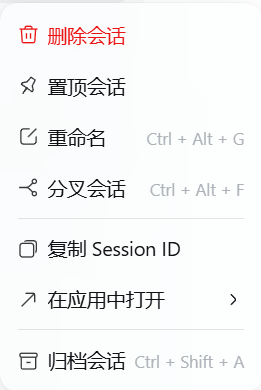
A DeepSeek Harness (DSH) bundle that adds a permanent 删除会话 / Delete
session action as the first row of a session's ... menu in the left sidebar,
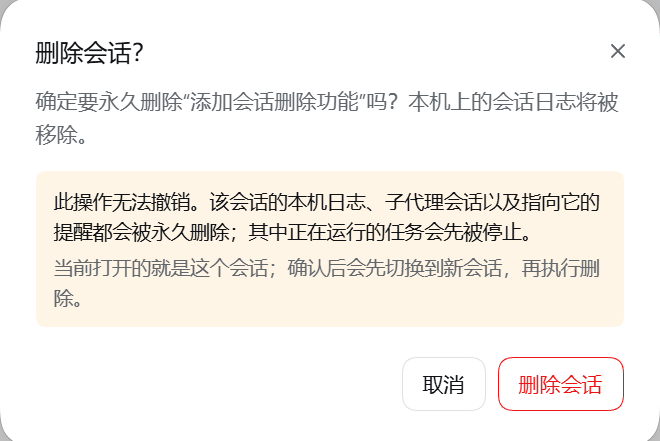
with a confirmation dialog. Unlike archiving, the action removes the session from
this device: the Session's local log directory (every immutable log generation,
the write lease, and torn-tail leftovers) is deleted, the projection-cache record
is purged, and the Session leaves every Workspace account, so its row disappears
from the sidebar. Subagent sessions created by the deleted Session are removed
with it.
Screenshots
The session ... menu |
The confirmation dialog |
|---|---|
 |
 |
Requirements
- DeepSeek Harness (Desktop or
dsh web) with the Plugin Manager available. - No build step and no runtime dependencies: the Host half is a Host plugin
(
index.js,deletion.js) and the UI half is a plain Client module (client.js).
Install
<spec> below is either a local folder path or a Git URL. Run it by asking the
agent to call plugin_manager install_bundle <spec>, or paste the same spec into
Settings → Plugins in the Desktop app.
From a local folder (development):
<spec> = D:\path\to\dsh-delete-conversation
From this repository:
<spec> = https://github.com/<owner>/dsh-delete-conversation
The manager checks the repository through git ls-remote, installs it into the
active profile, and enables the bundle. list_plugins then shows the row
include:delete-conversation as active.
Manual (no manager): add the folder to <DSH_HOME>/profiles/<profile>/ as a
link: dependency and list the package in that profile's dsh.profile.bundles,
or append the row from cordis.patch.yml to cordis.patch.yml under the
profile. Restart DSH after editing profile files by hand.
Uninstall with plugin_manager remove_bundle @local/dsh-delete-conversation,
or disable it in Settings → Plugins; deleted sessions are not restored.
Behavior
- Where — the
...button at the end of a top-level Session row. The action is registered ahead of the built-in actions (pin, rename, fork, copy id, archive) and is drawn in the danger color with the harness's own trash glyph. - Confirmation — a portalled modal shows the session title, states that the deletion cannot be undone, and explains that the local logs, subagent sessions, and reminders targeting it are permanently removed. When the session on screen is the target, it also says that a new session opens first. Escape, the close button, the backdrop, and Cancel dismiss it; the destructive action only runs after the user presses 删除会话.
- Result — the dialog reports progress, the row is dropped from the sidebar's
session list, and a short notice confirms the deletion. Four mechanisms keep
the row gone. The Host broadcasts the Session controller's own
api-session/removedevent for every removed log. The Client records each deleted id as a tombstone in local storage, re-applies it whenever the Host announces that Session again, and polls its own list every 2 s while tombstones exist, because a later list refresh merges whatever the Host still returns — and the Host derives that list from persisted logs and live Session objects, so a Session whose Agent has not been disposed can resurface long after the delete response. Three reconciliation passes (0.3 s, 1.2 s, 3 s) also ask the Host for its list and drop rows it no longer returns; the same reconciliation runs once when the bundle loads. Deleting a row the Host no longer knows answersnot-found, which the dialog treats as already deleted instead of reporting a failure. When a failed attempt had already closed the open session, the app reopens it for the user. - Running or open sessions — running work in the target tree is stopped
through the same
workspace/session-stopproviders archive uses (which also removes reminders targeting the sessions), and the route waits for it to settle before flushing each live write buffer and removing files. An idle session that is still open in a view is allowed; only work that does not stop within the timeout refuses the delete. When the target is the session on screen, the Client closes it first (opening a new blank session in the same Workspace).
What is removed
- the Session's own log directory under the harness session root;
- the same for every subagent-origin descendant (ordinary forks are independent sessions and are never touched);
- the Session projection-cache record in the profile's storage directory;
- the Session's Workspace account, archive entry, and pin entry.
Reminders that targeted the Session are removed through the archive-stop providers, so they cannot deliver into a missing log later.
Limitations
- A session whose running work does not stop within the timeout is refused; retry once it settles.
- A subagent row does not expose the action; deleting its parent removes it.
- Shared attachment bytes are not removed: the attachment store is content-addressed and the same file may still be referenced by another session.
- Telemetry that was already exported for feedback is not recalled.
- Rows left behind by deletes performed before the tombstone record existed are not remembered; deleting such a row once (or restarting the app) clears it, and every later delete is remembered.
Use
The feature is enabled per profile. The client module joins the running Web graph; reload the page if the menu entry does not appear. Turn it off in Plugins to remove the menu entry; the already-deleted sessions are not restored.
Package name
The package is still named @local/dsh-delete-conversation because that is the
name the development profile installed it under. Before publishing to a registry
(and for a cleaner install line from this repository), rename it in
package.json, then reinstall the bundle under the new name:
- set
"name": "dsh-delete-session"(or any free name you own); plugin_manager remove_bundle @local/dsh-delete-conversation;plugin_manager install_bundle <path or repository>.
The loader row id (delete-conversation, from cordis.patch.yml) does not
change, so the UI entry keeps working across the rename.
License
MIT — see LICENSE.
No comments yet. Be the first to write one.