@dsh-external/dsh-subagent-fold




给 DeepSeek Harness(DSH)用的子代理下拉折叠:把子代理按「使用批次」收进 历史 / 今日 / 上次 / 本次 四组,本次始终展开,其余可折叠。
不改原版头部、不新增入口——只在官方「子代理」下拉里加分组,按钮和布局一个都没动。
怎么用
- 打开:点官方「子代理」按钮(原版也支持悬停展开,插件不干预)。
- 看分组:最下面是「本次 N」标签 + 本次批次(始终展开);上面依次是「上次 N / 今日 N / 历史 N」。
- 折叠:点任一分组头即展开/收起,标题只显示「名称 + 条数」。
- 子代理会话内同样生效:打开某个子代理会话时,它头部的上级/目录下拉也按同一规则分组。
- 删除子代理:每行尾部有「⋯」→「删除子智能体」,二次确认后删除(运行中会先停止)。删除后该行隐藏,「N 个子智能体」计数同步减。
- 整组删除:各组标题(历史/今日/上次/本次)右侧的「⋯」→「删除本组(N 个)」,一次删掉整组;交互与行内删除一致。
| 分组 | 含义 | 默认 |
|---|---|---|
| 本次 | 最近一次使用子代理产生的那一批(并行发起算同一批) | 始终展开 |
| 上次 | 上一次使用子代理产生的那一批 | 折叠 |
| 今日 | 今天其余批次 | 折叠 |
| 历史 | 今天之前 | 折叠 |
「批次」按子代理创建时间聚合,间隔 ≤ 120 秒视为同一批。
效果示意
子代理下拉
├ 历史 12        ← 折叠(点开)
├ 今日 5         ← 折叠
├ 上次 2         ← 折叠
└ 本次 3         ← 标签 + 始终展开
   ├ 任务 A      运行中
   ├ 任务 B
   └ 任务 C
截图(前后对比)
| 之前(51 条平铺) | 之后(分组折叠) |
|---|---|
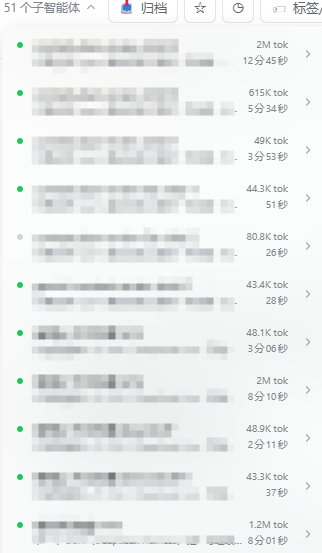 |
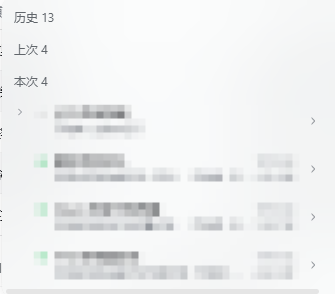 |
安装
npm(推荐)
已发布到 npm,一条命令装进 profile(会写依赖与 bundles):
dsh plugin --profile desktop add dsh-subagent-fold
或手动:
cd "$env:USERPROFILE\.dsh\profiles\desktop"
pnpm add dsh-subagent-fold
然后在 profile 的 package.json 登记:
{
  "dependencies": { "dsh-subagent-fold": "^0.0.3" },
  "dsh": { "profile": { "bundles": ["dsh-subagent-fold"] } }
}
完成后完全退出并重开 DSH。
最快(离线包):跑安装脚本
解压后运行(自动写 dependencies + dsh.profile.bundles,并备份 profile 的 package.json):
node tools/install.cjs --profile desktop          # 安装
node tools/install.cjs --dry-run                  # 只预览
node tools/install.cjs --uninstall --profile desktop  # 卸载
然后完全退出并重开 DSH。
方式一:标准 bundle(推荐)
把本包放进目标 profile 并登记,然后完全退出并重开 DSH:
cd "$env:USERPROFILE\.dsh\profiles\<profile>"
pnpm add "<本仓库路径或解压目录>"
在该 profile 的 package.json 登记:
{
  "dependencies": { "@dsh-external/dsh-subagent-fold": "link:<本仓库路径>" },
  "dsh": { "profile": { "bundles": ["@dsh-external/dsh-subagent-fold"] } }
}
方式二:手动解压
把 package.json、cordis.patch.yml、lib/ 放到
<profile>/node_modules/@dsh-external/dsh-subagent-fold/,再按上面登记 dependencies 与 dsh.profile.bundles,重启。
卸载
从 dependencies 与 dsh.profile.bundles 移除本包,删除 node_modules/@dsh-external/dsh-subagent-fold,重启。
兼容性
- DSH 桌面版(Electron)0.2.x,实测 0.2.1-rc.2。
- 纯客户端插件,不依赖 super-injector 等热加载工具;标准 bundle 安装即可用全部功能。
- 不采集数据、不发起网络请求。
文件结构
package.json        # 插件声明(bundle patch + client)
cordis.patch.yml    # 装配补丁:向组合树插入一条插件条目
lib/index.js        # 宿主半(空实现)
lib/client.js       # 客户端半:菜单分组与折叠(手写,零构建)
开发
lib/client.js 为手写 CJS bundle(window.__ModuleLoader__.load),无构建步骤。改完保存后 Ctrl+R 刷新页面即可加载。
已知限制
- 依赖官方下拉的
role="tree" / role="treeitem"语义锚点;官方若改结构需适配。 - 折叠条插在原生菜单内,极端重渲染/虚拟化可能短暂移除,插件有 1s 兜底重挂。
- 悬停展开是官方行为,插件不拦截;点击开/关由插件处理。
许可
BSD-3-Clause
@dsh-external/dsh-subagent-fold (English)
A subagent-dropdown folding plugin for DeepSeek Harness (DSH). Subagents are grouped by usage batch into History / Today / Previous / Current; Current is always expanded, the rest are collapsible.
No header replacement, no new entry point — it only adds grouping inside the built-in Subagent dropdown.
Usage
- Open the built-in Subagent button (native hover-open is untouched).
- The bottom shows a "Current N" label plus the current batch (always expanded); above it are Previous N / Today N / History N.
- Click any group header to expand/collapse; headers show only "name + count".
- Also works inside a subagent session: its header (parent/directory dropdown) is grouped the same way.
- Delete a subagent: the trailing ⋯ on each row opens "Delete subagent" (confirmed twice; a running one is stopped first). The row disappears and the "N subagents" count decreases accordingly.
- Delete a whole group: the ⋯ on each group header (History/Today/Previous/This batch) opens "Delete group (N)" to remove the entire group at once — same interaction as the row menu.
| Group | Meaning | Default |
|---|---|---|
| Current | the most recent batch of subagents (parallel spawns = one batch) | always expanded |
| Previous | the batch before that | collapsed |
| Today | other batches from today | collapsed |
| History | anything before today | collapsed |
A "batch" is clustered by creation time; a gap of ≤ 120 s counts as the same batch.
Screenshots
| Before (51 flat rows) | After (grouped & folded) |
|---|---|
|
|
Install
npm (recommended)
Published to npm — one command installs it into the profile (writes dependency + bundles):
dsh plugin --profile desktop add dsh-subagent-fold
Or manually:
cd "$DSH_HOME/profiles/desktop"
pnpm add dsh-subagent-fold
Then register in the profile's package.json:
{
  "dependencies": { "dsh-subagent-fold": "^0.0.3" },
  "dsh": { "profile": { "bundles": ["dsh-subagent-fold"] } }
}
Fully quit and reopen DSH.
Fastest (offline package): run the installer
After extracting, run (it writes dependencies + dsh.profile.bundles and backs up the profile package.json):
node tools/install.cjs --profile desktop          # install
node tools/install.cjs --dry-run                  # preview only
node tools/install.cjs --uninstall --profile desktop  # uninstall
Then fully quit and reopen DSH.
Standard bundle (recommended)
cd "$DSH_HOME/profiles/<profile>"
pnpm add "<path-or-extracted-dir>"
Then register in that profile's package.json:
{
  "dependencies": { "@dsh-external/dsh-subagent-fold": "link:<path>" },
  "dsh": { "profile": { "bundles": ["@dsh-external/dsh-subagent-fold"] } }
}
Fully quit and reopen DSH.
Uninstall
Remove the package from dependencies and dsh.profile.bundles, delete node_modules/@dsh-external/dsh-subagent-fold, restart.
Compatibility
- DSH desktop (Electron) 0.2.x (tested on 0.2.1-rc.2).
- Pure client plugin; no hot-reload tool (super-injector) required.
- No telemetry, no network requests.
Layout
package.json        # manifest (bundle patch + client)
cordis.patch.yml    # assembly patch (inserts one entry)
lib/index.js        # host half (no-op)
lib/client.js       # client half: grouping & folding (hand-written, no build)
Known limitations
- Relies on the built-in dropdown's
role="tree" / "treeitem"semantics. - The fold header is injected into the native menu; extreme re-renders may briefly remove it (1s re-assert fallback).
- Native hover-open is left as-is; click open/close is handled by the plugin.
License
BSD-3-Clause
No comments yet. Be the first to write one.