dsh-fallback
Router fallback for DeepSeek Harness (dsh / dsh-desktop).
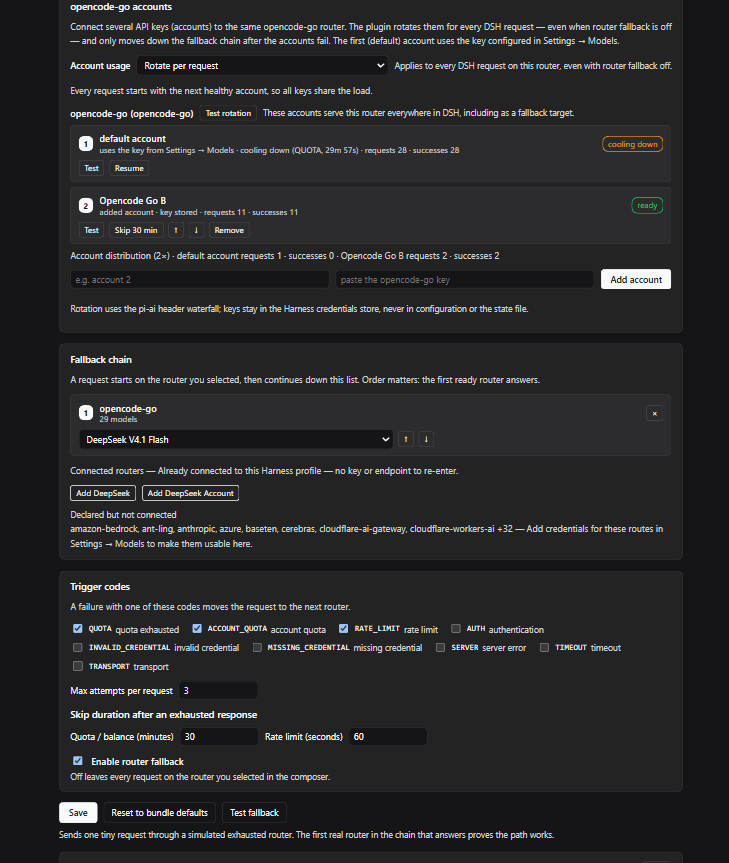
When the router (LLM provider route) the current request is using reports an exhausted quota or limit, the same request continues on the next router in your fallback chain — with no re-typed API keys, no second credential store, and no app restart. The chain is built from the routers already connected to your Harness profile.
Features
- Transparent fallback on quota/limit failures — a request that fails with
QUOTA,ACCOUNT_QUOTA, orRATE_LIMITis re-dispatched to the next ready router in the chain. The terminal failure only reaches the conversation when no router can answer. - Loads the routers already connected to dsh — the panel lists every
provider route registered in the profile (
opencode-go,opencode,deepseek-account,deepseek-official, custom gateways, …) together with each route's own model catalog. Adding a router to the chain needs no key, endpoint, or model list. - Several API accounts on one router, across DSH — connect multiple
opencode-go(oropencode) accounts to the same router. The plugin rotates the account key through the documentedllm-pi-ai/request-headerswaterfall for every DSH request on that route — including ordinary chats, subagents, and the route's turn as a fallback target — even when router fallback is off. Choose rotate-per-request (default), sticky-per-session, or priority/failover; an exhausted account gets its own cooldown and falls through to the next account before the chain moves on. Keys live in the Harness credentials store — never in configuration or the state file. Accounts are tested, skipped, resumed and reordered from the panel. - Per-request attempt chain — requests start at the router you selected in the composer, then continue down the chain. Order is editable from the panel.
- Cooldown after exhaustion — a router that reported an exhausted quota is
skipped for the rest of the configured window instead of being retried on
every model step.
RATE_LIMITuses a short window, quota/balance codes use a longer one; a provider-suppliedretry-afteralways wins. - Never corrupts visible output — chunks are buffered until the first real content chunk of an attempt; a rejected attempt that produced only framing chunks leaves no trace. Fallback never happens after visible output, because the durable message can no longer be replayed safely.
- Cross-provider history safety — when an attempt moves to a different
provider, provider-native reasoning blocks are dropped from history and
reasoning is pinned off when the target advertises an
offlevel, so a fallback is not rejected for missing another provider's thinking blocks. - Self-test — sends one tiny request through a simulated exhausted router and proves, end to end, which real router in the chain answers.
- Status and history — router health, cooldown countdowns, the last fallback events, and a per-router request/success/failure counter.
- dsh-desktop support — the panel is a normal Web UI plugin (left-sidebar entry + full page + same-origin JSON API), so it works in the desktop app and in the browser frontend alike.
Install
A bundle install links this directory into the running profile; no build step,
no dependencies, no @deepseek-ai package imports.
plugin_manager install_bundle <absolute path to this directory>
or from a shell with the plugin manager available:
dsh plugin install /path/to/dsh-fallback
After the first install, refresh the app window (or restart dsh-desktop) so the Web shell loads the new client module. Afterwards an entry named Router fallback / 라우터 폴백 appears in the left sidebar panel row.
Use
- Open Router fallback in the sidebar.
- Under Connected routers, add each router you want in the chain. The list is read live from the Harness LLM service; nothing is re-entered.
- Pick the model for each row.
Use the selected modelkeeps the model id you selected in the composer (useful when the same model is served by several routers); otherwise choose an explicit model. - Save. The chain applies to the next model call — the current conversation keeps running.
- Press Test fallback to force a simulated quota failure and confirm the first real router answers.
Requests start at the router selected in the composer and walk down the chain. If the selected router is not in the chain, it is tried first and the chain is used as its fallback list. Routes in cooldown are skipped.
Multiple opencode-go accounts
In the opencode-go accounts section:
- The first row is the default account: it uses the key configured in
Settings → Models (
OPENCODE_GO_API_KEYin the profile). - Paste another account's key and press Add account. The key is stored
through the credentials service under a generated
DSH_FALLBACK_OPENCODE_GO_*reference; the account joins the pool in the order shown (use ↑/↓ to change it). - Choose Account usage:
- Rotate per request (default) — every DSH request starts on the next healthy account, so all keys share the load.
- Sticky per session — each conversation keeps one account for prompt cache reuse; a new conversation takes the next account.
- Priority (failover) — the first account is used until it fails.
- Test sends one tiny request with that account's key. Test rotation sends two tiny requests through the ordinary request path and shows which account served each one. Skip 30 min takes an account out of rotation without deleting it; Resume puts it back.
- The pool serves this route everywhere in DSH: normal chats, subagents, and the route's turn as a fallback target. Only after every healthy account has failed does the chain continue. If every account is cooling down, the chain answers (and if nothing is healthy, the first account is tried so its real failure is shown).
The account pool works independently of the Enable router fallback switch:
turning fallback off disables the chain, not the account rotation. maxAttempts
still caps the total attempts (accounts plus chain), so raise it when you pool
more accounts than that. Rotate-per-request gives every key an equal share; if
the provider caches prompts per key, sticky-per-session keeps cache hits while
still spreading different conversations across accounts.
Because rotation happens at the pi-ai header seam, it works for every model on
the route — including anthropic-messages models (x-api-key) and
google-generative-ai models (x-goog-api-key). The plugin reads the model →
protocol map from the pi-ai catalog shipped with the running Harness and keeps
an embedded snapshot for installations where that catalog cannot be read.
Account keys are only written to the Harness credentials store. Deleting an account removes its key reference; the plugin never logs a key, and the state file contains labels and references only.
Configuration
The bundle row's config is the deployment default (empty chain, quota codes,
3 attempts). Everything edited from the panel is stored as overrides in the
profile's state file so the user's cordis.patch.yml is never rewritten:
<DSH_HOME>/fallback/state.json # e.g. C:\Users\<you>\.dsh\fallback\state.json
The file contains provider/model ids, failure codes and timings — no credentials. Deleting it resets the chain and all counters; a malformed or missing file simply falls back to the bundle defaults.
| Setting | Default | Meaning |
|---|---|---|
| Enable router fallback | on | Off disables the chain; pooled accounts still rotate. |
| Fallback chain | empty | Ordered routers; first ready one answers. |
| Account usage | rotate per request | How pooled keys are chosen: rotate, sticky per session, or priority/failover. |
| Trigger codes | QUOTA, ACCOUNT_QUOTA, RATE_LIMIT |
Failures that move the request to the next router. |
| Max attempts per request | 3 | Hard cap including the selected router. |
| Quota/balance skip | 30 min | Cooldown after QUOTA/ACCOUNT_QUOTA, unless the provider reports retry-after. |
| Rate-limit skip | 60 s | Cooldown after RATE_LIMIT. |
Security and privacy
- The settings API is served on loopback and is checked by DSH's connection trust service (Host/Origin validation and browser authentication). It accepts only same-origin JSON POSTs carrying the plugin's request marker; expensive test endpoints are single-flight.
- Added account keys are stored through the Harness credentials service, never in the plugin configuration, state file, logs or API responses. The state file keeps labels, credential references, counters and hashed session tags only. Stored error messages redact provider URLs, organization ids and key-shaped tokens; paths returned by the API redact the home directory.
- The credentials store itself is owned by DSH. Depending on the release it may be protected by OS access control rather than encrypted at rest; protect the profile directory and do not sync it to untrusted storage. See SECURITY.md.
- Fallback routes and pooled-provider accounts receive the request content by design. Review the chain before routing sensitive conversations through third-party routes.
How it works
The Host half attaches one llm/stream waterfall listener (a documented,
interceptable seam of @deepseek-ai/dsh-llm; the plugin imports no Harness
package). For each model call it plans the attempt list, dispatches the first
attempt through the normal adapter path, and only re-dispatches
{...request, provider, model} when the attempt failed with a trigger code
before any content became visible. Everything else — session log, streaming,
tool calls, turn errors — is the shipped behavior.
Pooled accounts are an attempt dimension on the same route, applied to the
selected route and to every chain route that supports accounts. Before each
call the pool orders its healthy accounts — round-robin, sticky per session, or
the configured priority — and each attempt carries its own health key, followed
by the chain. Each attempt's key is carried into
llm-pi-ai/request-headers through Node's async-local storage, because that
waterfall receives only routing metadata. Writing the protocol's auth header
there overrides the route's configured key for that request only (verified
against the live pi-ai adapter: a wrong contributed key fails with AUTH).
Known consequences of doing this at the LLM seam:
- The durable assistant message keeps the originally selected provider/model as its source (the Harness records the requested route, not the answering one). The panel's event log records the actual answering router.
- Quota failures are not retried on the same route first: the plugin switches
immediately.
RATE_LIMITis also in the default Harness retry set, so a fallback-capable chain answers faster than the retry backoff. - A fallback can still fail (invalid model on the target, context window,
credentials). The final failure is the provider's own, with a
[dsh-fallback: fallback chain exhausted]suffix on the message. - Only quota/limit-style codes are handled. Context-overflow, invalid-request
and auth failures are surfaced, not silently moved, because another router
would fail the same way. Add
AUTHto the trigger codes if an invalid account key should fall through to the next account/router instead. - Account pooling is offered for
opencode-goandopencode; the underlying key override works for any pi-ai route, but the panel intentionally limits the list. Model → protocol mapping prefers the installed pi-ai catalog and falls back to an embedded snapshot; an unknown model is assumed OpenAI-compatible (authorization: Bearer). deepseek-officialmay advertise no model catalog in some profiles; it can still be added withUse the selected model.
Development
Pure Node.js ESM; no bundler and no dependencies.
node --test --test-isolation=none "test/*.test.mjs"
lib/engine.mjs— attempt planning, failure classification, cooldowns, reasoning-history sanitization, the buffering stream runner (pure, unit tested).lib/accounts.mjs— the pooled-account model, credential references and validation.lib/rotation.mjs— rotate/sticky/failover account ordering (pure, unit tested).lib/providers.mjs— live provider/model discovery over thellmservice.lib/probe.mjs— the quota probe adapter and self-test request.lib/state.mjs— durable overrides, health and event log.index.js— Cordis wiring, interception, self-test, HTTP API.client.js— the Web UI page (plain React from the host module table).
License
MIT — see LICENSE. Third-party attribution is in THIRD_PARTY_NOTICES.md.
No comments yet. Be the first to write one.