dsh-section
中文
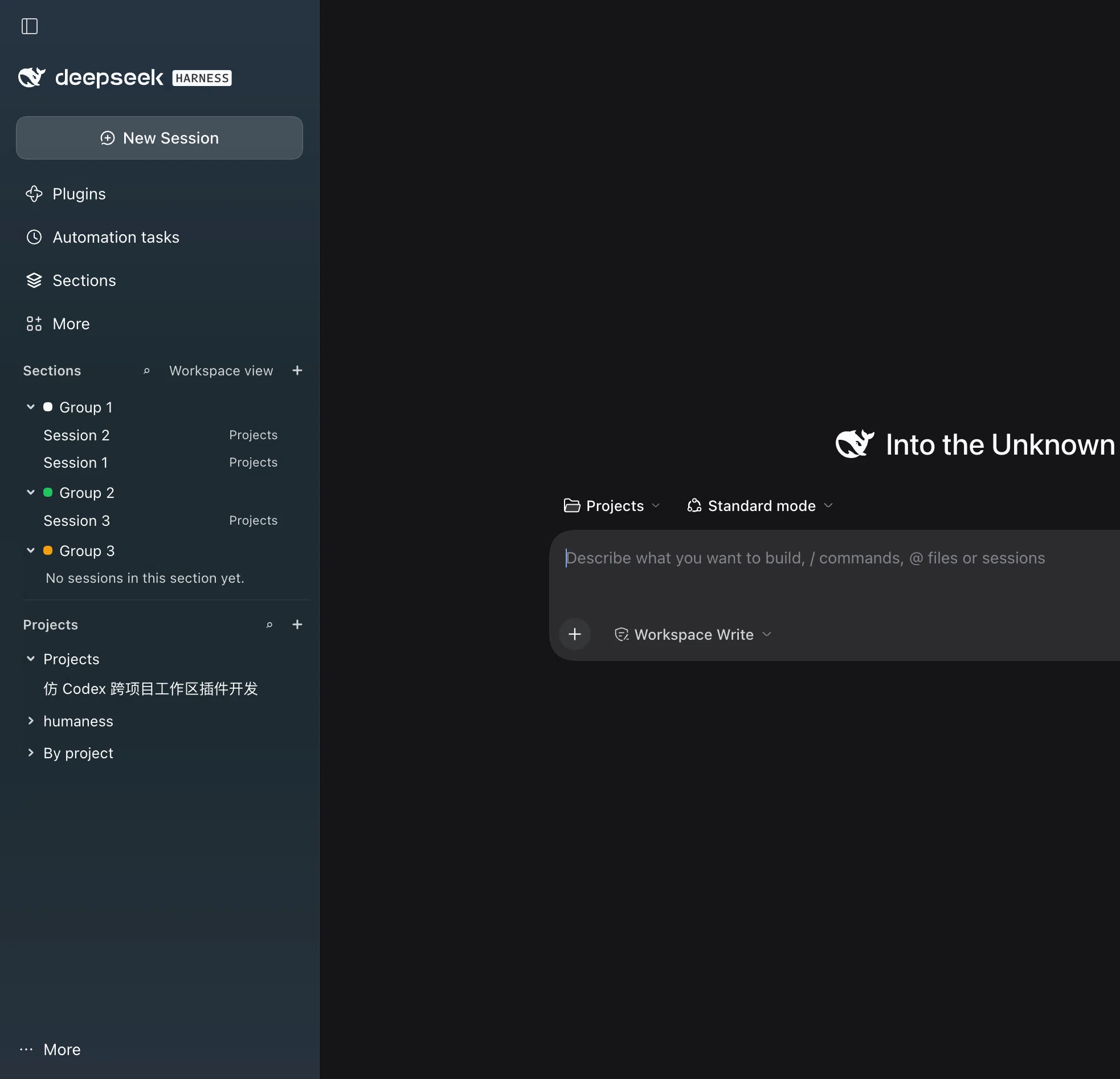
给 DeepSeek Harness(DSH)的 Web UI 加一层「分组」:把散落在不同项目(workspace)里的会话收进同一个分组,集中管理一条跨项目的工作线(类似 Codex 的 section)。
它解决什么
DSH 默认按项目组织会话,但一段工作常常横跨多个仓库:需求在 A、后端在 B、数据在 C。dsh-section 让你按「事情」而不是按「目录」来看会话,并且直接在左侧边栏里操作。
功能
- 分组管理面板:侧栏图标栏的「分组」图标打开,可新建/重命名/删除分组,往里添加会话,并清理已失效(会话被删)的成员。
- 分组模式侧栏:面板里的开关可以把左侧浏览区换成按分组的树(再关一次即恢复宿主原样)。同一棵树上还能看到按项目分好的未分组会话。
- 分组操作:分组头部的
⋯→ 添加会话 / 重命名 / 删除(删除需二次确认)。 - 会话操作:会话行尾的
⋯→ 加入分组(已在分组里则是移出分组)/ 重命名 / 归档。 - 项目操作:项目区每个项目头部的
⋯→ 添加会话 / 整个项目加入分组 / 归档项目(= 从侧栏移除该项目,不会删除磁盘文件,需二次确认)。 - 项目区顶栏:
⌕按项目名或会话标题筛选,+选择目录新增项目。 - 会话行标记:属于某个分组的会话,在侧栏行首会有一个分组色点(该行处于 idle 状态时才会显示)。
- 中英文:界面跟随宿主语言切换(内置 en / zh 词典)。
安装
用 DSH 自带的插件管理安装本目录(绝对路径),随后刷新 Web 页面:
# 在 DSH 会话里执行
plugin_manager action=install_bundle target=/绝对路径/dsh-section
也可以手动把包加入 profile 的 bundles。因为是以 link 方式安装,改完 client.js 刷新页面即可生效,无需重新安装。
数据与边界
- 分组与归属关系保存在浏览器 localStorage 的键
dsh-section.state.v1下(纯前端 UI 数据,不写入门户会话事件、不上传)。 - 分组模式侧栏通过遮蔽宿主的
sidebar.workspaces席位实现(priority: -1),因此宿主侧栏升级后可能需要跟随适配。 - 归档项目 = 调用宿主 workspace 的删除/移除,只影响侧栏列表。
开发
node --check client.js     # 语法检查
node tools/smoke.mjs       # 冒烟测试:假 DOM + 假 React,渲染每个注册项并断言交互
node tools/audit.mjs       # 审计样式键与词典键:悬空/未用/en-zh 是否对齐
目录结构:
client.js          浏览器侧插件(全部 UI 与交互)
index.js           宿主侧入口(本插件无宿主逻辑)
cordis.patch.yml   插件组成(insert @local/dsh-section)
icon.svg           插件图标
locale/en.json     设置页展示用的英文标题与说明
locale/zh.json     设置页展示用的中文标题与说明
screenshots.json   插件市场展示的截图清单
assets/            README 与插件市场用的截图、图标
tools/smoke.mjs    冒烟测试(不随包发布)
tools/audit.mjs    静态审计(不随包发布)
许可
未声明许可证;如需复用请先联系作者。
English
A grouping layer for the DeepSeek Harness (DSH) Web UI: collect sessions that live in different projects (workspaces) into one named section, so a single cross-project workstream can be managed in one place (similar to Codex sections).
Why
DSH organizes sessions by project, but real work usually spans several repositories — spec in A, backend in B, data in C. dsh-section lets you browse by workstream instead of by directory, and operate on it directly from the left sidebar.
Features
- Section panel: open it from the "Sections" icon in the sidebar rail; create, rename and delete sections, add sessions to them, and clean up members whose session no longer exists.
- Section-mode sidebar: a switch in the panel replaces the shipped workspace browser with a section tree (toggle it off to restore the host UI). The tree also lists ungrouped sessions, grouped by project.
- Section actions: the
⋯in a section header → add session / rename / delete (delete asks for confirmation first). - Session actions: the
⋯at the end of a session row → group (or ungroup) / rename / archive. - Project actions: the
⋯in a project header → new session / move the whole project into a section / archive the project (removes it from the sidebar, does not touch files on disk, asks for confirmation). - Project area bar:
⌕filters by project name or session title;+picks a directory and registers a new project. - Row marker: sessions that belong to a section get a section-colored dot at the start of their sidebar row (only while that row is idle).
- Locales: follows the host language (built-in en / zh dictionaries).
Install
Install this directory (absolute path) with DSH's plugin manager, then reload the Web UI:
# inside a DSH session
plugin_manager action=install_bundle target=/absolute/path/dsh-section
You can also add the package to the profile bundles manually. It is installed as a link, so editing client.js and reloading the page is enough — no reinstall needed.
Data and boundaries
- Sections and assignments live in browser localStorage under
dsh-section.state.v1(pure front-end UI data — no session events are appended, nothing is uploaded). - Section mode works by shadowing the host's
sidebar.workspacesseat (priority: -1), so a future host sidebar change may need a follow-up adaptation. - Archiving a project calls the host workspace removal and only affects the sidebar list.
Development
node --check client.js     # syntax check
node tools/smoke.mjs       # smoke tests: fake DOM + fake React, renders every entry and asserts interactions
node tools/audit.mjs       # audits style and dictionary keys for missing, unused and en/zh drift
Layout:
client.js          browser-side plugin (all UI and behaviour)
index.js           host-side entry (no host logic in this plugin)
cordis.patch.yml   composition patch (insert @local/dsh-section)
icon.svg           plugin icon
locale/en.json     English title/description shown on the Plugins page
locale/zh.json     Chinese title/description shown on the Plugins page
screenshots.json   screenshot list for the plugin storefront
assets/            screenshots and storefront icon used by the README
tools/smoke.mjs    smoke tests (not published)
tools/audit.mjs    static audit (not published)
License
No license declared; please contact the author before reuse.
No comments yet. Be the first to write one.