DSH Product Subagent Console
English · 简体中文


See, design, and verify multi-Agent work without leaving a DeepSeek Harness conversation.
The plugin adds a Subagents workbench with three connected views: follow delegated work in Runtime, prepare an executable plan in Plan, and match that plan with the work that actually ran in Compare.
It addresses three practical problems:
- find running, finished, or cancellable branches without opening every child conversation;
- review roles, dependencies, concurrency, resource conflicts, and budget limits before spending Provider time;
- confirm that every planned task produced the expected attempt and child session after execution.
Requires DSH
0.1.1-rc.2. This is an independent community plugin.Alpha preview: plans and execution history are cleared when the DSH Web process restarts.
Three views, one workflow
| View | Use it for | What you can inspect |
|---|---|---|
| Runtime | Following current and completed delegation | Parent-child branches, tasks, Providers, state, duration, and native child conversations |
| Plan | Designing work before Agents start | Roles, tasks, dependencies, Providers, execution limits, preflight, and approved revisions |
| Compare | Verifying planned work against execution | Planned tasks, actual attempts, status, timing, dependencies, and child sessions |
See it in action
The three core views are shown below. For a screenshot-by-screenshot journey through editing, preflight, live execution, completion, and cancellation, open the complete product tour.
Runtime — follow every delegated branch
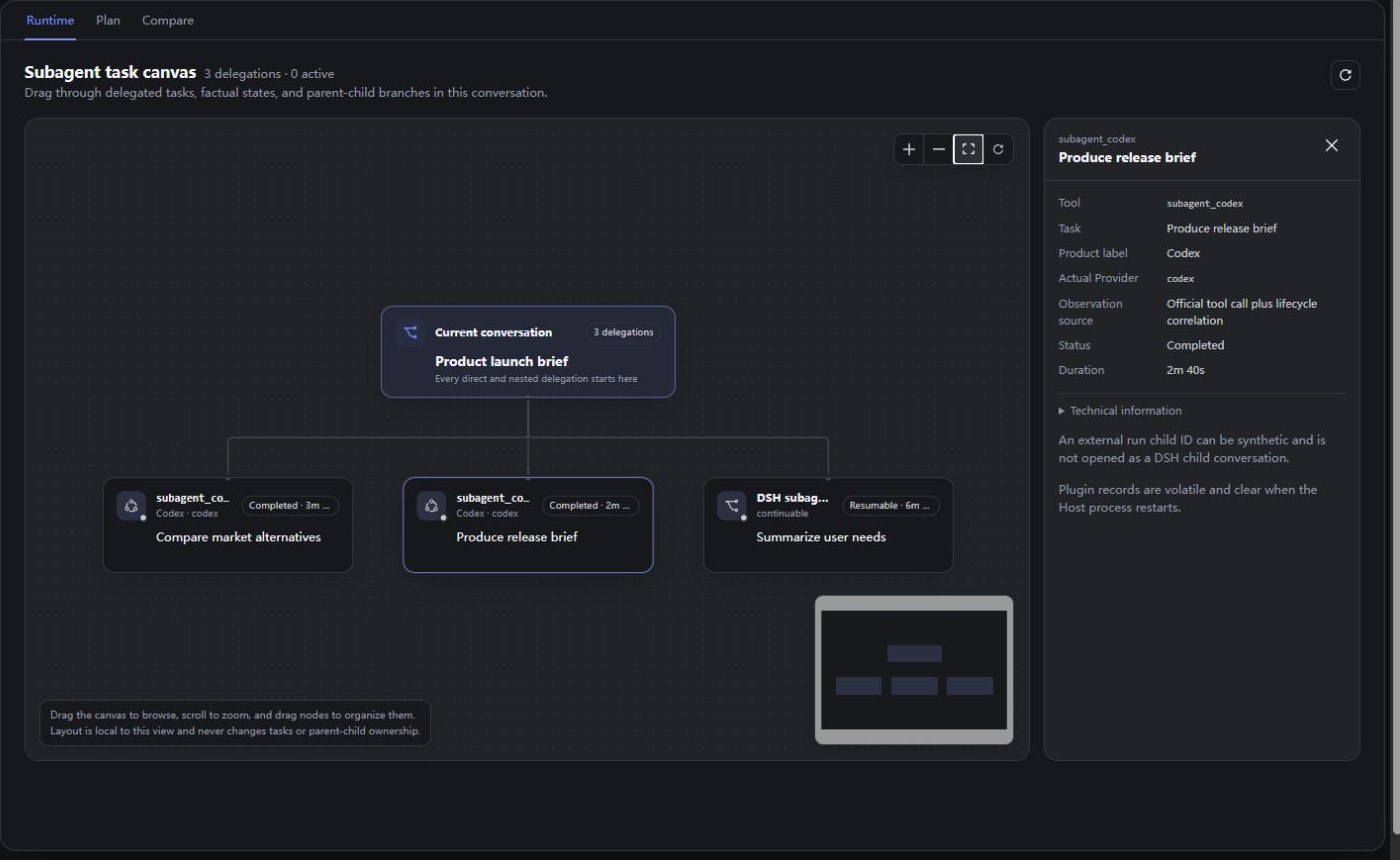
Runtime places native DSH child sessions and compatible Provider runs on one draggable branch canvas. Pan, zoom, rearrange cards, or select a node to inspect its task, state, duration, and Provider details. Native nodes can also open their child conversation directly.
Plan — design before execution
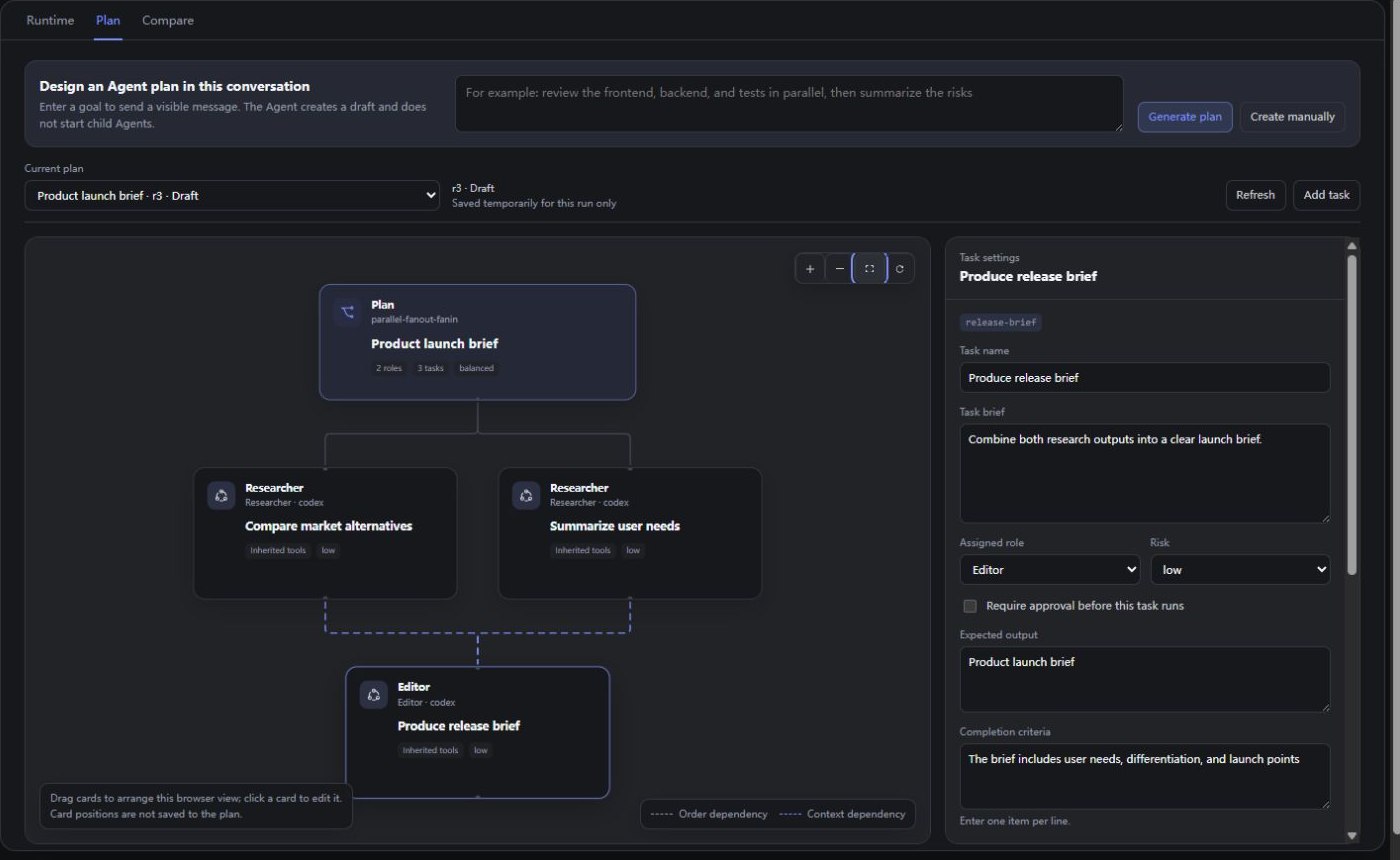
Enter a goal to generate a draft, or start manually. Refine roles, responsibilities, tasks, dependencies, Providers, resources, and execution limits before any child Agent starts.
Save the exact revision and run preflight against the capabilities available in the current DSH profile. Resolve blocking issues, review warnings, then approve the revision you want to execute.
Compare — match the plan with actual work
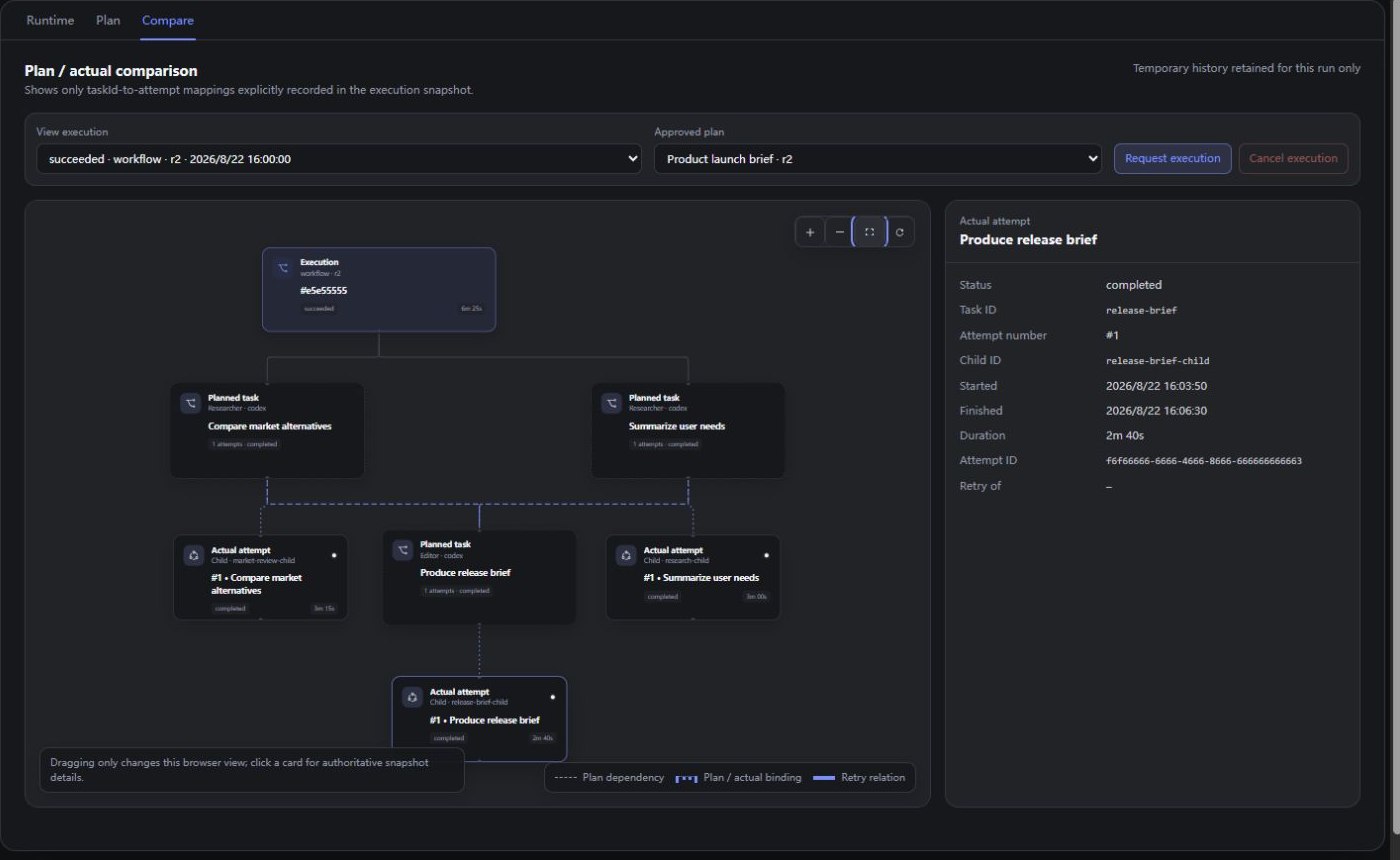
Compare connects each approved plan task to the attempts and child sessions recorded for that execution. Select a task or attempt to inspect its role, status, timing, dependencies, and expected output. Active executions can also receive a cancellation request.
From goal to verified execution
- Open Subagents → Plan, enter a goal, and generate or create a draft.
- Edit the canvas and settings, save the revision, then run preflight.
- Resolve blocking issues, review warnings, and approve the exact revision.
- Open Compare and request execution. Follow live branches in Runtime, then inspect the final plan-to-execution result in Compare.
See Agent Planner for the complete workflow and field guide.
Good fits
- Parallel checks: inspect frontend, backend, tests, or docs independently, then consolidate the findings.
- Staged delivery: research or implement first, review or integrate later, with explicit context handoffs.
- Long-running work: inspect nested delegation, duration, and state on one canvas, then open a native child conversation when needed.
- Execution verification: compare an approved plan with actual attempts to spot queued, missing, cancelled, or retried branches.
Install
Download the .tgz file and SHA256SUMS.txt from the matching GitHub Release, verify the archive, then install it into the profile you use:
sha256sum --check SHA256SUMS.txt

# DSH Desktop: run in Open DSH Terminal
dsh plugin add ./dsh-product-subagent-console-0.4.0-alpha.2.tgz

# Regular Web profile
dsh plugin --profile web add ./dsh-product-subagent-console-0.4.0-alpha.2.tgz
Restart DSH Desktop or the Web profile after installation.
Enable Agent Planner
Add the planner tool to a copied Agent Preset, save it, and create a new conversation with that preset:
- id: agent-planner
  name: dsh-product-subagent-console/plan-tool
  config:
    toolName: design_subagent_plan
    executeToolName: execute_subagent_plan
Preset changes apply to new conversations only. Regular delegated runs remain visible in Runtime even when the planner tool is not enabled.
Compatibility
- DeepSeek Harness Web or Desktop profile
0.1.1-rc.2 - Node.js
^22.19.0or>=24.0.0 - At least one configured compatible subagent Provider for Plan and Compare
- The matching Provider Bundle for each external coding Agent used by a plan or delegated task
Keep the plugin and all DSH packages on the same supported version family.
Documentation
Uninstall
# DSH Desktop: run in Open DSH Terminal
dsh plugin remove dsh-product-subagent-console

# Regular Web profile
dsh plugin --profile web remove dsh-product-subagent-console
Restart DSH Desktop or the Web profile after removal.
Support
Use GitHub Issues for reproducible bugs and feature requests. Report security issues through the private channel described in SECURITY.md.
License
MIT. Third-party notices are listed in THIRD_PARTY_NOTICES.md.
还没有评论,来写第一条。