READMESource: main@cfb9b788
DSH CtrlF
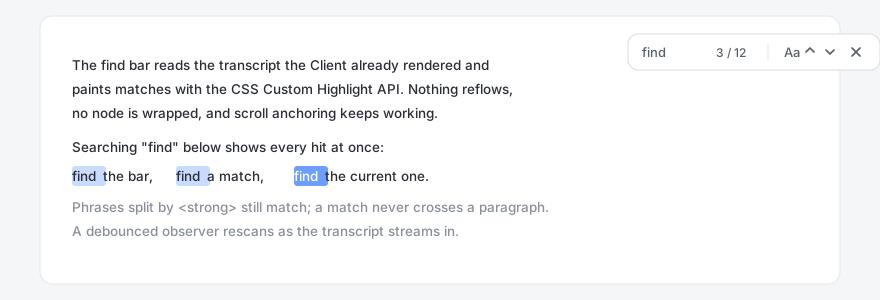
Press Ctrl+F inside a DeepSeek Harness conversation and search the transcript you are looking at: every match is highlighted, and you step through them without the page jumping around.
What it does
| Action | Key |
|---|---|
| Open the find bar | Ctrl+F / Cmd+F |
| Next match | Enter or F3 |
| Previous match | Shift+Enter or Shift+F3 |
| Close | Esc or the × button |
| Match case | the Aa button (remembered) |
The counter reads current / total; an empty result reads "No results".
Why it feels different from a browser find
- Matches across inline markup. The transcript is rendered Markdown, so one
sentence is often several text nodes (
<strong>,<em>, soft line breaks). DSH CtrlF searches a virtual concatenation of the visible text nodes, so a phrase split by markup still matches. Block boundaries insert a NUL sentinel no needle can contain, so a match never straddles two paragraphs. - Does not touch the DOM. No
<mark>wrapping, no node cloning. Matches are painted with the CSS Custom Highlight API (::highlight()), which is a presentation layer: nothing reflows and the host's own scroll anchoring and virtualisation keep working. - Survives streaming. New turns and token-by-token output keep arriving while
the bar is open. A debounced
MutationObserverrescans, and a rescan never throws the user back to match #1. - Looks like the host. Colours come from the
--dsw-alias-*theme tokens, so light and dark themes both work; UI text goes throughctx.locale(zh / en / ja / es / fr / de / ru / pt).
Install
DSH resolves bundles from a GitHub package. Pick whichever fits your setup:
# from the Harness UI: Plugins -> Add plugin -> paste the repository
# or from a checkout
git clone https://github.com/Johnson-lab1111/dsh-ctrlf.git
Then install the package directory as a bundle in your profile and enable it. The bundle contributes one Client row; there is nothing to configure.
Files
| Path | Role |
|---|---|
client.js |
Browser half: the find bar, matching, highlighting, scrolling |
index.js |
Host half: intentionally empty (the bundle row needs a module) |
cordis.patch.yml |
Inserts the dsh-ctrlf plugin row |
locale/*.json |
Title and description shown in the plugin list |
icon.svg |
Plugin icon |
Privacy
- No network requests. The module makes none at all.
- No session events, no writes to disk.
- The search query lives in page memory only and is dropped when the bar closes.
- The only persisted value is one boolean,
dsh.find.caseSensitive, inlocalStorage. - The Host half registers no service, no route, and no global.
Licence
MIT — see LICENSE.
No comments yet. Be the first to write one.