Treasure Map: A firmware map for your AI agent
English | 中文
Treasure Map draws the map; your agent finds the treasure.




Treasure Map turns an unpacked firmware filesystem into facts your coding agent (Claude Code, Codex, Cursor and others) reads through a bundled MCP server: every dangerous call it recognizes, where the data reaching it comes from, and — just as important — what it could not determine. Every fact points at an exact binary, function and address. It has no agent of its own and runs no model; deciding which lead is a real bug is your agent's job.
Facts are the tool's job; judgment is the model's.
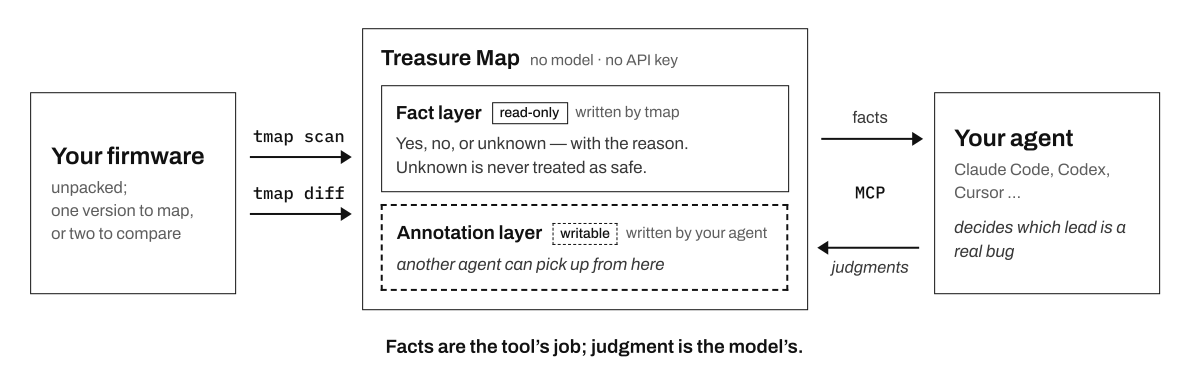
It does two things:
- Map one firmware. Every place the compiled code runs a shell command, copies into a memory buffer, formats a string or opens a file by path — each marked with what is known, what is not, and why. Your agent picks the views it needs, reads the code, and records its judgments.
- Diff two versions. Every function that changed between two releases, grouped by what happened around its dangerous calls. Instead of thousands of functions, your agent reviews the few that changed: is this a security fix, and which 1-day does it close in the old version? Is the fix complete, or does the same call survive somewhere else? Can the new check be bypassed?
Developer preview. Commands, config, the atlas database and MCP tool fields may change incompatibly between versions. After upgrading, see Upgrading.
Quick start
1. Install. One command installs tmap and then runs tmap init, which sets up the toolchain
(JDK 21, Ghidra 11.4.3, BinExport, BinDiff 8 — reusing what you already have) and registers the MCP
server with the agents you pick. No API key is needed. Restart your agent when it finishes and check
that treasure-map is connected.
curl -LsSf https://github.com/JoeyZzZzZz/treasure-map/releases/latest/download/install.sh | sh
2. Map a firmware. The input is an already-extracted filesystem — unpack the image first with
any extraction tool you like (or ask your agent to unpack it into its filesystem). -w is the name
you give this firmware; use it whenever you mention the firmware to your agent.
tmap scan ./firmware.extracted -w my-fw
Then ask your agent:
Audit firmware my-fw using treasure-map.
Choose for yourself which views of its candidate map to review
(by sink, by data source, or by any other layer) and find the issues in them:
open a lead's pseudocode, trace where its input comes from, and judge it yourself.
The candidates are leads to verify, not confirmed bugs.
Record each conclusion with annotate so the next session starts from it.
End with the leads worth following up, each with its evidence_ref and why.
3. Or diff two versions.
tmap scan ./fw_v1.extracted -w fw-v1
tmap scan ./fw_v2.extracted -w fw-v2
tmap diff --before fw-v1 --after fw-v2
A firmware pair splits into one diff per changed binary; the non-binary files are compared on their own.
Review the firmware diff fw-v1 → fw-v2 using treasure-map, starting from start_diff_review,
across every changed binary and the non-binary files.
Judge whether each change does something real; say inconclusive when you cannot tell.
For a real one: what weakness in fw-v1 does it address, and does the same pattern survive elsewhere?
Record each judgment with annotate_diff, and end with what you reviewed,
what you did not reach or could not diff, and the changes that look security-relevant.
That is all you need to get started. scan is the slow part — one Ghidra pass per binary, with
progress shown. Re-running with the same -w resumes where it stopped; a different -w keeps
another firmware alongside. Everything you scan and diff accumulates in one atlas
(~/.treasure-map/atlas.db), and the agent picks which firmware or diff to work on — no
reconfiguration per scan.
Your runs
tmap runs lists every firmware you have scanned, by the name you gave it, grouped by whether the
installed tmap would redo it:
3 run(s) in /home/you/.treasure-map/atlas.db:

needs re-hunt (2):
  fw-v1   complete   scanned 2026-10-20    58 bins / 10437 fns
  fw-v2   complete   scanned 2026-10-20    58 bins / 10419 fns
  → the hunt code changed since this run was hunted; re-hunt needs no decompile

up to date (1):
  my-fw   complete   scanned 2026-10-27   145 bins / 43643 fns

`tmap rescan` refreshes them.
What your agent gets
The firmware map
Each candidate is one point on the map, annotated on several equal layers: where the data comes from, how much of it an attacker controls, who wrote the value, how the spot is reached, whether anything filters it on the way, and whether the function was fully analyzed. Each layer reads YES, NO or an explicit UNKNOWN that says what is missing and why.
There is no score. The default view puts the highest-impact calls that nothing has proven safe first; your agent can re-sort or filter by any layer. Re-sorting changes the order, never the set of candidates. In every view, only a proven-safe fact can push a candidate down; an UNKNOWN never can.
Command-execution, buffer-copy and format-string calls come with in-function argument provenance. Path and file calls are covered for detection and ranking; their controllability comes from a text-level reading, and is marked as such.
The patch diff
tmap diff compares every binary whose content changed, in parallel, running Ghidra, BinExport and
BinDiff end to end — you never handle an intermediate file. (--binary NAME limits it to one.)
- A function-level patch view. One entry per changed function pair, grouped by what happened around its dangerous calls: a call that now goes somewhere else, a dangerous call that is still there, a reading that could not be decided. By default the entries most likely to matter come first; other orderings are a switch away.
- What a similarity score misses. BinDiff's similarity ignores constants: a function can read
similarity=1.0while a buffer length went from0x40to0x3f. tmap adds an address-normalized pseudocode comparison (truly identical, or only similar) and flags a changed length constant at a copy or format call. - Blind spots stated, not hidden. A binary that could not be diffed is listed as such, never counted as unchanged. A function with no counterpart is undetermined — it may have been inlined or moved — never reported as removed or added.
- Non-binary files too. Scripts, configs and web files are compared by path between the two versions, and your agent can record a judgment on each file.
- Judgments that stay. Your agent records on each entry whether the change does something real, and can carry that judgment over to the affected candidate in the firmware map.
If the stored scans or diffs were made by an older tmap, tmap diff brings them up to date first and
says what that involves before it starts.
Why facts, not verdicts
A scanner hands you findings and a severity score — a verdict you then have to trust or re-check. A modern agent already reads and reasons about one function well. What it cannot do is cover a whole root filesystem, or every changed binary between two releases, the same way twice — or say where it did not look. That is the half Treasure Map does.
- UNKNOWN is never "safe". A fact it could not establish stays UNKNOWN; a binary the diff could not analyze never reads as unchanged.
- Leads, not verdicts. A candidate is a lead to verify, not a confirmed vulnerability; a changed function is a change to review, not a confirmed fix. Reachability is graded one function at a time — this is not a taint-propagation engine, and it never claims a path is unreachable.
- Judgments that accumulate. Your agent's conclusions live in an annotation layer over the read-only facts, so a multi-session audit picks up where it left off — with any model or agent. A judgment is flagged for review again the moment the facts under it change.
Install details
tmap init installs the toolchain for you, or reuses what you already have if it passes the checks:
| Tool | Version | Used for |
|---|---|---|
| JDK | 21 (a JDK, not a JRE) | running Ghidra (JDK 11/17 make Ghidra 11.4.3 fail to launch) |
| Ghidra | 11.4.3 | decompiling every binary, headless |
| BinExport | for Ghidra 11.4.3 | exporting binaries for tmap diff |
| BinDiff | 8 | matching functions between two versions |
Downloads come from pinned URLs and are checked against a pinned size and sha256 before anything is
unpacked; they go to ~/.treasure-map/toolchain/.
| Platform | Status |
|---|---|
| Linux x86_64 (including WSL2) | supported |
| macOS on Apple Silicon | supported |
| macOS on Intel | runs the same toolchain; not acceptance-tested |
| Linux arm64, native Windows | not supported (no Ghidra decompiler / BinDiff build) — on Windows use WSL2 |
tmap init shows what it found and what it will download, and changes nothing until you confirm;
--dry-run prints the full plan.
Connect your agent
tmap init registers the MCP server for you; restart the agent afterwards.
Registering by hand
The command is always <absolute path of tmap> mcp (command -v tmap prints the path).
| Agent | Register |
|---|---|
| Claude Code | claude mcp add -s user treasure-map -- "$(command -v tmap)" mcp |
| Codex | codex mcp add treasure-map -- "$(command -v tmap)" mcp |
| Cursor / Claude Desktop / other JSON clients | add the block below to the client's MCP config file |
| dsh | tmap init --client dsh adds the entry to $DSH_HOME/cordis.patch.yml (default ~/.dsh), the layer every profile reads |
{
  "mcpServers": {
    "treasure-map": {
      "command": "/absolute/path/to/tmap",
      "args": ["mcp"]
    }
  }
}
Config files: Cursor ~/.cursor/mcp.json; Claude Desktop
~/Library/Application Support/Claude/claude_desktop_config.json (macOS); Windsurf
~/.codeium/windsurf/mcp_config.json; Gemini CLI ~/.gemini/settings.json. With Claude Code use
-s user: a project-local entry of the same name hides it inside that project (tmap doctor points
such entries out).
Parameter names, what each means and where it differs between tools:
get_tool_reference(name="parameters").
Upgrading
tmap update                                 # install the newest tmap
tmap rescan                                 # re-scan every run this tmap's code would redo
tmap diff --before fw-v1 --after fw-v2      # re-runs the diffs that are out of date
tmap update checks PyPI for the newest version, shows its plan and asks once (--check only
reports, --yes skips the question). It replaces the installed version, names any other tmap on
PATH that would shadow the new one, and then starts the new version's tmap init by itself — you
do not type it. That init also tells you how many of your runs predate the new version; tmap runs
shows which ones and what redoing each costs (see Your runs). A diff made by an older
tmap, or with another toolchain, is recomputed once.
With no arguments, tmap rescan re-scans every run the installed tmap's code would produce
differently. To rescan a single firmware, name its run — the -w name you scanned it with, unless
you set --run-id — for example tmap rescan fw-v1. --dry-run lists what would be rescanned and
why, without running anything.
tmap update works on the install the one-line installer makes (uv tool). Installed another way,
update it the same way you installed it.
Troubleshooting
Run tmap doctor first. Each check shows ✅, ⚠ (works, worth knowing), · (information), ❌, or ?
(could not be determined — never shown as ✅); it exits non-zero on any ❌ or ?.
tmap: command not found— the tool's bin directory is not on PATH. Runuv tool update-shell, then open a new shell.ghidra/java/bindiff❌ — runtmap initagain for the pinned download, or pass--ghidra / --java-home / --bindiff PATH. On WSL keep everything on the Linux side, not under/mnt/c/....binexport❌ "two copies" — Ghidra loads extensions from both its ownGhidra/Extensionsand its user settings directory; remove one of the two.- A binary is missing from a diff — ask your agent for
list_diff_blindspots, which names every binary the diff could not analyze and why. After fixing a toolchain problem,tmap diff … --force-retrytries them again. - Your own Ghidra 11.4.3 starts with an unexpected JDK — Ghidra remembers the JDK it last ran with
(
java_home.savein its settings directory), and tmap's runs record the JDK tmap uses there. SetJAVA_HOMEwhen you start Ghidra yourself.
Uninstalling
tmap uninstall
It shows its plan, asks once, then removes the treasure-map entry from each agent, removes the
toolchain tmap init downloaded (never a JDK, Ghidra or BinDiff you installed yourself), and offers
to remove the program itself.
Your data stays: ~/.treasure-map/config.yaml, .env, the atlas and the workspaces —
reinstalling reuses all of it. tmap uninstall --purge-data deletes them too, after you type a
confirmation phrase (not recoverable), but only what is provably tmap's: the atlas, what a scan
wrote in each workspace directory holding a tmap analysis.db, and the config.yaml / .env that
tmap init wrote. The workspace base itself stays (unless it is the default inside
~/.treasure-map and left empty), and nothing in it is deleted when it is your home directory or
above it. Anything else — a file you wrote yourself, in a workspace or beside one — is kept and
listed.
- An agent entry named treasure-map that does not run tmap is left alone, and so is one inside a dsh profile's own file.
- The program is removed with
uv tool uninstall tmap-agentswhen it was installed withuv tool; installed another way,tmap uninstalltells you to remove it the same way. --dry-runprints the plan and changes nothing;--yesskips the questions, but never the confirmation phrase.
Intended use & legal
Purpose. Treasure Map supports defensive security auditing and vulnerability research on firmware. It produces analysis leads; by design it does not generate proof-of-concept exploits, payloads, shellcode, or other directly weaponizable output.
Lawful use is yours to ensure. Only analyze firmware you lawfully possess — a device you own, or firmware made genuinely public by its vendor and obtained without bypassing any login, paywall or access control. Even lawfully obtained firmware may carry license, terms-of-service or contractual restrictions on reverse engineering; you are responsible for reviewing them.
Findings are candidates, not verdicts. Output requires independent human verification and is not a confirmed vulnerability.
No warranty. The tool is provided "as is". You are solely responsible for how you use it and for ensuring your activity is lawful in your jurisdiction. If unsure, consult qualified legal counsel.
Contributing
Issues and pull requests are welcome — see CONTRIBUTING.md.
No comments yet. Be the first to write one.