dsh-archive-manager
English | 中文



Archive manager plugin: manage archived sessions and active sessions of DeepSeek Harness (DSH) in one place.
Quick install (restart DSH afterwards and you are done)
dsh plugin --profile desktop add github:Joe-0202/dsh-archive-managerOther install methods: see Installation | Version downloads: see Releases
Why this plugin exists
DSH has built-in session archiving: archiving a session keeps its data fully on disk and merely hides it from the active list. But the built-in archive handling offers only a single filter ("Hide archived / All conversations / Archived only") and no dedicated place to review, archive, or clean up sessions in one spot — archived sessions simply pile up on disk.
This plugin fills that gap: it reuses DSH's native archiving mechanism and adds a dedicated management UI where "archive" and "delete" sit side by side.
Features
Sidebar entry
A new "Archive Manager" icon at the bottom of the sidebar (next to Settings); click it to open the management panel.
Two-tab panel
The panel has two tabs, and every session row offers archive-type actions and delete side by side:
| Tab | Contents | Actions per row |
|---|---|---|
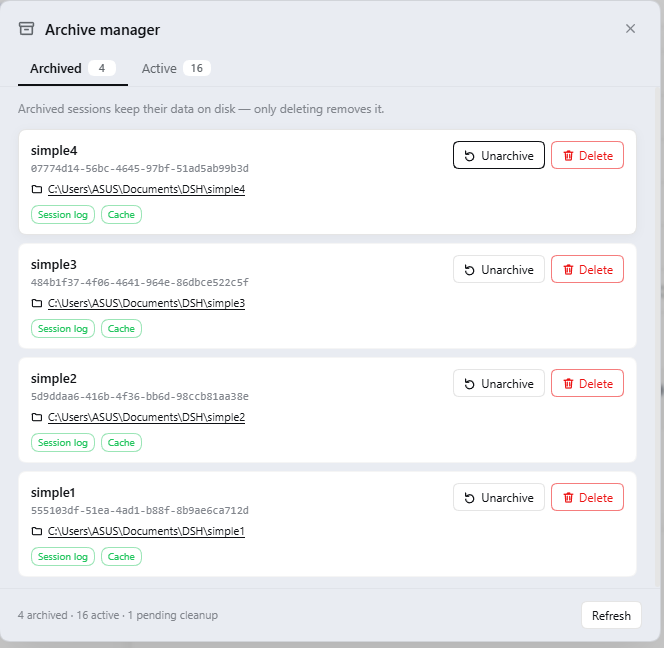
| Archived | All archived sessions | [Unarchive] [Delete] |
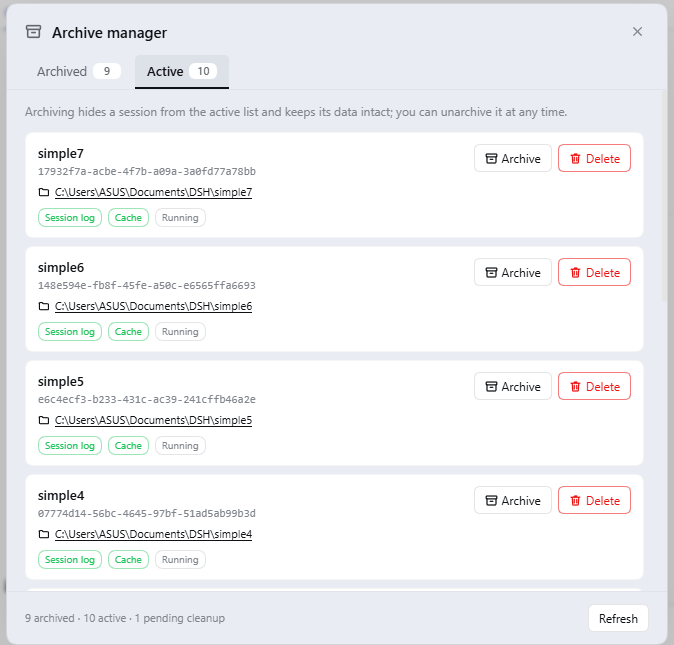
| Active sessions | Currently active sessions | [Archive] [Delete] |
Each entry shows:
- Session title ("Untitled session" when there is no title)
- Session ID (monospace)
- Bound workspace directory (clickable — opens directly in the file manager)
- Status badges:
session log/cache/data missing/running
Three operations
- Archive: calls DSH's native
archiveSession; the session is hidden from the active list and its data is kept exactly as is - Unarchive: calls DSH's native
unarchiveSession; the session returns to the active list and its data was never moved - Permanent delete: removes the session's session log directory + projection cache (irreversible)
- The bound workspace directory is never deleted (by design, so your project files cannot be removed by accident)
- A confirmation dialog guards the operation
- The archive record is queued and cleaned up automatically by the plugin on the next DSH start — no manual step required, and after a delete no "empty-data session" will reappear in the active list
Ghost entry detection
Entries in the archived list whose data was deleted long ago and only an archive record remains are marked "data missing"; deleting such an entry clears that leftover record.
Agent tools
archive_list / archive_add / archive_remove / archive_delete, drivable with natural language.
Screenshots
The Archived tab — every entry offers [Unarchive] and [Delete], and shows the bound workspace directory and on-disk data status:
The Active sessions tab — [Archive] and [Delete] side by side:
Installation
Replace
<profile>in the commands below with your profile name; the DSH desktop app usesdesktopby default. After installing, restart DSH and the "Archive Manager" icon appears at the bottom of the sidebar.
Option 1: Install directly from GitHub (recommended)
dsh plugin --profile <profile> add github:Joe-0202/dsh-archive-manager
DSH pulls the plugin from this repository and installs it into the profile as a bundle. To pin a specific version, add a ref:
dsh plugin --profile <profile> add github:Joe-0202/dsh-archive-manager#v0.1.0
Option 2: Download a release and install locally
- Open the Releases page, download Source code (zip) of the latest version and extract it
- Install using the path of the extracted directory:
dsh plugin --profile <profile> add link:<absolute path of the extracted directory>
Uninstall
dsh plugin --profile <profile> remove dsh-archive-manager
Uninstalling removes only the plugin itself; it does not delete any session data or archive records.
Usage
- Click "Archive Manager" at the bottom of the sidebar to open the panel
- In the "Active sessions" tab, click [Archive] on sessions you no longer need — they are hidden from the active list while their data is kept as is
- In the "Archived" tab, review all archived sessions
- Click [Unarchive] when needed to put a session back into the active list
- For sessions you no longer need, click [Delete] → confirm → permanent delete (irreversible)
Safety notes
- Deletion is irreversible: the session log and projection cache are removed outright, and a confirmation dialog is shown first.
- The bound workspace directory is never touched: even if a session is bound to
D:\projects\xxx, deleting an archived session removes only session data; your project directory and the files in it are completely unaffected. - Archiving itself carries zero risk: it only writes a marker; no data is moved or copied, and you can unarchive at any time.
- Session data is located by scanning
$DSH_HOME/sessions/*/for an exact sessionId match rather than re-deriving the path encoding, which avoids deleting the wrong directory. - Deletion is idempotent: if the target directory or cache is already gone, it counts as "already deleted" instead of raising an error.
Implementation notes
- Source of the archived list: the runtime projection is preferred (
workspaceController.follow()'s first-frame baseline carriesarchivedSessionIds; the stream is aborted as soon as it is read), with a fallback to the persistent snapshot in$DSH_HOME/storages/workspace.json. The panel therefore reflects the in-memory truth rather than a possibly stale disk copy. - Active sessions:
sessionQuery.listSessions()(which already excludes archived sessions), plus a defensive de-duplication pass. - Session title / cwd: read from the projection cache at
$DSH_HOME/storages/session_projcache/sessions/<id>.json(the cache embeds these values in a{ <key>: { val } }structure). - Session log directory:
$DSH_HOME/sessions/<workspace encoding>/<sessionId>/, located by exact-match scanning; after deleting a session, if its workspace encoding directory becomes empty, that empty directory is cleaned up as well. - Archive / unarchive: calls DSH's native
workspaceRegistry.archiveSession(id, { stopActivity: true })andunarchiveSession(id)— the plugin does not implement archiving semantics itself. - Removal from the archive set goes through the "pending-cleanup queue" (key design): permanent delete has three steps — delete the log, delete the cache, and
enqueue the id, but does not unarchive at that moment.
The reason:
unarchiveSessionmeans "send this session back to the active list", not "forget this id". If you previously opened a session in the archive panel, it stays in the harness's memory; deleting the on-disk data and then unarchiving makes the harness put this session — no data, but still in memory — back into the active list, where opening it necessarily fails withsession/not-found— and only a restart clears it. Once queued, the session stays archived (so it can never appear in the active list) and the plugin runsunarchiveSessionon the next start to finish the job — at that moment memory is clean, so unarchiving cannot trigger a ghost. Queue file:$DSH_HOME/storages/archive-manager-pending.json; queued entries are hidden from the panel immediately and surfaced transparently in the footer as "N pending cleanup". - Delete / open folder run through the
subprocessservice (Windows:Remove-Item -Recurse -Force/cmd /c start explorer; POSIX:rm -rf/xdg-open). - Client-side UI: a hand-written
window.__ModuleLoader__.loadlazy-CJS bundle with zero build steps; the stylesheet is injected through thestylesbuiltin (falling back to a manual<style>tag), and everything uses DSH's--dsw-alias-*design tokens so it matches the built-in UI's visual system; the panel is mounted ondocument.bodyso it is not unmounted when a slot re-renders.
Directory structure
archive-manager/
├── package.json          # plugin manifest + dsh.client declaration
├── cordis.patch.yml      # bundle patch (mounts the plugin row)
├── screenshots.json      # storefront screenshot declaration
├── assets/               # UI screenshots
├── dsh/
│   ├── index.js          # Host side: archive set, archive/unarchive/permanent delete, pending queue, routes/tools
│   └── client.js         # Client side: sidebar entry + two-tab panel (lazy-CJS bundle, zh/en dictionaries)
├── CHANGELOG.md
├── LICENSE
├── README.md             # English (this file)
└── README.zh.md          # Chinese
Known limitations
- Panel data is fetched when the panel opens and after every operation; click "Refresh" in the panel's bottom-right corner for the latest state.
- The "running" badge means that active session currently has a live agent resident in memory.
- A deleted session's archive record is cleaned up automatically by the plugin on the next DSH start; before that start it is already hidden from the panel, and the footer shows "N pending cleanup". This step requires no manual action.
Disclaimer
- This project is a third-party open-source plugin maintained independently by a community developer. It is not an official DeepSeek project and has no affiliation, sponsorship, or endorsement relationship with DeepSeek.
- Names and trademarks such as "DeepSeek" and "DeepSeek Harness" belong to their respective owners; this project uses these names only to describe compatibility and uses no logos or brand marks of theirs.
- This plugin permanently deletes session data as you instruct. The author accepts no liability for data loss caused by accidental deletion (the software is provided "as is" under the MIT License, see below).
License
MIT (see LICENSE)
Open source and contributing
Issues and Pull Requests are welcome.
Local development: no build step is required (the source is the artifact). Edit
dsh/index.js(Host side) ordsh/client.js(Client side) directly, link-install it with the command below, then restart DSH for the changes to take effect:dsh plugin --profile <profile> add link:<absolute path of this directory>Code structure:
dsh/index.js— Host side: reading the archive set, archive/unarchive, permanent delete, pending-cleanup queue, HTTP routes, agent tools.dsh/client.js— Client side: sidebar entry, two-tab panel, custom confirmation dialog, stylesheet injection (all using the harness's--dsw-alias-*design tokens).
Publishing to npm (optional; the main distribution channel today is direct install from GitHub):
npm login
npm publish
After publishing, users can install it with
dsh plugin --profile <profile> add dsh-archive-manager. If that package name is already taken on npm, switch to a scope (for example@joe-0202/dsh-archive-manager) and update theinsert[].namevalue incordis.patch.ymlaccordingly.Contribution license: by submitting a Pull Request you agree that your contribution is released under this project's MIT License.
No comments yet. Be the first to write one.