dsh-file-drag
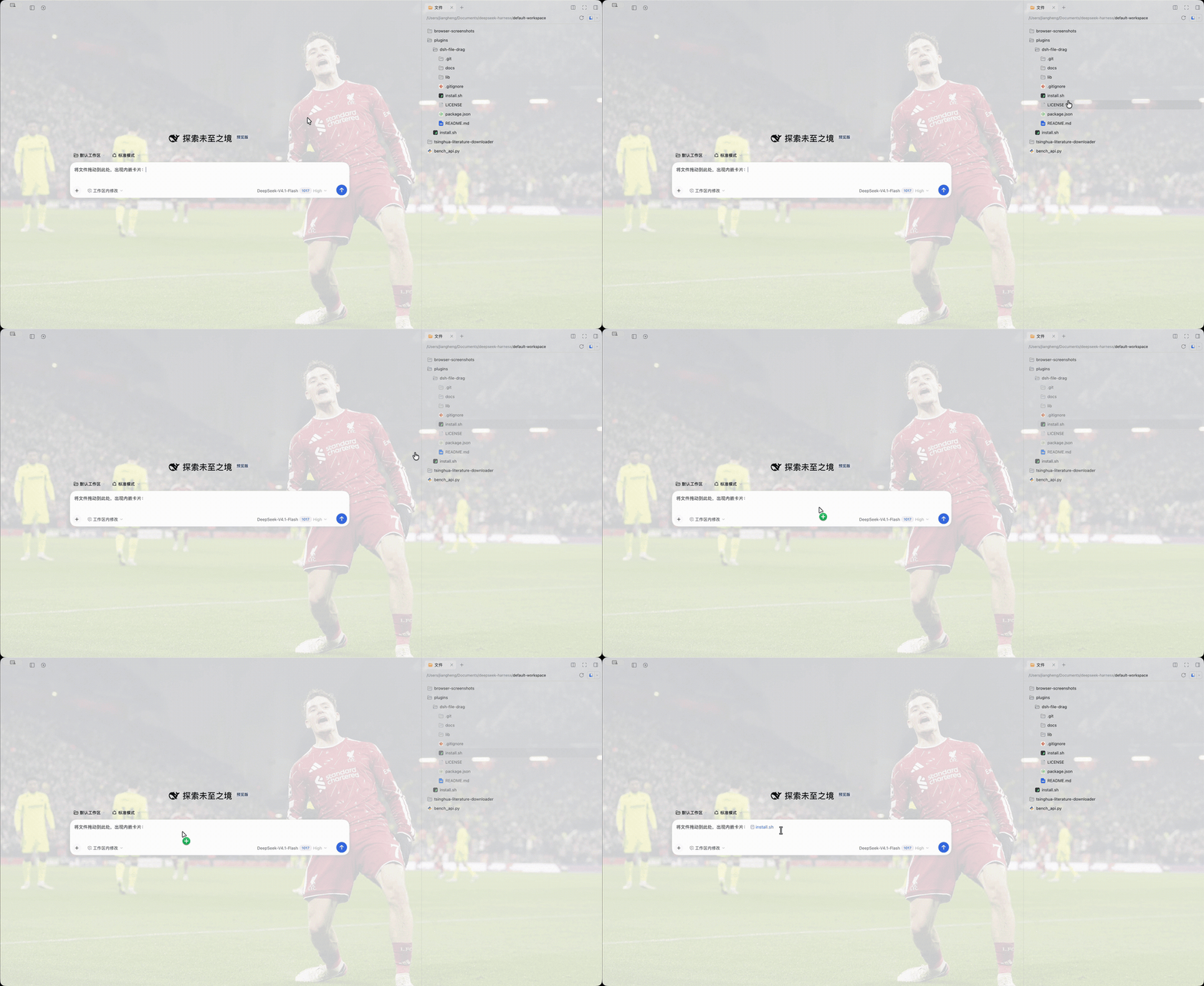
Drag files and folders from the DeepSeek Harness Files sidebar straight into the message composer. By default each dropped file becomes a small inline chip inside the sentence you are writing — the same rounded token the composer's own @ picker produces — and you can switch that to an uploaded attachment or a plain @ path.
DeepSeek Harness already accepts file drags that come from the operating system, but its Sidebar Files pane has no drag source at all, and the composer only claims drags whose payload type is Files. This plugin closes that gap from the outside: it arms the existing file rows, carries the relative path over a private MIME type, and then hands the result to the composer through its own insertion paths.
Do you need this?
Watch the clip above before installing anything. The plugin only changes one thing: it lets a file in the right-hand Files tab become something you can drop into the middle of a sentence.
- You keep material in the workspace and refer to it by path while writing → you will use this every day.
- You paste code inline, or never open the Files tab → skip it. Nothing else in the app changes, and there is nothing to configure.
Repository and releases: https://github.com/JiayuREN1127/dsh-file-drag
Requirements
- DeepSeek Harness 0.2.1-rc.2 or a build that still renders the right sidebar Files tab.
- The
desktopprofile (~/.dsh/profiles/desktop), which is what the macOS app uses.
Install
git clone https://github.com/JiayuREN1127/dsh-file-drag.git
cd dsh-file-drag
./install.sh
From a market index
The repository also publishes a format-1 market index. Add this URL under Settings → Plugins → Discover → Index sources to install and update the plugin from there:
https://raw.githubusercontent.com/JiayuREN1127/dsh-file-drag/main/market/index.json
install.sh copies the package into ~/.dsh/profiles/desktop/node_modules/dsh-file-drag and appends one Loader row to ~/.dsh/profiles/desktop/cordis.patch.yml, keeping a timestamped backup of that file first.
To install by hand, do the same two things:
- Copy this package to
~/.dsh/profiles/desktop/node_modules/dsh-file-drag. - Append to
~/.dsh/profiles/desktop/cordis.patch.yml:
- insert:
    - id: file-drag
      name: dsh-file-drag
Then quit the app completely (Cmd-Q) and reopen it. The Loader tree is built at startup, so a page reload is not enough for the first install. Later plugin updates only need a page reload.
Usage
- Open the Files tab in the right sidebar.
- Press and drag a file or a folder onto the message composer.
- Release.
While dragging, the composer shows a dashed outline so you know it will accept the drop.
Drop behaviour
Pick it in Settings → General → File drag:
| Mode | Result |
|---|---|
| Inline chip (default) | A small rounded card with the file icon and name lands in the sentence, exactly where the caret is. It is the composer's own reference token, so it moves, wraps and deletes like text. |
| Attachment | The file is read and uploaded, and appears in the attachment rail above the composer. |
| @ path | The relative path is inserted as plain text, e.g. @src/client/index.ts. |
Hold Alt (⌥) while dropping to get the plain @ path once, without changing the setting.
The preference is stored per client under the dsh-file-drag:mode key in localStorage.
| Source row | Inline chip | Attachment | @ path |
|---|---|---|---|
src/client/index.ts |
chip labelled index.ts |
uploaded card | @src/client/index.ts |
folder packages |
chip labelled packages/ |
falls back to a chip | @packages/ |
my notes.md |
chip labelled my notes.md |
uploaded card | @"my notes.md" |
Paths keep the composer's own formatFileMention grammar: folders end with a slash and whitespace is quoted. A chip that cannot be placed falls back to the @ path form, so a drop is never silently lost.
How it works
Drag source. The Files tab renders every row as <li data-files-entry="file|directory|other" data-files-path="relative/path">. The plugin does not guess the tree shape: on pointerdown it sets draggable on the closest such row, so the press can turn into a drag.
Transport. dragstart writes a private payload, application/x-dsh-file-path, holding the relative path and the entry kind. The native Files type is deliberately not used for the drag itself, because a synthesized File has no host path and the desktop path bridge would reject it.
Inline chip. On drop the plugin reaches the resident composer shell for the session and calls its addFiles with one reference — the same call the composer makes when you pick a file from the @ menu — so the full Lexical decorator node, icon, label and clipboard projection all come from DeepSeek Harness itself. The session-scoped conversation service is reached through ctx.sessions.binding(id).ctx.get("conversation"), because a root-level plugin cannot inject a session-scoped service.
Attachment. The plugin reads the file through the workspaceFiles client Remote (readBytes), wraps the bytes in a real File, and replays the built-in Files drop onto the composer. The composer then takes its own upload path, so the card behaves exactly like one dragged in from the operating system.
@ path. The mention is delivered as a synthetic paste event carrying text/plain on the editor root. The draft editor is Lexical, which ignores direct DOM writes and document.execCommand; a paste is the only reliable way in.
Settings row. The preference is a row registered into the settings.general.item slot, so it appears in DeepSeek Harness's own Settings page and follows the UI language.
Compatibility
Built against DeepSeek Harness 0.2.1-rc.2. The plugin depends on implementation details that are not a public contract:
- the
data-files-entry/data-files-pathattributes on sidebar rows, - the composer being a
[contenteditable="true"]element that handlespaste, - the composer component carrying a
sessionIdprop, - the
settings.general.itemsettings slot and theconversationservice face, window.__ModuleLoader__.loadas the client bundle entry point.
If a future release changes any of these, the plugin degrades instead of breaking the page: every handler is guarded, a failed chip insertion falls back to the @ path, and apply is wrapped so a failure never blocks boot.
Limitations
- One item per drag; multi-select dragging is not implemented.
- Only works while the Files tab is rendered, because the rows are the drag source.
- Drops are accepted anywhere in the window, not only over the composer.
- Attachment mode reads files through the workspace-files Remote, so it inherits that service's size limit; oversized files fall back to a chip.
- The mention is relative to the Files tab root, which is the session workspace. A session opened in another folder still receives the same relative path.
Uninstall
rm -rf ~/.dsh/profiles/desktop/node_modules/dsh-file-drag
cp ~/.dsh/profiles/desktop/cordis.patch.yml.bak-<timestamp> ~/.dsh/profiles/desktop/cordis.patch.yml
Then restart the app.
License
MIT
No comments yet. Be the first to write one.