dsh-kanban
English | 简体中文
A DeepSeek Harness (dsh) plugin
that turns a Jira Server / Data Center + GitLab board into a kanban the agent
can actually work — every DSH workspace is a board project, the model drives the
board through tools, and a floating panel in the session header gives you the human
view.
Screenshots
| Floating panel | Issue detail | Create issue |
|---|---|---|
 |
 |
 |
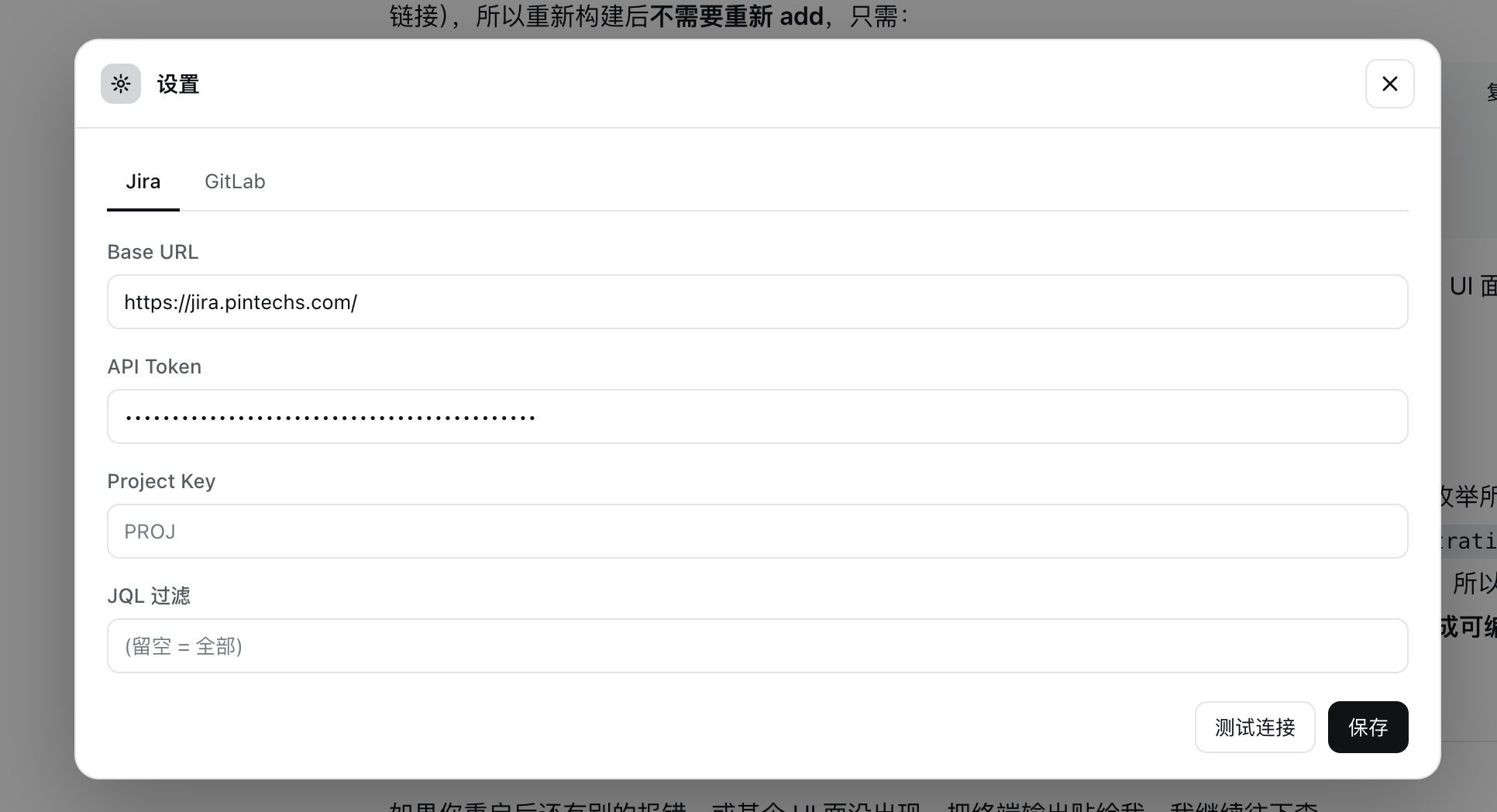
| GitLab workspace | Settings |
|---|---|
 |
 |
Highlights
- One project per DSH workspace. The board derives one project from every workspace: its own Jira connection, GitLab connection, and local-repo config, plus its own cached issues.
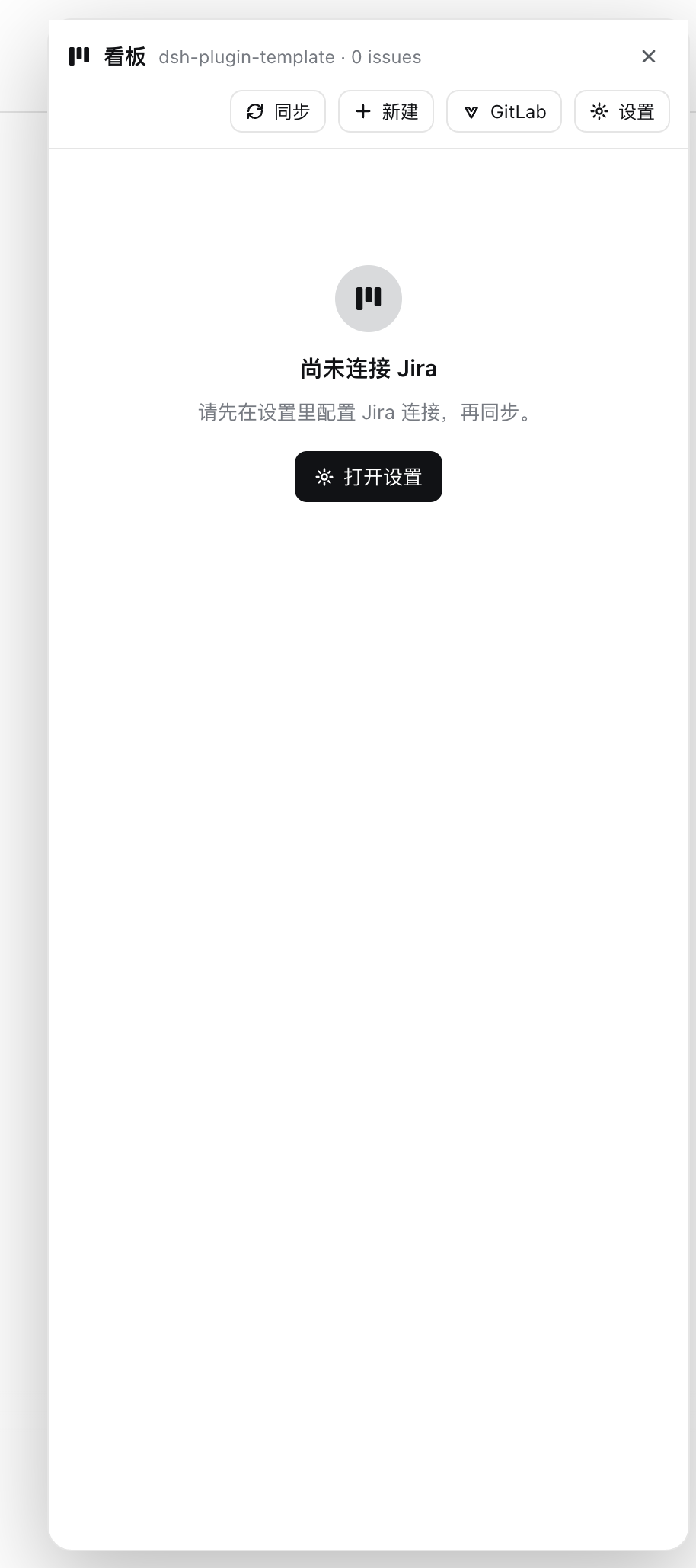
- The panel follows your workspace. Open the board from the session-header 「看板」button; the panel tracks the currently selected session and reloads for that workspace's project automatically. Switch sessions → the board follows.
- Auto-sync on open. Each project syncs from Jira once per panel session (cached issues show instantly; the sync runs in the background). After configuring Jira, it syncs once as well.
- Grouped board for narrow panels. Status groups with category accents, collapsible sections, counts, and client-side search. Move an issue via click → detail → transition buttons (keyboard friendly).
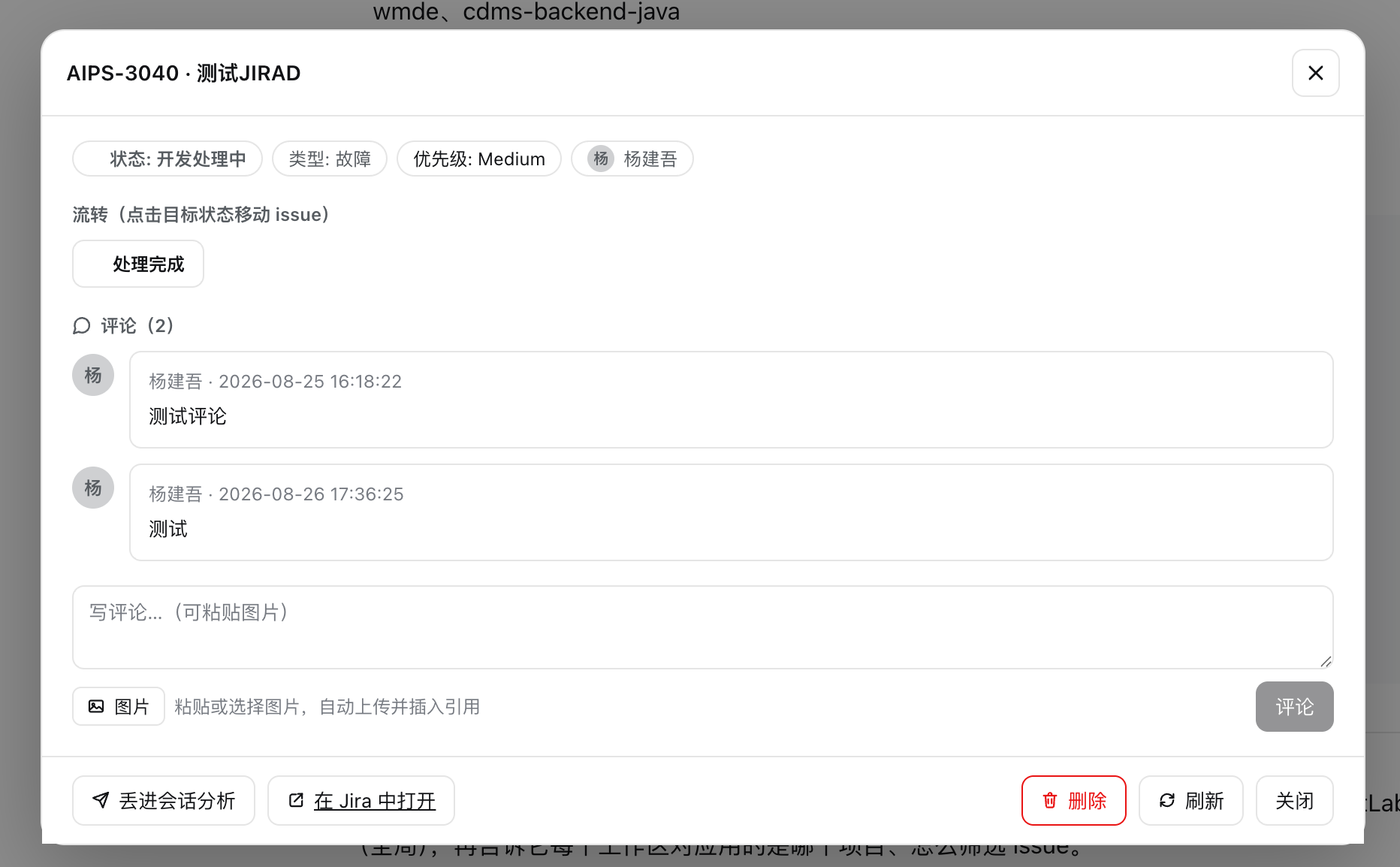
- Full issue detail. Rendered description (Jira images proxied through the host so the browser needs no token), attachment links, transitions, comments with paste/attach image upload, and a lightbox.
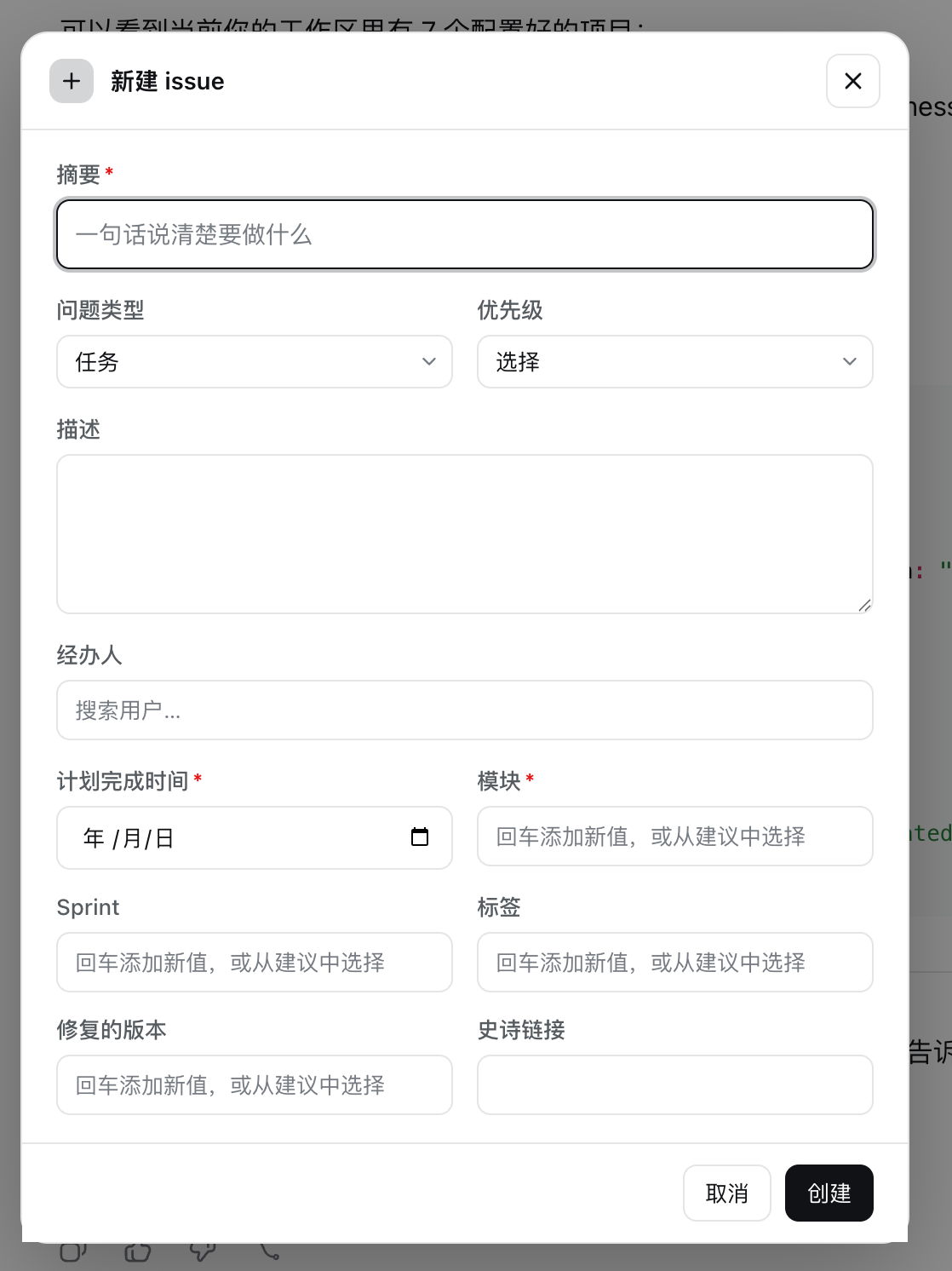
- Create issues with Jira's own metadata. The form is driven by Jira's createmeta API: required markers, auto-selected issue type, priority beside type, assignee search, chip-style multi-value fields (components/labels), and inline error reporting from Jira.
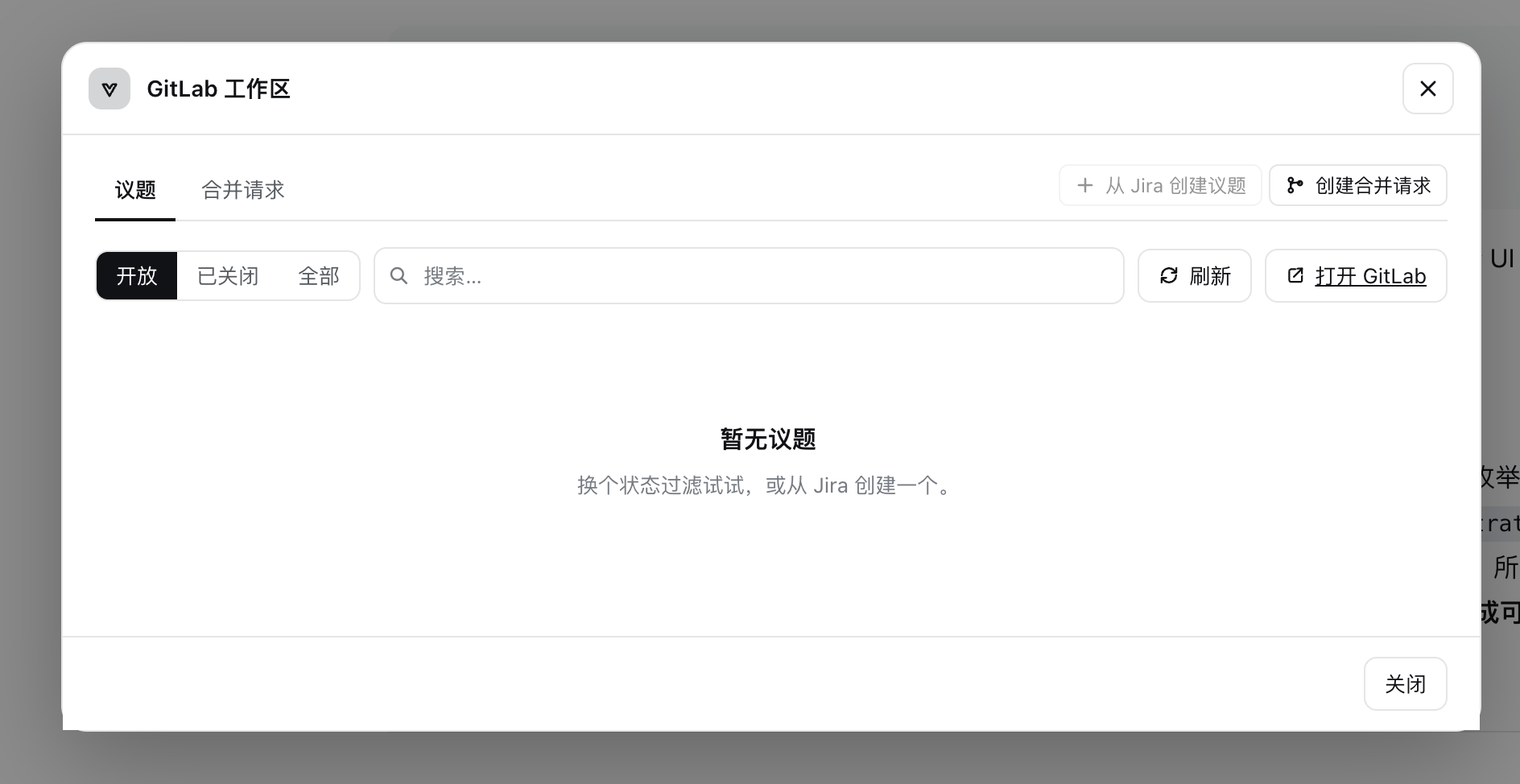
- GitLab workspace. Issues and merge requests with state filters, search, open-in-GitLab links, create-an-issue from selected Jira issues, link Jira, create an MR (existing/new branch, branch preview, linked issues).
- Send-to-session analysis. From the issue detail, push an analyze-only
request into the current session — or a brand-new session in the current
workspace — through the official
ISession.prompt/workspaces.startSession()entry points. Image attachments ride along as image content parts (base64), so vision-capable models can actually see them; the instruction tells the agent to pull live data withkanban-issueand to analyze without modifying anything. - Agent-side tools with rich chat rendering. Tool results render as board columns, issue details, project lists, and sync stats directly in the conversation.
- Bilingual UI. Every surface follows the harness locale setting (中文 / English) and re-renders on language switch.
Install as a bundle (for users)
dsh plugin --profile demo add /path/to/dsh-ui-kanban
# or from git
dsh plugin --profile demo add github:you/dsh-ui-kanban
On pnpm ≥10 the first git-dependency
prepareis refused; add the package to the profile'spnpm-workspace.yamlallowBuildsand retry.
Verify the config layer and boot:
dsh --profile demo --dump-config     # should show a "# == dsh-kanban" layer
dsh --profile demo
For the Web GUI + config card, use the web profile:
pnpm build
dsh plugin --profile web add /path/to/dsh-ui-kanban
dsh web
Configuration
The dsh-kanban settings namespace resolves: schema defaults → cordis.yml
base → user document. Common settings are at the top; projects are nested.
- insert:
    - id: dsh-kanban
      name: dsh-kanban
      config:
        dataDir: ''            # empty => ~/.dsh/kanban (env KANBAN_DATA_DIR wins)
        allowSelfSigned: true  # common default for GitLab self-signed TLS
        verbose: false
        jira:                  # GLOBAL Jira host + token, inherited by every workspace
          baseUrl: 'https://jira.example.com'
          apiToken: ''
        gitlab:                # GLOBAL GitLab host + token, inherited by every workspace
          baseUrl: ''          # e.g. https://gitlab.example.com
          apiToken: ''
        projects:              # per-workspace OVERRIDES (keyed by workspace id)
          - id: default        # workspace id
            name: Default      # optional display override (default = workspace title)
            jira:
              projectKey: 'PROJ'
              jql: ''          # `project = <key>` is auto-prepended
            gitlab:
              project: ''      # group/repo or full URL (auto-normalized)
            localRepo:
              directory: ''    # empty => the workspace's own path
The board auto-derives one project per DSH workspace (id = workspace id, name =
workspace title, localRepo.directory defaults to the workspace path). Every
workspace inherits the global Jira / GitLab host + token; projects only carries
the per-workspace overrides the user changes. The "current project" follows the
current session's workspace — there is no global activeProject.
Jira tokens and GitLab tokens are role('secret'); the GUI card edits only the
global host/token (a blank password keeps the host-side secret), and per-workspace
connection overrides are managed with the kanban-configure tool.
The floating panel
Opened from the session-header 「看板」button (conversation.session.header.utilities
→ shell.overlay). The panel:
- follows the currently selected session's workspace (falls back to the opening session when none is selected) and reloads when it changes;
- auto-syncs each project once per panel session, then silently refreshes;
- shows a status-grouped issue list: category color accents, collapsible groups, issue counts, and client-side search (key / summary / assignee / status);
- opens the issue detail on click (Enter/Space works): rendered description, attachment links, transitions as action buttons, comments with image paste/attach, and the 「丢进会话分析」action;
- hosts the GitLab workspace (issues / merge requests, create from Jira, link Jira, create MR) and the settings dialog (Jira / GitLab connections).
What it gives the agent
The host half registers 15 model-callable tools. Real Jira/GitLab work (and the
on-disk issue cache) stays in the host half — nothing Jira/GitLab ships to the
browser, and tokens are role('secret') so the web surface never echoes them.
| Tool | Purpose |
|---|---|
kanban-projects |
List projects (workspaces), their Jira keys, sync state, active one. |
kanban-set-active-project |
Set which project tools operate on by default. |
kanban-configure |
Set a project's Jira / GitLab / local-repo connection. |
kanban-sync |
Pull issues from Jira into the local cache (added/updated counts). |
kanban-issues |
Read the cached board, grouped by status column. |
kanban-issue |
Live detail: description, attachments, transitions, comments, canDelete. |
kanban-move |
Move an issue via a workflow transition. |
kanban-create |
Create a Jira issue (and cache it). |
kanban-comment |
Comment on an issue. |
kanban-assign |
Assign an issue to a user (Jira username), optionally with a comment. |
kanban-gitlab-issues |
GitLab issues (with linked Jira keys + MR). |
kanban-gitlab-mrs |
GitLab MRs (with issues + Jira keys). |
kanban-gitlab-create-issue |
Create one GitLab issue from one or more Jira issues. |
kanban-gitlab-create-mr |
Create a GitLab MR (optionally from a new branch). |
kanban-gitlab-link-jira |
Link Jira keys to a GitLab issue. |
Send-to-session analysis
The issue detail has a 「丢进会话分析」 action. After a confirm dialog (current session / new session in the current workspace):
- the panel sends a prompt through the official
ISession.promptentry point (new sessions go throughworkspaces.startSession(), which creates and opens a session in the current workspace); - the message carries only the issue key plus an instruction to call
kanban-issuefor the latest details and to analyze without modifying anything — the agent pulls live data through the tool, and the chat renders it with the same rich toolview; - image attachments are fetched through the host proxy and attached as image content parts (base64), so vision-capable models see them; text-only models degrade gracefully (the harness substitutes a text placeholder).
Local development
From a deepseek-harness checkout root, load this repo's source via overlay
(host half only, no install):
cp dev/cordis.example.yml dev/cordis.yml   # template -> local file (gitignored)
# edit dev/cordis.yml: set `name` to this repo's absolute path
pnpm dsh web --patch /absolute/path/to/dsh-ui-kanban/dev/cordis.yml
To test the browser-half config card, install into a profile (see above).
Run the checks:
pnpm install
pnpm typecheck
pnpm build
node test/smoke.mjs
test/smoke.mjs verifies the host module loads and registers the tools, the
settings-namespace wiring, the backend resolving projects offline, and that the
browser lib/client.js executes its __ModuleLoader__ handshake.
How the browser half works
package.jsondeclaresdsh.client: { platform: "web" }+exports["./client"]; dsh's client-modules loadslib/client.jsas a browser plugin.src/client/index.tsregisters the surfaces — the config card (settings.plugin.item), custom tool-result views (tool.call.toolviewkeyed by the kanban tool names), and a session-scoped floating panel opened from the session header "看板" button (conversation.session.header.utilities→shell.overlay), the only entry to the interactive board. See docs/ui-surfaces.md.- The board renders from the structured
output.presentationMetathe host half emits for each tool call; no arbitrary RPC to the host is needed. - Runtime client deps:
reactonly; everything else (icons, modals, toasts) is inlined. All colors ride the host theme variables (--dsw-alias-*), so light and dark themes adapt automatically.
Making it your own
Rename the package consistently across package.json name, src/index.ts
name/NAMESPACE, cordis.patch.yml id/name, the client bundle id in
tsdown.config.ts, and src/client/constants.ts. Add/remove fields in
src/config.ts (Config + schema) and mirror scalar fields in the config card.
Publishing
- npm:
pnpm publish - tarball:
pnpm pack, thendsh plugin add ./dsh-kanban-0.1.0.tgz - git:
dsh plugin add github:you/dsh-ui-kanban
License
MIT
No comments yet. Be the first to write one.