Plugin sync
English | 中文
Your plugins follow you. Nothing to re-find on the next machine.
The profile's plugin list, versions and configuration live in your own private GitHub repository — not someone's cloud. Backups happen as you change plugins; a new machine pulls the manifest, shows you the difference, and restores what you pick. Plugins installed from a local directory come back as source, secrets never travel, and every download is checksummed before it is written.
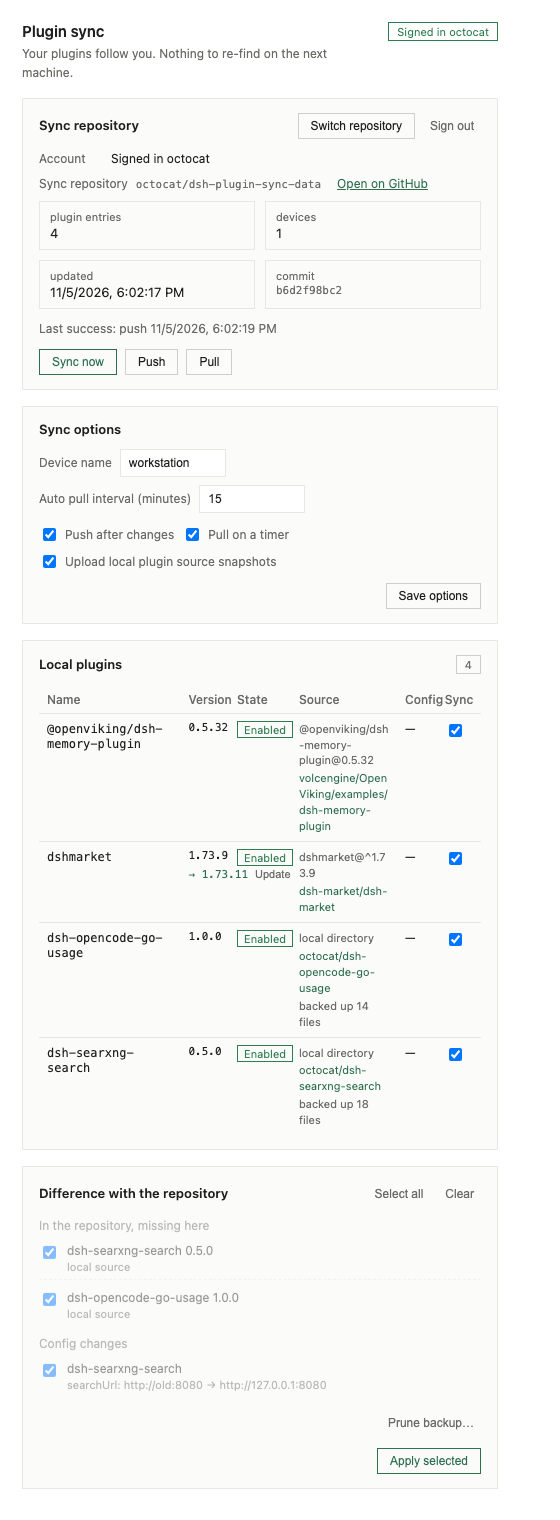
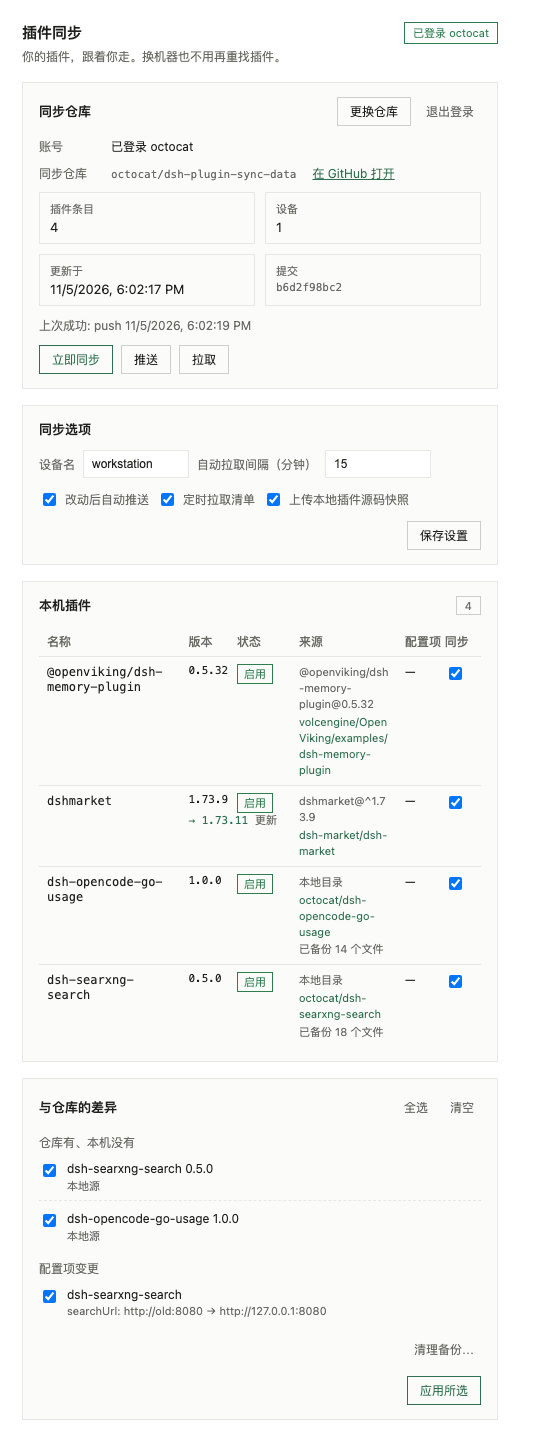
Screenshots use fictional sample data (octocat, workstation); nothing from a
real account or machine is shown.
What it does
- Inventory — every profile bundle that is not shipped with the installation: name, version, enablement, installation source, and the row ids it declares.
- Where it came from — the repository each plugin was really installed from:
the git remote of a local checkout first, the package's own
repositoryfield second, including the subdirectory of a monorepo. Unknown stays unknown. - Configuration — the profile's override layer for those rows, with
credential-shaped values replaced by
<redacted>before anything leaves the machine. Environment references (apiKeyEnv) are kept, because they name a secret instead of containing one. - Source backup — a bundle installed from a local directory (
link:/file:) has no registry version to reinstall from, so its sources are committed to the same private repository as real files, one commit per push, browsable on GitHub. Restore downloads, verifies the SHA-256, writes the files and links the directory. - Restore — missing bundles, version replacement, configuration writes and enablement toggles, grouped and opt-in. Nothing is applied without your click, and each result reports what the Host actually did.
- Updates — know when a plugin's origin publishes something newer than what is installed. One click upgrades it here; local checkouts are left to you.
- Cleanup — per-plugin sync switch (this machine only), and a Prune backup action that removes entries — optionally their source files — from the shared manifest.
- Push — after a plugin change (30 s debounce) and on demand.
- Pull — on a timer and on demand; the difference is shown, never applied by itself.
Install
The repository is an installable bundle (package.json declares dsh.bundle).
Point the Harness plugin manager at this directory or the GitHub repository,
then reload the page: Settings → Plugin sync appears.
# from a checkout
dsh plugin --profile desktop add /absolute/path/to/plugin-sync
Requires DeepSeek Harness 0.2.x (the settings.section, ctx.locale,
ctx.pluginManager, ctx.configEditor and ctx.credentials contracts).
Sign in
The page offers both GitHub steps as pre-filled links, so nothing has to be typed
from memory. The default data repository is dsh-plugin-sync-data; the bare
name dsh-plugin-sync stays reserved for the plugin's own public repository.
- ① Create the private repository →
github.com/new?name=dsh-plugin-sync-data&visibility=private; click Create (an empty repository, no README). - ② Generate the token (pre-filled) → the fine-grained token form opens with the name, description, a 90-day expiry and
Contents: writealready set. Pick Only select repositories → the repository you just created, Generate, copygithub_pat_…. - Paste it, press Pick from my repositories (the token is used for that listing only and is not stored), choose the repository, then press Validate and save — that is when the token is stored. Signing in pulls first and never pushes this machine's state — a fresh machine only reads, so an empty or older local state cannot overwrite the shared manifest. Press Push once when the repository should be seeded.
After signing in, Switch repository → Pick from my repositories lists every repository the token can write to; choosing one re-checks visibility and write access with the stored token, so no re-paste is needed. One repository is active per profile; two independent stores means two DSH profiles.
Choosing a repository that is not a sync store is refused with a
confirmation: a non-empty repository without a manifest is somebody's project, so
the page lists a few of its files and asks before anything is written. A
dsh-plugin-sync.json in an unexpected shape is refused outright.
A classic token with the repo scope also works but is broader, and is not the
recommendation. The plugin never reads your git credential helper or the
keychain.
The repository must be private: configuration leaves the machine, and a public repository would publish it. A public repository is refused unless you tick Allow a public repository explicitly.
What lands in the repository
dsh-plugin-sync.json at the repository root:
{
  "schema": 1,
  "updatedAt": "2026-11-05T05:10:00.000Z",
  "devices": {
    "3f2a91c0d4e8": { "name": "workstation", "updatedAt": "…" }
  },
  "plugins": {
    "dsh-searxng-search": {
      "version": "0.5.0",
      "enabled": true,
      "source": "local:dsh-searxng-search",
      "repository": "https://github.com/octocat/dsh-searxng-search",
      "repositoryFrom": "git-remote",
      "config": { "searxng-search": { "proxy": "http://127.0.0.1:7890" } },
      "snapshot": {
        "format": "tree",
        "path": "snapshots/dsh-searxng-search/0.5.0",
        "commit": "9c33e2c…",
        "files": 18,
        "bytes": 292546,
        "sha256": "…"
      },
      "redacted": 1,
      "updatedAt": "…",
      "by": "3f2a91c0d4e8"
    }
  }
}
Local sources are stored as real files under snapshots/<name>/<version>/,
written through the Git Data API so a push is one commit and the repository
stays readable: you can open a plugin's source on GitHub, see the diff between
two backups, and search it. Files are content-addressed, so an unchanged file
costs no upload. Removed files are deleted in the same commit; the executable bit
is preserved.
Which files: those listed by the package's files field, plus package.json,
cordis.patch.yml, locale/, assets/, scripts/, the icon and the READMEs.
node_modules, .git, .env*, logs and symlinks never are. A file above 1 MiB
or a snapshot above maxSnapshotBytes refuses the whole snapshot instead of
uploading a truncated one.
Merging
Two devices write the same file. Each push reads the current revision, merges
this device's entries into it, and writes with the revision it read; a 409
means another writer won, so it reads and merges again (three attempts). Remote
entries this device does not have stay untouched — the file is the union, and an
empty device pushing never deletes anything.
Configuration
| Field | Default | Meaning |
|---|---|---|
repo |
empty | owner/name of the private repository. |
apiBase |
https://api.github.com |
Change for GitHub Enterprise. |
manifestPath |
dsh-plugin-sync.json |
Where the manifest lives. |
snapshotsPath |
snapshots |
Where source backups live. |
snapshotFormat |
tree |
tree stores real files; json stores one base64 snapshot file. |
deviceName |
host name | Shown in the manifest. |
deviceId |
derived | Stable identity; derived from host, platform and home when empty. |
autoPush |
true |
Push after a plugin change, 30 s debounce. |
autoPull |
true |
Pull the manifest on a timer. |
intervalMinutes |
15 |
Timer period, clamped to 1–1440. |
includeSnapshots |
true |
Upload sources for linked bundles. |
maxSnapshotBytes |
4194304 |
Total source cap per plugin. |
maxManifestBytes |
2097152 |
Manifest cap; larger documents are refused. |
excludedRows |
[] |
Loader row ids this device never publishes. |
excludedPlugins |
[] |
Plugins this device neither pushes nor diffs. |
allowPublicRepo |
false |
Permit a public sync repository. |
Settings changed in the page are persisted in ~/.dsh-plugin-sync/settings.json
(outside the profile, so no profile file is rewritten); the row configuration in
cordis.patch.yml provides the defaults.
Security notes
- Routes accept a loopback browser only.
/stateand/apirequire the custom headerx-dsh-plugin-sync: 1(which forces a CORS preflight the route never answers, so another origin cannot send it), refuse any peer that is not127.0.0.1/::1, and reject anOriginoutside loopback or a browserSec-Fetch-Siteofcross-site. A plaincurlstill needs the header, and a web page cannot add it. They are not behind the Harness session login: keep Harness on loopback. - The token is bound to the host that validated it. Login calls
GET /useragainst an HTTPS base (plain HTTP only for loopback), and the base is stored in the credential record beside the token. Every later request uses that stored base, so changing a setting can never route the token elsewhere; switching API hosts requires pasting the token again. - Nothing secret is published. Redaction is two-layered: credential-shaped
key names and credential-shaped values (
ghp_…,github_pat_…,sk-…,xox…,AKIA…, PEM private keys) become<redacted>. Environment references such asapiKeyEnvstay, because they name a secret instead of containing one. - Sources are scanned and refused. A file that matches a credential shape stops the upload and names the file, so a token pasted into a plugin can never reach the repository.
- The manifest carries no local paths. A linked bundle's absolute path is
replaced by
local:<name>; restore uses the source backup. Repository paths (manifestPath,snapshotsPath, a snapshot's own path) are validated against.., absolute forms and backslashes, and every restored file is checksummed and path-checked before it is written. - Provenance never carries credentials. A git remote such as
https://user:token@github.com/o/r.gitis normalized to a plain URL before it is stored. - Only expected sources install. Apply accepts a
github:spec, ahttps://github.com/…spec, or the exactname@versionthe plan generated; anything else is refused withINSTALL_REFUSED/SOURCE_MISSING. Updates are pinned to the exact version that was detected. - A public repository is refused at login and again before every push. The
only way through is the red ⚠ Allow a public repository option: ticking it
opens a confirmation that spells out that the list, the redacted configuration
and the sources become public and that a pushed commit stays in Git history;
the Host additionally rejects the saved setting unless the request carries
acknowledgePublic(ACK_REQUIRED). The sync repository must stay private. - The token lives in the credential record
dsh-plugin-sync/github(the store file is mode 0600); the plugin's own settings file is written 0600 as well. No route returns the token, and the plugin never reads git credentials or the keychain.
Storage vs publishing — the research note
DSH installs a GitHub source as the root package of a repository
(installBundle('github:owner/repo#v1.0.0'), checked with git ls-remote before
pnpm runs). pnpm has no way to install a subdirectory of a git repository, so a
single repository holding plugins/<name>/… cannot be installed directly.
That splits the two ideas:
- Storage (this build) — one private repository holds the manifest and the
sources. It is enough for multi-device sync, and restoring a snapshot is this
plugin's job: download, verify, write to
~/.dsh-plugin-sync/plugins/…, install dependencies if the package declares any, theninstallBundle(<that directory>). - Publishing (next version) — one public repository per plugin, with
package.json,cordis.patch.yml, av<version>tag and thedshtopics. After that, any Harness can install it bygithub:owner/repo#v<version>without this plugin. That is distribution, not synchronization, so it stays a separate explicit action; a marketplace pull request remains manual.
Development
node --check index.js && node --check client.js
node --test test/*.test.js
No build step, no runtime dependencies.
License
MIT — see LICENSE.
No comments yet. Be the first to write one.