DSH Excalidraw
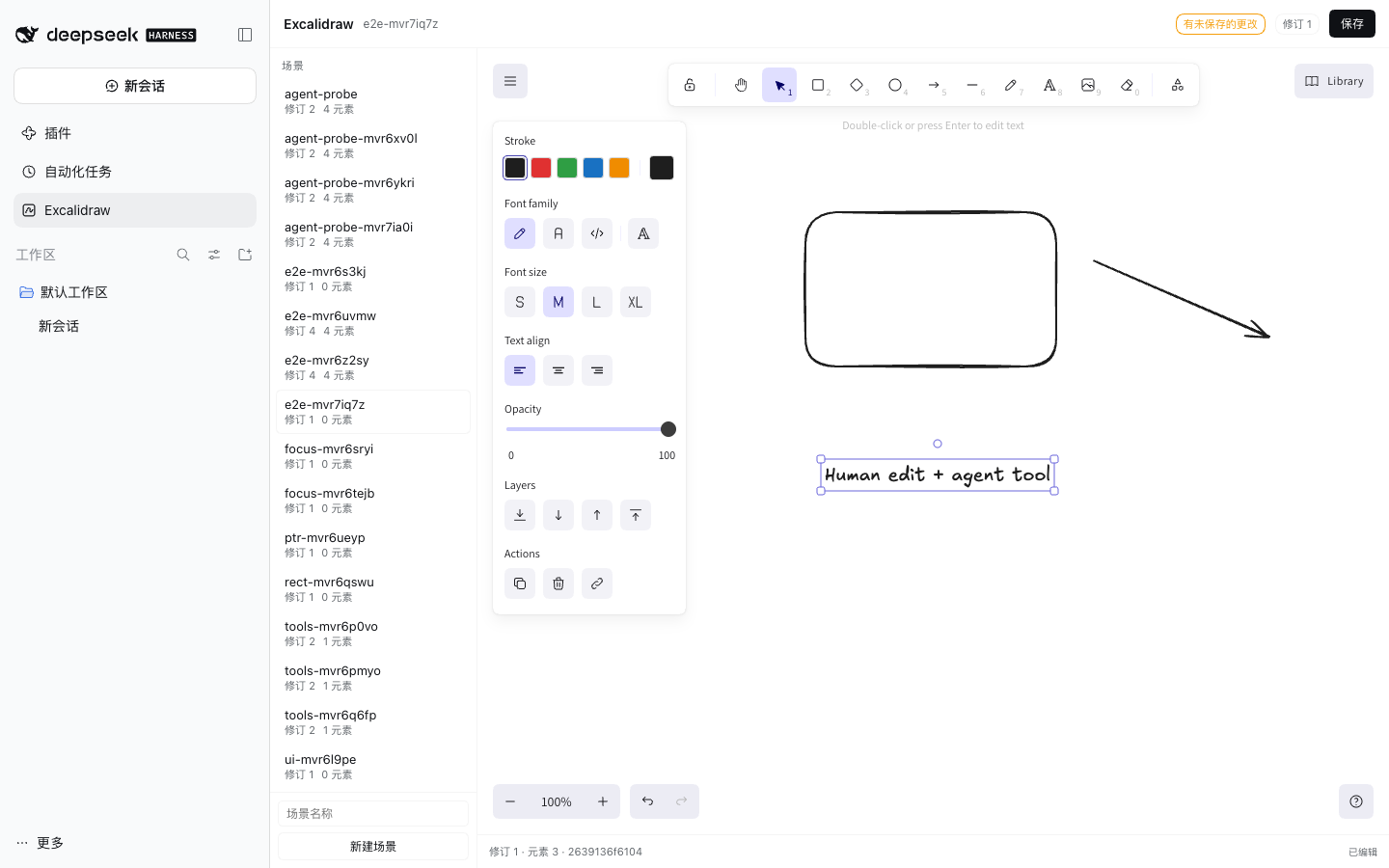
A native DeepSeek Harness plugin that brings the core drawing capabilities of Obsidian Excalidraw to the Harness: a real, interactive Excalidraw canvas, durable .excalidraw file persistence with revision fences, and typed agent tools that create and edit the same scenes the person is looking at.
中文摘要:本项目不是把 Obsidian 插件整体搬进 Harness,也不是桥接 Obsidian。它用 MIT 许可的上游 Excalidraw 渲染器 + 原创的 MIT 场景核心,实现 Harness 原生插件:可交互画布、带修订号与幂等重试的文件持久化、5 个带 JSON Schema 与权限边界的 Agent 工具。仓库包含原始源码证据、三方案对比、ADR、黄金语料、56 个自动化测试、13 步真实浏览器 E2E 和真实 Host 工具调用探针。详见 docs/00-index.md。
Status
- Version: 0.1.0 (MVP, architecture and verification complete)
- Target: DeepSeek Harness 0.2.1-rc.2 (verified live) with the plugin contract of the Harness 0.2.x client-modules loader
- Renderer:
@excalidraw/excalidraw@0.18.1(MIT), React 18 from the Harness page module table - Verification: 56 automated Host/core tests, 13-step real-browser E2E, 5 agent tools executed inside a real isolated Harness Host, golden corpus generated with the MIT Excalidraw runtime
- What this is: an installable DSH plugin and a DSH-native drawing editor
- What this is not: an Obsidian bridge, a standalone web app, or a copy of the AGPL Obsidian plugin
What it does
| Capability | Implementation | Evidence |
|---|---|---|
| Install / load / unload / configure through the official plugin mechanism | One bundle row in cordis.patch.yml; every resource is a ctx.effect; config clamped in apply |
platform evidence, lifecycle tests, verification |
| View and interactively edit supported Excalidraw scenes | Genuine @excalidraw/excalidraw component registered in the Harness main panel, with a sidebar entry |
render spike, E2E screenshots |
| Agent creates / reads / modifies drawings through typed, permissioned tools | Five JSON-Schema tools backed by the same service the UI uses | agent probe, contract |
| Reliable save, reopen, and structural fidelity | Atomic write + fsync + read-back hash verification, sidecar revision, idempotent request ids, conflict recovery, backup recovery | store tests, E2E, golden corpus |
Architecture
┌──────────────────────────── Harness page (browser) ────────────────────────────┐
│  sidebar.panellist icon  ──►  main panel: ExcalidrawPage                      │
│                                   ├─ genuine Excalidraw canvas (React 18)     │
│                                   ├─ scene list, save, conflict banner         │
│                                   └─ same-origin fetch (session cookie)        │
└───────────────────────────────────────┬────────────────────────────────────────┘
                                        │  /dsh-excalidraw/api/*  (connection fence)
┌───────────────────────────────────────▼────────────────────────────────────────┐
│  Host half (Cordis plugin, Node)                                               │
│  ExcalidrawService ── SceneStore (atomic + revision + lock + backups)          │
│        │                     │                                                 │
│        ├─ 5 agent tools      └─ <DSH_HOME>/excalidraw/drawings/*.excalidraw    │
│        └─ /dsh-excalidraw/assets/*  (fonts, locale chunks, CSS)                │
└────────────────────────────────────────────────────────────────────────────────┘
Two halves in one npm package:
- Host (
lib/index.js): scene store, HTTP API, asset route, agent tools. Zero runtime dependencies; Node built-ins only. - Client (
lib/client.js): the loader-format bundle (window.__ModuleLoader__.load({id, factory(require)})) with React external. It contains Excalidraw 0.18.1, the page UI, and the stylesheet text.
Install
The built lib/ and assets/ directories are committed, so installation needs no build step and no network.
DSH Desktop / plugin manager — install the repository directory as a bundle:
plugin_manager install_bundle target: /absolute/path/to/dsh-excalidraw
Or from the CLI in a profile:
dsh plugin --profile <profile> add /absolute/path/to/dsh-excalidraw
The bundle adds dsh-excalidraw to dsh.profile.bundles. A newly installed package may require a Harness restart; the plugin manager reports restart-required with the reason. After restart, open Excalidraw in the left sidebar.
Configuration
The row in cordis.patch.yml exposes the tunables; user overrides belong in the profile's own cordis.patch.yml.
- id: dsh-excalidraw
  name: 'dsh-excalidraw'
  config:
    drawingsDir: ''            # default: <DSH_HOME>/excalidraw/drawings
    maxSceneBytes: 16777216    # 1 MiB .. 64 MiB
    maxElements: 5000          # 1 .. 20000
    maxFiles: 64               # 0 .. 256
    maxTextLength: 20000       # 100 .. 100000
There is deliberately no engines.dsh range yet: the plugin was verified on 0.2.1-rc.2 and adding an untested range would claim compatibility the evidence does not cover.
Use
Person
- Click Excalidraw in the sidebar.
- Enter a lowercase scene name and click New scene.
- Draw with the Excalidraw toolbar; Save (or
Cmd/Ctrl+S) writes the file. - If an agent or another writer changed the scene, the save returns a conflict banner: Reload from disk keeps their version, Overwrite anyway writes yours as the next revision.
Agent
The five tools are visible to every agent in the profile:
| Tool | Purpose | Key arguments |
|---|---|---|
excalidraw_scene_list |
Discover scenes | — |
excalidraw_scene_read |
Read scene + revision + sha256 | name, include (full/summary), element_type |
excalidraw_scene_create |
Create a scene from typed elements | name, elements, app_state, files, request_id |
excalidraw_scene_apply |
Atomic add/update/delete under a revision fence | name, expected_revision, operations, app_state, request_id |
excalidraw_scene_validate |
Validate an arbitrary .excalidraw document |
scene |
Example sequence the model is expected to follow:
1. excalidraw_scene_list
2. excalidraw_scene_read { name: "architecture" }        -> revision 7, sha256 ...
3. excalidraw_scene_apply {
     name: "architecture",
     expected_revision: 7,
     request_id: "agent-2026-10-28-1",
     operations: [
       { op: "add", element: { id: "api", type: "rectangle", x: 40, y: 40, width: 160, height: 90, backgroundColor: "#a5d8ff" } },
       { op: "add", element: { type: "text", x: 40, y: 150, text: "API" } },
       { op: "add", element: { type: "arrow", x: 210, y: 80, points: [[0,0],[140,40]], startElementId: "api" } }
     ]
   }
4. excalidraw_scene_read { name: "architecture" }        -> revision 8
Rules enforced by the Host, not by prompt text:
- Scene names are a strict filename alphabet; no paths, no symlinks.
applyrequires the revision returned by a recent read. A concurrent write returnsrevision_conflictwith the current revision and sha256.- Operations are all-or-nothing; a bad element or dangling binding rejects the whole call.
- A repeated
request_idreturns the committed revision withduplicate: trueand does not mutate again. - Saves only return success after the bytes were written, fsynced, read back, parsed and hash-verified.
Data model and compatibility
- Format: plain
.excalidrawJSON (type: "excalidraw",version: 2) — the format Excalidraw itself saves. - Created elements: rectangle, ellipse, diamond, arrow, line, text, freedraw, image (with a
filesdata-URL map). - Read/preserved elements: the above plus
frame,magicframe,embeddable,iframe; unknown well-formed fields on those elements are preserved. - Not supported: Obsidian
.excalidraw.mdMarkdown envelopes, Obsidian script engine, PDF/Mermaid conversion, libraries, collaboration/encryption, and non-image attachments. See compatibility. - Revision metadata lives in
<drawings>/.dsh-excalidraw/, not inside the.excalidrawfile, so drawings stay portable.
Verification
pnpm install          # dev tooling only; installation of the plugin does not need it
node scripts/verify.mjs   # typecheck + build + 56 unit/integration tests + packaging checks
Evidence in this repository:
- Verification report — test inventory, exact commands, results.
- E2E report — 13 steps in real Chrome against an isolated Harness: create, draw rectangle/arrow/text with real input, save, verify bytes/hash/meta, reload, external-writer conflict, overwrite, reopen.
- Agent probe report — five tools called through the real Host tool registry: create, read, apply, idempotent retry, stale fence, invalid name, validate, disk hash match.
- Verify transcript — the complete passing run.
- Render spike — why embedding the genuine Excalidraw canvas was chosen.
The E2E test requires a running isolated Harness; it is intentionally not part of verify so the routine check never touches a user's live profile. Reproduction steps are in test/e2e/README.md.
Architecture decision and comparison
- Options comparison — A (bridge the Obsidian CLI), B (full port), C (shared drawing core with native DSH adapter), with measured/cited outcomes.
- ADR-0001 — the accepted design (a C-shaped split: MIT Excalidraw renderer + original scene core + DSH-native host), and the routes explicitly abandoned.
- Upstream evidence — pinned commits and file:line call paths from the Obsidian plugin.
- DSH platform evidence — the exact plugin, tool, client-loader and transport contracts.
- License audit — the upstream AGPL/MIT contradiction, what was not copied, and the obligations we accept.
License
The plugin's original code and the scene core are MIT (see LICENSE). The browser half bundles the MIT-licensed @excalidraw/excalidraw@0.18.1 and its MIT/ISC/Apache/0BSD dependency closure; the upstream Obsidian plugin is not copied and its AGPL/MIT metadata contradiction is documented rather than silently resolved. Font binaries are shipped unmodified from the Excalidraw distribution with their embedded licenses recorded in THIRD_PARTY_NOTICES.md.
Limits, honestly stated
- The client bundle is 8.0 MiB (2.39 MiB gzip). It is fetched, parsed and executed at page boot. This is proven to work but is the largest known cost; chunking via package-local
client.<name>.jsis the first v0.2 task. .excalidraw.md(Obsidian's modern envelope) is out of scope; only plain.excalidrawJSON is read and written.- Text width for agent-authored text is computed with a deterministic approximation, not browser metrics; Excalidraw re-measures on open. Text in agent-created scenes can differ by a few pixels from text drawn by hand.
- The UI intentionally persists a narrow
appStatesubset (viewBackgroundColor,gridSize, grid mode). Zoom, scroll and theme are not stored in the file. - Cross-process safety uses a lock file with stale recovery; it is not a distributed lock for network filesystems.
- The live Desktop profile receives
restart-requiredon first install; the plugin was fully exercised in a separate isolated profile rather than restarting the session you are reading this in. - A model-driven "natural language → tool call" conversation was not executed because the isolated profile has no model credentials; the tools themselves were executed through the real Harness tool registry by a probe bundle (evidence). The remaining link is the model's choice to call the tool, which the Harness owns.
No comments yet. Be the first to write one.