@jacksonchen/dsh-devops



GitLab + Kubernetes DevOps control plane for DeepSeek Harness (DSH): AI tools, web console, webhook notifications, and alert monitoring.
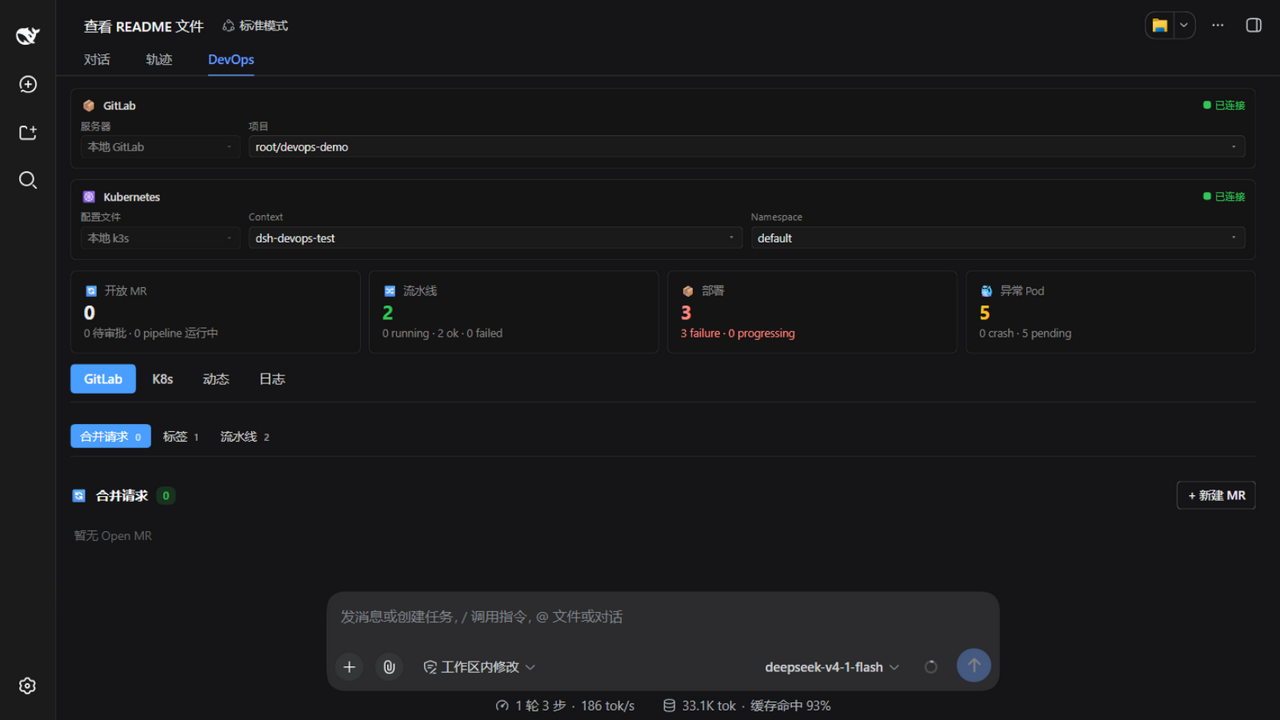
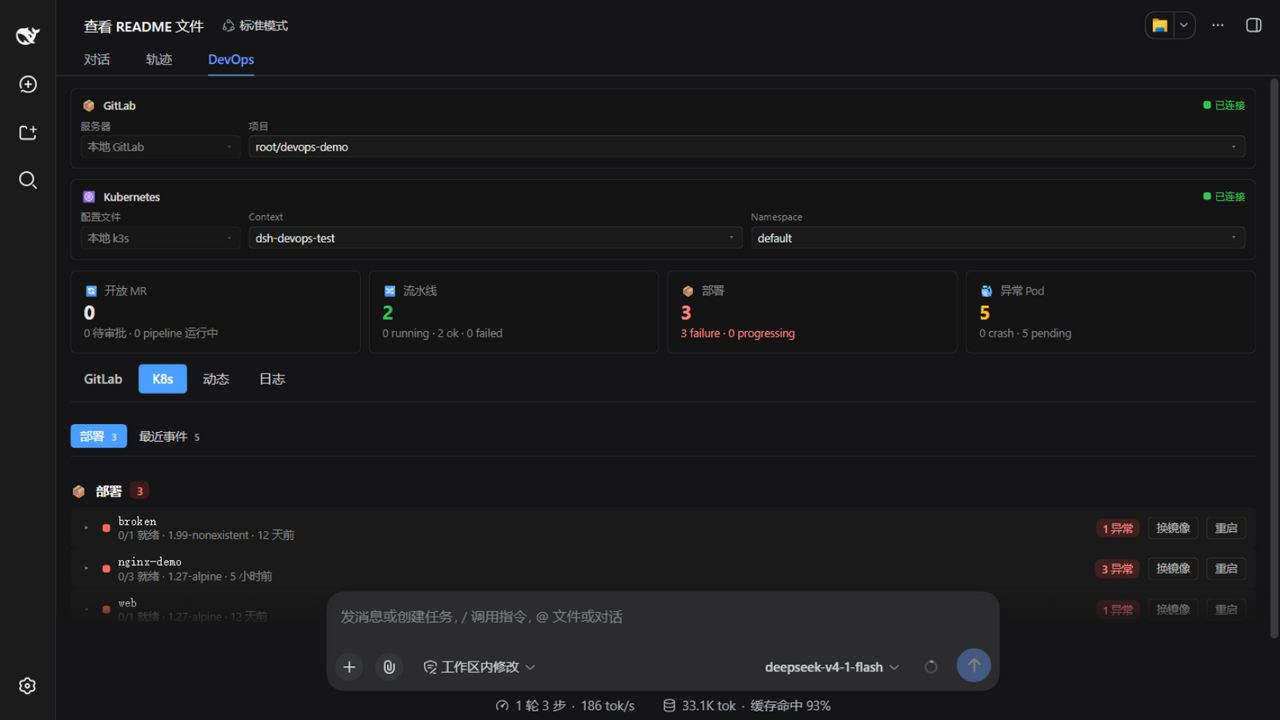
| GitLab tab | K8s tab |
|---|---|
 |
 |
Features
- GitLab API: Create/review/close merge requests, manage tags, monitor CI/CD pipelines with per-job detail and build logs
- Kubernetes API: Deployment status, pod lists, events, logs, image change and rollout restart
- Dashboard UI: Four stat cards at the top (open MRs / pipelines / deployments / unhealthy pods) + second-level tabs (MRs / Tags / Pipelines / Deployments / Events), each config card placed under its own tab (GitLab server / project, kubeconfig / context / namespace), searchable dropdowns everywhere, modal-driven operations — reachable from the native sidebar (a panel row below New Session), the session DevOps tab, and Settings
- Native-style alignment: the console styling is fully aligned with the DSH host native design — the palette bridges the host's semantic tokens (light/dark follows instantly, no detection logic), 0.5px hairline strokes, inverted pill primary buttons, underline-style tabs; state-color tints and font sizes follow the host theme and font-size adjustment
- Multi-config: Multiple GitLab servers and multiple kubeconfigs, switchable from both the dashboard and settings
- Webhook + Alert engine: GitLab webhook →
followup()notification; background polling detects pipeline failures and pod issues - i18n: Chinese / English dictionaries registered into the DSH LocaleRuntime — the console follows the app's language setting
- Self-signed clusters: Per-request CA pinning from kubeconfig via
node:https
Installation
🚀 Recommended: Local Checkout Method (No npm dependency issues)
Due to a known issue with @deepseek-ai/dsh-type-meta missing from npm, the local checkout method is the most reliable way to install this plugin. See GitHub discussion #410 and discussion #984.
Method 1: Complete Setup Guide (Recommended ✅)
This guide walks you through cloning the repository and installing it locally.
Step 1: Clone the Repository
# Create a directory for your project tools (or use existing location)
mkdir -p ~/dev/tools
cd ~/dev/tools

# Clone the dsh-devops repository
git clone https://github.com/Jackson-chen97/dsh-devops
cd dsh-devops
Step 2: Install the Plugin in the DSH Profile
Use one of these two methods:
Option A: Using the dsh plugin CLI (registers dependency + bundle automatically)
dsh plugin --profile web add "~/dev/tools/dsh-devops"
Option B: Edit the profile package.json directly
Declare it in BOTH dependencies and dsh.profile.bundles:
{
  "dependencies": {
    "@jacksonchen/dsh-devops": "~/dev/tools/dsh-devops"
  },
  "dsh": {
    "profile": {
      "bundles": ["@jacksonchen/dsh-devops"]
    }
  }
}
Step 3: Restart DSH
dsh --profile web
The browser should open the WebUI automatically (default http://127.0.0.1:3080/).
The plugin ships its own
cordis.patch.yml, which is applied automatically as a bundle layer (including the connection-service dependency patch for DSH 0.1.5) — you do not need to insert the plugin entry into the profile'scordis.patch.ymlmanually.
Step 4: Configure DevOps Settings
- Open DSH Settings → DevOps tab
- Click "+ Add server" to fill in GitLab info (Base URL + Token) and test the connection
- Click "+ Add config file" to fill in a kubeconfig path and test the connection
- Save and return to the dashboard
Why Local Checkout?
✅ Works offline - No pnpm registry needed
✅ Bypasses dependency issues - The dsh-type-meta problem is avoided
✅ Install without building - The checkout ships lib/ built by tsdown (host ESM + web client CJS)
✅ Hot reload support - Re-run pnpm build after changing src/, restart DSH, done
Other Methods (For Reference Only)
Once the dsh-type-meta issue is resolved by maintainers, you can use these traditional methods:
From npm (after publishing):
dsh plugin --profile web add @jacksonchen/dsh-devops
From GitHub:
dsh plugin --profile web add https://github.com/Jackson-chen97/dsh-devops.git
Equivalent pnpm commands in the profile directory:
cd ~/.dsh/profiles/web
pnpm add @jacksonchen/dsh-devops       # npm (once published)
pnpm add https://github.com/Jackson-chen97/dsh-devops.git  # GitHub
Usage
- Open DSH Settings > DevOps, add GitLab server(s) (Base URL + token) and kubeconfig file(s) — saved to
~/.dsh-devops/config.json - On the dashboard, pick the GitLab project and K8s context/namespace — switching saves automatically and AI calls follow immediately
- Create MRs, tags, inspect pipelines with build logs, and operate deployments right from the dashboard — or just ask the AI, which calls the same tools with the same config
Or configure via a cordis patch entry config: block (headless setups etc.):
- id: dsh-devops
  name: '@jacksonchen/dsh-devops'
  config:
    gitlab:
      baseUrl: 'https://gitlab.example.com'
      token: 'glpat-xxxx'
      projects:
        - id: main
          path: 'my-group/my-project'
          tokenEnv: 'GITLAB_TOKEN'
    k8s:
      kubeconfigs:
        - id: prod
          path: '~/.kube/config'
          context: 'prod'
Note the structural difference: the Settings UI writes
~/.dsh-devops/config.json(theservers[]/kubeconfigs[]multi-entry shape), while a cordisconfig:uses the Schemastery schema above and takes precedence over the settings file.
AI Tools
All tools are registered as soon as the plugin loads — no YAML config needed. They read the same configuration the Settings > DevOps UI saves (~/.dsh-devops/config.json), so switching project/cluster in the dashboard applies to AI calls immediately. Calling a tool before configuring returns a hint to finish setup first.
An explicit config: block in the cordis patch entry still works as an override layer for headless setups.
| Tool | Description |
|---|---|
devops_config |
List all configured GitLab servers/projects and K8s clusters (ids, labels, active selection) — call it first to map a name to a project / cluster id |
gitlab_mr_create |
Create MR (optional reviewers, auto-triggers pipeline watch). Approvers are sent as assignee_ids (honored by every GitLab version) plus reviewer_ids (GitLab ≥ 12.8); the tool echoes reviewers_applied / reviewers_supported and the console warns for any approver that didn't take effect |
gitlab_mr_review |
Review MR (approve/request_changes/comment) |
gitlab_mr_list |
List merge requests |
gitlab_tag_create |
Create git tag |
gitlab_pipeline_status |
Get pipeline status |
gitlab_pipeline_jobs |
List pipeline jobs |
gitlab_pipeline_watch |
Start/check pipeline monitoring |
k8s_deployment_status |
Get deployment rolling status |
k8s_pods |
List pods with restart counts |
k8s_events |
Get recent K8s events |
k8s_logs |
Get pod logs (tail N lines) |
Do it directly from the conversation
Once configured, no command syntax is needed — just describe what you want in plain language and the agent picks the right tools:
| You say in chat | What the plugin does |
|---|---|
| "What's the latest pipeline status?" | Get the latest pipeline status for the current project (or a given branch) |
| "List the jobs of pipeline #42" | List the pipeline's job details (name / stage / status / duration) |
| "Watch the main branch pipeline and tell me when it's done" | Start background monitoring (30s polling); reports success / failure (with failed job names) back into the chat when it settles |
| "Create an MR: fix/login into main, titled 'Fix login', reviewer zhangsan" | Create the MR and auto-start pipeline monitoring |
| "Approve !128" / "Request changes with…" / "Comment on !128: …" | MR review: approve / request_changes / comment |
| "Which MRs are currently open?" | List MRs (iid, title, state, branches, approvals) |
| "Tag v1.4.0" | Create a git tag (ref and message optional) |
| "Show the pods of the order service in staging" | Calls devops_config first to map "staging" to the cluster id, then lists pods (phase, restart counts) |
| "Give me 200 lines of logs from pod order-service-7d9f in staging" | Maps the cluster, then tails the pod logs (N lines) |
| "Which version is this deployment rolled to?" / "Status of all deployments" | Deployment rolling status (replicas, conditions); lists all when no name is given |
| "Any recent K8s events?" | List recent events (reason / message / object) |
| "What servers and clusters are configured?" | devops_config lists all configured entries (id, label, active selection) |
Notes:
- Names are enough — no ids to memorize: a server/cluster name you mention (e.g., a label like
prod-gitlaborstaging) is first mapped to theproject/clusterid viadevops_configbefore the other tools are called. - Unconfigured = hint, not error: calling any tool before setup returns "open Settings → DevOps and finish configuring first".
- Pipeline watch is a background job: it does not block the chat, polls every 30s, and reports success / failure (with failed job names) / timeout back into the conversation when it settles.
Configuration Reference
GitLab Config
| Field | Required | Description |
|---|---|---|
baseUrl |
Yes | GitLab instance URL |
token |
Yes | GitLab access token (direct value) |
defaultProject |
No | Default project ID (falls back to first) |
projects[].id |
Yes | Unique project identifier |
projects[].path |
Yes | GitLab project path (group/project) |
projects[].token |
Either | Per-project direct token (settings-file source, wins over tokenEnv) |
projects[].tokenEnv |
Either | Env var name containing the token (cordis config source) |
projects[].defaultBranch |
No | Default branch for this project |
K8s Config
| Field | Required | Description |
|---|---|---|
kubeconfigs[].id |
Yes | Unique cluster identifier |
kubeconfigs[].path |
Yes | Kubeconfig file path (~ supported) |
kubeconfigs[].context |
No | Context to use (defaults to current-context) |
kubeconfigs[].namespace |
No | Default namespace override |
defaultContext |
No | Default cluster ID |
defaultNamespace |
No | Fallback namespace |
Webhook Config
| Field | Required | Description |
|---|---|---|
secret |
Yes | Shared secret for webhook verification |
projectPaths |
No | Filter by project path (whitelist) |
quietEvents |
No | Event types to suppress |
Monitor Config
| Field | Default | Description |
|---|---|---|
pollIntervalSec |
30 | Polling interval |
cooldownSec |
300 | Alert cooldown to prevent spam |
pipeline[] |
⚠️ | Pipeline alert rules (trigger: failed/canceled/success) |
pod[] |
⚠️ | Pod alert rules (trigger: crash/restart/pending_stuck) |
Development
pnpm install         # install dependencies
pnpm run typecheck   # TypeScript check
pnpm run build       # tsdown dual build: host ESM + browser client (output in lib/)
pnpm run test        # run vitest suite
pnpm run verify      # typecheck + build + test in one go
Note: With a local link install (the profile dependencies point at this directory), DSH loads the artifacts in lib/ directly — re-run pnpm build after changing src/, otherwise the host keeps loading the stale bundle. The committed lib/ also means a fresh clone can be installed without building.
Architecture
src/
├── index.ts            # Public contract: name / inject / Config / apply
├── protocol.ts         # RPC channel + endpoint names (shared host/client)
├── config.ts           # Schemastery schema + cross-field validation
├── types.ts            # Shared domain types
├── core/               # Framework-independent domain layer
│   ├── gitlab/         #   GitLab REST client + multi-project router/service
│   ├── k8s/            #   K8s REST client + kubeconfig parser + router/service
│   ├── webhook/        #   Pure event parsing + followup message generation
│   ├── monitor/        #   Alert rule evaluation + throttle
│   ├── http.ts         #   fetch/node:https with timeout + CA pinning
│   └── logging.ts      #   ~/.dsh-devops/devops.log writer/reader
├── host/               # DSH host adaptation layer
│   ├── plugin.ts       #   apply(): lazy services + tools + RPC + webhook + monitor
│   ├── rpc.ts          #   /dsh-devops-read + /dsh-devops-write channels
│   ├── endpoints-*.ts  #   RPC endpoint handlers (raw params, test-before-save)
│   ├── tools*.ts       #   gitlab_* / k8s_* AI tool definitions
│   ├── services.ts     #   Lazy per-call service wrappers
│   ├── config-store.ts #   ~/.dsh-devops/config.json persistence + migration
│   └── runtime-config.ts # cordis override > settings file resolution
└── client/             # Web console (React TSX + CSS Modules, zh/en locales)
    ├── index.ts        #   slots.inject('settings.section' | 'conversation.view')
    ├── api.ts          #   DevopsClient — RPC wrapper over the two channels
    ├── locales.ts      #   zh/en dictionaries (DSH LocaleRuntime)
    ├── DevopsSettings.tsx / DevopsDashboard.tsx
    ├── DevopsUI.module.css
    └── ui.tsx          #   Shared primitives (searchable Select/Modal/StatCard/…)
Requirements
- Node.js ≥ 20 (native
fetch, ESM; development builds need ≥ 22) - GitLab ≥ 16.0 (MR Approvals API)
- Kubernetes API ≥ 1.25 (apps/v1)
- Network access to GitLab and K8s API endpoints
License
MIT
No comments yet. Be the first to write one.