dsh-iridescent-model-selector
English | 中文
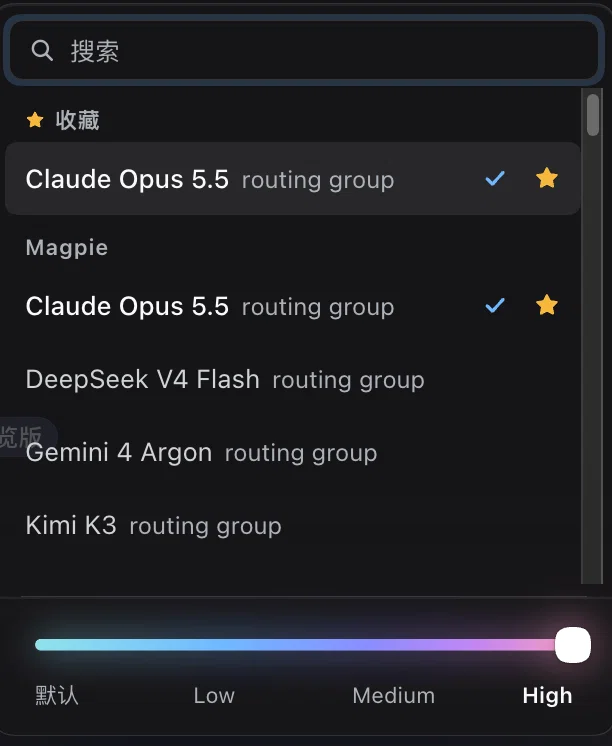
A DeepSeek Harness (dsh) client plugin that replaces the model button in the composer with its own picker: the current model and reasoning effort sit on the button, and one panel holds the model list, your favorite models, and a reasoning-effort slider.
Features
- Direct model picking. One panel lists every model from the harness's own model catalog, grouped by provider. A search field appears when more than four models are available. Clicking a row switches the session's model for the next request.
- Favorites. Hover a row and click the star to pin a model to a Favorites group at the top of the list. Up to 24 favorites are kept in the browser's local storage.
- Reasoning-effort slider. The slider has one stop for each effort level the selected model advertises. A continuous aurora gradient (cyan → blue → violet → rose) reveals more of its spectrum at higher levels, with a glow and a light sweep that grow with the level. Release the thumb or click a level name to apply it.
- Per-model effort memory. The last effort you used with each provider/model pair is restored when you switch back to that model, if the model still offers it.
- Native fallback. The plugin takes the composer's model seat at a higher priority instead of removing the built-in selector. The built-in selector stays registered underneath and shows again when this plugin is disabled or uninstalled. The
/modelcommand is unaffected. - Keyboard support (↑/↓ through models, Enter in search picks the first match, Esc closes), IME-safe input, Chinese and English UI, and
prefers-reduced-motionsupport.
Compatibility
Tested on DeepSeek Harness Desktop 0.2.1-rc.3, and engines.dsh is pinned to that version.
The plugin reads the per-session model directory (modelDirectories) that the built-in @deepseek-ai/dsh-client-ui-model-selection plugin provides. That service is an internal detail of the harness, so a later harness release can change it. Keep the built-in model-selection plugin enabled; this plugin does nothing without it.
Install
Web (dsh web):
dsh plugin --profile web add git+https://github.com/JackieJam/dsh-iridescent-model-selector.git
Desktop: install from the same Git URL through the app's plugin manager (or a plugin market such as dsh-market once it lists this plugin).
To go back to the built-in selector, disable or uninstall the plugin.
Notes
- Model and effort changes go through the harness's normal session model selection. A step that is already running keeps the model and effort it started with.
- Favorites and remembered efforts live in the browser's
localStoragefor the DSH page, so they are per machine and are not synced.
No comments yet. Be the first to write one.