AI Notepad


A lightweight, general-purpose, AI-native text editor for DeepSeek Harness.
Plain text editing + selection-scoped AI + Windows file associations.
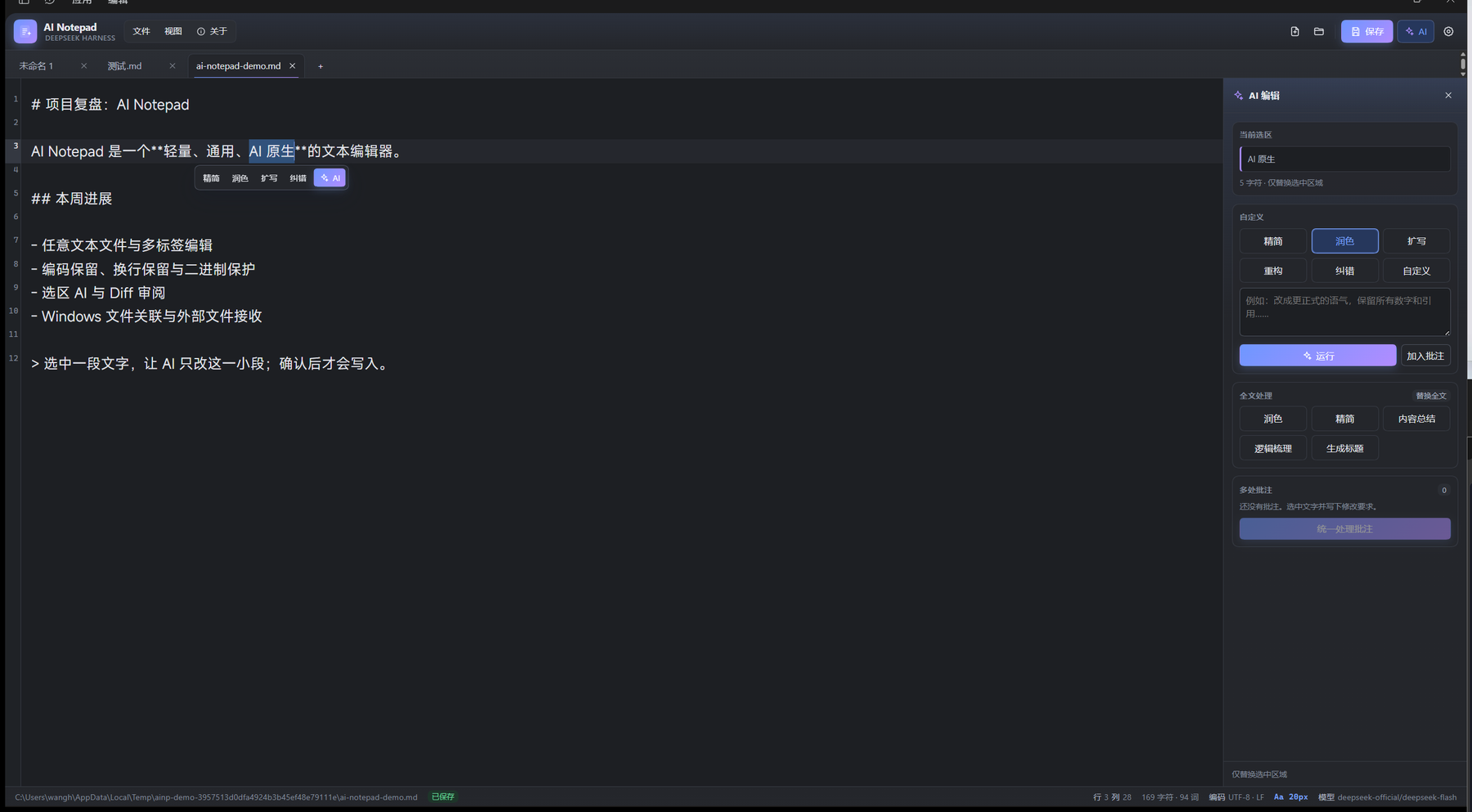
AI Notepad is a DeepSeek Harness plugin that turns the Harness Web UI into a lightweight, general-purpose AI text editor.
Install
From the plugin market after the listing is live. The market entry uses the version-free GitHub Release tarball, so no npm account is required.
From GitHub:
dsh plugin --profile web add JackWangSIA/dsh-ai-notepad
A prebuilt tarball is available at:
https://github.com/JackWangSIA/dsh-ai-notepad/releases/latest/download/dsh-ai-notepad.tgz
If the package is later published to npm, dsh plugin --profile web add dsh-ai-notepad
will also work.
On DSH Desktop, prefer Plugins → Add plugin with the repository URL. The desktop profile is managed by the app; do not edit it with the CLI by hand.
What works
- Open, edit, save and Save As any text file through a native Windows picker, or drop a file onto the editor.
- Multi-tab editing with CodeMirror 6, undo/redo, find, line numbers, wrapping, and unsaved-change prompting.
- Encoding-aware I/O: UTF-8, UTF-8 BOM, UTF-16 LE/BE, GB18030/GBK and Windows-1252. Saves preserve the detected encoding, BOM and dominant line ending. GB18030/Windows-1252 round-trip checks refuse lossy writes.
- Binary-file detection protects files from accidental text editing.
- Hash-based compare-before-write: if another program changed the file while it was open, the save returns a conflict and does not write.
- Selection-scoped AI editing: concise, polish, expand, restructure, proofread, or a custom instruction.
- Whole-document AI: polish, concise, summarize, outline and title generation.
- A diff review modal with accept, reject and regenerate. Nothing is written before acceptance. Accepting uses a normal CodeMirror transaction, so Ctrl+Z still works.
- Multiple annotations can be collected and sent in one batch; every reviewed region is validated against the original document before a single undoable edit.
- Markdown preview with escaped raw HTML and a conservative CommonMark subset. Ctrl+E toggles preview/edit; double-clicking the preview also returns to the editor. A floating preview toolbar shows the mode and the shortcut.
- Independent font, size, line-height, weight, wrap, theme, line-number and tab-size settings, persisted in browser storage.
- Searchable Windows font picker with recommended Chinese/latin fonts, per-font samples, a live typography preview, keyboard navigation and a refresh action. The setting stores one family name and always appends safe CJK/latin fallbacks.
- Ctrl+wheel zooms the editor font from 8–48 px;
Ctrl+=/Ctrl+-/Ctrl+0also work. The current size is shown in the status bar. - V2 visual refresh: compact menu cluster, gradient brand mark, pill save button, softer tab strip, card-based AI rail and settings sections, refined empty state, custom scrollbars and dark-theme variants.
- About sits beside File and View: version, build/update time, feature overview, shortcut reference, live runtime information (platform, current model, association status), recent updates, usage boundaries, and a one-click “copy version info” action. Version and build time are injected by
scripts/build.mjsfrompackage.jsonand the build clock. - Windows per-user file associations: ProgID,
OpenWithProgids,RegisteredApplicationsand a lightweight VBS launcher that writes paths to an inbox and starts/focuses DSH. The Host watcher consumes the queue and the Client opens the files. - Association status, install, remove and restore actions are in View → File associations.
Shortcuts
| Shortcut | Action |
|---|---|
Ctrl+S / Ctrl+Shift+S |
Save / Save As |
Ctrl+Z / Ctrl+Y |
Undo / Redo |
Ctrl+F |
Find |
Ctrl+E |
Toggle Markdown preview / edit |
Ctrl+wheel, Ctrl+=, Ctrl+-, Ctrl+0 |
Font zoom in / out / reset |
Ctrl+Alt+1..4 |
Selection concise / polish / expand / proofread |
Ctrl+Alt+B |
Add annotation |
Ctrl+Alt+N |
Focus AI Notepad from the main shell |
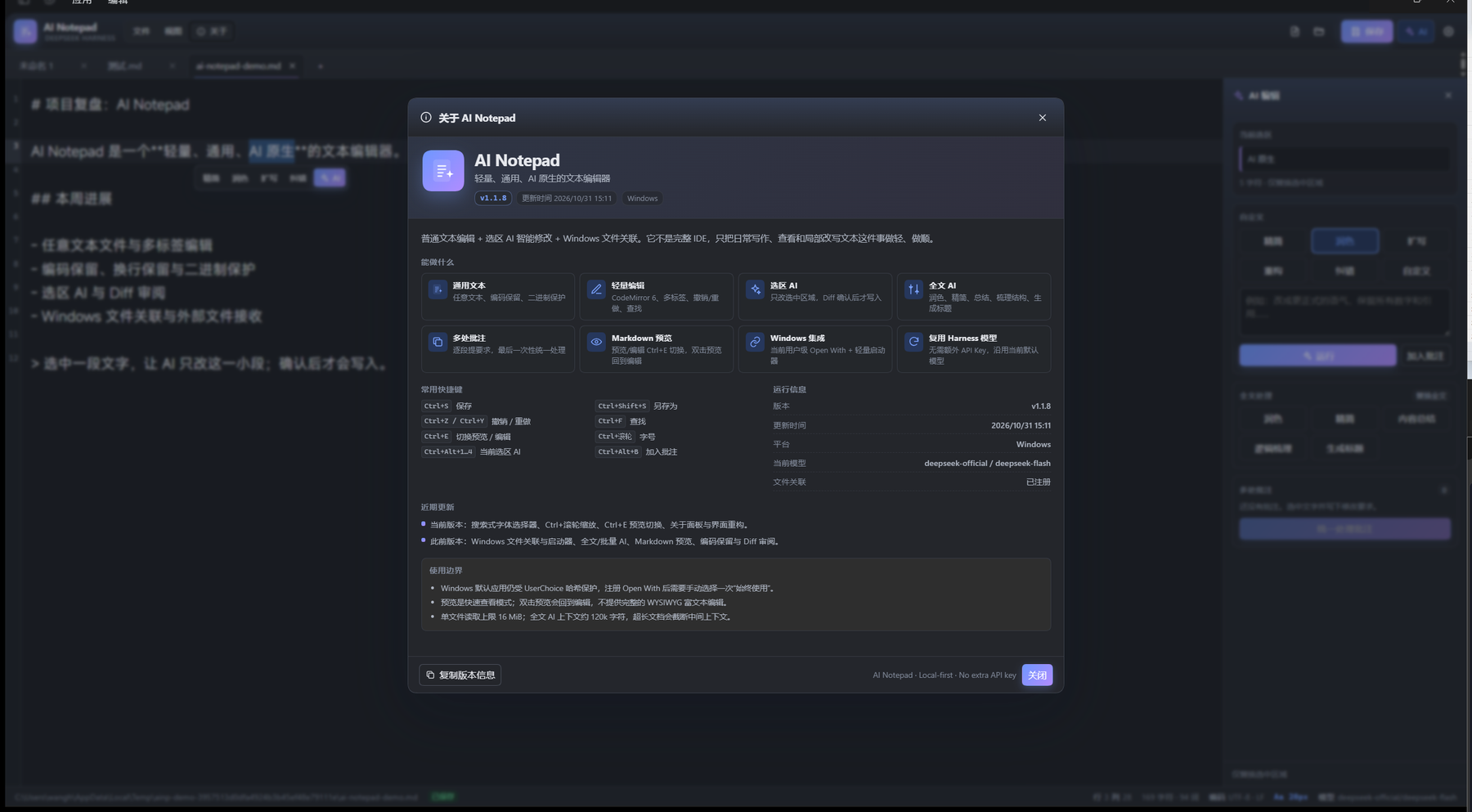
Important Windows limitation
Windows 10/11 protects the default-app choice with a per-user UserChoice hash. No third-party application can silently force itself to become the default. AI Notepad therefore registers a real current-user OpenWithProgids entry, after which the user chooses it once in Explorer's Open with → Always use this app. The plugin can open Windows Default Apps for that choice, but it does not fake the system default. Uninstalling removes the ProgID and Open With entries; if AI Notepad is the current UserChoice, it removes that choice so Windows asks again. It cannot restore a previous hash-protected default.
The desktop shell has a single-instance lock but currently ignores file paths in its argv. The VBS launcher is therefore not a simulation: it is the registered file handler, and it delivers paths to the running Harness through the plugin inbox. A second launch focuses the existing window.
Architecture
lib/index.js— Host half. Connection/api/ai-notepad/*routes, bounded file I/O, encoding, conflict guards, LLM calls, Windows registry, inbox watcher, pickers, font enumeration.src/— Client source.app.jsxis the full main-column page,editor.jsxowns CodeMirror,store.jsowns tabs/AI/review/settings,diff.jsandmarkdown.jsare pure helpers.lib/client.js— generated classic ModuleLoader bundle (React andreact/jsx-runtimestay external).lib/scripts/— native file pickers, font enumeration and the Windows external-open launcher.scripts/build.mjs— esbuild bundle step.test/— Host route/integration tests, encoding tests, VBS→inbox test, store AI/batch tests, ModuleLoader load test, and server-render tests for app/review/preview.
Build and install
$node = "$env:USERPROFILE\.dsh\dsh-runtimes\dsh-primary-runtime\dependencies\node\bin\node.exe"
$pnpm = "$env:USERPROFILE\.dsh\dsh-runtimes\dsh-primary-runtime\dependencies\pnpm\bin\pnpm.mjs"
& $node $pnpm install --ignore-scripts --dir .
& $node scripts/build.mjs
Then install the absolute directory with the Harness plugin_manager install_bundle action. Do not copy files into the profile manually.
Verification notes
The plugin installs and its Host row is active; the Client registers a main page, a sidebar panel icon and a settings section. Automated tests cover file I/O, encoding, conflict handling, AI request/response shapes with a fake LLM, selection/batch review and apply, generated client load, VBS queue delivery, and server-side rendering of the app, review and preview views. Live behavior was exercised through Windows UI Automation; screenshots in assets/ come from the running desktop app.
License
MIT © 2026 Wang Heran
No comments yet. Be the first to write one.