Generated artifacts for the DSH package
ggb-plugins-dsh0.8.5. Source, issues and the MIT license: https://github.com/Jack7510/ggb-plugins (directorydsh/).
ggb-plugins
English | 简体中文
Turn a 2D math problem — given as text or an image — into an interactive GeoGebra file.
A host agent (Codex or DeepSeek Harness) reads the problem and writes a native Algebra/CAS
program; this project runs it locally, verifies every stated condition, exports the .ggb,
reloads it, and delivers the file with a verification report and a screenshot.
Chinese and English are supported. The agent picks the working language from your preferences and context, keeps the original problem text, and never invents answers: it analyses conditions and builds the construction only.
Demo
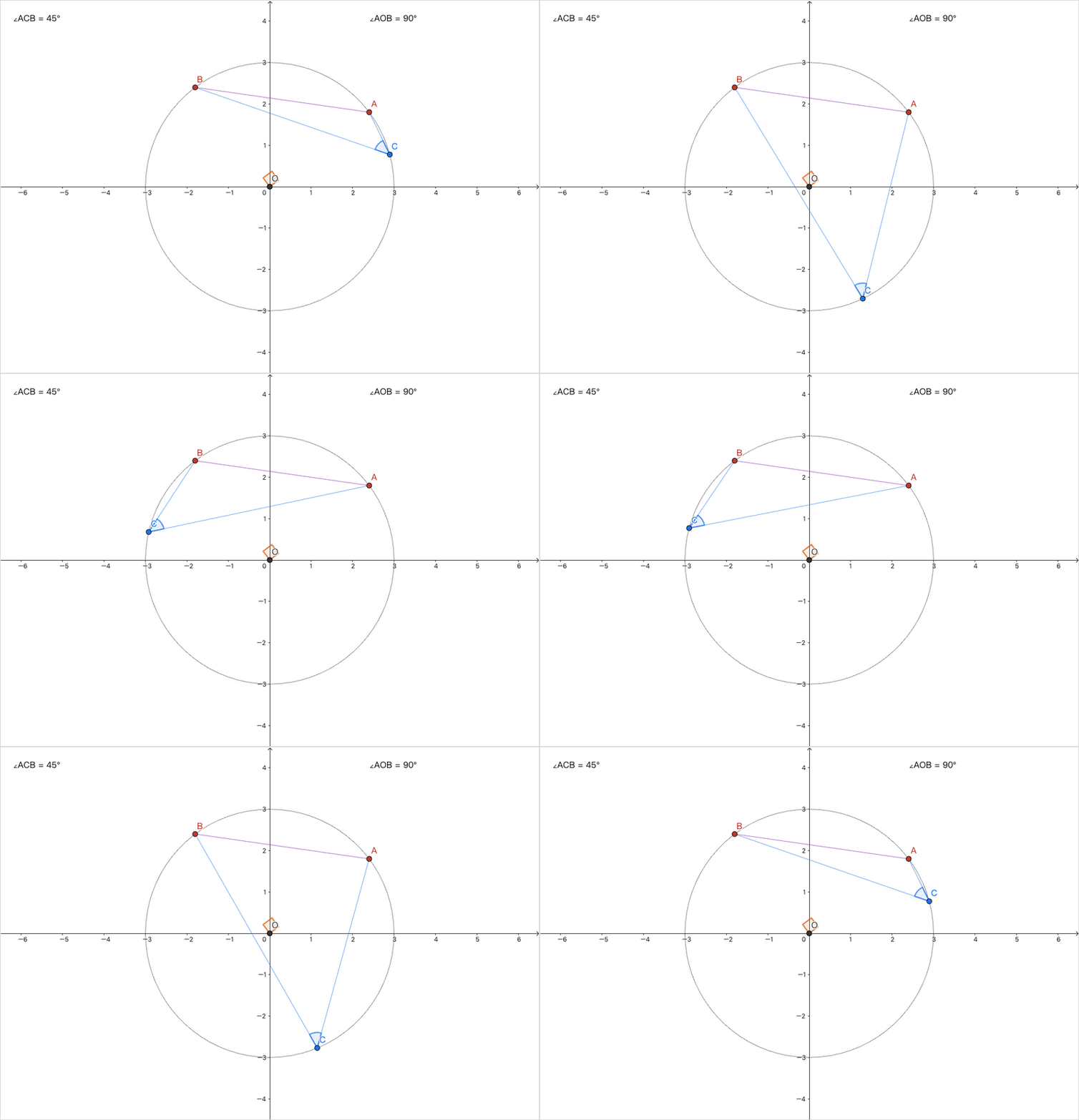
Dragging C keeps ∠ACB at half of ∠AOB while the construction, dependencies and checks stay live.
What you need
| Requirement | Why |
|---|---|
| Codex or DeepSeek Harness (DSH) | Interprets the problem and writes the native GeoGebra program |
| Node.js 22+ with pnpm 11 | Runs the local CLI and prepares dependencies |
curl and unzip |
Download and unpack the pinned GeoGebra runtime |
| Google Chrome or Microsoft Edge | Drives the applet headless during verification |
No extra model API key is required. Installation needs network access; GeoGebra and the browser
are not redistributed with the package. Building release packages additionally uses zip, tar,
and npm.
Installation
The current release is v0.8.5. It ships a Codex ZIP and the DSH npm bundle. The Codex package is not yet in a public plugin directory, but the Release ZIP is installable; see the 0.8.5 release notes.
- Codex: installation and upgrade guide, in Chinese.
- DSH: independent headless profile guide, in Chinese.
The DSH bundle is also on npm:
profile=desktop   # use web for the DSH Discover or Web host
dsh plugin --profile "$profile" add ggb-plugins-dsh@0.8.5
node ~/.dsh/profiles/$profile/node_modules/ggb-plugins-dsh/scripts/setup-plugin.mjs
Desktop users can paste one install message into the DSH chat instead of running the commands themselves.
To browse the plugin from DSH, enable Experimental plugins → Custom plugin markets, then add this source under Discover → Add index source:
https://cdn.jsdelivr.net/gh/Jack7510/ggb-plugins@main/docs/market/index.json
The two clients install independently and share one execution and verification pipeline. Both
guides end with runtime preparation (setup-plugin, which also reports the browser it will use)
and a readiness check (doctor).
Your first problem
Enable the plugin, start a new host session, and describe the problem. Images can be attached.
Use GeoGebra to construct triangle ABC, mark the midpoint M of AB, and connect CM. Colour the median red. Drag A to verify that the midpoint and median stay linked, save the file, and open the interactive preview.
Construction, reload, and every automated check run headless without intermediate windows. A condition that fails or cannot be verified blocks delivery instead of being skipped; failures keep their diagnostics so the next attempt can be corrected. If necessary conditions are missing or ambiguous the agent asks first, and when you do not give coordinates it explains the initial configuration it chose. The Skill defines what the agent may and may not decide on its own.
What you get
A successful run writes one delivery directory:
| File | Purpose |
|---|---|
<title>.ggb |
Native GeoGebra file named after the problem; open, inspect, and keep editing |
verification.json |
Per-condition results: construction, reload, and interaction samples |
preview.png |
Screenshot of the delivered configuration |
request.json, manifest.json |
Archived input and delivery manifest |
Reports state which checks ran and how far finite interaction samples reach; they never claim a general proof.
The delivery directory sits at <outputDir>/<title>/delivery/. <title> comes from the problem
and also names the GGB file; a repeated title gets -2, -3 instead of overwriting an earlier
delivery.
Interactive preview
The preview loads the same delivered GGB and supports applicable point dragging, parameter changes,
and zooming without writing back to the delivery. The preview process exits once the page loads; the
window keeps working, and running preview again reloads it. Use --headless for automated checks.
Use the CLI directly
Hosts call this CLI for you, but other local tools can drive it too:
node <installed-plugin>/dist/src/cli.js doctor
node <installed-plugin>/dist/src/cli.js inspect --ggb /absolute/base.ggb
node <installed-plugin>/dist/src/cli.js build --request /absolute/request.json
node <installed-plugin>/dist/src/cli.js preview --delivery /absolute/delivery
To change an existing GGB, declare base in the request: edit colours, line styles, filling, or
visibility, add objects, or update independent values and coordinates. inspect lists objects,
current values, and the digest the request must declare. Deleting, renaming, and view changes are
not supported. Request authoring is documented in the
capability contract, in Chinese.
Run from source
With the requirements above installed:
pnpm install --frozen-lockfile
pnpm setup:runtime
pnpm build
pnpm demo
pnpm demo constructs the bundled triangle example into output/. Verification and maintenance
commands, the working rules for coding agents, and the release process live in
AGENTS.md; do not duplicate them here.
Repository map
src/— CLI, execution, verification, and delivery pipeline.viewer/— the local page that hosts the GeoGebra applet.skills/— the shared Skill both hosts load.codex/,dsh/— host-specific plugin assets, install guides, and acceptance records.examples/,tests/— runnable inputs and regression tests.scripts/— dependency setup, packaging, and coverage tools.docs/— requirements and design, change record, and cross-client validation records. Historical records are indexed in the stage archive.
Scope and limits
- Supported: 2D geometry, functions, equations, calculus, lists, matrices, and statistics, in Chinese or English.
- Not supported: 3D construction, continuing an external GGB file you cannot declare, and general mathematical proofs.
- Accepting native commands does not mean every command or overload has been validated; the command coverage record states the boundaries.
- Numeric sampling and unresolved CAS results are evidence, not proof.
The project uses the MIT license; the source is github.com/Jack7510/ggb-plugins. GeoGebra has separate licensing and attribution requirements; see third-party notices.
No comments yet. Be the first to write one.