dsh-mcp-hub
English | 中文


One-click MCP deployment for the DeepSeek Harness (DSH) — built for Windows developers.
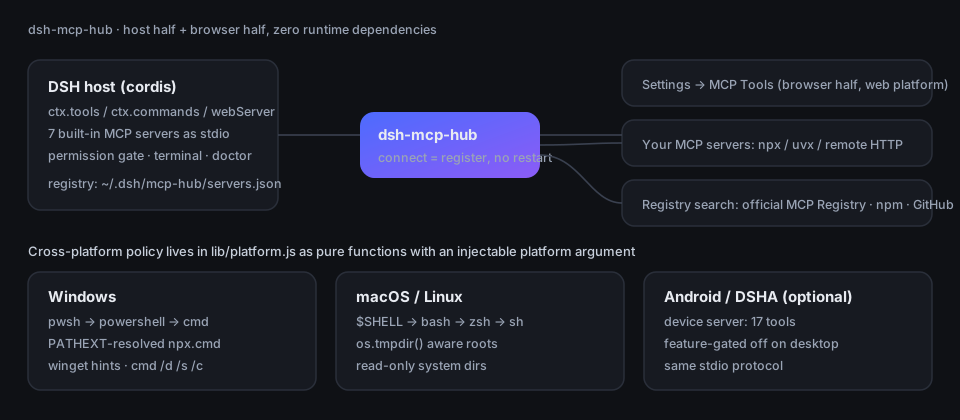
Open Settings → MCP Tools, search an MCP server, click install. It is connected in the
running harness immediately — no restart, no config file, no npx.cmd pain.
Install
# Windows (PowerShell) — from a clone or an extracted release tarball
.\install.ps1 -Verify

# macOS / Linux
./install.sh
Then restart DSH once and open Settings → MCP Tools → Doctor.
Prefer DSH's own plugin channel? It is the same thing:
dsh plugin --profile web add dsh-mcp-hub
Requires Node.js >= 20. Execution-policy and pnpm fallbacks are covered below.
Why this exists
MCP is great. Getting an MCP server running on a Windows dev box is not. Three things are genuinely harder there, and this plugin targets exactly those:
- Spawning a server is a fight.
npxisnpx.cmd, which Node'sspawnwill not find withoutPATHEXThandling. This plugin resolves executables the way cmd.exe does, sonpx/uvx/gitpresets just work. - You cannot tell what DSH already gives you. DSH ships its own tool set (on Windows the command-execution tool is pwsh, not bash). The catalog and search results therefore list DSH's native capabilities next to each candidate and tell you when something would be a duplicate — instead of letting you install a second shell.
- "Missing dependency" is a dead end. The built-in doctor answers what is missing and
the exact command to fix it (
winget install OpenJS.NodeJS.LTS,winget install astral-sh.uv, ...) instead of dumping a stack trace.
Feature matrix
| dsh-mcp-hub | static mcp.json / @deepseek-ai/mcp-client |
|
|---|---|---|
| Time to add a server | one click in Settings | edit config, restart |
| Restart required | no (connect = register) | yes |
| Discovery | official MCP Registry + npm + GitHub, on demand | you find it yourself |
| De-duplication vs DSH native tools | yes, with reasons | none |
| Per-server permission tiers | permanent / session / ask / disabled | none |
| Built-in offline toolkit | 7 servers, 61 tools, zero deps | none |
| Environment diagnosis | /mcp doctor + Settings panel |
none |
| Terminal | built-in (pwsh → powershell → cmd on Windows) | none |
What you get
Settings page "MCP Tools": status bar, environment doctor, one-click presets, on-demand search (official MCP Registry / npm / GitHub), installed-server list with a per-server permission dropdown, the DSH native-tool list for the current platform, a custom MCP form, a built-in terminal and the live host log.
Slash commands and model-facing tools exposing the same capabilities:
/mcp doctor                 # diagnose the environment
/mcp list                   # installed servers + running state
/mcp search sqlite          # search registries (no full pre-fetch)
/mcp add mcp-sqlite         # install
/mcp permission kb ask      # always / session / ask / disabled
/mcp reload                 # full re-sync
7 built-in zero-dependency MCP servers (61 tools) that also work as plain stdio servers in any MCP host:
files,exec,net,kb(long-term memory),util,hub(control plane) anddevice(Android/DSHA only).Four permission tiers per server: always / this session (asked once) / ask every time / disabled. The "ask" path uses DSH's approval channel; with no approval UI available it fails closed instead of silently allowing.
Windows-first engineering
All platform-specific behaviour lives in lib/platform.js as pure functions with an
injectable platform argument — which is why the Windows branch is unit-tested on Linux CI and
really executed on the Windows runner.
| Concern | Windows behaviour |
|---|---|
| DSH native command tool | pwsh (not bash) — used consistently in de-dup, UI text, search hints |
| Default file roots | home + %TEMP% (never a whole drive) |
| Path policy | hard-blocks Windows device namespaces; %SystemRoot%, Program Files (x86), |
ProgramData and $Recycle.Bin are read-only, resolved through env vars |
|
| Path comparison | case-insensitive, forward/back slashes both accepted, correct prefix boundaries |
(C:\WindowsApps is not inside C:\Windows) |
|
| One-shot commands | cmd.exe /d /s /c (safest for dir, &&, %VAR%) |
| Interactive terminal | pwsh.exe → powershell.exe → cmd.exe /Q /K, auto-fallback on ENOENT |
| Executable resolution | PATHEXT-aware, so npx.cmd / node.exe resolve (the classic spawn npx ENOENT) |
| Runner detection | node / npx / uvx / git, each with the matching winget command |
| Danger list | format, diskpart, bcdedit, cipher /w, reg delete HKLM, |
recursive delete of a drive root, ... while dir / git / npm / node stay allowed |
|
| Installer | install.ps1 is UTF-8 with BOM (required for CJK text under Windows |
PowerShell 5.1), uses Join-Path throughout, normalises file: specs to forward slashes |
Honest status
This plugin is real and tested, but it is not magic. Specifically:
- Verified by CI on windows-latest, ubuntu-latest and macos-latest (Node 20 and 22). On the Windows runner the installer is really executed, including install and uninstall. The GUI is covered by a browser-half smoke test, not by a human clicking through a physical Windows desktop — treat first-run UI polish as young.
device(17 tools) only does anything on Android/DSHA; on a desktop it is not offered.- Python-based MCP servers need
uvx; the plugin tells you the winget command but will not install it for you. - The permission gate depends on DSH's approval channel. In a headless session "ask" cannot prompt, so it denies rather than allowing.
- Installed servers are not auto-updated; re-install to pick up a newer version.
- Registry search depends on third-party APIs (official MCP Registry, npm, GitHub). Rate limits and outages are surfaced, not hidden.
- Not published to npm yet — see Roadmap.
Roadmap
- Publish to npm so
dsh plugin add dsh-mcp-hubneeds no clone - Publish releases with a prebuilt tarball and provenance
- Screenshots / short GIF of the settings page
- Per-server resource limits (memory / CPU caps for stdio servers)
- Import/export of the server registry for team sharing
Development
Zero runtime dependencies (only Node built-ins; the MCP SDK is provided by DSH). One devDependency, for tests:
npm install
npm test            # 10 suites: hygiene, platform, capabilities, installer, client-smoke,
                    # handshake, hub-query, host-query, plugin-integration, dsh-wiring
npm run pack:check  # validate the published tarball contents
Tests that need the MCP SDK or a local DSH install skip explicitly (exit 0) instead of
pretending to pass; CI sets MCP_HUB_REQUIRE_SDK=1 so skipping becomes a hard failure.
See CONTRIBUTING.md for the test map and the one architectural rule: platform-specific code must stay injectable so it can be tested on any OS.
Feedback
Bug reports are welcome and genuinely useful — the structured template asks for exactly what is
needed: version, OS, Node version, the doctor report and the relevant hub.log lines.
- Open a bug report
- Suggest a feature
- Security issues: please do not open a public issue — see SECURITY.md.
Contributors
| Role | Who | What |
|---|---|---|
| Maintainer | JD579g | requirements, review, releases, final say |
| Co-creator (coding agent) | DSH agent (deepseek-flash) | drafted the implementation, tests, CI and docs in pairing with the maintainer |
This project was built inside DeepSeek Harness (DSH) as a maintainer + coding-agent pairing:
the agent drafts and implements, the maintainer decides, verifies and ships. Commits carrying a
Co-authored-by: trailer record where the agent took part.
AI is not a disclaimer — whoever opens a pull request is still responsible for correctness, licensing and security. See CONTRIBUTORS.md.
License
MIT · Changelog · Contributing · Code of Conduct · Contributors
No comments yet. Be the first to write one.