dsh-sidebar-notes


A todo list and a sticky-note board for the DeepSeek Harness Web UI — each with its own page in the main column and its own row in the left sidebar — plus three agent tools so a session can read and update the user's own list instead of asking them to retype it.
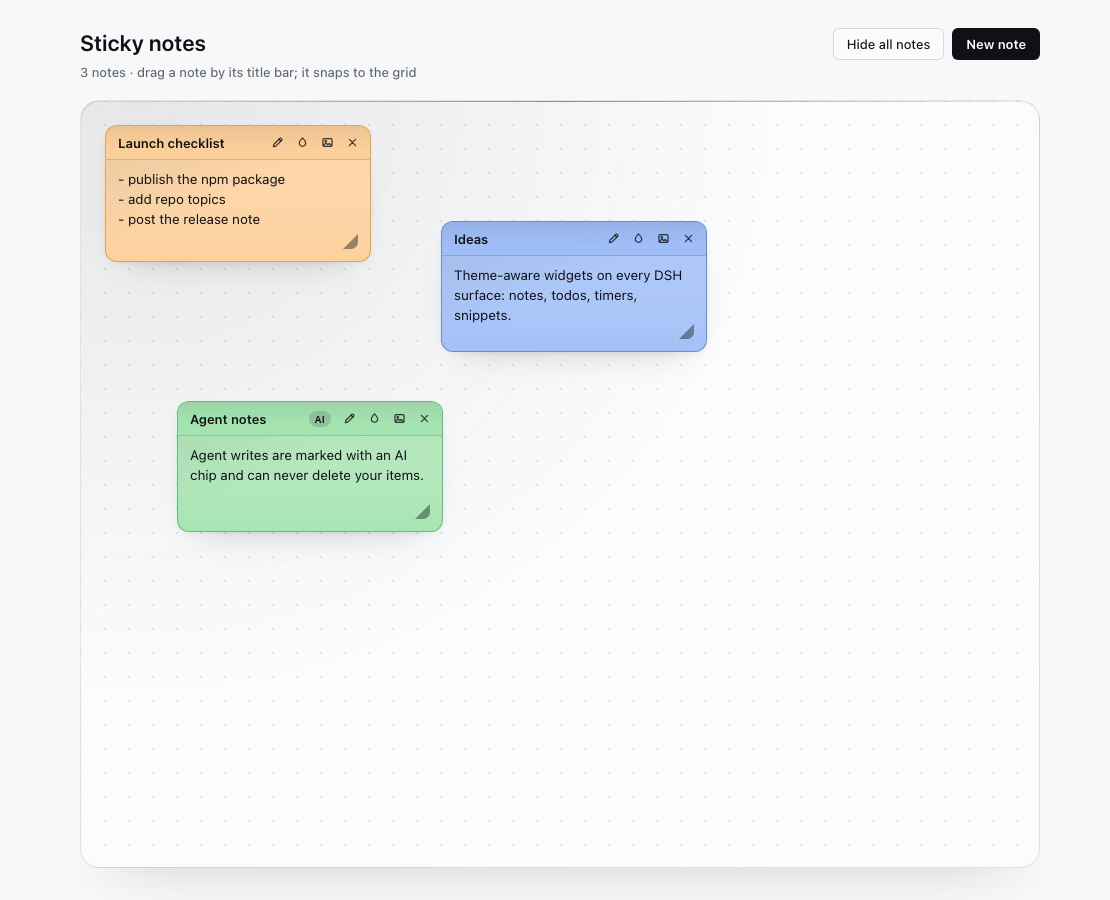
The plugin has no palette of its own: every surface, note skin and control derives from the active DSH theme's semantic tokens, so it looks native in light and dark and under full UI themes such as Frieren UI, Arasaka UI and Cyberpunk 2077.
| Todos | Sticky notes |
|---|---|
 |
 |
Features
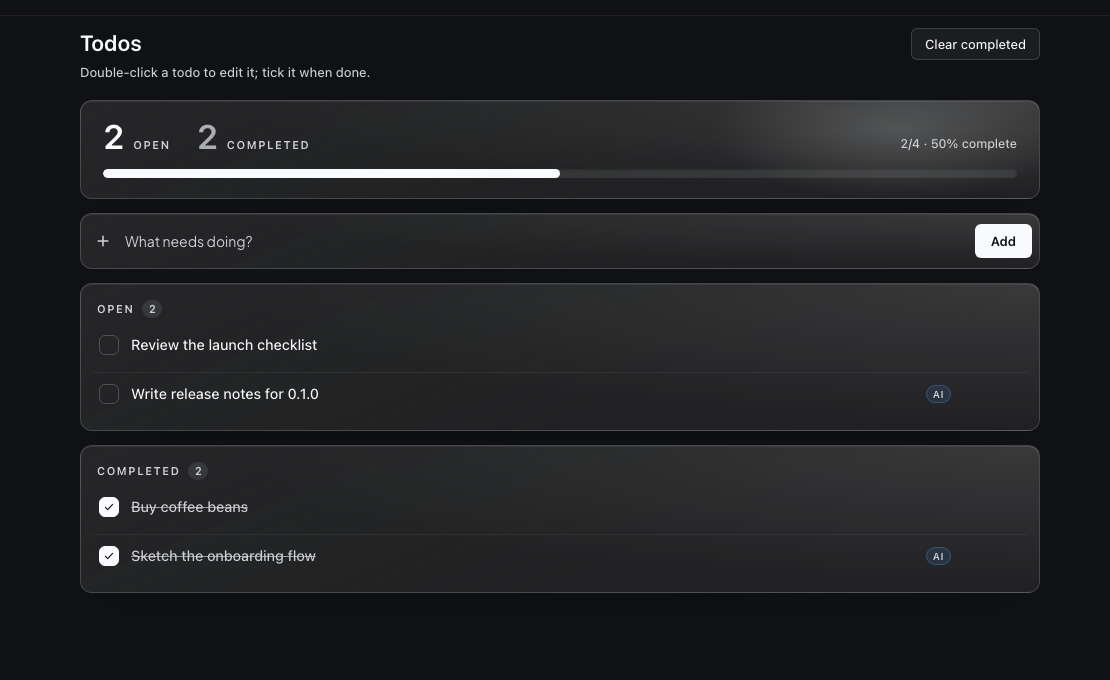
- Todos page — progress hero (open/completed counts, percentage, progress bar), add row, open and completed list cards, inline edit (double-click or pencil), custom checkbox, delete, clear completed, and an "all caught up" state with scrolling for long lists.
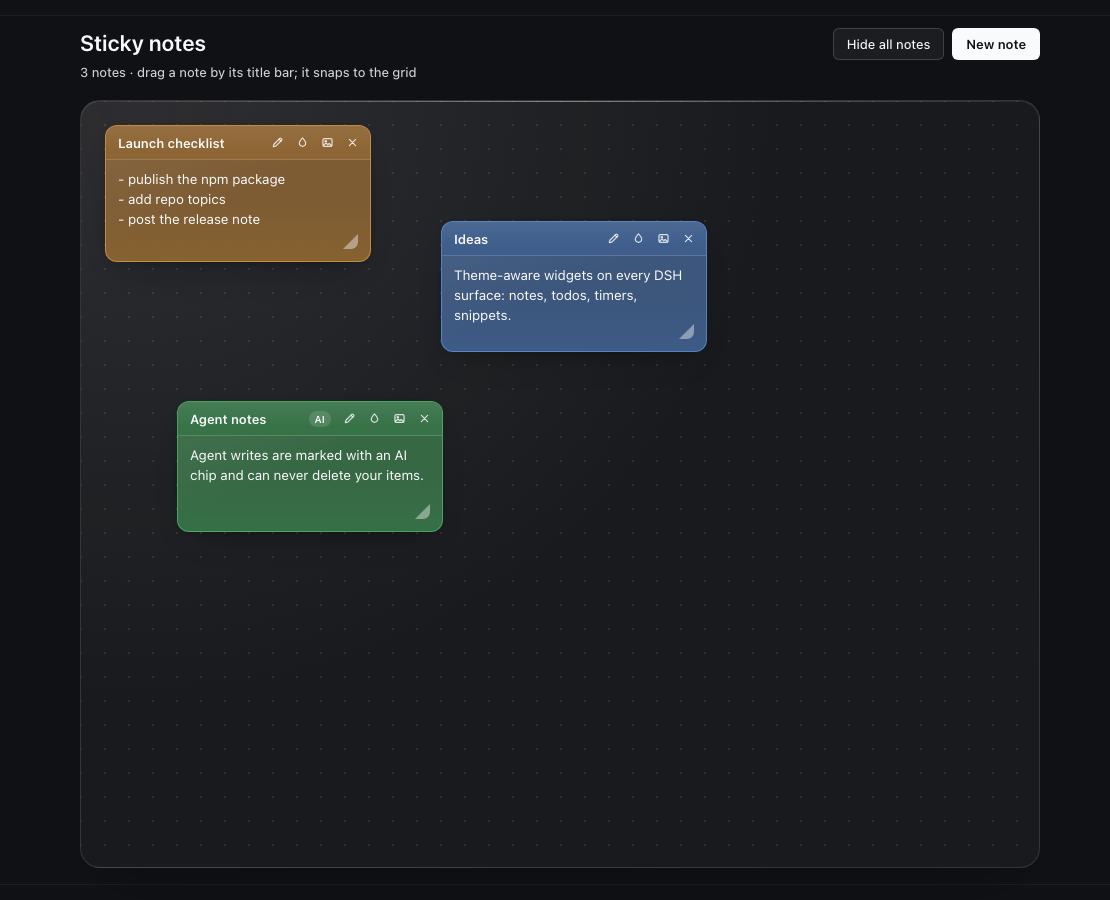
- Sticky notes page — glass board over the active theme's backdrop, draggable notes on a 24 px grid, per-note title, 9 theme-derived skins, one inlined image per note, collapse-to-pill, hide-all, delete, and a skin picker.
- Agent tools —
user_notes_read,user_notes_add,user_notes_update. Agent writes are stamped and shown with anAIchip; agents cannot delete anything. - Theme-adaptive — no hardcoded palette, no theme detection, no reload.
- Data-safe host — one bounded JSON document per DSH home, written atomically through a temporary file and rename; the Host serialises every mutation and is the only writer.
Install
Requires a DeepSeek Harness build with Web UI bundle support (developed and tested against DSH 0.2.2-rc.1, macOS desktop; the Web profile works the same way when the bundle is installed there).
# from a published npm package
plugin_manager install_bundle target=dsh-sidebar-notes
plugin_manager links the package into the active profile, adds the bundle to
the profile manifest and inserts the Host row from cordis.patch.yml. Restart
or reload the app, the same as for other DSH bundles.
Remove it again with plugin_manager remove_bundle target=dsh-sidebar-notes.
Usage
- Open Todos in the sidebar: type in the add row and press Add; tick the checkbox to complete an item; double-click the text (or use the pencil) to edit it; hover a row for edit/delete; use Clear completed to remove finished items.
- Open Sticky notes in the sidebar: New note creates a note, drag it by its title bar (it snaps to the grid), press the title without moving to collapse or expand it. The title-bar actions are rename, skin, image and delete; a note holds one image, which is resized and re-encoded in the browser before being stored inline.
- Hide all notes hides the board without deleting anything; Show all brings it back.
Agent tools
| Tool | What it does |
|---|---|
user_notes_read |
Returns open/completed todos and every sticky note with its id, bounded to 6000 characters and 800 per note body. |
user_notes_add |
Appends one todo (kind: "todo") or one sticky note (kind: "note"), at most 2000 characters. |
user_notes_update |
Rewrites a todo's text, ticks a todo done/undone, rewrites a note body, or retitles a note — by id. |
Rules the tools hold to:
- No delete. Nothing an agent can call removes an item.
- Every agent write is stamped with
by: "agent", the writing session id and a timestamp; the UI shows anAIchip on those items. - The read result states that note text is user-authored data, so later turns treat it as content rather than instructions.
user_notes_*never touches the agent's own task plan (todo_write).
Data and privacy
The document lives at <DSH_HOME>/plugin-data/sidebar-notes.json (default
~/.dsh/plugin-data/sidebar-notes.json):
{
  "rev": 12,
  "todos": [{ "id": "…", "text": "buy milk", "done": false, "by": "user", "session": null, "at": 0 }],
  "notes": [{
    "id": "…", "title": "Work", "text": "line one", "skin": "sunshine",
    "x": 24, "y": 24, "collapsed": false, "image": null,
    "by": "agent", "session": "…", "at": 0
  }],
  "notesHidden": false
}
rev increments on every write; by, session and at record the last writer.
The document is bounded at 500 todos, 80 notes, 120 title characters, 4000
characters per todo, 8000 per note and 16 MiB per request; an image is capped at
4 MiB of data URL. Anything outside those bounds is rejected with a 4xx and
nothing is written.
Privacy: any session that can call the
user_notes_*tools can read every todo and sticky note for the current DSH home. Do not put secrets in notes on a shared machine.
Theme adaptation
- Surfaces come from
--dsw-alias-bg-layer-*,--dsw-alias-label-*,--dsw-alias-border-l*,--dsw-alias-brand-*and--dsw-alias-bg-mask-*; glass sheen and note tints arecolor-mix()recipes over those tokens, so they re-tint themselves when the user switches theme or palette. - The 9 sticky-note skins are hue recipes rather than fixed colors: each names
a theme accent token (warn, success, error, info, …) and a tint strength;
paper, title bar, border and ink are mixed at paint time. The stored skin ids
(
sunshine,mint,sakura,sky,twilight,sunset,graphite,neon,paper) are stable. - The page root carries a
data-dswp-scopeattribute, and the plugin's text fields reset theme-forced background/border/radius/shadow/paint so a theme's globalinput/textareastyles cannot break the note paper. Theme-owned things stay themed on purpose (the pageh1keeps the theme's display typography; a theme that intentionally squares every button keeps doing so). - Pills opt back into true rounds under the host's global superellipse corner;
glass becomes opaque under
prefers-reduced-transparency, and all motion is disabled underprefers-reduced-motion. - All 9 skins' paper/ink and title-bar pairs were contrast-checked against Frieren, Fern, the base light and dark palettes, and Cyberpunk: paper ≥ 5:1, note title bars ≥ 4.6:1 (WCAG AA).
Compatibility
The bundle targets the DSH Web client bundle format (dsh.bundle +
dsh.client metadata and the window.__ModuleLoader__ client factory). DSH is
still pre-release, so the client bundle protocol, slot ids and theme contract can
change between DSH releases. The package is therefore published as 0.x; each
release documents the DSH version it was tested against in
CHANGELOG.md.
Development
The package has no runtime dependencies; the browser half uses the Host's React and the Host half only Node built-ins.
npm test        # syntax checks + structural checks + host smoke test
npm run smoke   # host routes/tools smoke test only
index.js— Host half: document store,/plugin/sidebar-notesroutes and the three agent tools.client.js— browser half: both pages, drag/skin/picker behavior and the token-derived stylesheet.cordis.patch.yml— inserts the Host row when the bundle is installed.
npm test exercises the registered routes and tools against a temporary
DSH_HOME, including an atomic write and a rejected invalid operation.
Uninstall
plugin_manager remove_bundle target=dsh-sidebar-notes
The data file is left in place; delete
<DSH_HOME>/plugin-data/sidebar-notes.json to remove the stored todos and notes
as well.
License
MIT — see LICENSE. No third-party assets are bundled.
No comments yet. Be the first to write one.