DSH LazyGit Plugin
See your Git history and changes. Run everyday Git operations with a few clicks.
A visual Git workbench inside DeepSeek Harness Web.






English · 简体中文
Preview
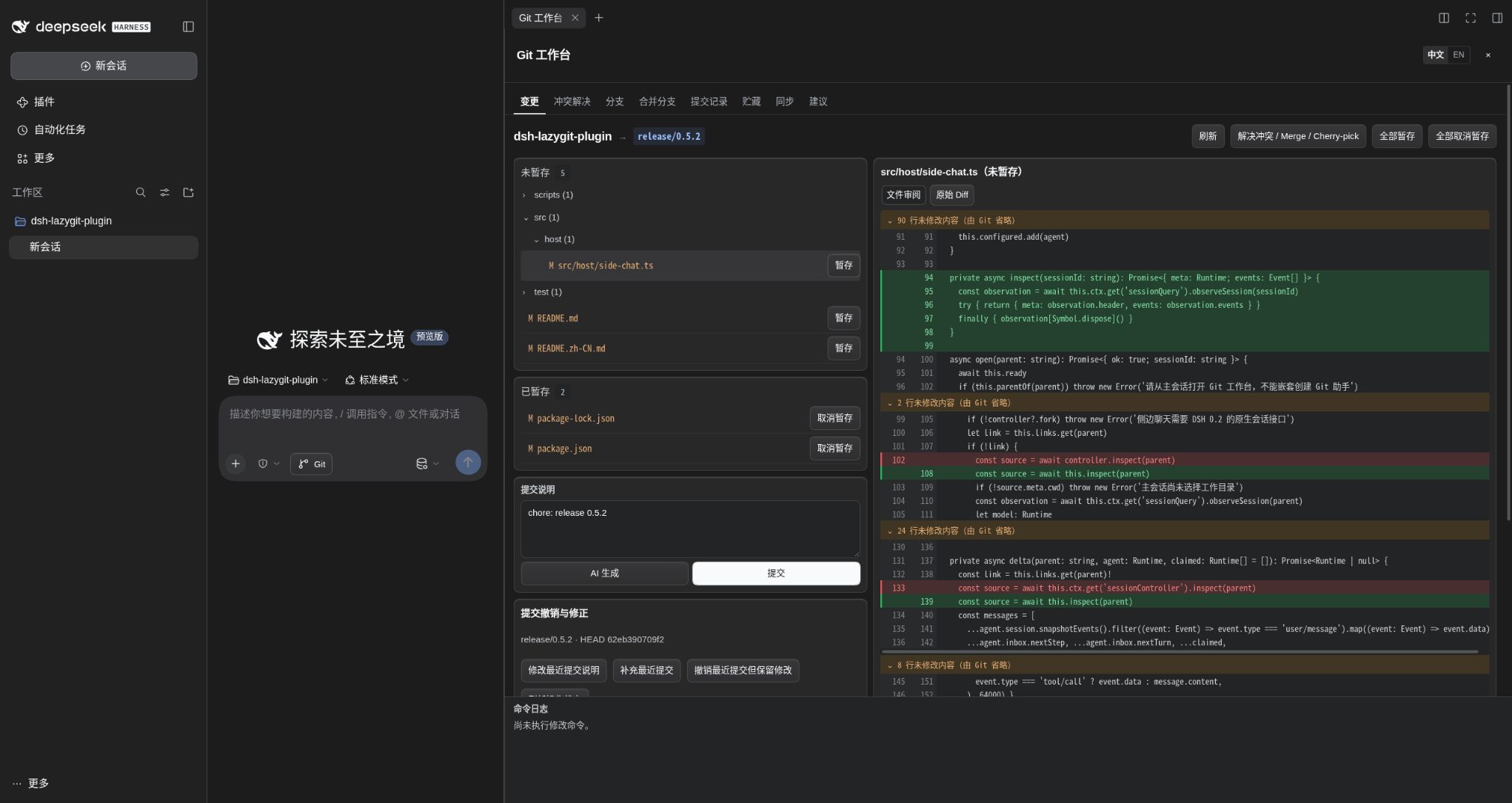
Git you can see and use
Understand your repository at a glance. Browse the commit graph, inspect commit details and file diffs, compare staged and unstaged changes, and see branches, tags, stashes, and remote sync status in one workbench.
Click through everyday Git work. Stage files, commit, switch branches, merge, stash, fetch, pull, and push from the interface. Preview changes before merging and resolve conflicts in the built-in three-pane editor.
| Area | What you can do |
|---|---|
| Changes | Browse changed files by directory; review diffs with old/new line numbers and independently scrollable hunks, or switch to raw diffs; stage or unstage individual files or all changes; write a multiline message or use AI Generate to draft a Conventional Commit. |
| History | Browse the graph, inspect messages, parents, changed files and diffs; amend, undo, or revert commits. |
| Branches | Search, create, switch, and delete local branches; inspect remote branches and tags. |
| Merge | Preview incoming commits and changes; choose normal, fast-forward-only, or squash merge. |
| Conflicts | Compare current, incoming, and result panes; accept either side, keep both, or edit manually; save, resolve, and continue. |
| Stashes | Stash all or selected files, optionally including untracked files; review, apply, pop, drop, or create a branch from a stash. |
| Sync | Inspect upstream and ahead/behind counts; fetch, fast-forward pull, push, set upstream, and manage Rebase. |
| Suggestions | Chat with the independent Git assistant; review commands, explanations, and risks; execute a proposal step by step or copy it for manual execution; diagnose failures and review proposed fixes. |
The command log at the bottom of the workbench shows the Git commands submitted through the interface and their running, success, or failure status. The workbench follows the host's light or dark theme.
Quick start
Requires Git, Node.js >=24.9.0, and DeepSeek Harness Web.
If you installed dsh-easygit-plugin before, stop the Harness backend and run dsh plugin --profile web remove dsh-easygit-plugin before installing the new package below. Existing assistant session links and proposal records are imported once, preserving the original storage and any records already present under the new name. For a manual installation, replace the old mount with the lazygit entry in lazygit.cordis.yml. Refresh the browser after restarting.
npm install -g @deepseek-ai/dsh@0.2.2-rc.1
dsh plugin --profile web add dsh-lazygit-plugin@0.5.3
dsh web
Open a session for your Git repository, then click the Git button beside the composer. The workbench opens in a native right-sidebar tab.
Use the compact 中文 / EN control in the title bar to switch the workbench language. Your browser remembers the selection. Switching preserves the current tab and unsaved input; file paths, commit content, and raw Git output remain unchanged.
A typical workflow: Changes → review the diff → stage files → enter a message → commit → Sync → push. New branches can set their upstream when pushing.
If pnpm blocks installation because the package was recently published, add the package to the existing configuration in ~/.dsh/profiles/web/pnpm-workspace.yaml:
minimumReleaseAgeExclude:
  - dsh-lazygit-plugin
Common workflows
1. Review, commit, and push
In Changes, select a file to review its diff, stage the changes you want, then enter a message or click AI Generate. Review the message, commit, and open Sync → Push. New branches can set their upstream when pushing.
AI generation requires a configured model and sends it the staged diff and limited project context. Check the generated message before committing.
2. Switch branches, merge, and resolve conflicts
Create or switch branches in Branches. To set unfinished work aside, save it in Stashes; apply restores it while keeping the stash, and pop removes the stash after successful restoration.
With a clean worktree, open Merge, select a branch, preview its changes, and choose a merge method. Fetch first when using a remote branch. If conflicts occur, edit the result in Conflicts, then save → mark resolved → continue.
3. Fix an existing commit
Open Changes → Commit edits to edit the latest message, add staged changes to the latest commit, or undo it while keeping your changes. These actions rewrite history, so check whether the commit has already been pushed. To reverse a commit with a new commit, select it in History and choose Revert this commit; this requires a clean worktree and index.
4. Use the Git assistant for complex operations
Open Suggestions → Expand Git assistant chat and describe your goal. Review the proposed commands and risks, then confirm execution. Multi-step proposals stop at the first failure. You can ask the assistant to analyze failures; proposed repairs also require confirmation.
Update, remove, or install from source
# Update / remove
dsh plugin --profile web update dsh-lazygit-plugin
dsh plugin --profile web remove dsh-lazygit-plugin
After updating, restart the Harness backend and refresh the browser to load both Host and Client changes.
# Install from source
git clone https://github.com/IT-coder-Yy/dsh-lazygit-plugin.git
cd dsh-lazygit-plugin
npm install
npm run build
dsh plugin --profile web add "${PWD}"
You can also install directly from the repository with dsh plugin --profile web add github:IT-coder-Yy/dsh-lazygit-plugin.
Compatibility
| DSH version | Real-service smoke test | Working directory |
|---|---|---|
Earlier tested versions (0.2.0-rc.1–0.2.1-rc.5) |
Passed | Original session directory; worktree changes supported from 0.2.1-alpha.2 |
0.2.2-alpha.2 |
Passed (pinned release-time dependencies) | Current directory, including worktree changes |
0.2.2-alpha.3 |
Passed | Current directory, including worktree changes |
0.2.2-rc.1 |
Passed | Current directory, including worktree changes |
Development
npm install
npm run check
npm pack --dry-run --ignore-scripts
npm run check runs type checks, tests, and build reproducibility checks. Git integration tests create temporary repositories for repository operations and recovery scenarios.
CI also runs npm run test:dsh against all versions covered above, including earlier tested releases. To reproduce one version locally:
npm install --prefix /tmp/lazygit-dsh-check @deepseek-ai/dsh@0.2.1-rc.5
DSH_INSTALL_DIR=/tmp/lazygit-dsh-check npm run test:dsh
The smoke test uses and cleans up a temporary DSH_HOME and Git repository. It does not read existing sessions or call a model.
No comments yet. Be the first to write one.