DSH Git Plugin
A visual Git workbench for inspecting repositories, running common actions, and safely executing AI-generated Git workflows in DeepSeek Harness Web.





English · 简体中文
How to use
👀 Inspect Git state → 🖱️ Run a quick action or ask the Agent → ✅ Review → 🚀 Execute
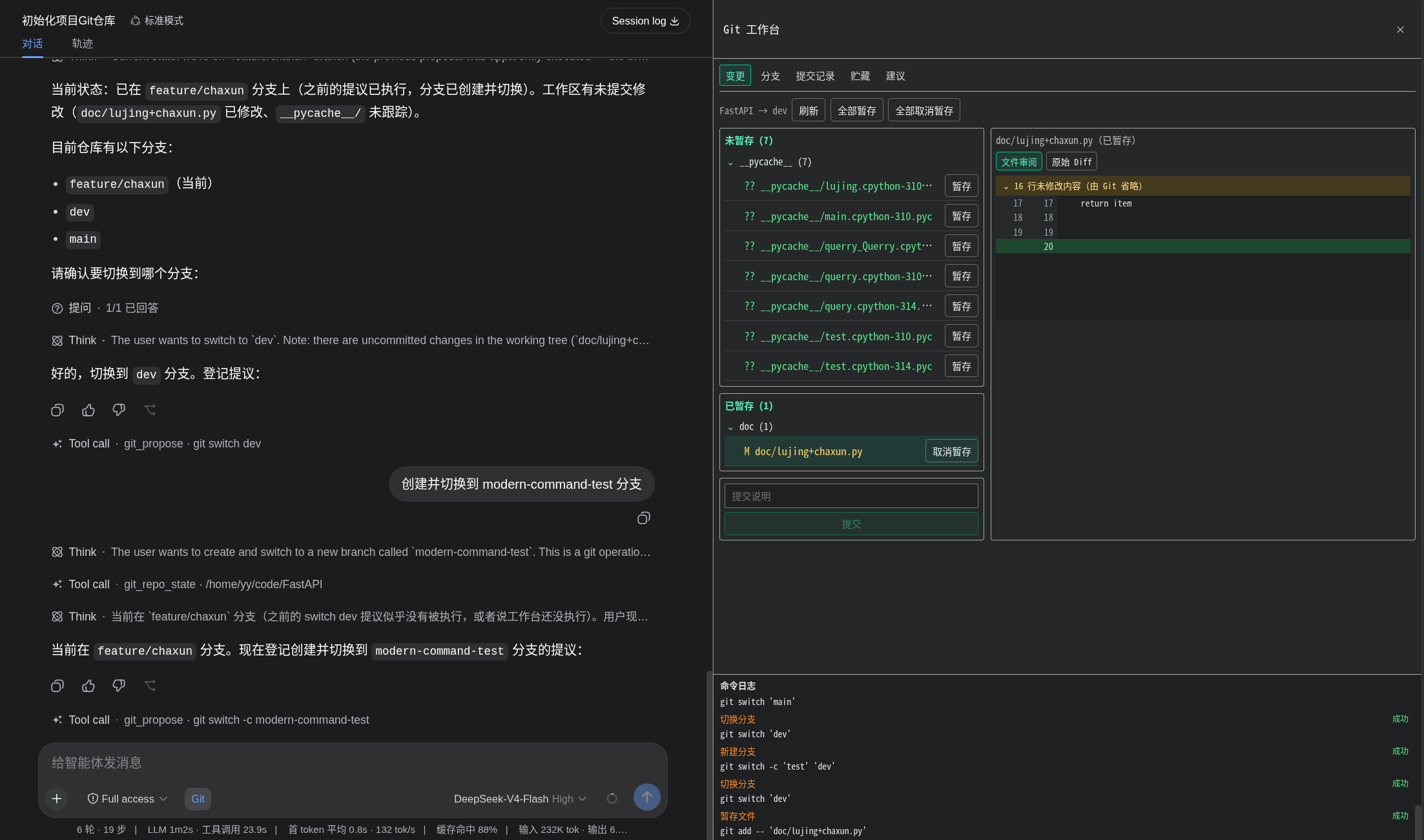
Preview
Features
- Visual repository state: See the current branch, staged and unstaged files, and each file's formatted review view or raw diff.
- Commit history and details: Browse the current branch as a commit graph, then click a commit to inspect its message, author, timestamps, parents, changed files, statistics, and full diff.
- One-click Git actions: Stage or unstage one file or all files, create commits, and create, search, switch, or safely delete local branches directly from the workbench.
- References at a glance: Inspect local branches, remote branches, and tags without leaving DeepSeek Harness Web.
- Natural-language workflows: Turn a request into a clear, step-by-step Git command proposal, then execute it directly or copy it for manual execution.
- Safety by default: Validate commands against a conservative allowlist, require confirmation for high-risk operations, prevent proposal replay, and redact common credentials from diagnostics.
Quick start
0. Allow immediate installation of the new package
Newer versions of pnpm may delay recently published packages. To install the latest release immediately, add dsh-easygit-plugin to ~/.dsh/profiles/web/pnpm-workspace.yaml:
minimumReleaseAgeExclude:
  - dsh-easygit-plugin
1. Install the plugin
dsh plugin --profile web add dsh-easygit-plugin
2. Start DSH Web
dsh web
3. Open the Git workbench
Use the Git button beside the composer to inspect changes, review commit history, stage files, commit changes, or manage branches with a click.
For a more involved workflow, ask the Agent for a Git operation. For example:
Commit the documentation update to the current branch with the message "docs: update guide"
Review the generated steps in the Git workbench, then choose direct execution or manual execution.
Install from source
git clone https://github.com/IT-coder-Yy/dsh-git-plugin.git
cd dsh-git-plugin
npm install
npm run build
dsh plugin --profile web add ${PWD}
Install from GitHub repository
dsh plugin --profile web add github:IT-coder-Yy/dsh-git-plugin
Update the plugin
dsh plugin --profile web update dsh-easygit-plugin
Uninstall the plugin
dsh plugin --profile web remove dsh-easygit-plugin
How it works
The plugin registers two model tools:
| Tool | Description |
|---|---|
git_repo_state |
Reads the current repository state without modifying it. |
git_propose |
Validates and registers one or more Git steps. |
The Web profile adds a Git action beside the composer and opens the workbench in the native details area. Its tabs provide visual access to working-tree changes and diffs, branches and references, commit history and details, stashes, and Agent-generated proposals. Commands are validated both when a proposal is created and immediately before execution.
Security
- Each step must contain exactly one allowed
git <subcommand> ...command. - Shell control operators, command substitution, redirection, executable hooks, and unsafe Git options are rejected.
- High-risk operations require explicit confirmation and proposals can only be executed once.
- The plugin follows the Shell and sandbox policies provided by DeepSeek Harness; use it only with trusted repositories and trusted Git configuration.
Please report vulnerabilities privately by following SECURITY.md.
Compatibility
Last verified on 2026-08-16 with DeepSeek Harness 0.1.0-rc.6 and dsh-easygit-plugin 0.2.1. Verification covered the full project check (59 tests), reproducible build artifacts, DSH Web startup, and a successful response from the plugin's /easygit host route.
Development
Requires Node.js ^22.19.0 || >=24.0.0, Git, and a DeepSeek Harness developer preview release that supports static Cordis plugins.
npm install
npm run check
npm pack --dry-run --ignore-scripts
No comments yet. Be the first to write one.