dsh-rebooter
English · 简体中文
A lightweight DeepSeek Harness plugin for start service / stop service / restart service / update / open. The default web UI is its own window and does not need a browser. The page window's power button opens the lifecycle menu; one desktop entry DSH Server for the status panel. Update stops DSH first, then upgrades every plugin in the current profile.
Plugin conventions: docs/dsh-plugin-spec.md. Design notes: docs/design-notes.md. Status panel: docs/status-panel.md.
How to use
A lightweight plugin. The default web UI is its own window and does not need a browser. Open does not launch Chrome, Edge, or another browser. A program bound with the gear still opens instead. Double-click DSH Server on the desktop to open the panel, which is the same kind of window. The pictures show the Chinese labels.
Both windows are only a display shell. Closing or minimizing them does not stop a running service or the supervisor. To stop, use Stop service or Update and stop. The window's own close button only closes that window.
The separate window needs the OS web component: WebView2 on Windows, the built-in WebKit on macOS, and WebKitGTK on Linux. If that component is missing, or the window cannot be created, the plugin does not install it. DSH Server and the DSH page then open with the system default program, usually the browser. In the browser there is no top-right button group, blank areas cannot drag the window, and Browse on the panel cannot pick a file — type the path. Start, stop, restart, update, language, and theme still work.

Double-click this icon to open the panel. It is created only the first time this plugin starts with DSH. If you delete it, the next start does not put it back. Use Put on Desktop on the panel, or the desktop command in Install. Without the icon, the panel command in Install still opens it.
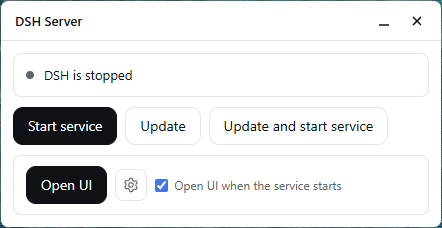
Stopped: start, update, update and start. If "open the page when the service starts" is checked, the next start also opens the page.
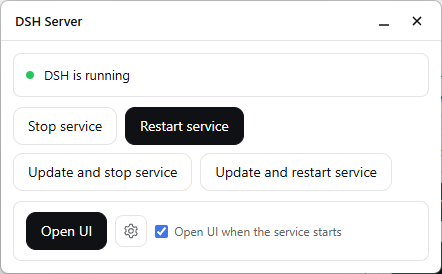
Running: stop, restart, update and stop, update and restart, open the page. The gear binds another program; after that, Open opens that program.
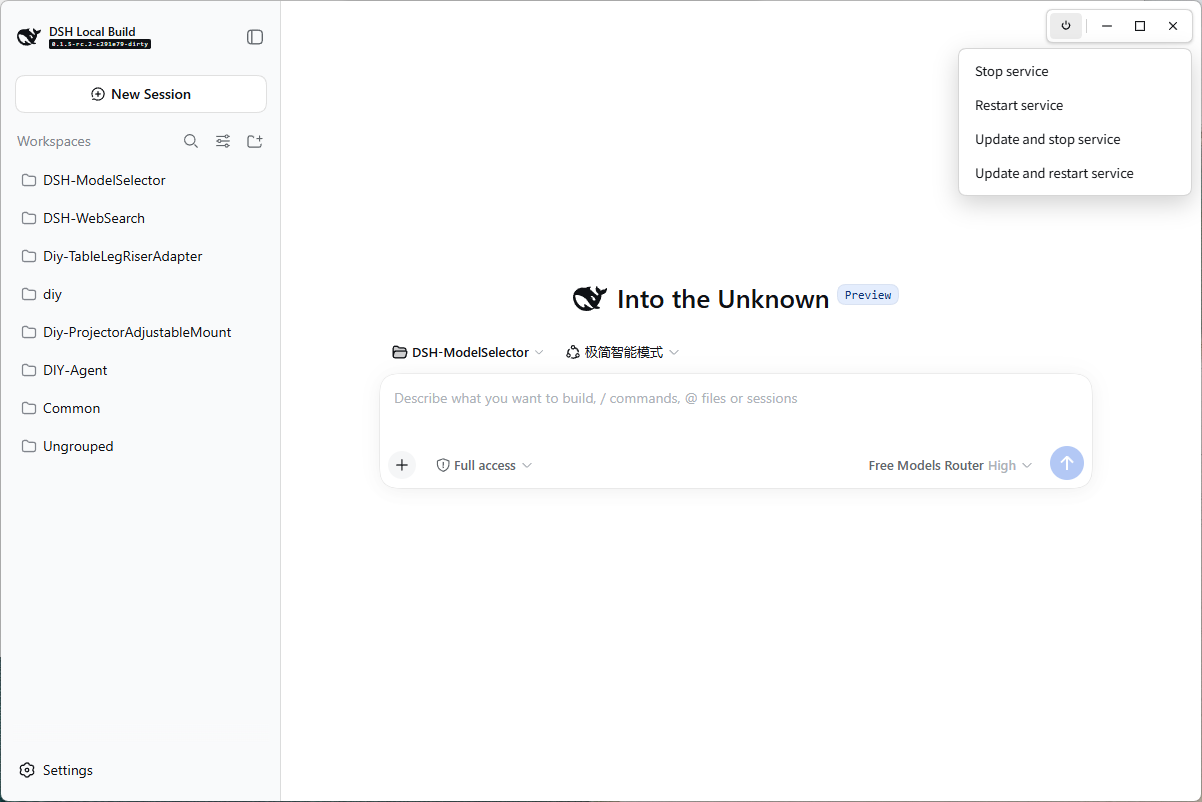
The picture above is that separate window, not a browser tab. The top-right starts empty. Move the pointer into the small corner where the top edge meets the right edge, and the buttons appear: power, minimize, maximize, close. Move away and they hide. The power button opens the four items above; Start is not in that menu. The close control at the far right only closes this window.
What it does
| Action | Menu | Panel / CLI |
|---|---|---|
start |
no | yes |
stop |
yes | yes |
restart |
yes | yes |
update |
no | yes (when stopped) |
update-stop |
yes | yes |
update-restart |
yes | yes |
open |
no | yes (when running) |
panel |
— | opens DSH Server |
The four menu items open from the power button on the page window's control bar. Clicking one posts /api/dsh-rebooter/action. Start is not in that menu.
A detached Node supervisor keeps DSH alive after start: an unexpected host exit is relaunched until you stop. Starting the service no longer opens the browser unless Open UI when the service starts is checked in the panel (or you pass --open). Stopping the service also closes the page window. The window close button only closes that window.
On Windows, a console-less host would flash a console on every short tool spawn. When this plugin starts the host, it prepends windows-hide-child.cjs to NODE_OPTIONS so Node's windowsHide defaults on for those children. A terminal dsh web does not get that inject.
Install
Anyone can install it from npm. Then restart dsh web.
dsh plugin --profile web add dsh-rebooter
The desktop shortcut is created the first time DSH starts. Open the panel anytime, or put the shortcut back on the Desktop:
npx --yes dsh-rebooter panel
npx --yes dsh-rebooter desktop
The panel button Put on Desktop does the same as the desktop command. Requires Node 24 or newer. The panel window uses the OS web view: WebView2 on Windows, system WebKit on macOS, WebKitGTK on Linux. If that runtime is missing, DSH Server and the DSH page open with the default URL handler. The panel follows the UI language (zh or en). Open UI opens that page in its own window. A bound program, if set, still opens instead.
Working on this repository keeps the local link. Build, then point the profile at ./package. Do not install the npm copy over that link. Here, open the panel and put the shortcut back with the local commands, not npx (that runs the published package).
node build-rebooter.mjs
dsh plugin --profile web add ./package
node package/lib/cli.cjs panel
node package/lib/cli.cjs desktop
Update / uninstall
After an npm install, update this plugin with dsh plugin --profile web update dsh-rebooter, then restart dsh web. In this repository, rebuild the linked package instead:
git pull && node build-rebooter.mjs
Uninstall: dsh plugin --profile web remove dsh-rebooter. State lives in $DSH_HOME/rebooter/ and is left in place.
The in-app Update actions run dsh plugin --profile web update --latest, which updates every installed plugin, not only this one.
Publish a version
node publish-via-actions.mjs 1.0.1
That starts publish.yml on GitHub and waits until it finishes. Use a version higher than the one on npm. You can also open Actions and run publish.yml by hand.
Before the first run, add a Trusted Publisher on the npm package settings: user IQzhan, repository dsh-rebooter, workflow filename publish.yml, and allow a direct npm publish.
Layout
| File | Role |
|---|---|
dsh-rebooter-core.js |
Pure policy: action names, ports, availability matrix |
dsh-rebooter-runtime.js |
Node IO: state dir, supervisor, jobs, desktop entry |
dsh-rebooter-panel.js |
Status panel HTTP + HTML |
dsh-rebooter.host.js |
Cordis adapter: records launch, HTTP, dispatches CLI |
dsh-rebooter.client.js |
No page UI; the menu is on the window bar |
dsh-rebooter-cli.js |
start / stop / restart / update* / open / panel / desktop |
windows-hide-child.cjs |
Windows NODE_OPTIONS preload: default windowsHide on child spawns |
build-rebooter.mjs |
Builds package/ |
docs/dsh-plugin-spec.md |
DSH plugin conventions |
docs/design-notes.md |
Why this plugin is shaped this way |
docs/status-panel.md |
DSH Server panel design |
Tests
node verify.mjs
8 suites, 208 assertions: policy core · runtime · panel · adapter · package · menu · bilingual docs · portability guard.
Scratch files stay in-repo under .tmp/, never the system temp directory.
No comments yet. Be the first to write one.