dsh-model-caps
English · 简体中文
A small DeepSeek Harness plugin. For each custom provider it fills blank context windows, output caps, thinking levels, and thinking wire compat, so chat can offer levels and send the right payload — without hand-editing settings.yaml. Values you already wrote stay. Models are not added or removed.
Design source of truth: DESIGN.md. OpenAI-compatible is the default track; Anthropic is an optional user choice. One custom route has one api.
How to use
After install, open a chat and pick a model from a custom provider the way you pick a built-in one. The plugin has already filled blank size and thinking fields on that route.
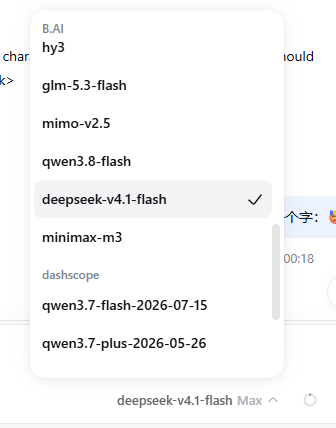
Custom providers (here B.AI and dashscope) show up next to each other. You switch models in the same menu; no extra settings page.
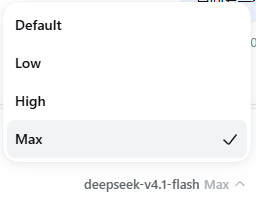
When the model has a thinking map, the footer shows levels (Default / Low / High / Max, …). Pick a level; the plugin’s auto compat aims the wire at what that Completions or Anthropic route can actually send.
Hand-written compat, non-standard effort wires, and reasoningEfforts: false are left alone.
What it writes
A custom provider is a llm-pi-ai route with api, baseURL, and at least one model. Catalog routes such as openai or google are left alone.
Per field, blanks merge in this order (DESIGN.md §5):
- The provider’s own
GET {baseURL}/modelslisting. - pi-ai builtins (when the host has them): match by normalized id, prefer the same
api, else a maker row; project onto the route protocol. Maker Completions wires may overlay; Anthropic-only hits supply a menu, not a fabricateddeepseekformat. - models.dev maker rows for remaining gaps (thin dialect fallback when no builtin hit).
Id lookup: exact → drop scheme: / path leaf → peel a trailing calendar date → peel vN.M when more name follows (deepseek-v4.1-flash → deepseek-v4-flash; bare mimo-v2.5 stays). FlashX and Flash stay distinct.
Writes: contextWindow, maxTokens, blank name, blank input (text / image), reasoningEfforts, auto compat. Catalog-shaped auto fills may refresh. Route-level thinking budgets are not written.
Install
From npm, then restart dsh web:
dsh plugin --profile web add dsh-model-caps
Requires Node 24 or newer. Caps fill on mount, and again when you save the provider in Settings. There is no separate settings page.
Working in this repository: keep the local link. Build, then point the profile at ./package (do not install the npm copy over that link):
node build-model-caps.mjs
dsh plugin --profile web add ./package
Update / uninstall
After an npm install:
dsh plugin --profile web update dsh-model-caps
Then restart dsh web. In this repo, rebuild the local link:
git pull && node build-model-caps.mjs
Uninstall: dsh plugin --profile web remove dsh-model-caps. Hand-written wires and compat stay. Catalog-shaped effort maps may have been refreshed; removing the plugin does not roll that back.
Publish a new version
node publish-via-actions.mjs 1.0.1
This starts publish.yml on GitHub and waits until it finishes. The version must be newer than the one on npm. You can also run publish.yml manually in Actions.
First time: in the npm package settings, add a Trusted Publisher for user IQzhan, repository dsh-model-caps, workflow file publish.yml, and allow direct npm publish.
Layout
| Path | Role |
|---|---|
dsh-model-caps-core.js |
Pure policy: index, match, project, merge, planMutations |
dsh-model-caps-sync.js |
IO: listing, models.dev, optional builtins, mutate |
dsh-model-caps.host.js |
Cordis mount and triggers |
dsh-model-caps.client.js |
No settings page |
build-model-caps.mjs |
Build package/ |
DESIGN.md / DESIGN.zh.md |
Design source of truth |
docs/images/ |
README screenshots |
publish-via-actions.mjs |
Dispatch and watch npm publish via Actions |
Tests
node verify.mjs
8 suites. Scratch files stay under .tmp/ in the repo.
No comments yet. Be the first to write one.