dsh-my-plugins
一个面板,只管理你安装的插件
One panel for the plugins you installed — nothing more




简介
「我的插件」是挂在 设置 → 插件 区的一个 DSH 插件:查看、启用、关闭、卸载你自己安装的插件,官方自带的插件一律不显示、不管理。样式与官方插件清单完全一致(同一套主题变量),亮色/暗色模式自动跟随。
"My Plugins" is a DSH plugin tab inside Settings → Plugins: view, enable, disable and uninstall only the plugins you installed. Built-in plugins are never listed or touched. Styling matches the official plugin inventory exactly (same theme variables), and follows light/dark mode automatically.
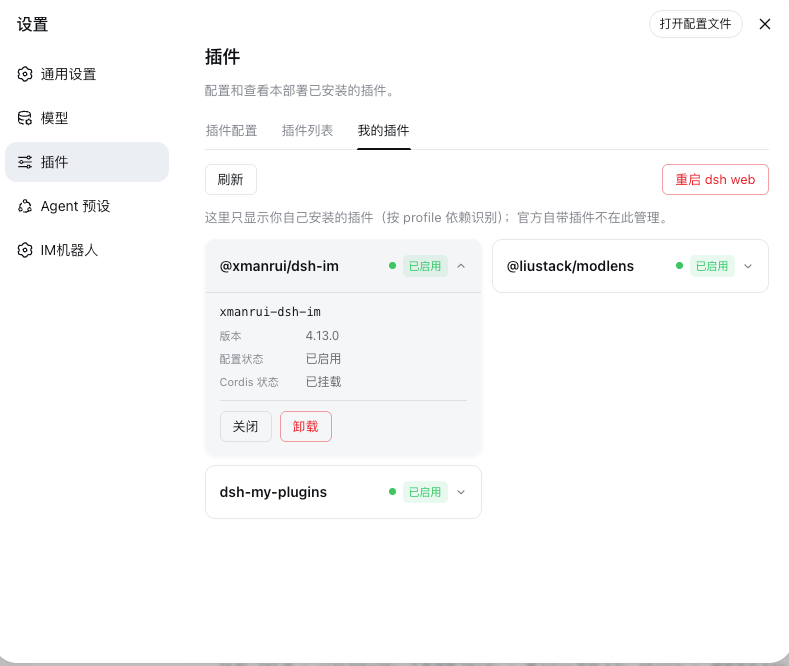
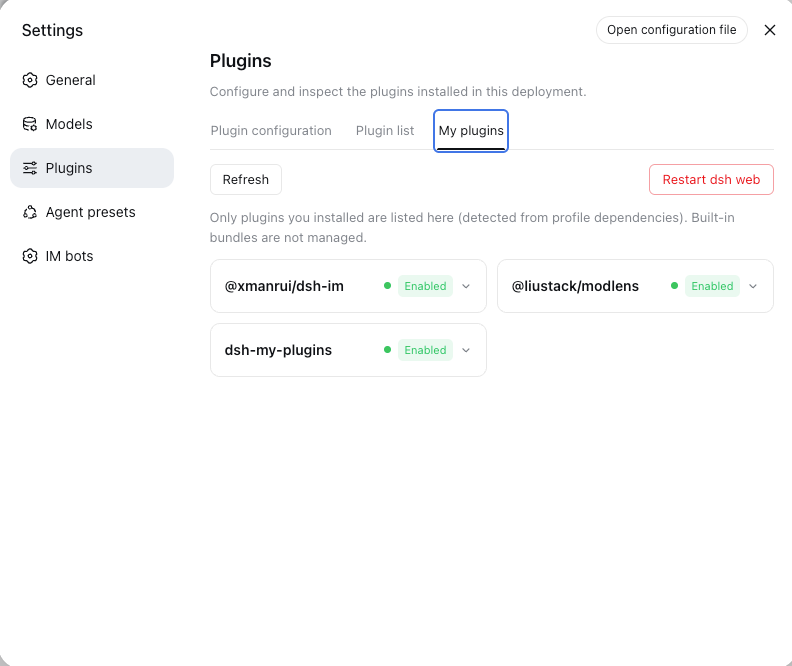
「我的插件」面板 · My Plugins —— 设置 → 插件 → 我的插件(Settings → Plugins → My plugins)
功能
| 操作 | 机制 | 生效时机 |
|---|---|---|
| 查看 | profile dependencies ∩ Cordis Loader 条目,附版本与运行相位 |
实时 |
| 启用 | loader.update(id, {disabled:false}) + 移除持久化停用行 |
热生效 |
| 关闭 | loader.update(id, {disabled:true}) + 写入 profile 的 cordis.patch.yml 托管块 |
热生效,重启后保持 |
| 卸载 | dsh plugin remove + 清理 bundles 残留 + loader.remove(id) |
重启 dsh web 后完全生效 |
| 重启 | 面板内一键重启 dsh web(分离式 helper,端口释放后重新拉起) | 立即 |
卡片行为与官方插件清单一致:启用时显示状态点(绿=已挂载 / 红=挂载失败 / 蓝=加载中)+「已启用」标签;停用时只显示「已停用」标签;同一时刻只展开一张卡片;顶部工具栏提供刷新与重启 dsh web。
判定「我的插件」的口径
profile(默认 web)的 package.json 中 dependencies 键 = 你安装的插件。官方自带包的条目永不纳入管理,面板不会给它们任何操作按钮。
持久化
停用状态写成 profile 的 cordis.patch.yml 中的托管块,重启后依然保持:
# dsh-my-plugins managed begin
- id: <entryId>
  disabled: true
# dsh-my-plugins managed end
删除该块即可全部恢复启用。面板同时在 $DSH_HOME/dsh-my-plugins/state.json 保存镜像,启动时与实时 loader 树比对自愈(清理指向不存在条目或组条目的残留键)。
运行时 id 与补丁行 id
树内条目带组前缀(如 include:dsh-pocket)。Cordis Loader 原生支持 a:b 嵌套 id,因此运行时更新用原始 id;而写入补丁层的行必须用配置文件里的纯 id(最后一个 : 段)。两个形态、两个函数,互不混淆。
安装
从 GitHub 源安装(构建产物随仓库提交,无需本地构建):
dsh plugin --profile web add https://github.com/I-am-shy/dsh-my-plugins.git
或从本地源码安装:
git clone git@github.com:I-am-shy/dsh-my-plugins.git
dsh plugin --profile web add file:/path/to/dsh-my-plugins
重启 dsh web、刷新浏览器,然后打开 设置 → 插件 → 我的插件。本 tab 使用 order: 20,排在「可配置」「插件列表」之后,固定在最后一位。
Need the tab in another language? Set the interface language in DSH settings — the panel switches between 中文 and English instantly (locale namespace settings.myPlugins).
使用
| 操作 | 做法 |
|---|---|
| 查看状态/版本/相位 | 点击卡片展开 |
| 关闭 / 启用 | 展开卡片 → 关闭 / 启用 |
| 卸载 | 展开卡片 → 卸载,弹窗确认 |
| 重启 dsh web(完成卸载、干净生效) | 工具栏 → 重启 dsh web |
重启后页面会轮询服务器恢复并自动刷新当前页(要求连续 3 次探测成功再刷新,避免撞上未完成启动的服务器)。
HTTP API(同源、仅回环)
| 端点 | 方法 | 请求体 | 作用 |
|---|---|---|---|
/my-plugins/list |
GET | — | 插件列表 + profile + 端口 |
/my-plugins/set-enabled |
POST | {pkg, enabled} |
启停 + 持久化 |
/my-plugins/uninstall |
POST | {pkg} |
卸载 + 清理 |
/my-plugins/restart |
POST | {} |
重新拉起 dsh web |
设计
- 只在官方「设置 → 插件」注册一个「我的插件」tab(
order: 20),不新增一级菜单入口; - 只管理
dependencies ∩ loader 条目,官方自带(@deepseek-ai/dsh-base/dsh-web-app展开的条目)永不纳入; - 组条目(
options.group)永不作为操作目标,面板拒绝关闭自身(防止持久化后无法从界面恢复); - 所有操作写入审计日志
$DSH_HOME/dsh-my-plugins/audit.jsonl;HTTP 只接受 loopback + 同源 Origin 请求; - 浏览器只拿到脱敏列表(无任何凭据/密钥回传);重启 helper 以注入
--no-open的方式重新拉起,不弹新浏览器窗口。
本地开发
npm install
npm run typecheck    # tsc --noEmit 严格检查
npm run build        # 构建 src/host → lib/index.js、src/client → client/client.js
npm run build:watch  # 变更即重建
lib/ 与 client/ 产物随仓库提交,消费者安装时零构建。本地与活着的 dsh web 联调时推荐符号链接开发环(避免 file: 安装硬链接被编辑工具换 inode 后残留旧副本):
# 首次注册后,把 pnpm 硬链接副本替换为符号链接
rm -rf ~/.dsh/profiles/web/node_modules/dsh-my-plugins
ln -s /path/to/dsh-my-plugins ~/.dsh/profiles/web/node_modules/dsh-my-plugins
改完 client 刷新页面即可(模块系统按需加载);改 host 需重启 dsh web。
项目结构
dsh-my-plugins/
├── src/
│   ├── host/                  # Node 侧(构建 → lib/index.js,ESM)
│   │   ├── index.ts           #   入口:inject + apply + 启动自愈
│   │   ├── constants.ts       #   路径、块标记、fiber 相位映射
│   │   ├── types.ts           #   服务/状态/行类型
│   │   ├── audit.ts           #   审计日志
│   │   ├── profile.ts         #   profile package.json 读取
│   │   ├── patch.ts           #   cordis.patch.yml 渲染 + 状态读写
│   │   ├── loader.ts          #   条目发现(组安全)
│   │   ├── operations.ts      #   启用/关闭/卸载
│   │   ├── restart.ts         #   分离式重启 helper
│   │   └── routes.ts          #   /my-plugins HTTP API
│   └── client/                # Web 侧(构建 → client/client.js,CJS 单文件)
│       ├── index.ts           #   __ModuleLoader__ 注册
│       ├── app.ts             #   slots + 语言 + 样式接线
│       ├── component.ts       #   面板组件
│       ├── api.ts             #   同源 RPC
│       ├── locales.ts         #   中英词典
│       └── styles.ts          #   主题变量 CSS
├── lib/index.js               # 构建产物(已提交)
├── client/client.js           # 构建产物(已提交)
├── scripts/build.mjs          # esbuild 管线(含 --watch)
├── tsconfig.json              # 严格 TS / noEmit
├── cordis.patch.yml           # 条目插入清单
└── package.json               # dsh 清单 + npm 元数据
已知边界
- 卸载是结构性操作(pnpm 包已移除),重启 dsh web 后完全生效——面板如实提示并与你一起完成重启;
loader.update属于条目级热重启;带常驻服务的插件在关键操作后重启一次 dsh web 最干净;- 仅 profile
dependencies内的包可管理;官方自带插件不在管理范围(有意为之)。
排查
改动后面板没变
profile 内的安装产物可能是旧硬链接副本(编辑工具换 inode 写文件时断裂)。重新 npm run build,然后重装或按上文切换为符号链接。
重启后已关闭的插件又启用了
持久化块在 profile 的 cordis.patch.yml(~/.dsh/profiles/web/cordis.patch.yml)。文件被重建或块被删除会重置状态——这是特性:删掉托管块即全部恢复。
贡献
欢迎 Issue 与 PR。请保持 npm run typecheck 干净,并使构建产物与源码同步提交(npm run build 后一并 commit)。
许可证
MIT © 2026 I-am-shy
No comments yet. Be the first to write one.