dsh-review-comments
English | 中文
A file review comments plugin for the DeepSeek Harness Web UI. It lives in the right
sidebar: browse and fuzzy-search the workspace, read files with syntax highlighting and
git status, comment on a line or a line range, then hand the collected comments to the
model as a compact path#line ordered list.
In the Harness UI the entry is the File Review guide card (中文:文件评审).
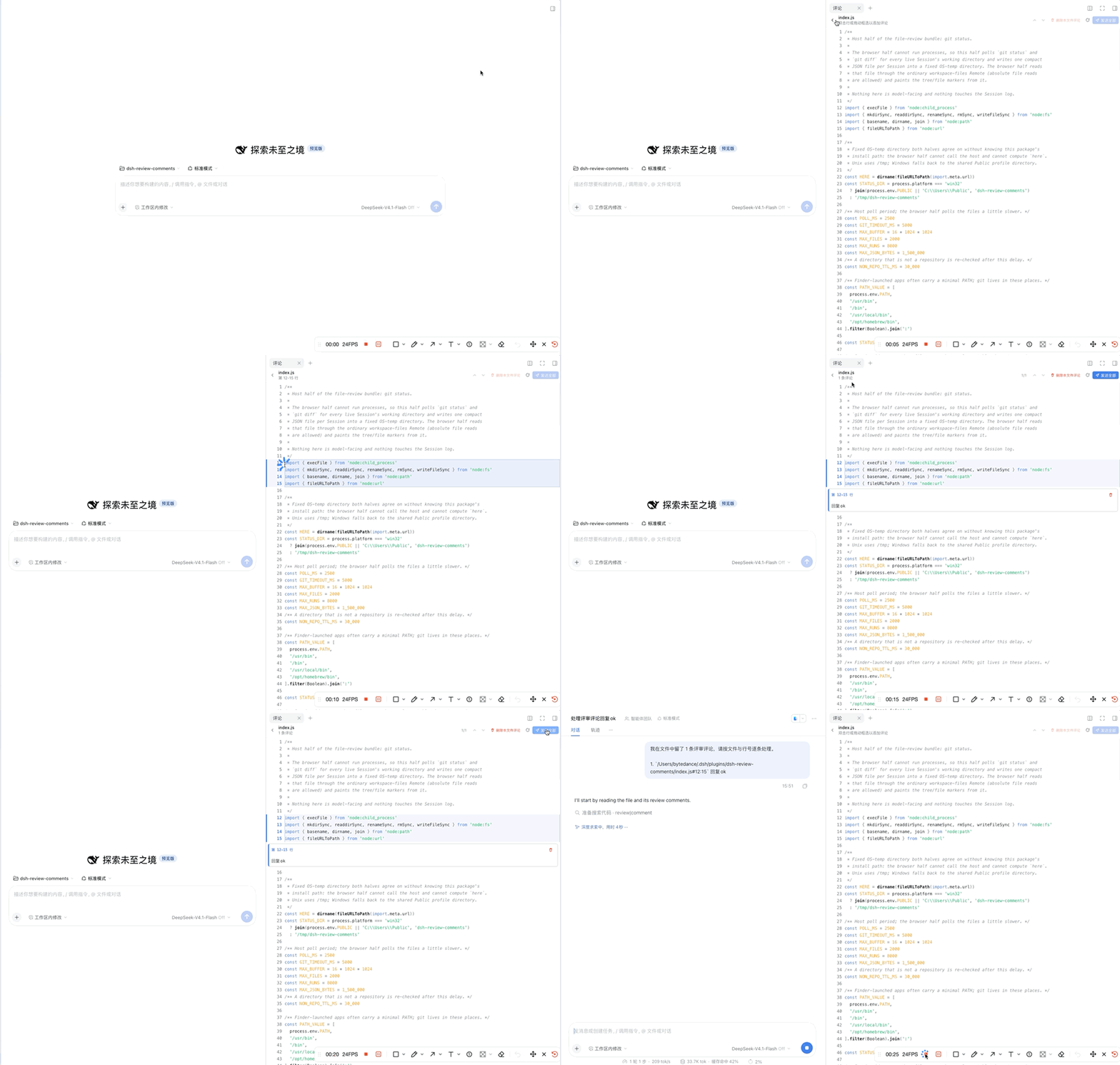
Demo
Scope
This plugin focuses on comments: read full file content, anchor a comment to a line or a line range, then hand the collected comments to the model. Git changes are shown as context marks, so browsing changes and writing comments stay out of each other's way.
Features
- Right-sidebar entry — a guide card in the Harness right sidebar; no separate window, no custom panel chrome. The tab framework, theme tokens and locale are the harness's own.
- Recursive fuzzy search — type any part of a name:
changesitemsfindschanges_items.tsx; separators and missing characters do not matter. Results are ranked by match quality and grouped by folder. Skips.git/.svn/.hg/node_modules. - Syntax highlighting — grammar-based, powered by a vendored Prism.js 1.30.0 (MIT, see THIRD_PARTY_NOTICES.md): JavaScript/TypeScript/ JSX/TSX, JSON, CSS/SCSS/Less, HTML/XML/SVG/Vue, Markdown, Python, Shell, YAML, TOML, INI, SQL, diff/patch, Go, Rust, Java; other suffixes fall back to plain text. Long files (>5000 lines) render as plain text to stay responsive.
- Git status — added/untracked = green, modified/renamed = blue, deleted = red, conflicted = amber, both in the file tree (with A/M/D/R/U letters) and as per-line vertical bars in the file view. A Changed only switch lists just the project's uncommitted files.
- Line comments — double-click a line, or drag across lines to select a range, then
type in the composer that opens below the selection.
Enterturns it into an inline card;Shift+Enteradds a newline;Esccancels. - Jump between comments — the file header shows the current position (
2/7) with previous/next buttons;Ctrl/Cmd+Up/Down,Ctrl/Cmd+P/NandCtrl/Cmd+wheeljump too. The tree shows a right-aligned comment count per file and, for folders, the aggregate of everything below them (rendered as a bold count tag on the theme accent colour, like the composer's send button); the browser footer always shows the workspace total. The browser header has a labelled Delete all comments button (the footer carries the same action as a compact icon button), while the file header deletes only that file's comments and its subtitle shows that file's count. Search results and the changed-files list carry the same count tags. - Send comments to the model —
Ctrl/Cmd+Enterin the comment box or the panel's send button submits the formatted list. Comments that are still pending are also appended to any ordinary chat submit: type your own message, press Enter (or Cmd/Ctrl+Enter / the Send button) in the chat composer, and the message goes out as your text, one blank line, then the comment list — the comment cards stay in the panel until that send is accepted. - Light/dark and zh/en — colors come from
--dsw-alias-*theme tokens; the UI ships Simplified Chinese and English dictionaries.
Requirements
- A DeepSeek Harness profile whose Web UI includes the right sidebar
(
@deepseek-ai/dsh-client-ui-sidebar-right— part of the default web bundle). Tested with DeepSeek Harness0.2.1-rc.5on macOS; other desktop/web platforms should work. - Node.js ≥ 20 only if you build from source.
- Optional:
gitonPATH. Without it the plugin still runs; git status stays off.
Install
From the Plugin Manager (recommended)
- Open Settings → Plugins.
- Install from this repository: paste
https://github.com/HusuSama/dsh-review-comments(the manager supports GitHub sources) or pick a local checkout directory. - The bundle is selected automatically — the browser half hot-loads into the open page.
From the CLI
# install from this repository (pnpm fetches the package from GitHub)
dsh plugin --profile web add github:HusuSama/dsh-review-comments

# local checkout instead, e.g. for development:
dsh plugin --profile web add link:/absolute/path/to/dsh-review-comments
Then enable the File Comments bundle in Settings → Plugins (the CLI only adds the dependency; the Plugin Manager UI installs and selects it in one step). No app restart is needed: the browser half hot-swaps, and the host half starts together with the bundle.
The plugin is distributed only through this GitHub repository — there is no npm
release, so always install with the github: spec above (or through the Plugin Manager's
GitHub source).
From source
git clone https://github.com/HusuSama/dsh-review-comments.git
cd dsh-review-comments
node build.mjs                 # regenerate client.js from src/
node --test tests/core.test.mjs
dsh plugin --profile web add link:"$PWD"
Usage
Open the right sidebar (the expand button in the conversation header) → the guide page shows the File Review card. Click it (or use the tab strip's add control → the card) to open the file manager. If the sidebar is already expanded, close another tab and use the guide. There is no global keyboard shortcut for opening the panel; the guide card is the entry point.
| Action | Where | Result |
|---|---|---|
| Click a folder | file list | expand/collapse (lazy per-level load) |
| Type in the search box | file list header | recursive fuzzy search of the whole workspace, ranked and grouped; empty input returns to the tree |
| Toggle Changed only | file list header | list only the session project's uncommitted git changes |
| Click a file | file list / results | open the file: line numbers, syntax highlighting, git change marks |
| Double-click a line | file view | comment composer opens below that line |
| Drag across lines | file view | select a line range; composer opens below the selection; the range stays highlighted while you type |
Enter |
composer | add the comment card at that place |
Shift+Enter |
composer | newline inside the comment |
Ctrl/Cmd+Enter |
comment box / header send button | send all pending comments to the model |
| Enter / Cmd+Enter / Send | chat composer | if comments are pending: your text, one blank line, then the comment list — sent as one message |
| Previous / Next | file header | jump between this file's comments (position 2/7 shown) |
Ctrl/Cmd+Up/Down, Ctrl/Cmd+P/N, Ctrl/Cmd+wheel |
file view | jump between this file's comments |
| Comment counts | file tree / footer | per-file count tags, per-folder subtree totals, workspace total in the footer |
| Delete all comments | file list header / footer | clear every pending comment |
| Delete comments in this file | file header | clear only the open file's comments |
Esc |
composer | cancel |
| Delete button on a card | comment card | remove that comment |
Comments are cached per sidebar tab, so switching tabs and coming back keeps them; send or delete them to clean up.
What the model receives
A single user message with an intro line and one ordered-list item per comment — absolute
path plus #startLine (or #startLine:endLine), then the comment text. No source excerpts:
the model can read the file at those lines itself.
我在文件中留了 3 条评审评论,请按文件与行号逐条处理。

1. `/Users/me/proj/README.md#5` 标题需要说明用途
2. `/Users/me/proj/src/client/index.ts#12` 这里没有处理 null 情况
3. `/Users/me/proj/src/client/index.ts#20:24` 这段逻辑可以提取为函数
The message follows the active UI language (Chinese above); items are ordered by path and start line, and multi-line comment text keeps its list indentation.
Git status
The host half polls the session working directory every 2.5 s and writes one compact JSON
file per session under the system temp directory (/tmp/dsh-review-comments; on Windows
C:\\Users\\Public\\dsh-review-comments); the browser half reads it through
the harness's ordinary file Remote.
- file tree: added/untracked green, modified/renamed blue, deleted red (strikethrough),
conflicted amber; directories containing changes are hinted; letters
A/M/D/R/Umark rows. - file view: a 3 px bar left of the code marks added (green) / modified (blue) lines; deletions get a short red bar on the anchor line; the file header shows the status.
- Changed only groups the changed files by folder; deleted files show a hint instead of opening.
- Limits per session: 2000 files, 8000 line runs, ~1.5 MB JSON; beyond that the status is truncated.
Search
The search box is recursive and fuzzy:
changesitems→src/utils/changes_items.tsx(separators ignored)- best matches first: exact file name > file-name prefix > file-name substring > path substring > separator-insensitive matches > in-order fuzzy matches
- skip list:
.git,.svn,.hg,node_modules - bounded: 400 folders, 4000 files, 300 results, 4 s — a cut search is reported as “Too many results”; clearing the box restores the tree unchanged.
How it works
index.js— host half. Uses the harnesssessions+workingDirectoryservices to find each live session's project, thengit rev-parse/status/diffthroughchild_process, and writes<status-dir>/<sessionId>.json(atomic, only when changed).client.js(generated bybuild.mjs) — browser half. Registers a right-sidebar tab type (ctx.sidebarRightTabs.register) plus its body in thesidebar.right.pane.tabslot, reads workspace files throughremote.workspaceFiles, and polls the status file above.- Sending reuses the composer's own
inputActions.setDraft()/submit(), i.e. the same path as pressing Enter in the chat box. An invisible bridge above the composer appends the pending comments to an ordinary send (your text, blank line, then the list). Nothing is written to the session log by the plugin itself. - Everything visual uses
--dsw-alias-*theme tokens (link,bg-document-selection,interactive-bg-hover-accent,elevation-panel, …), so light/dark and themes come for free.
Project layout
| Path | Purpose |
|---|---|
index.js |
host half: git status poller and status-file writer |
src/client.core.js |
pure logic: paths, formatter, Prism adapter, git/search helpers (unit tested) |
src/vendor/prism.min.js |
vendored PrismJS 1.30.0 (MIT), isolated from the host page globals |
THIRD_PARTY_NOTICES.md |
third-party license texts |
src/client.ui.js |
React UI (no JSX): file tree, search, file view, comment popover/cards, CSS |
src/client.apply.js |
registrations: locale dictionaries, tab type, body slot, stylesheet |
build.mjs |
concatenates the vendored Prism bundle and the three sources into client.js (do not edit client.js) |
tests/core.test.mjs |
Node built-in test runner, 137 tests |
locale/*.json, icon.svg |
plugin display metadata |
docs/media/demo.gif |
the demo animation shown above |
Development
node build.mjs                # regenerate client.js
node --test tests/core.test.mjs   # 137 unit tests
node --check client.js        # syntax check
The browser half hot-swaps into an open page about half a second after client.js changes
(the harness client-hmr watcher). The host half is loaded with the bundle: after editing
index.js, disable and re-enable the bundle once in Settings → Plugins (or restart the
harness) to load it.
Limitations
- Text files only. Binary/undecodable files show “not a text file” instead of a preview (images, PDFs and Office documents are out of scope).
- Git status covers live sessions' working directories; repositories are detected with
git rev-parse; non-repositories show the feature disabled. - Comments are anchored to line numbers as displayed when they were written. Editing or reloading a different version of the file does not move existing cards.
- Files are read page by page up to 20,000 lines; highlighting is skipped above 5,000 lines.
- Search and git payloads are bounded as described above.
Credits
Syntax highlighting is powered by PrismJS 1.30.0, vendored under its MIT license. See THIRD_PARTY_NOTICES.md for the full text.
No comments yet. Be the first to write one.