dsh-moss-live
Full-duplex voice for DeepSeek Harness.
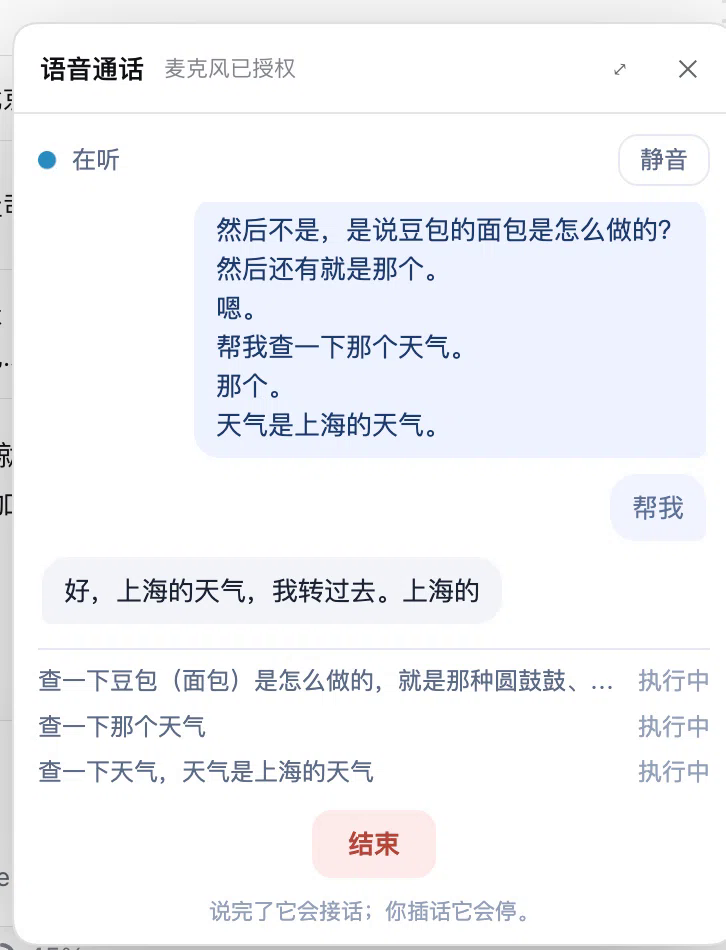
A phone button next to the composer opens a small call panel. You speak, MOSS-Live answers out loud, and anything that needs real work is delegated to the DSH agent — which figures out how to do it (immediately, in the background, or as a scheduled task) and runs it in a subagent.
Which one do you need?
- Live conversation — speak, interrupt, get an answer out loud → this plugin.
- Already-recorded audio/video — precise timestamps, beat-synced cuts, event boundaries, word-level timing → agent-ear, an offline audio/video skill.
The difference is what you get: real-time gives you something that can answer back; offline gives you something that cuts precisely. They are complementary — this plugin does not transcribe files, and agent-ear does not run a live call.
you speak ──► MOSS-Live (full duplex, barge-in)
                 │  dsh_task(objective)          ← text only
                 ▼
           DSH main agent (decides, clarifies, schedules)
                 │  spawn
                 ▼
              subagent (tools, files, shell, web)
                 │  final text
                 ▼
           MOSS speaks the answer
The wrapper is thin on purpose. Capture, playback, barge-in and playback acknowledgements are MOSS's own browser demo; the harness only adds a local relay that holds the API key, one tool call, and the subagent runner.
How it works
| Layer | Owns | Talks to the next layer with |
|---|---|---|
| MOSS-Live (front) | listening, speaking, interruptions | one async tool call |
| Relay (this plugin) | API key, protocol translation, call log | sessionController.prompt + subagents |
| DSH main agent | clarification, planning, scheduling | child agents |
| Subagents | the actual work | final text |
Two tools are registered on each call session:
dsh_task(objective)— forward one request; the agent decides how to execute it.dsh_tasks()— summarize what is running and what finished.
While a task runs the user keeps talking; results are spoken as they land. A task that outlives MOSS's 120 s tool window gets an immediate "on it" and its result is delivered later as commentary.
Install
Requirements: DeepSeek Harness with a MOSS API key (from the MOSS console at
platform.mosi.cn, model moss-live-1.0), Node.js ≥ 22.19.
From npm
The package is on npm as dsh-moss-live:
npm install dsh-moss-live
Then install it as a bundle in your DSH profile, using the absolute path:
plugin_manager action=install_bundle target=/absolute/path/to/node_modules/dsh-moss-live
From the plugin market
dsh plugin --profile web add dshmarket
Then install dsh-moss-live from the market.
From a git clone
git clone https://github.com/HudsonHuang/dsh-moss-live.git
cd dsh-moss-live
npm ci            # required — see the note below
Then register that directory as a bundle:
plugin_manager action=install_bundle target=/absolute/path/to/dsh-moss-live
install_bundle links a local directory into the profile (pnpm link:); it
does not install that directory's dependencies. The plugin's runtime imports
ws and @mossai/mosslive at load, so a clone without npm ci is recorded as
installed and then fails on first use; the panel names the missing package, and
npm run doctor prints the exact command.
Finally reload the plugin row if needed, refresh the DSH page, and click the phone button next to the composer.
Put your MOSS key in one of these places:
.moss-api-keyin the plugin directory (one line, mode 600), or- the
apiKeyfield of the plugin config, or - the
MOSS_API_KEYenvironment variable.
Verify before the first call
Run it from the plugin directory (the clone, or node_modules/dsh-moss-live after
npm install):
npm run doctor
It checks the Node version, required files, ws/@mossai/mosslive resolution,
the vendored relay's module load, the relay port (default 127.0.0.1:17861), the
key, and — unless --offline — one real MOSS WebSocket handshake plus
attach_session (an empty session, no audio).
It exits non-zero on failure and prints the fix. A pass covers only the checks
printed as [ok]: it does not test audio, microphone permission, DSH
delegation, the desktop shell's iframe microphone injection, or billing/quotas.
Those are printed as not covered, and --offline explicitly says the key and
reachability were not verified. There is no blanket "all checks passed" line.
If the key exists only in the plugin's apiKey config, the CLI cannot read it;
pass --key-file <path> or set MOSS_API_KEY for the handshake check.
Configuration
| Field | Default | Meaning |
|---|---|---|
apiKey |
— | MOSS API key (overrides the file/env) |
keyFile |
.moss-api-key |
Key file, relative to the plugin directory |
listen |
127.0.0.1:17861 |
Local relay address |
mossUrl |
wss://api.mosi.cn/v1/realtime |
Upstream endpoint |
model |
moss-live-1.0 |
Realtime model |
sessionTimeoutMs |
180000 |
How long a task may take before the agent reports back |
Calls are recorded
Every call writes calls/YYYYMMDD-HHMMSS.md (transcript, dispatched tasks, results)
and leaves a single line with that path in the conversation. An append-only
.calls/YYYY-MM-DD.jsonl keeps the raw stream. Both stay local.
Troubleshooting
| Symptom | Fix |
|---|---|
ERR_MODULE_NOT_FOUND: Cannot find package 'ws' |
You installed from a clone without npm ci. Run it in the plugin directory and reload the plugin. npm run doctor reports this as well. |
| Panel says MOSS rejected the key (HTTP 401/403) | Set the key in plugin config apiKey, MOSS_API_KEY, or .moss-api-key (one line), then start the call again. |
| Panel says it cannot reach MOSS | Check network/proxy and mossUrl (default wss://api.mosi.cn/v1/realtime); run npm run doctor. |
EADDRINUSE / port 17861 is busy |
Change the plugin's listen to 127.0.0.1:17862; or find the owner with lsof -nP -iTCP:17861 -sTCP:LISTEN (macOS/Linux) or `netstat -ano |
PUBLIC_WSS_URL_REQUIRED |
mossUrl must be wss:// (loopback ws:// only for development), with no credentials, query or hash. |
API_KEY_REQUIRED |
The key is empty or contains a newline; write exactly one line. |
Known limits
- Doctor is not a call test. It checks everything up to
attach_session; it does not send audio or exercise the microphone, DSH delegation or billing. - One call at a time — the demo relay is single-session by design.
- Microphone permission lives in the parent page. The desktop shell's
dsh-app://origin is not a secure context, so the harness page captures audio and hands the stream to the call page. In a plain browser the call page can capture on its own. - The front model still decides. It is instructed to forward everything except pleasantries, and to clarify before forwarding an under-specified request, but that is a prompt, not a guarantee.
- Results are capped at 2000 characters on the way back to the voice layer.
- MOSS's voice, not DeepSeek's — the mouth is MOSS-Live, the brain is DSH.
Layout
index.js              Host half: relay lifecycle, session policy, delegation → subagents
client.js             Client half: the phone button and the in-app panel
vendor/runtime/       MOSS browser demo relay (MIT), with the wrapper changes below
vendor/web/           MOSS demo front end + a purpose-built compact call page
test/                 Error-message tests + delegation / barge-in end-to-end scripts
Wrapper changes inside vendor/ (everything else is upstream):
runtime/server.mjs— session policy + tools injected aftersession_attached,dsh_task/dsh_taskshandling, delegation torun(), per-call log, pinned token, harness origin allowed; failed MOSS handshakes are classified (auth vs network) and sent to the page asrelay.errorbefore the socket is closed.web/js/mic.js— prefer a stream injected by the parent page.web/js/client-demo.js— keep the query string, report real errors, relay override.web/product/embed.html,web/js/embed-app.js,web/product/embed.css— the compact panel UI (new, not upstream);embed-app.jsshows the relay's actionable error and the microphone guidance instead of a generic disconnect message.
Credits
Built on @mossai/mosslive 0.1.0 and
its examples/browser-demo (MIT — see vendor/LICENSE). MOSS-Live is a product of
MOSS / OpenMOSS. DeepSeek Harness is a DeepSeek project. This repository is an
independent integration, not affiliated with either.
License
MIT — see LICENSE.
No comments yet. Be the first to write one.