Fork notice — This is a modified version of dsh-annotation by omdsh-dev (MIT, Copyright (c) 2026 omdsh-dev). We are not the original author and this fork is not endorsed by them. See CREDITS.md for attribution and the full change list. The 1.5.0 diff adds: click an
Annotation Nchip in a reply to jump back to the annotated passage (text-anchor based, survives reload, smooth scroll + brief highlight).Maintained by HuaLQIn · Modified on 2026-10-24 (baseline: upstream 1.4.11). Where to report issues: problems caused by this fork's changes (the 1.5.0 chip-jump work) go to [this repository]'s issues. Problems that also exist in the original go upstream — please do not use this fork's tracker for them. Install conflict: this fork keeps the upstream package name
@changfenhuang/dsh-annotation. Do not install both at once; they will overwrite each other.
dsh-annotation
English · 简体中文
Selection-annotation plugin for DSH Web: select text → annotate → press Enter to send it along with your message; the model replies to each annotation by number.
🌐 Live Product Site — Explore dsh-annotation in DSH
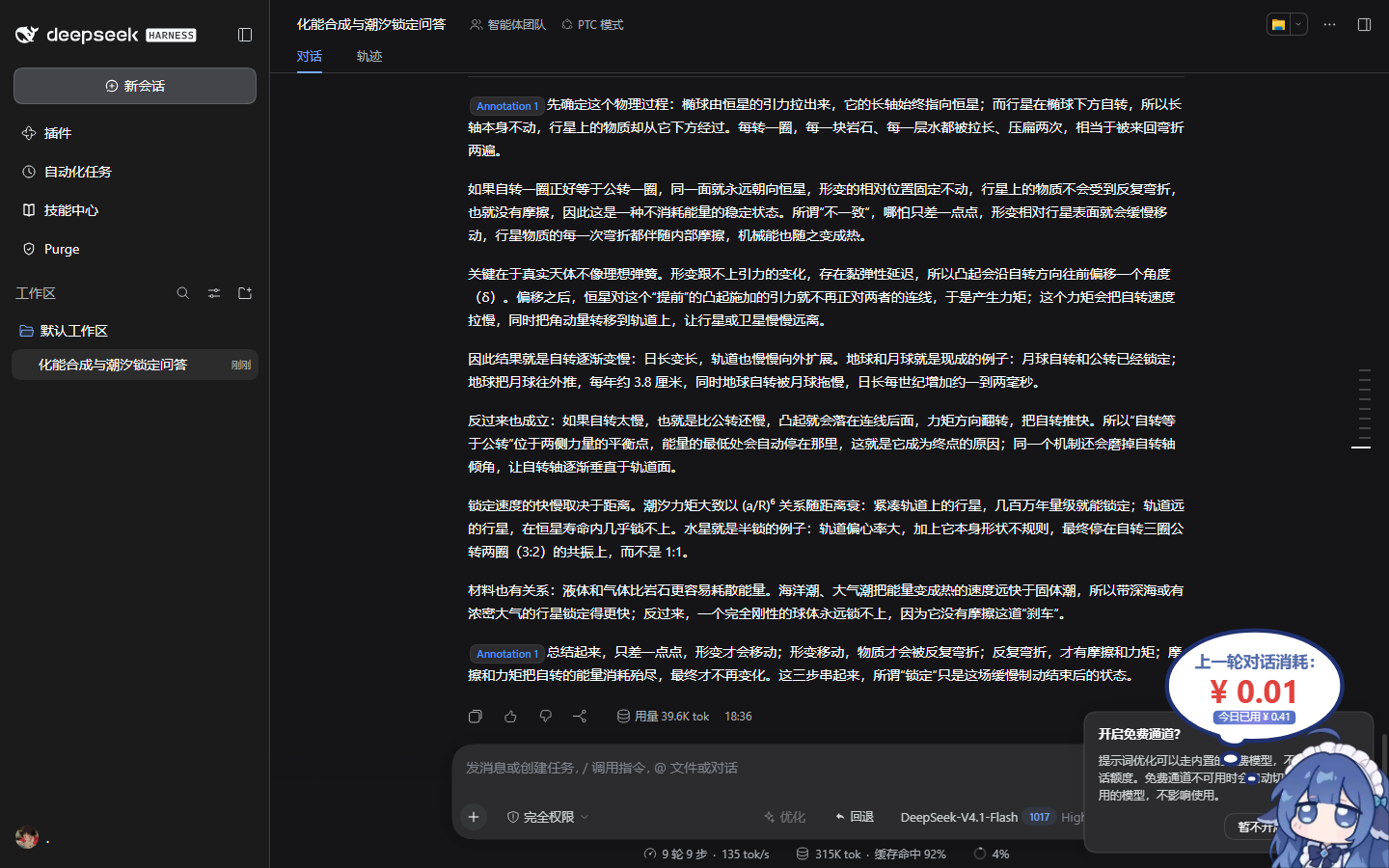
Select any text in an assistant reply to annotate it (the annotation body may be left empty = just mark the passage). Annotations accumulate across messages and turns. An Annotations ×N chip appears next to the input box — hover to view all annotations, remove them one by one. Press Enter and the annotation block goes to the model together with whatever question is in the input box. The annotation block never shows up as text in your own message bubble — only the question plus the chip (content visible on hover; hidden before paint, zero flicker). The model replies with Annotation 1: … … Annotation N: …, one per annotation, and every Annotation label in the reply is a hoverable chip showing the annotated passage and your note.
Form: official bundle plugin (dsh.bundle + a dsh.client declaration in package.json, injected into the browser via client-modules; the Node half is an empty implementation). Zero core changes — no DSH files are touched; cordis.patch.yml only inserts its own id once, and the profile patch stays [].
Features
Sidebar file annotations (DSH 0.1.6-alpha.1): select plain text, Markdown, or code in a workspace file preview and use the same annotate, save, and Enter-to-send flow. The editor and model-facing quote include the file path. After reloading and reopening the original file, its markers are restored; identical passages in different files remain separate. PDF, images, and HTML inside iframes are not covered.
| Feature | Description |
|---|---|
| Select-to-annotate | Select assistant text → toolbar "Annotate" → write your note (may be empty); dismiss by clicking elsewhere or pressing Esc |
| Numbered marker + highlight | A blue numbered marker + highlight anchored to the passage, viewport-anchored with collision avoidance, never lost when scrolled out of view |
| Cross-turn collection | Any number of annotations accumulate across messages/turns, numbered from 1 |
| "Annotations ×N" chip | Small chip beside the input box; hover shows every annotation, deletable individually |
| Enter sends with your message | Annotation block + the question in the input box are sent to the model together (the model receives the full content) |
| Hidden in your bubble | The annotation block is removed from your bubble's DOM the moment you send (before the browser paints), leaving only the question + the chip (hover to view); historical messages self-heal after a refresh |
| Numbered reply correspondence | A format instruction is injected into the message so the model replies Annotation 1: … … Annotation N: … one by one |
| Reply annotation chips | Annotation N: in the reply renders as hoverable chips showing the passage + your note |
Interaction flow
Select assistant text ──▶ Toolbar "Annotate" ──▶ Write note / save empty ──▶ Blue numbered marker + highlight
        ▲                                                        │
        └────────────── any number, accumulate across turns ◀────┘
                                │
                                ▼
              "Annotations ×N" chip beside the input (hover to view / delete)
                                │
                            Press Enter
                                ▼
    Model receives: annotation block (number + passage + note) + your question
    Your bubble: question only + "Annotations ×N" chip (zero flicker)
    Model reply: Annotation 1: … Annotation 2: … (hoverable chips)
Install
This fork is not published on npm. Install it straight from this repository:
# recommended — install from this repository
dsh plugin --profile <your-profile> add git+https://github.com/HuaLQIn/dsh-annotation-jump.git

# or — clone, then install from a local path (development / debugging)
git clone https://github.com/HuaLQIn/dsh-annotation-jump.git
cd dsh-annotation-jump
dsh plugin --profile <your-profile> add .

# then restart the web service — see "Restarting the web service" below
<your-profile> is the profile you actually run: web for the browser build, desktop for the desktop app.
Package name, and why the npm package is not this fork
This fork keeps the upstream package name @changfenhuang/dsh-annotation on purpose, so that swapping it into an existing DSH install does not break anything.
Two consequences, both important:
dsh plugin add @changfenhuang/dsh-annotationornpm install @changfenhuang/dsh-annotationpulls the upstream 1.4.x release from npm, not this fork. You will not get the chip-jump feature that way.- Because the package name is the same, this fork and the upstream version cannot be installed side by side — they overwrite each other.
Requirements
- Node.js 20 or newer (
engines.nodeinpackage.json). - A DSH build that provides
cordis4.x (peerDependencies).
Uninstall
dsh plugin --profile <your-profile> remove @changfenhuang/dsh-annotation
Then restart the web service. Annotation state lives in the browser's localStorage under keys starting with dsh.annotation.; uninstalling does not clear it, and you can delete those keys from the browser console if you want a clean slate.
Migrating from the old @omdsh-dev package name
If you installed the plugin before v1.4.2, remove the old dependency before installing the renamed package:
In this fork, replace the second command with the git install command above — the npm package name installs upstream, not this fork.
dsh plugin --profile web remove @omdsh-dev/dsh-annotation
dsh plugin --profile web add @changfenhuang/dsh-annotation
If dsh web still fails and mentions @omdsh-dev/dsh-annotation, remove only the stale dsh-annotation entry that uses that old name from ~/.dsh/profiles/web/cordis.patch.yml. The plugin now supplies the @changfenhuang/dsh-annotation entry itself.
| Do | Don't |
|---|---|
Only dsh plugin add / only write bundles |
Never insert the same id again in the profile/home cordis.patch.yml |
Self-check:
dsh --profile web --dump-config | rg "id: dsh-annotation"   # must be exactly 1 line
dsh web --no-open   # open the printed one-time token URL in a browser
In the browser console, window.__DSH_BOOT__.entries.find(({ id }) => id === '@changfenhuang/dsh-annotation') must return an entry with a url. dsh 0.1.2 no longer exposes the old bare per-plugin URL.
Restarting the web service
Pick the command for your platform:
# macOS (launchd)
launchctl kickstart -k "gui/$(id -u)/com.dsh.web"

# WSL / Linux with systemd user services
# The unit name may differ by install method; check with:
#   systemctl --user list-units | rg dsh
systemctl --user restart dsh-web
Environments without a service manager (e.g. some containers) often need no restart at all: client.js is served per request with no caching, so a hard refresh (Cmd/Ctrl+Shift+R) picks up plugin changes. The self-check commands above are platform-neutral.
Architecture notes
Pure browser-side: everything lives in
client.js(a hand-written CJS bundle, no build step, served no-cache per request)Message format (the literal protocol block sent to the model; follows the DSH
localepreference — zh or en):zh: 我批注了以下 N 处内容…\n\n1. 原文\n 批注:…\n\n请用「Annotation 1:…」…\n\n提问: en: I annotated the following N passage(s)…\n\n1. quote\n Note: …\n\nPlease respond… "Annotation 1: …"…\n\nAsk:The zh delimiter is 「提问:」(ask:) rather than 「问题:」(question:) — the heading line "回答我的问题:" also contains the latter, and the bubble-hiding surgery would misfire on it; the en delimiter is
Ask:. Hiding and reverse-parsing accept both languages plus the legacy 「问题:」 marker.Bubble hiding: user bubbles are plain-text rendered (a single MessageText node, not markdown); a MutationObserver in the microtask phase (before paint) splits at the last
\n提问:, cuts the annotation block, and attaches the chip; a 1 s polling fallback plus historical-message repair after refreshReply chips: after streaming settles (
data-streamingremoved), eachAnnotation N:is replaced with a hoverable chip; item data is stored on the most recent user message carrying the annotation tag (tag.__annotationItems) and rebuilt after refresh; snapshot the text nodes collected by the TreeWalker before touching the DOM, then replace one by one — replacing a child mid-walk invalidates the walker pointer and only the first node gets processedLocale-aware: UI copy and the protocol block follow DSH's
localeservice (zh/en, live switch); historical bubbles stay parseable across languages; missing locale service falls back to zhIME-safe: the Enter interception carries
isComposing/ keyCode 229 guards; never hard-edits the composer textarea's DOM;setDraftonly assembles the annotation block at the last moment before submit and never clobbers the user's draftNo reliance on send-completion event chains: bubble decoration uses MutationObserver + polling (
watchInputDraftcan be ineffective before the session is loaded at init; it is only a staging entry)Focus-chat compatible: works inside the focus conversation view of dsh-focus-chat — assistant rows there are
[data-focus-flow]containers with a*_assistantCSS-Modules class (plusdata-streamingwhile running); selection, annotation, reply chips, and re-anchoring all work in the focus tab alongside the main chat view
Developer testing
Version history
| Version | Highlights |
|---|---|
| v1.4.x | Locale-aware: zh/en UI copy and annotation protocol block, live switch via DSH locale service |
| v1.3.x | Numbered reply correspondence: format-instruction injection + hoverable Annotation N: chips (TreeWalker snapshot fix) |
| v1.2.x | Hidden annotation block in bubble: MutationObserver microtask zero-flicker + polling fallback + historical-message repair |
| v1.x | Self-contained annotation flow (replaces the v0.9 chip design): capture-Enter assembles the block and sends it with the message |
| v0.9.x | Early chip design (insertReference + slash codec), superseded by v1.x |
Friendly links
License
MIT
Demo
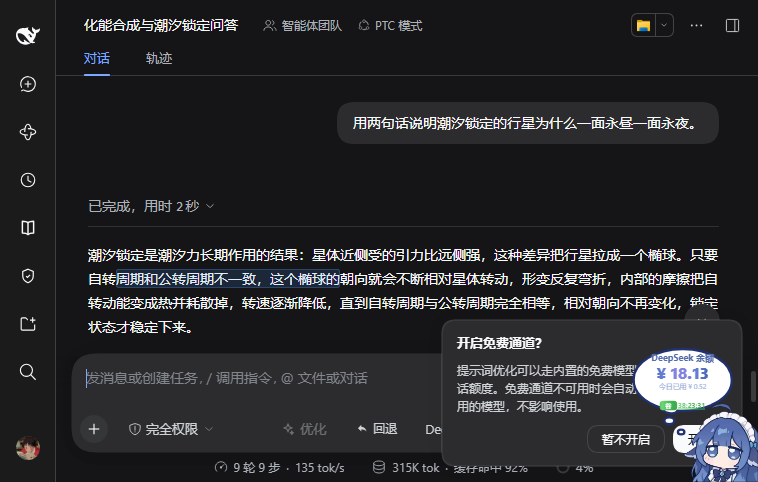
| Jump back to the annotated passage | Chips in a reply | Not-found notice |
|---|---|---|
 |
 |
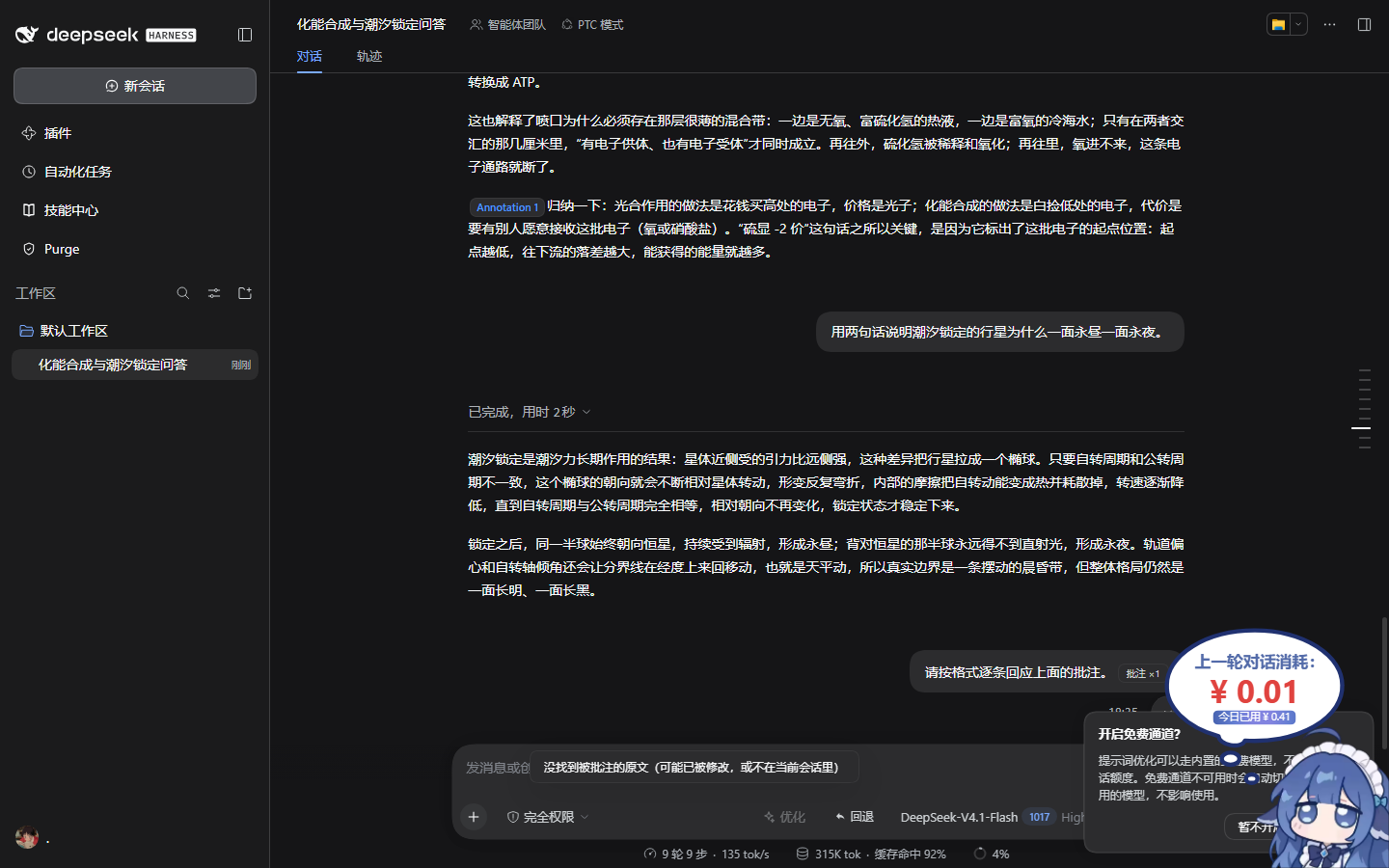 |
Screenshots come from a real DSH 0.2.1-rc.2 session (zh UI): select assistant text → annotate → send → the model replies with Annotation 1: … → click the chip → the page scrolls back to the quoted passage and flashes it briefly.
No comments yet. Be the first to write one.