dsh-model-settings
概述
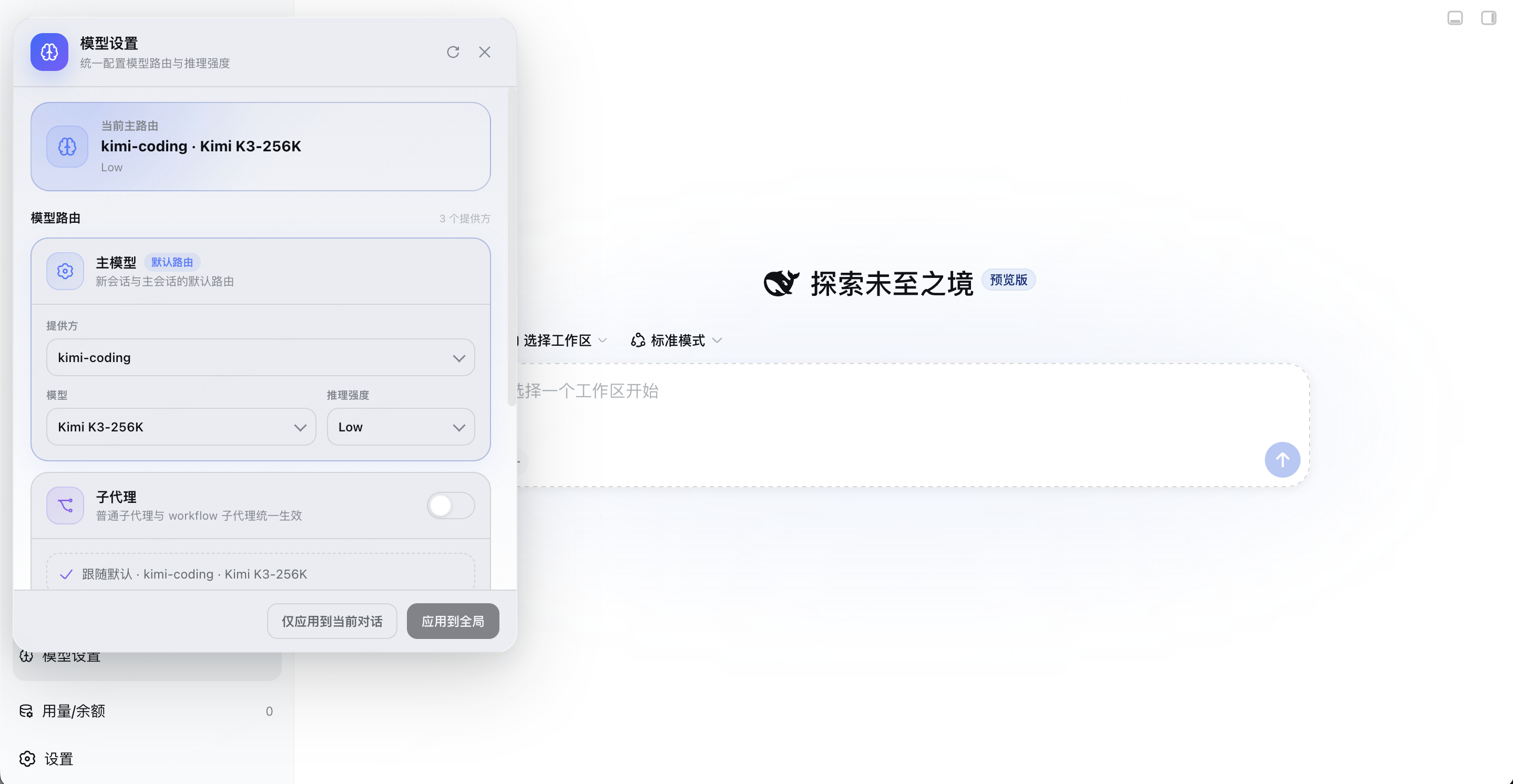
一个面板统一设置 dsh 里三类独立调用模型的对象:
- 主 agent(新会话默认模型)
- 子代理(subagent / workflow 拉起的子任务)
- goal 回合(goal 激活期间的回合)
每档独立设置 provider / 模型 / 推理强度(reasoningEffort),保存即热更新,无需重启。
两个动作分清:应用到全局写入配置并切换当前对话;仅应用到当前对话只切当前会话,不写配置。
起源
这个插件的诞生源于一次真实的账单事故。
2026 年 8 月 19 日,作者把 dsh 的主会话切到了 kimi(走订阅,想省点钱)。彼时 DeepSeek 刚推出峰谷计价——白天的账归梁文峰,夜里的价归梁文谷。白天是峰价,按量计费该留到夜里;白天干活,该走套餐。
结果晚上一看余额,DeepSeek 从五十多变成了 -1.6。
排查(解压全部 76 个会话日志逐条核对)后发现:主会话确实是 kimi,但下午拉起的 12 个子代理全部走了 DeepSeek 官方 API(deepseek-v4-flash),前一天晚上还有 40 个,两天合计约 ¥41–52。不是 key 泄露,而是 dsh 的模型路由机制:子代理继承的是创建时的默认模型(agent-default-model),不跟随主会话在界面里选的模型。
也就是说:一旦主会话被切到别的模型(比如 kimi),子代理并不会跟随——它们继承的是创建时的默认模型。于是有了这个插件:用一个面板统一控制主模型、子代理、goal 回合的模型与推理强度,保存即热更新。
它做什么
在 dsh Web 界面左下角(工作区下方、设置的上面,按拼音排在「用量/余额」之前)新增 模型设置 入口,用一个面板统一管住三类独立调用模型的"消费者":
| 档位 | 管谁 | 什么时候生效 |
|---|---|---|
| 主模型 | 新会话默认(写 agent-default-model) |
应用到全局:写全局配置 + 立即切换当前对话 |
| 子代理(含 workflow) | 所有子代理请求(agent/request 瀑布全局拦截) |
热更新:运行中的会话下一次拉子代理即生效 |
| goal 回合 | goal 激活期间的会话回合 | 热更新:下一个 goal 回合即生效 |
每个档位都可以独立设置 provider / model / 推理强度(reasoningEffort),也可以选择「跟随默认」。
两个按钮,别搞混
| 按钮 | 含义 | 一句话 |
|---|---|---|
| 应用到全局 | 写全局配置 + 立即把当前对话也切过去 | 现在和未来,都归你管 |
| 仅应用到当前对话 | 只切当前打开的对话,不写配置 | 只改当下,不留后患 |
热更新:保存后无需重启 dsh。新会话用新主模型,已运行会话的下一次子代理请求、下一个 goal 回合立即用新配置。
兼容性
当前最新的 @deepseek-ai/dsh 是 0.2.1-rc.2,和 DSH NEXT 2.0.19-next 的内核完全一致,这是主目标路径:SettingsForms + volatile Config,已用真实 host 启动和真实浏览器验证。旧版本是附加兼容,不影响最新版。
宿主侧不静态依赖某一代 dsh-settings 的具名导出,而是按运行时能力选择接入方式;客户端图标也做了新旧名字回退:
| dsh 版本 | settings 接入 | 图标导出 | 状态 |
|---|---|---|---|
0.1.7–0.2.x(含最新 0.2.1-rc.2) |
SettingsForms + volatile Config |
Icon*Regular/Medium |
主路径,已验证 |
0.1.2–0.1.6 |
SettingsProvider.installSection |
Icon*16 |
兼容 |
0.0.1–0.1.1 |
installSettingsSection + settingsNamespace |
Icon*16 |
兼容 |
已在 dsh 0.0.1-rc.1、0.1.0-rc.7、0.1.5-rc.2、0.1.7-rc.2、0.2.1-rc.2(DSH NEXT 2.0.19-next)上验证;最新 0.2.1-rc.2 还用真实 web profile 启动,调通了 state / save / 清除覆盖 / 重启恢复,并在真实浏览器里确认面板打开无报错。
环境要求
dsh Web UI:面板是 web 端 UI(
dsh.client.platform: "web"),web profile 和 DSH NEXT 桌面端(同样跑 web 客户端)都加载。peer 依赖:
包 版本范围 @deepseek-ai/cordis^4.0.1@deepseek-ai/dsh-llm0.0.1-rc.1–0.2.x(含预发布,显式分支)@deepseek-ai/dsh-settings0.0.1-rc.1–0.2.x(含预发布,显式分支)@deepseek-ai/schemastery>=3.18.1 <4.0.0dsh-llm/dsh-settings的完整范围在package.json:普通 semver 不会让预发布版本命中<0.3.0,所以按 patch 版本逐段写了||分支;最新0.2.1-rc.2也在范围内。必需的宿主服务:
agents、webServer(服务端),slots、locale(客户端)。可选服务,缺失时对应能力降级而不是崩溃:
服务 缺失时 settings面板可读不可写,保存返回 settings service unavailablellm模型目录为空,面板显示「没有可配置的模型提供方」 agentDefaultModel读不到当前默认模型,主路由显示「尚未设置」 goalsgoal 档不生效,其余两档正常
安装
Web 版(dsh 0.1.x / 独立 web profile)
# 从 GitHub 安装
dsh plugin --profile web add github:Howthemeaning/dsh-model-settings
dsh plugin 会把包安装进 profile 并自动把 dsh-model-settings 加入 dsh.profile.bundles 层(因为本包声明了 dsh.bundle.patch)。重启 dsh 后生效。
DSH NEXT 桌面端(0.2.x)
DSH NEXT 的 desktop profile 由 Electron 客户端管理,CLI 会拒绝 --profile desktop。打开侧边栏 插件 → 添加插件 → 安装第三方插件,填入 github:Howthemeaning/dsh-model-settings(也支持本机目录),然后重启客户端。
仅用于本地调试的手动方式:把包放进 ~/.dsh/profiles/desktop/node_modules/dsh-model-settings,并把 dsh-model-settings 同时加入 ~/.dsh/profiles/desktop/package.json 的 dependencies 和 dsh.profile.bundles,再重启 DSH NEXT。桌面端可能重写这个 profile,日常安装仍建议走客户端插件页。
卸载
# Web 版
dsh plugin --profile web remove dsh-model-settings
DSH NEXT 在侧边栏 插件 页卸载;手动安装的则从 ~/.dsh/profiles/desktop/package.json 的 dsh.profile.bundles 和 dependencies 里删掉 dsh-model-settings,再删除 ~/.dsh/profiles/desktop/node_modules/dsh-model-settings。
配置项
日常使用直接开面板即可 —— 面板保存写的是 settings 的用户层,优先级高于下面这些默认值。
如果要在部署时预置默认值(例如团队统一把子代理钉在便宜的模型上),在 profile 的 ~/.dsh/profiles/<profile>/cordis.patch.yml 里用 update 覆盖本插件的 config(Web 版是 web,DSH NEXT 是 desktop):
- update:
    - id: model-settings
      config:
        subagent:
          provider: deepseek-official
          model: deepseek-v4-flash
          reasoningEffort: low
两个可选档位,字段相同:
| 字段 | 类型 | 说明 |
|---|---|---|
subagent |
object | 子代理(含 workflow 子代理)的覆盖档,缺省为跟随默认 |
goal |
object | goal 激活期间会话回合的覆盖档,缺省为跟随默认 |
<档>.provider |
string | provider id,与面板「提供方」下拉一致 |
<档>.model |
string | model id |
<档>.reasoningEffort |
string | 推理强度 id,省略表示用模型默认值 |
主模型档不在这里配 —— 它写的是 agent-default-model 命名空间,由面板或 dsh 自身的设置负责。
开发
本包是手写 ESM,没有编译步骤:lib/index.js 是宿主侧,lib/client.js 是浏览器侧(手写 __ModuleLoader__ bundle,CSS 内联其中)。
peer 依赖由 dsh 自带,本地开发把 node_modules 指到对应版本的 dsh 安装目录即可;跑兼容性矩阵时分别指向 0.0.1 / 0.1.x / 0.2.x 的 node_modules:
ln -sfn "$(npm root -g)/@deepseek-ai/dsh/node_modules" node_modules
npm run check
| 命令 | 作用 |
|---|---|
npm run build |
校验发布产物齐全,并用 node --check 过一遍两个 js(无 transpile) |
npm run check |
build 之后跑 test/smoke.mjs 和 test/client-smoke.mjs |
test/smoke.mjs mock 一个最小 cordis ctx,覆盖 agent/request 的档位优先级与三个端点;它会按当前 dsh-settings 的导出自动走 0.0.1 / 0.1.x / 0.2.x 对应的接入路径。test/client-smoke.mjs 分别用旧 Icon*16 和新 Icon*Regular/Medium 的 primitives 加载客户端 bundle,防止面板注册成功但首次渲染因图标缺失崩溃。另外两个是排查工具,不在 check 里:test/read-log.mjs 解压并打印会话日志的 request/header,test/render-debug.mjs 在 node 里强制渲染面板以复现崩溃。
改完 lib/client.js 后,把文件同步到已安装副本并硬刷新页面才能看到效果(CSS 在首次加载时注入 <style>,但不需要重启 dsh):
cp lib/client.js ~/.dsh/profiles/<profile>/node_modules/dsh-model-settings/lib/client.js
发布到插件市场
市场目录来自 awesome-dsh-plugin,不是 dsh-market 应用仓库。发布步骤:
- 给本仓库加
dsh-plugintopic(CI 会检查)。 - 在 awesome 仓库的
data/plugins/新增Howthemeaning__dsh-model-settings.yml,只提交这一个文件,不要手改生成的 README。 - 提 PR;合并后站点和 dsh-market 会自动收录,通常一天内生效。
仓库根的 screenshots.json 声明市场详情页截图;字段格式见 awesome 仓库的 contributing.md。
License
MIT —— 本插件因一次真实的余额事故而生,希望它能帮你管住每一笔模型开销。
No comments yet. Be the first to write one.