dsh-plugin-token-usage
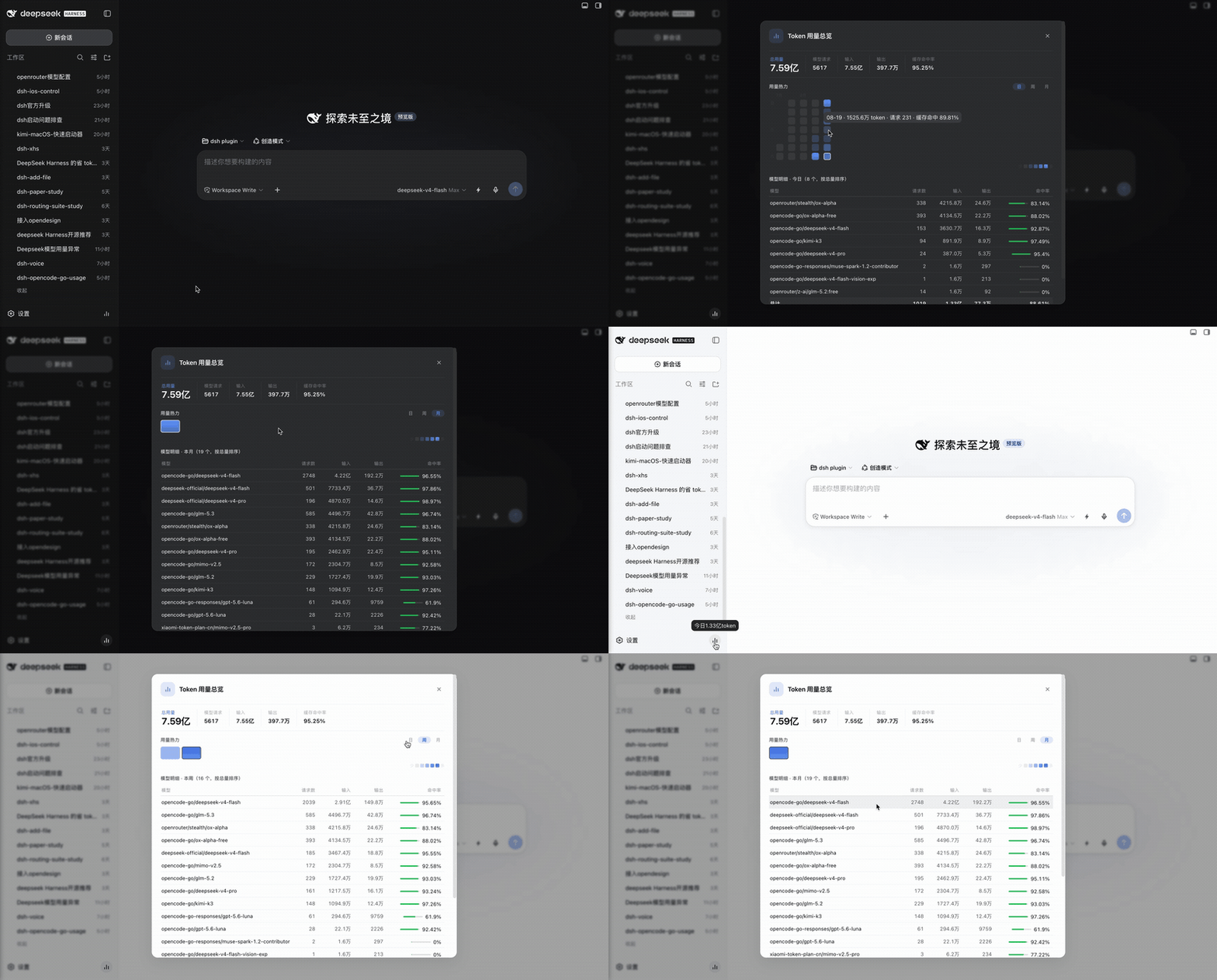
A DeepSeek Harness plugin that read-only scans your local session logs and renders a GitHub-style token usage heat map with a granularity-linked per-model breakdown — plus an instant "tokens today" badge on hover. Everything stays on your machine.
Compatibility: targets the new-generation DSH architecture (≥
0.1.2-rc.1). The tool run-card registers in thetool.call.toolviewkey domain under the wire tool nameusage_report; the legacytool.view.cordis/selfslot is now owned by the dynamic Client Guard and no longer applies to static plugins.
Features
- 🔥 GitHub-style heat map: one cell per day for the last 30 days (zero-usage days filled), Sunday-first columns, month labels, today outlined; 5-level accent scale normalized per view.
- 🗓 Day / Week / Month switcher: weeks start on Sunday, aligned with grid columns; the color scale renormalizes per granularity.
- 🫧 First-party tooltips:
08-22 · 420M token · 341 requests · 95.9% cache hit, left-edge aligned to each cell, shown instantly (delayMs=0), viewport-aware flip. - 🧩 Granularity-linked model table: exact in-window aggregation via session×day and model×day secondary maps (no approximations), with window totals row and empty state.
- ⚡ Sidebar hover badge:
1.25亿token today, silent 30s polling, rolls over at midnight automatically. - 🚿 Zero-usage filtering: models that only produced requests but no real tokens are excluded from the breakdown and from request totals.
- 🌗 Theme-native: every color maps to DSH theme variables (
--dsw-alias-*); light/dark just work. - 🛠
usage_reportmodel tool: ask your agent "how many tokens did I use today?" without opening the panel.
Install
Option A (recommended): one command, self-mounting
dsh plugin --profile web add dsh-plugin-token-usage
The package ships its own cordis.patch.yml bundle patch, so the host half (HTTP API +
model tool) activates automatically.
Option B: manual mount
Put this directory into
~/.dsh/profiles/web/node_modules/(orpnpm add file:it);Append to
~/.dsh/profiles/web/cordis.patch.yml:- insert: - id: token-usage name: 'dsh-plugin-token-usage' config: ttlMs: 15000Restart DeepSeek Harness.
⚠️ Pick one. If the bundle patch already mounts it, do NOT manually insert the same id — that would double-load the plugin.
Upgrading from the manual install? If you previously added the
insertblock above to your profile, delete it before restarting — with the self-mounting bundle patch present, the same id would be registered twice and startup crashes withduplicate loader entry id: token-usage.
Configuration
| Key | Default | Description |
|---|---|---|
ttlMs |
15000 |
Scan result cache duration (ms) |
scanTimeoutMs |
180000 |
Per-log decompression timeout (ms) |
Usage
- Web GUI: click the bar-chart icon on the sidebar settings row → usage modal; Esc or click the backdrop to close.
- Chat tool: ask your agent to call
usage_report(refreshforces a rescan,topcaps model rows — default 10, max 50).
Privacy
Read-only parsing of local logs under ~/.dsh/sessions/** (streamed zstd decompression,
8-way concurrency). No network requests, no telemetry, no writes.
No comments yet. Be the first to write one.