Plugin Discovery · DSH Plugin Discovery
A Plugin Discovery page under the DSH sidebar (below Automations): the complete GitHub-hosted DSH plugin marketplace, with 22k+ plugins and a one-sentence Chinese description for every project.
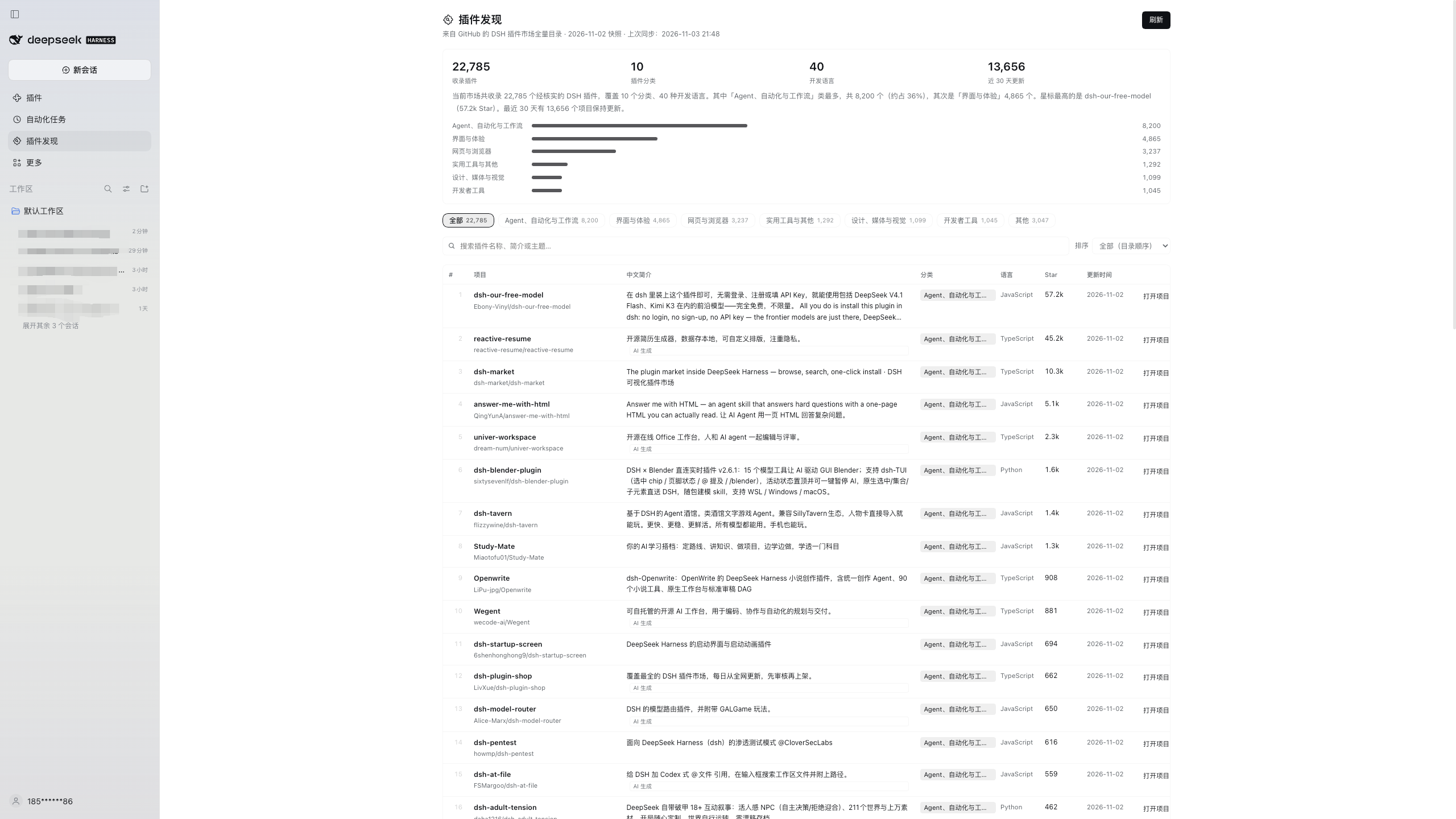
What it does
- The full catalog: syncs the community-maintained DSH plugin catalog on GitHub (every repository verified under the
dsh-plugintopic — 22,785 right now) and groups it into the same 10 categories the upstream catalog uses. - A Chinese description for every project: one sentence explaining what each plugin does. Repository-provided Chinese comes first, then an AI-generated Chinese summary bundled with this repo; newly listed projects get an automatic Chinese category summary until translated, with the original English description kept below.
- Head-category filters: only the 6 head categories become filter chips; the long tail folds into Other.
- Three sort modes: catalog order (default), most stars, recently updated — plus keyword search and 50 / 100 / 200 rows per page.
- Refreshes on every open: paints instantly from a local cache, syncs the latest catalog in the background, then swaps in the new data. The Refresh button in the corner forces a sync.
- Ecosystem overview: plugin count, categories, languages, projects updated in the last 30 days, an auto-generated Chinese summary, and a category distribution bar.
- Click any row or Open project ↗ to jump to the plugin's GitHub repository.
Install
Requires DSH V0.2.1-rc.5 or newer.
Open Plugins in the DSH sidebar → Add plugin → Install a third-party plugin.
Paste this repository's Git URL:
https://github.com/HiddenPuppy/dsh-plugin-discoveryAfter installation, Plugin Discovery appears under Automations in the sidebar. Refresh the window if it does not show up immediately.
You can also let an agent install it (plugin_manager → install_bundle with the Git URL or a local absolute path), or git clone this repo and pass the local path to the install dialog.
Data source
- Catalog: bruc3van/awesome-dsh-plugin, the community-maintained full catalog of the GitHub
dsh-plugintopic. - Reads its 13 per-category volumes (
catalog/*.md, ~6 MB total) instead of the 22 MBrepositories.json: lighter, friendlier to networks where GitHub raw is slow, and categories come straight from the volumes. - Tries
raw.githubusercontent.comfirst (freshest data) and falls back to the jsDelivr mirror per file when a request times out or fails. The page footer shows the upstream snapshot date and the last sync time. - The upstream catalog refreshes once a day; this plugin attempts a sync every time you open the page.
How the Chinese descriptions are produced
| Source | Count | Notes |
|---|---|---|
| Repository-provided Chinese | ~11.4k | The repository's own Chinese description |
| AI-generated Chinese | ~11.4k | Cached in zh-descriptions.json; edit it and refresh the page to override |
| Automatic category summary | new entries | Until a Chinese description exists, a sentence is generated from category and language |
Descriptions combine repository text with model-generated summaries and are for reference only; the repository itself is authoritative.
Project layout
.
├── index.js              # Host half: fetch volumes, parse, Chinese fallback, disk cache, API routes
├── client.js             # Browser half: sidebar entry + main panel page
├── cordis.patch.yml      # Bundle patch: inserts the plugin-discovery row
├── locale/{zh,en}.json   # Title and description shown by the plugin manager
├── icon.svg              # Plugin icon (puzzle piece + magnifier)
├── zh-descriptions.json  # AI Chinese description cache (owner/repo → Chinese)
├── docs/screenshot.png   # Usage screenshot
└── tools/                # Offline normalization check, route e2e test, live sync, cache warm-up
The Host half registers two routes on DSH's authenticated API channel:
GET /api/plugin-discovery/feed— the normalized catalog;?refresh=1starts a background refresh,?wait=1waits for the in-flight refresh before respondingGET /api/plugin-discovery/meta— sync status (last sync time, refreshing, error message)
The browser never talks to GitHub directly: download, parsing, classification and caching all happen in the Host; the browser only renders the result.
Development & verification
node tools/live-test.mjs                     # one real upstream sync, prints the stats
node tools/route-test.mjs /path/to/catalog   # route, cache and failure-fallback test with local volumes
node tools/warm-cache.mjs                    # pre-warm the current profile's disk cache
License
MIT
No comments yet. Be the first to write one.