READMESource: main@2e7e1683
dsh-bilingual · 中英双语对照(DSH 桌面端)
给 DeepSeek Harness 桌面端(DSH Desktop) 的聊天界面加一个「双语」开关:开启后,助手回复的每一段原文下面自动追加另一种语言。
适用平台: DSH Desktop(Windows / macOS / Linux 的桌面应用)。插件安装到
profiles/desktop;同一套 Web GUI 架构下也可用于dsh web,当前主要在桌面端验证。
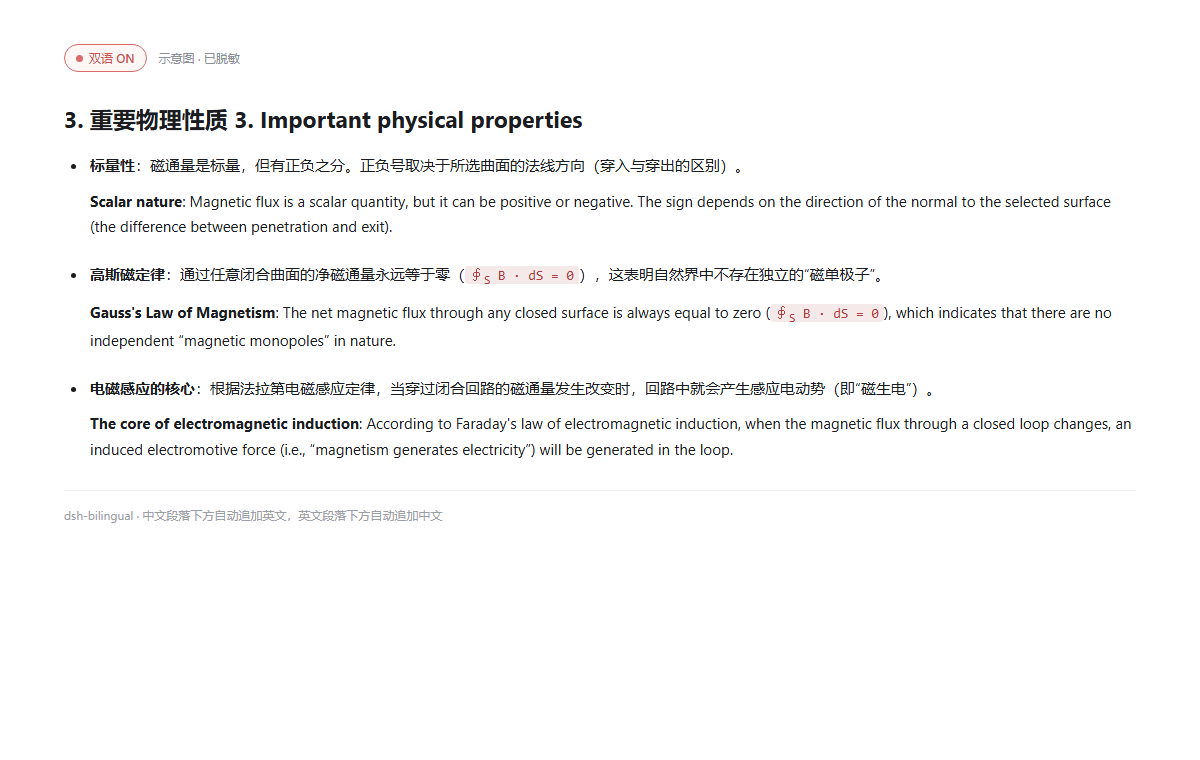
- 原文是中文 → 下面加英文;
- 原文是英文 → 下面加中文;
- 标题的译文拼在同一行(
3. 重要物理性质 3. Important physical properties); - 列表项的译文仍在该条项目符号内,前面留一个空行,和原文形成两段;
- 代码块、表格、块级公式、HTML 块原样保留,不翻译;
- 只改显示:会话记录、发给模型的上下文、复制按钮都仍是原文。
### 3. 重要物理性质 3. Important physical properties

- **标量性**:磁通量是标量,但有正负之分。正负号取决于所选曲面的法线方向。

  **Scalar nature**: Magnetic flux is a scalar quantity, but it can be positive or negative.
  The sign depends on the direction of the normal to the selected surface.

- **高斯磁定律**:通过任意闭合曲面的净磁通量永远等于零。

  **Gauss's Law of Magnetism**: The net magnetic flux through any closed surface is always zero.
安装
本插件按「本地 link」方式装进桌面 profile:
# 1. 退出 DSH(或装完后再重启)
# 2. 在插件目录执行:
& "$env:LOCALAPPDATA\Programs\DeepSeek Harness\resources\runtime\bin\node.exe" install.mjs --profile desktop

# 3. 重新打开 DSH
install.mjs 会做三件事(都会先备份 package.json):
- 在
profiles/<profile>/package.json的dependencies里加"dsh-bilingual": "link:<本目录>"; - 在
dsh.profile.bundles里加"dsh-bilingual"; - 在
profiles/<profile>/node_modules/dsh-bilingual建一个指向本目录的 junction。
也可以用 DSH 的插件管理器以「本地链接」方式安装;本质是同样三件事。
使用
- 打开 设置 → 双语。
- 插件会自动复用 DSH 已保存的
DEEPSEEK_API_KEY(~/.dsh/.credentials.yaml里的凭据),通常不用再填; - 如果 DSH 里没有,粘贴一个
sk-...,点「保存」,再点「测试连接」; - 优先级:插件里填的 Key > 环境变量
DEEPSEEK_API_KEY> DSH 凭据; - 插件 Key 存在
~/.dsh/dsh-bilingual.json(DSH_HOME下),不会写进会话,也不会回传到浏览器; - 模型默认
deepseek-chat,Base URL 默认https://api.deepseek.com,可改成任意 OpenAI 兼容端点。
- 插件会自动复用 DSH 已保存的
- 回到对话,点会话头部的 「双语」 按钮开启。
- 默认关闭;开关状态存在
sessionStorage,只对当前标签页生效; - 开启后,已经落定的助手消息会按可见区域逐条翻译;滚动到新消息时继续翻译;
- 翻译只发生在显示层,刷新页面后同一段会命中本机缓存,不重复请求。
- 默认关闭;开关状态存在
- 关闭开关即恢复原文(缓存保留,下次开启直接复用)。
它是怎么做的
- 浏览器半(
lib/client.js)以priority: -10影子注册conversation.chat.node的assistant-step渲染器;正文块从数据层拿原始 Markdown, 经lib/markdown.cjs的行级切分后,把译文插回同一份 Markdown,再交给官方MarkdownText渲染。标题/列表/引用因此保留原结构,列表译文仍在同一个<li>里。 - 宿主半(
lib/index.js)注册同源路由/api/dsh-bilingual/*,代理 DeepSeekchat/completions:Key 只在服务端,浏览器不直连;批量请求、超时、错误归一化都在这里。 - 纯函数(
lib/markdown.cjs)负责切分、语言判断、译文清洗与拼装,有独立单测。
开发与自检
# 构建:把 markdown.cjs 内联进 client.template.js → client.js
& "$env:LOCALAPPDATA\Programs\DeepSeek Harness\resources\runtime\bin\node.exe" build.mjs

# 测试(Markdown 切分/拼装、宿主路由、客户端 bundle 注册)
& "$env:LOCALAPPDATA\Programs\DeepSeek Harness\resources\runtime\bin\node.exe" --test tests/*.test.mjs
修改 lib/client.js 或 lib/index.js 后需要重启 DSH;只改客户端 bundle 时,重启后刷新页面即可。
已知边界
- 只翻助手回复正文:用户消息、思考链、工具调用、工具输出不翻;表格单元格、代码块、公式不翻。
- 只处理中文/英文:其他语言(日/韩/俄等)按“非中文即英文”的粗略判断处理,可能不翻或翻错方向。
- 目标语言是“另一种”:不做“固定翻成中文”;中文段配英文、英文段配中文,正是本插件的用途。
- 依赖 DSH 的 assistant-step 数据形状:DSH 大版本升级若改
node.data.blocks/MarkdownText,需要跟着适配;渲染抛错时会退回纯文本,不会白屏。 - API 费用:每段未命中缓存的文本都会发一次 DeepSeek 请求;长回复首次开启会批量请求,请留意用量。
卸载
- 编辑
profiles/desktop/package.json:从dependencies删掉dsh-bilingual,从dsh.profile.bundles删掉dsh-bilingual; - 删除
profiles/desktop/node_modules/dsh-bilingual(junction,不删源码); - 重启 DSH。
可选:删除 ~/.dsh/dsh-bilingual.json(会一并删掉保存的 Key)。
License
MIT
No comments yet. Be the first to write one.