dsh-webseek
English | 中文
Turn a DeepSeek web share link into a real session inside DSH.
English
What it does
In DSH Web, clicking Share on a chat gives you a public link (https://chat.deepseek.com/share/<id>). This plugin adds an import icon to the left sidebar: paste the link, pick a target workspace, and you get a new session with the same title — the full conversation from that share, ready to keep chatting in.
Screenshots
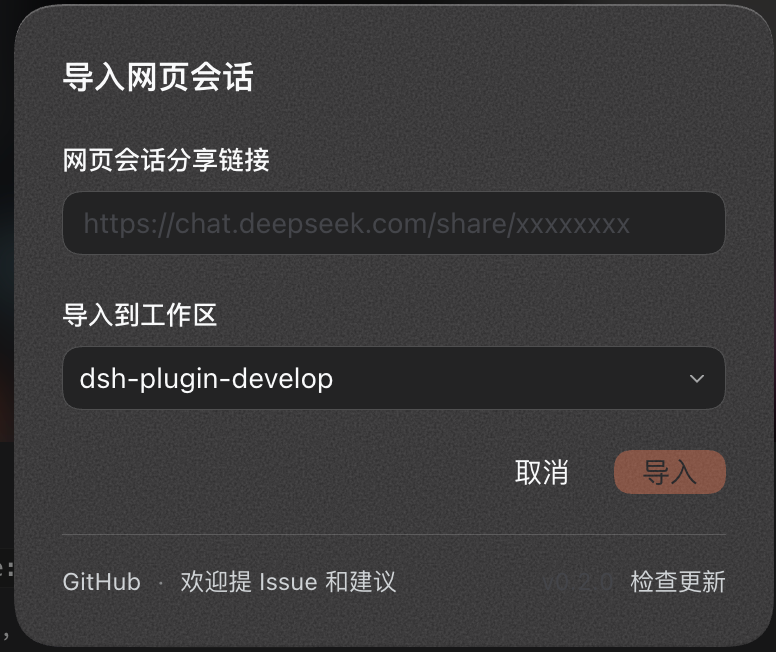
The import entry in the sidebar, and the import dialog with its footer:

Install
Requires DSH >=0.2.0-rc.2 <0.3.0 and Node >=22.
dsh plugin --profile <your-profile> add dsh-webseek
Usage
- Click the import icon on the left sidebar (in the collapsed 56px rail it sits in the plugin-icon row above the gear).
- Paste the share link (
https://chat.deepseek.com/share/…, or just the share id). - Pick the target workspace → Import.
- The session appears in the sidebar right away; click Open session in the dialog to jump to it.
The imported session is a cold session: the title comes from the share, and the body replays the mainline you see on the web page (user turns plus model answers, with the model's thinking kept as a [思考] block before each answer). Importing the same share twice does not create a duplicate.
Interface & update check
The dialog follows your light/dark theme and skin plugins automatically, with no hard-coded colors. Its footer holds a link to this project on GitHub, an entry to file issues or suggestions, the current version, and a Check for updates button that queries npm and shows "Up to date" or "New version vX.Y.Z".
Compatibility
- Runs on the DSH web client.
- Imported sessions cannot be continued in-place under an ACP backend (such as codebuddy-code): ACP only accepts sessions it created, and refuses a message to an imported history (
ACP_BACKEND_NEW_SESSION_REQUIRED). Native model backends (OpenAI-compatible) have no such limit and treat the history as context.
Known limitations
api/v0/share/contentis the web app's internal endpoint; it may break when DeepSeek changes. Failures are reported in the dialog.- The share title may just be the web default "Shared Conversation"; the plugin copies it as-is.
- The session shows up immediately; if it ever doesn't, refresh the page.
License
MIT
中文
把 DeepSeek 网页版的分享链接变成 DSH 里一个真实的会话。
简介
在 DSH 网页版点「分享」会得到一个公开链接(https://chat.deepseek.com/share/<id>)。本插件在左侧栏放一个导入图标,填两样东西——分享链接、目标工作区——就会得到一个同名的新会话,内容是那份分享的完整对话,可以直接接着聊。
界面截图
左栏的导入入口,以及带页脚的导入弹框:
安装
需要 DSH >=0.2.0-rc.2 <0.3.0、Node >=22。
dsh plugin --profile <你的 profile> add dsh-webseek
用法
- 点左侧栏的导入图标(折叠成 56px 导轨时,图标落在齿轮上方那行插件图标里)。
- 粘贴分享链接(
https://chat.deepseek.com/share/…或直接是分享 id)。 - 选目标工作区 → 导入。
- 左栏立刻出现同名会话;弹框里点「打开会话」直接跳过去。
导入的会话是「冷会话」:标题取网页上的标题,正文按网页上看到的主线回放(用户轮次 + 模型回答,模型的思考过程以 [思考] 段落保留在回答前面)。同一份分享重复导入不会重复建会话。
界面与检查更新
弹框跟随你的深浅色主题与皮肤插件自动切换,没有一处硬编码颜色。底部一行页脚:本项目 GitHub 链接、反馈 Issue 的入口、当前版本号,以及检查更新——点一下向 npm 查询最新发布版本,显示「已是最新」或「有新版本 vX.Y.Z」。
兼容
- 运行在 DSH web 客户端。
- 导入的会话在当前 ACP 后端(codebuddy-code 这类)下不能就地续聊:ACP 只认自己创建的会话,给外来历史的会话发消息会被拒绝(
ACP_BACKEND_NEW_SESSION_REQUIRED)。原生模型后端(OpenAI 兼容那类)没有这个限制,历史会作为上下文发出去。
已知限制
api/v0/share/content是网页版的内部接口,DeepSeek 改版即可能失效;失败时弹框会给出提示。- 分享标题可能就是网页默认的「Shared Conversation」——插件照搬网页标题。
- 导入的会话会立刻出现在左栏;万一没出现,刷新一下页面即可。
许可证
MIT
No comments yet. Be the first to write one.