READMESource: master@919bd461
dsh-plugin-keeper
English
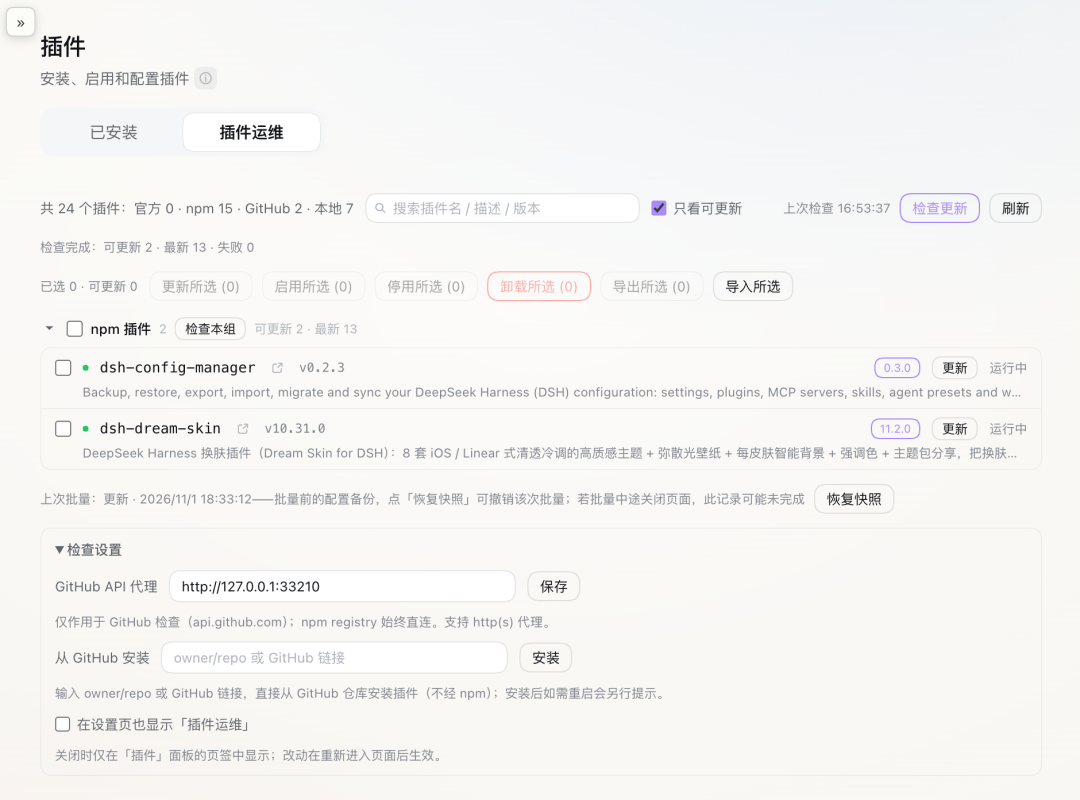
A plugin ops console for DeepSeek Harness (DSH 0.2.x): inventory the installed plugins, update / enable / disable / remove them in bulk, export and import them, install straight from GitHub, and search the list.
It only manages plugins you already have. No marketplace, no hot restart — the host requires a process restart when package contents change.
The sidebar Plugins page → "插件运维" tab
What you can do
- See every plugin installed in the current profile in one place, grouped by where it came from (official / npm / GitHub / local)
- Find out which ones have a newer version and update them in bulk
- Enable, disable or remove plugins in bulk
- Export selected plugins (with their config) into a zip, and import that zip on another machine
- Install a plugin straight from GitHub
- Search the list by package name, description or version
How to use it
- The panel lives in the sidebar Plugins page → "插件运维 / Plugin Ops" tab; it can also be shown in Settings
- Tick the rows you want, pick an action; a dialog lists what will be touched before anything runs
- Enable and disable take effect right away; updates and removals need a restart
- Export downloads a zip you can copy to another machine; import shows you what will happen before installing anything
- Type a package name fragment in the search box to filter; the matched parts are highlighted
When it helps
- Moving to a new machine: export the plugins you use and import them there
- Cleaning up after a burst of installs: review, then disable or remove in bulk
- Routine upkeep: one click to see what is outdated, then update in bulk
Install
dsh plugin add dsh-plugin-keeper
Restart dsh after installing (package changes require a process restart).
Compatibility
| Item | Requirement |
|---|---|
| DSH | >=0.2.0-rc.2 <0.3.0 |
| Node | >=20 |
First run
- Open sidebar Plugins → "插件运维": plugins are grouped by source and the totals match
dsh plugin ls - Click "Check updates": the badges match the latest versions on npm / GitHub
- Select a non-official plugin → "Disable": the row immediately shows disabled; enabling it works the same way
- Type a package name fragment in the search box: the list narrows and the matched parts are highlighted; Esc or × restores the full list
Roadmap
- Later: desktop profile adaptation, experimental items (nav icon injection, deep embedding in the official page)
License
MIT
中文
DeepSeek Harness (DSH 0.2.x) 的插件运维台:盘点已装插件、批量更新启停卸载、导出导入、GitHub 直装、搜索。
只管已装的插件;不做插件市场,也不做热重启(宿主要求包内容变更必须重启进程)。
侧栏「插件」→「插件运维」页签
能做什么
- 在一个页面里看全当前 profile 的插件,按来源分组(官方 / npm / GitHub / 本地)
- 查哪些插件有新版本,然后批量更新
- 批量启用、停用、卸载
- 把选中的插件(连同配置)导出成 zip,在另一台机器导入
- 直接从 GitHub 装插件
- 按包名、简述或版本搜插件
怎么用
- 面板在侧栏「插件」→「插件运维 / Plugin Ops」页签;也可以在设置页开一个同名入口
- 勾选要处理的行 → 选动作 → 执行前弹框会列出将要处理的包名
- 启用与停用立即生效;更新与卸载需要重启
- 导出后浏览器会下载 zip,拷到另一台机器导入;导入会先给你看会发生什么,确认后才装
- 搜索框输入包名片段即可过滤,命中的部分会高亮
什么时候用
- 换机器:把在用的插件导出,到新机器导入
- 装了一堆想清理:统一勾选后批量停用或卸载
- 日常维护:点一次看清哪些过期,再批量更新
安装
dsh plugin add dsh-plugin-keeper
安装后重启 dsh(包内容变更需要进程重启生效)。
兼容性
| 项 | 要求 |
|---|---|
| DSH | >=0.2.0-rc.2 <0.3.0 |
| Node | >=20 |
上手检查
- 打开侧栏「插件」→「插件运维」,插件按来源分组,总数与
dsh plugin ls一致 - 点「检查更新」,徽标与 npm / GitHub 网页上的最新版本对得上
- 勾一个非官方插件 →「批量停用」,该行状态立刻变成「已停用」;再启用同样立刻恢复
- 在搜索框输入包名片段,列表收敛,命中的部分高亮;Esc 或 × 恢复全量
Roadmap
- 后续:desktop profile 适配验证、nav 图标与深度嵌入官方页等实验项
License
MIT
No comments yet. Be the first to write one.