





English · 中文
中文: DeepSeek Harness 图像理解插件 · 8 种分析模式(描述 / OCR / 图表取数 / UI 评审 / 目标检测 / 对比 / 代码生成 / 端点诊断)· 兼容任意 OpenAI / Anthropic 视觉端点 · 支持本地图片、链接与截图 · 密钥掩码、隐私优先。
✨ Why DSH Vision Analysis?
Your text-only agent can finally "see" — with a free vision source built in: install the plugin, paste an image, ask. No API key, no model swap, no local-file dance.
- 🆓 Built-in FREE vision source — ships pointed at OVHcloud AI Endpoints' anonymous tier (Qwen2.5-VL-72B). Zero cost, zero key, zero config.
- 🖼️ Image bridge for text-only models — paste or send images directly in conversation; the plugin routes them to vision automatically (native multimodal routes stay untouched).
- 🔁 Rate-limit failover — when one vision model is throttled, the next in the chain answers; if everything is exhausted you get clear recovery guidance instead of a failure.
- 🧾 Structured output —
chart-dataandocrreturn machine-readable JSON (rows,lines, …) your agent can consume directly. - 8 analysis modes out of the box —
describe,ocr,ui-review,chart-data,object-detect,compare,code-gen,debug— each with a tuned instruction template. - Any vision endpoint — OpenAI
chat/completionsor Anthropicmessageswire formats. MiMo, Step, SiliconFlow, OpenRouter, Gemini (OpenAI-compat), GPT-4o, Claude, Qwen-VL, or a local Ollama / LM Studio / vLLM. - Any input — absolute local path,
http(s)URL, or base64data:URL; up to 4 images per call with built-in comparison. - Privacy-first by design — image bytes never enter the session log or reach your main model; only the vision model's text comes back. The
debugreport never reveals your API key (fully masked). - Production-grade plumbing — result caching, retry with exponential backoff, live configuration from
Settings → 插件配置. - Dependency-light — just
@deepseek-ai/schemastery+@deepseek-ai/dsh-settingsat runtime.
🖼️ Demo
Paste an image, ask a question, get a real answer — even on a text-only model. The image is routed to your configured vision endpoint and the analysis lands straight in the conversation:
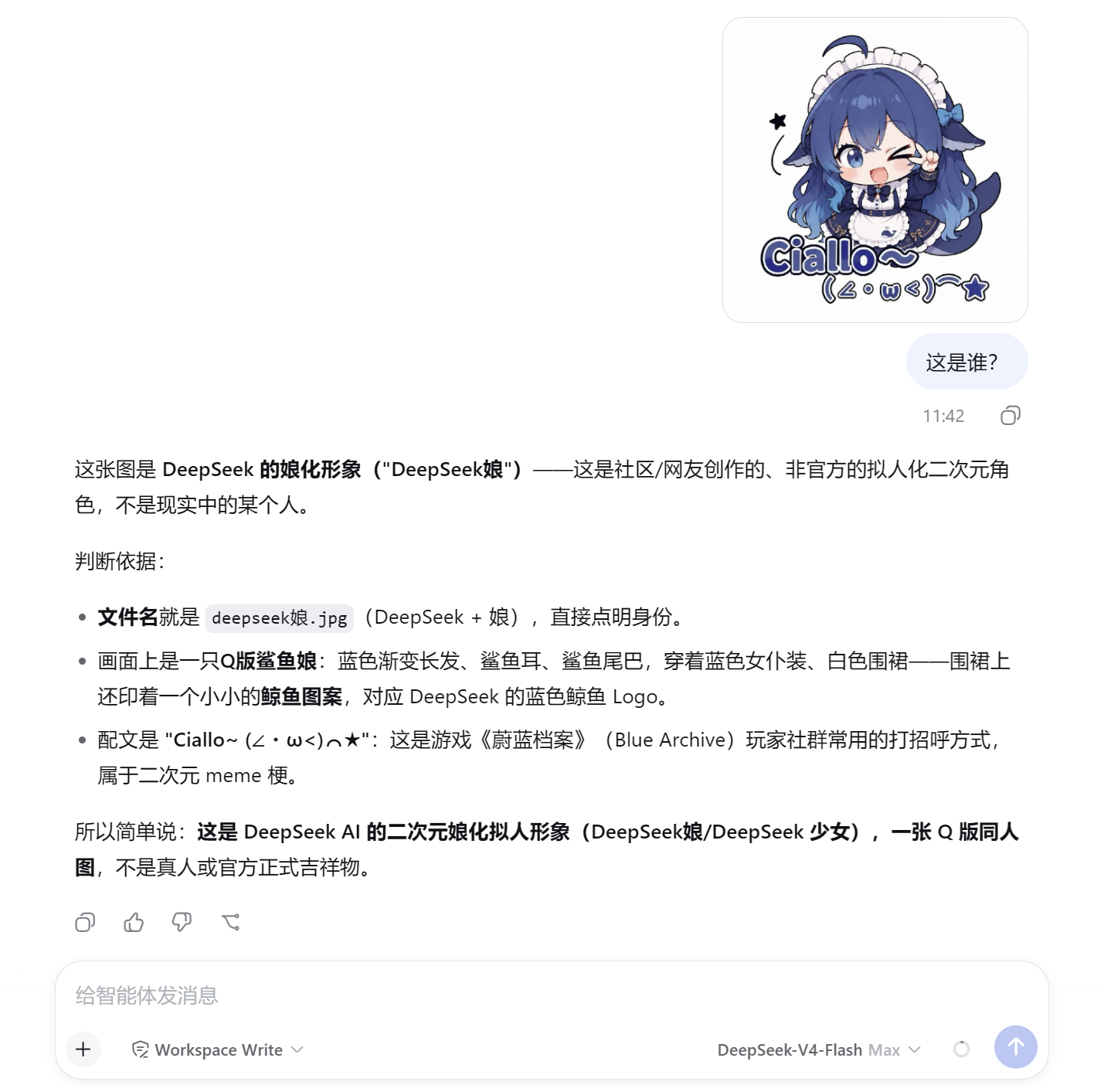
In the screenshot: a pasted image plus the question "这是谁?" — the vision endpoint identifies the DeepSeek fan-art character and walks through its reasoning, all without switching models or saving files locally.
More scenarios — real outputs from the free vision models
Three everyday capabilities, each answered by a different free vision model automatically (when one is rate limited, the plugin fails over to the next).
1. OCR — pull text out of documents and screenshots
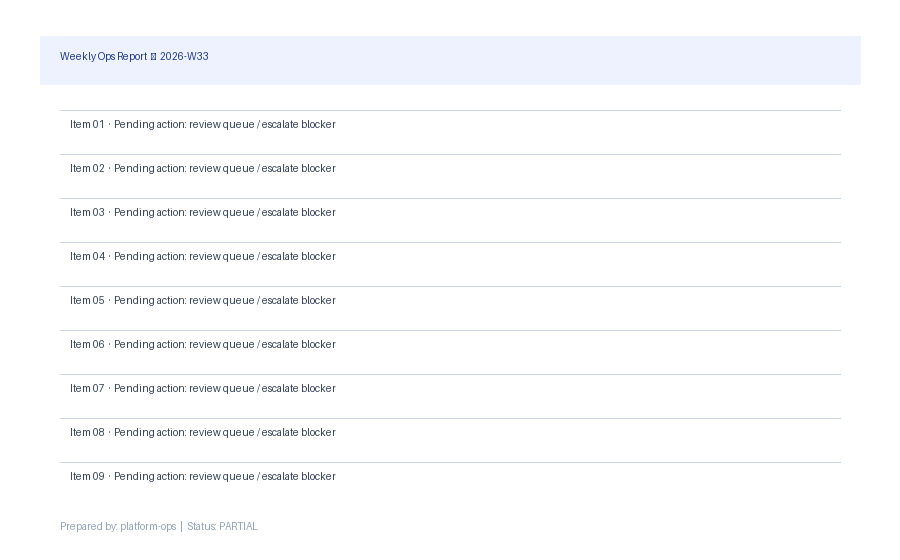
Weekly Ops Report — 2026-W33 Item 01 · Pending action: review queue / escalate blocker Item 02 · Pending action: review queue / escalate blocker … (all lines transcribed verbatim)
2. Charts → structured data your agent can use
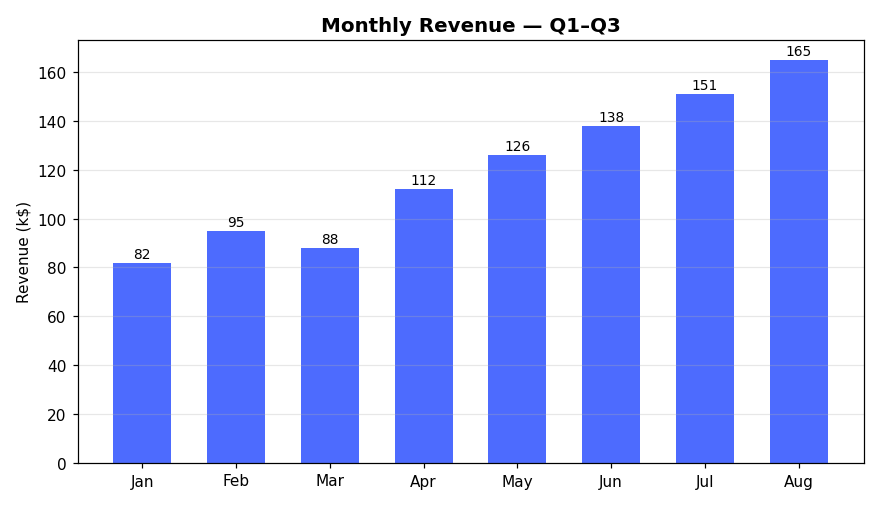
{ "title": "Monthly Revenue — Q1–Q3", "rows": [["Jan","82"],["Feb","95"],…] }
3. UI review — a designer's eye on your interface
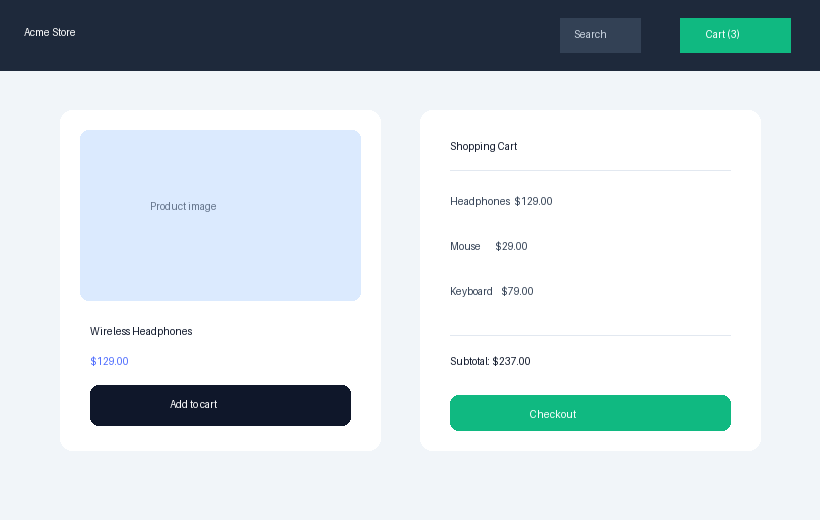
• Inconsistent button styling across "Add to cart" and "Checkout" (High) • Product name and price lack visual hierarchy (Medium) • Cart items unstructured; subtotal not visually distinct (Medium)
🚀 Quick start
# From GitHub (no npm needed)
dsh plugin --profile web add github:Harvey-Will/dsh-vision-analysis

# Or one-click from the plugin market inside the Harness
Restart the web profile and ask your agent to analyze an image by path or URL:
"Use analyze_image to OCR
/tmp/screenshot.pngand tell me what it says."
That works with zero configuration: the plugin ships pointed at a free anonymous vision endpoint (OVHcloud AI Endpoints, Qwen2.5-VL-72B) — no API key required.
Two ways to use it
1. analyze_image tool (zero config) — the agent reads a local path, an http(s) URL, or a data URL. Works immediately after install.
2. Paste images straight into the conversation (image bridge) — requires two setup steps:
- add the model to
bridgeModelsin the plugin config; - declare
imagein that model'sinputModalitiesinsettings.yaml(this is what lets the Harness admit image prompts for it).
# ① ~/.dsh/settings.yaml — under llm-deepseek.models, for each text-only model:
#    inputModalities: [text, image]
# ② plugin config:
bridgeModels: [deepseek-v4-flash]
config:
  apiFormat: openai          # or anthropic
  baseURL: https://api.siliconflow.cn/v1
  apiKey: your-key           # leave empty for anonymous/local endpoints
  model: Qwen/Qwen2.5-VL-72B-Instruct
  fallbackModels: [Qwen3.5-9B]   # same-endpoint alternates tried on HTTP 429
🧭 Choose the right mode
| Mode | What it does | Built-in tokens / temp |
|---|---|---|
describe |
General understanding (default) | 4096 / 0.7 |
ocr |
Exact text extraction | 4096 / 0.0 |
ui-review |
Design review with score | 4096 / 0.5 |
chart-data |
Tables + trend from charts | 4096 / 0.0 |
object-detect |
Objects, people, activities | 4096 / 0.5 |
compare |
Two+ images side by side | 4096 / 0.5 |
code-gen |
HTML+CSS from a UI shot | 4096 / 0.3 |
debug |
Endpoint connectivity report | 4096 / 0.7 |
🔧 The tool
analyze_image(image?, images?, mode?, prompt?)
image— absolute path,http(s)URL, ordata:image/...;base64,URLimages— up tomaxImages(default 2, max 4) for multi-image callsmode— one of the eight above;describeby defaultprompt— your precise instruction overrides the mode template
A targeted prompt beats a generic description:
prompt: "Extract the table as CSV">>prompt: "Describe this".
⚙️ Configuration
- id: vision-analysis
  name: dsh-vision-analysis
  config:
    apiFormat: openai          # openai | anthropic
    baseURL: https://api.siliconflow.cn/v1
    apiKey: ''                # empty → UNIVERSAL_VISION_API_KEY → local model
    model: Qwen/Qwen2.5-VL-72B-Instruct
    defaultMode: describe
    maxImages: 2              # 1-4
    maxBytes: 10485760        # per-image cap (10 MB)
    timeoutMs: 120000
    maxTokens: 4096
    temperature: 0.7
    modes:                    # per-mode overrides
      ocr:
        temperature: 0.0
All fields are editable live from Settings → 插件配置 (API key field is masked).
🔒 Security & privacy
- Your images stay private: local files are read by the tool and sent base64-embedded only to your configured endpoint; the raw bytes never enter the session log or reach the main model.
- Your key stays secret: never embedded in requests to the main model; the
debugreport only says configured / not configured — no prefix, no characters. - Prefer the environment: keep keys out of
cordis.yml— useUNIVERSAL_VISION_API_KEYor the masked secret field in Settings. - Endpoints are not sandboxed by tool approvals — only point the tool at endpoints you control, and only reference
http(s)image URLs you trust the endpoint to fetch. - Installing a plugin runs its code with your permissions — review the source before installing.
🧩 Compatibility
| Supported | |
|---|---|
| DeepSeek Harness | 0.1.0-rc.x (verified on rc.8) |
| Node.js | ^22.19 || >=24 |
| Vision wire formats | OpenAI chat/completions, Anthropic messages |
| Image formats | PNG, JPEG, GIF, WebP, BMP (local / URL / data URL) |
⚠️ Community plugin — not an official DeepSeek product. The Harness API is in developer preview and may break between versions.
Built for the DeepSeek Harness community · dsh-plugin topic · awesome-dsh-plugin
Found a bug or have an idea? Open an issue — PRs welcome.
No comments yet. Be the first to write one.