dsh-background-by-model


English | 中文
Forked from
Tkingxiao/dsh-any-backgroundand renamed todsh-background-by-model.
A DeepSeek Harness appearance plugin built around an ordered list of model rules. Each rule carries its own wallpaper, theme color, layout mode, framing, opacity and blur — switch the model, and the background switches with it, through the global switch effect you choose on the Config page.
v0.3.0 is a breaking release. Video wallpapers, generated dynamic backgrounds and the single global theme color were removed. See the v0.3.0 entry in CHANGELOG.md.
How Model Rules Work
A rule is a match string plus one complete set of background settings. When you switch models, the plugin reads the current session's model name, scans the list top-down, and applies the first rule whose match string appears anywhere in that model name (case-insensitive). If nothing matches, rule 1 is used — rule 1 doubles as the fallback.
Example list:
| # | Match string | Wallpaper |
|---|---|---|
| 1 | deepseek |
Image A |
| 2 | flash |
Image B |
| 3 | glm |
Image C |
| Current model | Result | Why |
|---|---|---|
DeepSeek-Flash |
Rule 1 → Image A | deepseek matches first |
GLM-Flash |
Rule 2 → Image B | flash is earlier in the list than glm |
Qwen-Flash |
Rule 2 → Image B | flash matches |
GLM-Turbo |
Rule 3 → Image C | only glm matches |
Kimi-K3 |
Fallback → Rule 1 → Image A | no rule matches |
Notes:
- Order matters. The first match wins, not the best match — drag rules to reorder them.
- An empty match string makes a rule skip matching entirely and act purely as a fallback. A single rule with an empty match string is therefore "one wallpaper everywhere".
- The match string is compared against the concatenation of provider, model id and model display name, so any of the three can be used to select a rule.
- The current model is read from this session's durable model selection (the
modelSelectionprojection — the same value the composer's model picker renders), so switching the model inside a session takes effect immediately. The Model Background page shows which model was read, and labels it host default when only the host-wide default was available instead of this session's own selection.
Note: the example table above has no
kimientry, so switching to Kimi falls back to rule 1 = Image A, which looks like "nothing happened". Add a rule with the match stringkimito give Kimi its own wallpaper.
Screenshots
One interface, one config — only the current model differs:
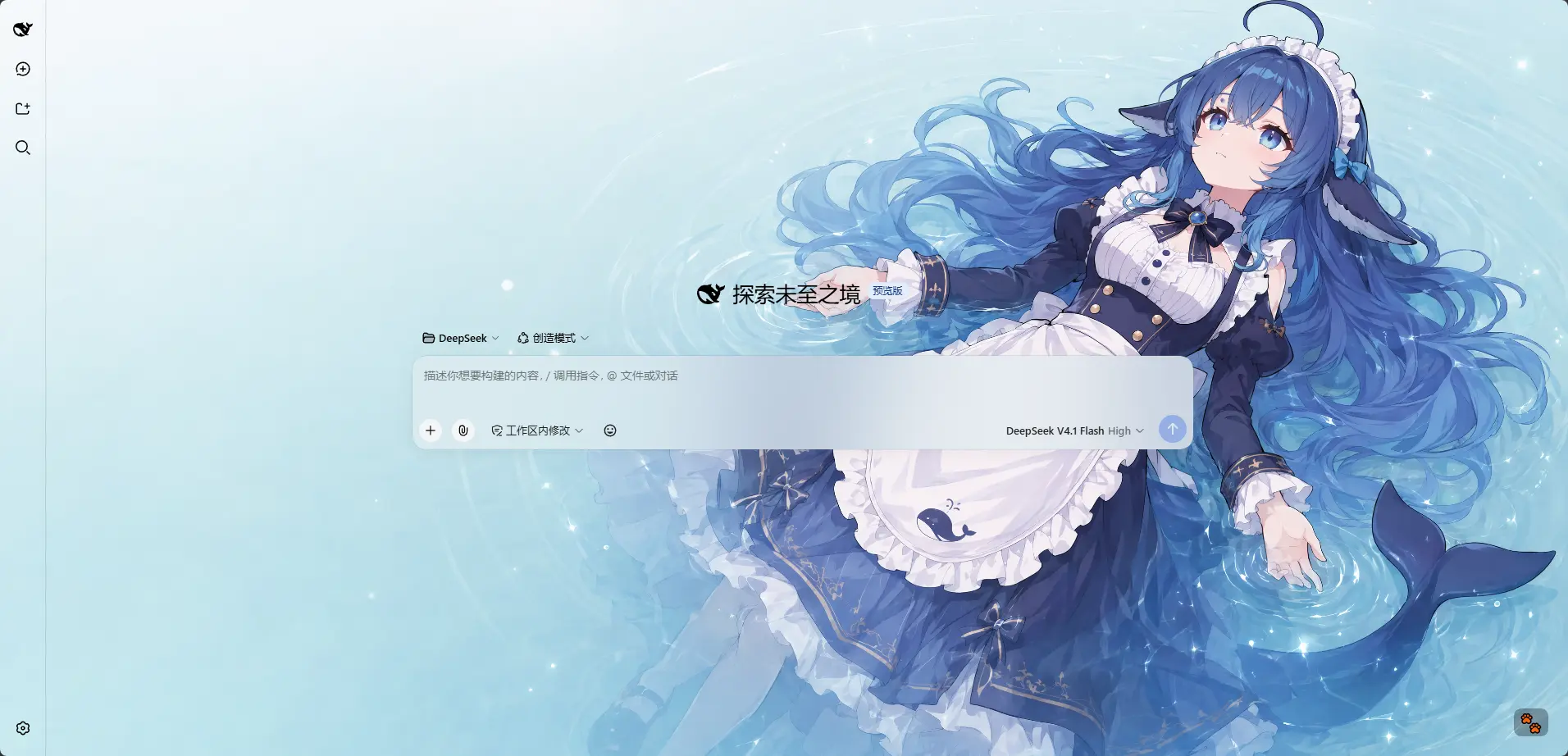
DeepSeek V4.1 Flash · matched the rule whose match string contains deepseek: a light wallpaper with a matching theme color
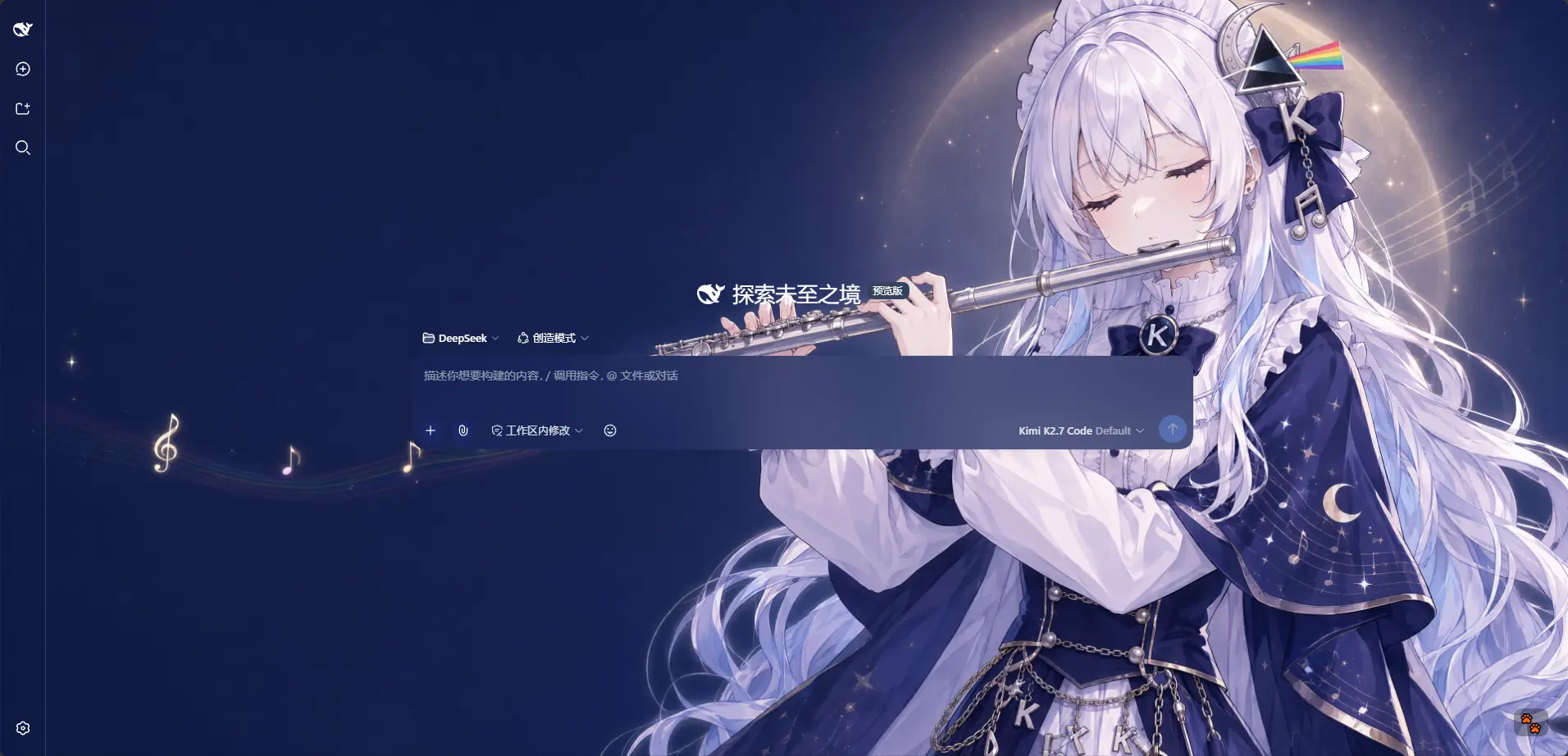
Kimi K2.7 Code · matched the rule containing kimi: a dark wallpaper, a dark theme, and the whole interface reskinned with it
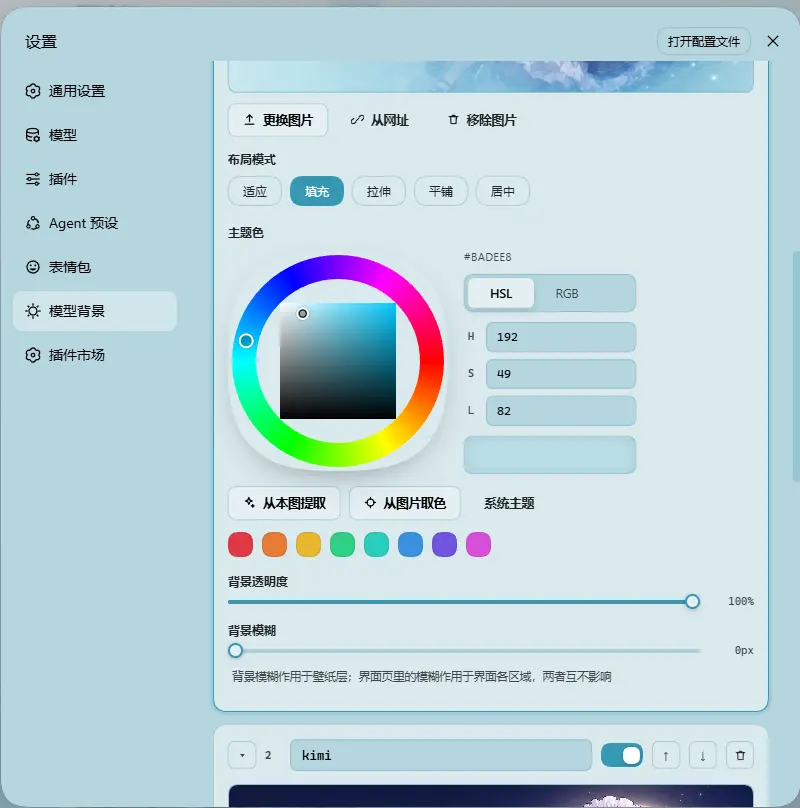
One rule on the Model Background tab · image, layout mode, theme color (wheel / HSL / RGB / extract from this image / pick from image), background opacity and background blur are all properties of that rule alone
Example wallpaper art from ZipZipPipe on bilibili
Features
Model rules
- Ordered Rule List — Add, remove, reorder and name rules. Each rule is matched by its own match string; the first hit wins and rule 1 is the fallback.
- Live Match Readout — The top of the Model Background tab shows the current state, e.g.
Current model deepseek-flash → matched · Rule 1, so you can verify a rule on the spot. If the current model can't be detected, a hint is shown instead. - Per-rule Appearance — Every rule owns its wallpapers, layout mode, opacity and blur, and every image owns its framing and its theme color. Nothing is shared globally except the Interface tab.
- Several Images per Rule — A rule holds an ordered set of images, shown as a filmstrip: add several at once (file picker, drag & drop, or a list of URLs, one per line), reorder them, promote one to first, replace one in place (which keeps its position in the rotation), or remove them one by one. The image a rule paints when nothing rotates is its first. Removing the last image simply leaves the rule empty — and empty is not the same as off: while the rule keeps a theme color of its own it still matches, still serves as the fallback, and paints the interface instead of a wallpaper; only a rule with neither (a freshly added one) is skipped by matching. So an emptied rule is a visible, reversible state rather than one you get stuck in. While it holds no picture the filmstrip is hidden and the big preview tile is the upload button, so there is exactly one obvious place to add one.
- Import / Export — Export every rule including all of its images to a
dsh-background-by-model-theme.json(format version 6, images inlined as base64) and restore it anywhere. Files written by earlier releases still import: each rule's single image is lifted into its image list, a color written before per-image colors is lifted onto every image that has none, and a file written before the switch effect gets that setting's shipped default — so an older theme file restores its look unchanged. - File-based Persistence — All settings and images are stored on the filesystem under
~/.dsh/.dsh-background-by-model-data/, notlocalStorage. - Automatic Migration — Old single-wallpaper configs are upgraded in place on first read. See the v0.3.0 entry in CHANGELOG.md.
- Bilingual — Full Chinese / English UI with automatic locale detection.
- Theme Watchdog — Re-asserts the custom theme if the host resets it.
Image rotation
Per rule, and off by default — cycling spends real bandwidth, memory and battery, so nothing turns it on for you.
- Enable it per rule — the switch appears in the rule card and only becomes usable once the rule holds two or more images.
- Dwell time — 10 s / 30 s / 1 min / 5 min / 30 min / 1 h, or any custom value in seconds (clamped to 5 s – 24 h).
- Order — In order walks the list top-down and wraps around; Shuffle picks uniformly among every image except the one on screen, so a tick never looks like it was missed.
- Also step on a model switch — an optional second trigger: every time the model changes and lands on that rule, it steps once. That is the whole feature for a rule meant to show "a different picture every time" without any timer running.
- Only the active rule rotates — one timer for the whole plugin, aimed at whichever rule the current model resolved to. It stops while the tab is hidden and resumes on a fresh interval; a single-image rule (and every holiday) never schedules anything.
- Next image — steps the wallpaper immediately, for when you want to check the set.
- What follows a switch is the rule — except the color, which travels with the picture — layout mode, opacity and blur belong to the rule and stay put. The theme color belongs to the image, so a rotation can move through a green picture, a red one and a system-themed one, and the interface palette changes with the wallpaper. The cross-fade between two images is the same one a model switch already used.
- Framing is per image, and so is the color — a crop and an accent both belong to a picture, so each image keeps its own while sharing the rule's layout, opacity and blur. The filmstrip marks the images that carry a color of their own, and the color controls always say which image they are editing.
- Only the images it needs are loaded — boot reads each rule's first image; the rest stream in when a card is expanded or when the rotation is about to need one. Ten images per rule therefore do not mean ten wallpapers transferred before the first frame.
Switch effect (global)
What a wallpaper change looks like. It lives on the Config page, it is the same for every rule (a rule has no notion of a transition), and it covers every way the wallpaper changes: a model switch, a rotation step, the manual Next image, and a holiday taking over.
- Four effects — Cross-fade (the blend every earlier release performed, and therefore the default), Instant (a hard cut), Zoom in (the incoming image settles from 6% larger) and Slide in (it pushes in from the side). Zoom and slide animate
transform, which the wallpaper layer had never used, so neither costs a byte of extra transfer. - Easing — standard / linear / ease-out / ease-in-out. The row is not rendered while the effect is Instant: a hard cut has no curve to shape, and a control that does nothing is worse than no control.
- One duration for every switch —
0–3000 ms, and0is a hard cut rather than "unset". It replaced the per-rulerotate.fadeMs, which from 0.7.0 on was a duration with no control anywhere — it could only be hand-edited — so a hand-tuned value is folded into this one when a config that predates the setting is first read (a value equal to the shipped 320 ms is ignored, so an ordinary config keeps the ordinary default). Instantand0ms are the same hard cut — two ways of asking for one thing, so both are honoured instead of one being read as "not set".- Reduced motion is a veto, not a shorter animation — while
prefers-reduced-motion: reduceis in force nothing animates at all, and the card says so rather than previewing something the interface will not do. - A preview swatch, because a wallpaper fading into itself is invisible — replaying the effect on the wallpaper already on screen would show nothing, which is exactly the "I changed it and nothing happened" this plugin keeps designing out. The swatch replays the chosen effect with the duration a real switch would use right now, and picking a different effect replays it at once.
- The interface colour changes on the same clock — a theme colour is one rewrite of the token block, which used to change every surface in a single frame while the wallpaper faded. The alias tokens are registered as colours so they interpolate over this setting's duration and easing, including the surfaces that re-declare those tokens instead of inheriting them and the two the plugin paints inline. One deliberate exception: a light↔dark flip switches instantly, because that is a different palette rather than a tint of the same one, and interpolating between them walks the interface through mid-tones whose text is unreadable in both directions. The wallpaper keeps its own animation either way.
- And it is not a slider — the fade is armed only when the palette itself moved. A drag rewrites the same token block on every frame, and a live transition there would make the surface lag behind the pointer.
Holiday backgrounds
A small one, not a settings block: one switch on the Config page and nothing else. It is on out of the box, and on the day the background changes by itself and changes back the next morning.
- How it behaves — On 中秋节 and 国庆节 the wallpaper switches to that holiday's own image, with that holiday's own fixed theme color (中秋
#384A77, 国庆#FFF6EB). The next day, the model rules take over again. - Mid-Autumn Festival — 农历八月十五, the day itself. It moves every year (2024-09-17, 2025-10-06, 2026-09-25, 2027-09-15 …), so it is resolved from the Chinese calendar at runtime, in Asia/Shanghai — the lunar day turns over at Beijing midnight, not yours.
- National Day — October 1–7.
- Mid-Autumn wins the overlap — the two do collide (2025-10-06 was both); the single precise day is the better answer.
- A holiday with no image falls through to the model rules rather than blanking the wallpaper.
- Built-in wallpapers — Both holidays ship with a compressed wallpaper (228 KB and 500 KB at native resolution, against 8.37 MB of source art). Only the holiday that can paint today is ever fetched, so a profile that is not on a holiday transfers none of it.
- Neither the art nor the palette is swappable, by design — an easter egg that asks to be configured is not an easter egg. A holiday slot is read-only: a file dropped into
modelbg-h-midautumn/modelbg-h-nationaldayis ignored by every read, and the plugin refuses to write, fetch into or delete those slots. The theme colors are constants in the holiday definition and are forced on every read — on the holiday and on its image, since a theme color lives on the image now — so a hand-editedcolorintheme-config.jsoncannot repaint a festival either. Theme exports therefore carry your rules only. - Turning it off — the switch on the Config page, or
"holidays": { "enabled": false }in the same file.
Per-rule settings
- Wallpaper — Give a rule one or more images; each image is its own file. The filmstrip picks which one you are editing, and the "first" one is what the rule paints when no rotation is running. A rule may also hold no image: it then paints no wallpaper, but as long as it has a theme color of its own it still matches and still serves as the fallback (painting the interface alone), and only with neither is it skipped by matching until you give it something.
- Theme Color — HSL wheel plus numeric input and an inspiration palette, with Extract from this image and an eyedropper. The color belongs to the image: those controls edit the one selected in the filmstrip, the strip shows which images already carry a color of their own, and an image that has none follows the system theme rather than inheriting its rule's. A rule with no image at all has only its own color left to edit — and that is exactly what such a rule paints. Generates the full CSS design-token set in real time. Following the system theme hands the palette back to the host while the wallpaper and the Interface-tab opacity/blur sliders keep working — the surface colors are read back from the host's own tokens and re-emitted with your alpha, so the wallpaper is never buried under an opaque plate.
- Layout Mode — Fit / Fill / Stretch / Tile / Center.
- Framing — Drag to pan and scroll to zoom inside a viewport-proportional editor; only editable in Fit mode, and the committed framing stays consistent across window resizes and cross-monitor moves. Stored per image.
- Background Opacity —
0–100%for the rule's wallpaper layer. - Background Blur —
0–60 px, applied to the wallpaper layer.
Global settings (Interface tab)
- Per-part Interface Opacity — Independent sliders for the main background, left panel, right panel, cards & panels (including the dropdowns and menus around the dialog), the input & controls (composer box, Cordis panel), plus the settings panel and the conversation text box. Independent of the theme color: a rule with no color keeps every one of these sliders live.
- Per-part Interface Blur — Frosted-glass
backdrop-filterblur (0–60 px) for each interface part, including a real backdrop on the composer and Cordis panel via stable host selectors. - Conversation & Trajectory — The message list is wrapped in a translucent card automatically, and the trajectory page gets whole-page opacity & blur controls, letting the wallpaper shine through the content.
- Right Panel — The column that slides in from the right when you open a file now has a card of its own: its opacity follows Main background until you drag it (then this card owns it), and its blur stacks on top of the main-background blur. While closed it takes no space and costs nothing.
Settings
Settings → Theme now has three tabs:
| Tab | Scope | Contents |
|---|---|---|
| Interface | Global, shared by every model | Opacity & blur for the main background, left panel, right panel, cards & panels, input & controls, settings panel, conversation text box and trajectory page |
| Model Background | Per rule | The ordered rule list, the live match readout, and each rule's images (filmstrip), theme color, layout mode, per-image framing, opacity, blur and rotation |
| Config | — | The global switch effect, import / export of the whole rule set (dsh-background-by-model-theme.json), plus the single holiday background switch |
The old Color tab is gone — the theme color is now a property of each rule. The old Background tab became Model Background.
Storage
Data directory: ~/.dsh/.dsh-background-by-model-data/ (Windows: C:\Users\<you>\.dsh\.dsh-background-by-model-data\)
| File | Contents |
|---|---|
theme-config.json |
The rule list (each rule with its image list and rotation) plus the global Interface settings, the global switch effect and the holiday overrides |
modelbg-<slot> |
One image, stored as raw bytes without a file extension — one file per image, so a rule with three images owns three slots |
modelbg-h-midautumn / modelbg-h-nationalday |
Not used: both holiday wallpapers ship inside the package and are served straight out of it |
Installation
Method 1: npm install (Recommended)
dsh plugin --profile web add dsh-background-by-model
# or install straight from the repository:
dsh plugin --profile web add github:HarmlessFunny/dsh-background-by-model
Then restart dsh web.
The plugin appears as a "Theme" section in Settings.
Method 2: npx (No Global Install)
npx @deepseek-ai/dsh plugin --profile web add github:HarmlessFunny/dsh-background-by-model
npx @deepseek-ai/dsh web
Method 3: Local Build (Development)
The lib/ directory is committed, so installs need no build step. To rebuild after editing src/:
git clone https://github.com/HarmlessFunny/dsh-background-by-model.git
cd dsh-background-by-model
pnpm install
pnpm run bundle      # output goes to lib/
pnpm run typecheck
To mount a working copy into a profile instead, add it to the profile's package.json and register the bundle:
{
  "dependencies": {
    "dsh-background-by-model": "link:E:/DeepSeek/dsh-background-by-model"
  },
  "dsh": {
    "profile": {
      "bundles": ["dsh-background-by-model"]
    }
  }
}
After changing anything under src/, run pnpm run bundle again — the mounted profile loads lib/, so edits do not take effect until the bundle is rebuilt.
pnpm test builds, typechecks and runs six checks (tsdown && tsc -p tsconfig.json && node scripts/holiday-check.ts && node scripts/rotation-check.ts && node scripts/transition-check.ts && node scripts/repaint-check.ts && node scripts/ui-strings-check.ts && node scripts/node-half-check.mjs). None of them needs a dependency, a transformer or a browser, and each can be run alone with pnpm check:holiday / pnpm check:rotation / pnpm check:transition / pnpm check:repaint / pnpm check:ui / pnpm check:node:
check:holiday— the two holiday windows against known dates, the Beijing day boundary (23:59 vs 00:01), leap eighth months across 1900–2100, and the four gatespickHolidayapplies before a holiday is allowed to take over the background.check:rotation— the rotation's decisions (nextIndex/isRotating): no walking off the end of a list, shuffle never repeating the image already on screen (across the whole support of the roll), and "rotating" never claimed for a rule with nothing to rotate.check:transition— the switch effect's decisions (resolveFadeMs/transitionPlan), which live insrc/client/transition.tsand are the ones that fail without a sound: that the shipped default still produces exactly the transition string earlier releases wrote (opacity 320ms ease, opacity only — an unchanged property must not be put on the transition list), thatInstant, a0duration, a0unified duration and a non-numeric duration each mean a hard cut, that reduced motion vetoes rather than shortens, that every effect starts somewhere other than where it ends (the "I picked the new effect and nothing happened" failure), and that every effect lands fully visible and unscaled — a zoom that never resets would crop every later wallpaper.check:repaint— the decision that says whether an edit has to repaint the interface (shouldRepaint), including the case that kept failing in the field: an edit that creates the winner (a rule's first picture, its first or auto-extracted color) must repaint even though the edited rule was not the active one yet. It also fails if any of the write paths insrc/client/index.tsxstops asking — so re-introducing the oldid === activeRuleIdtest breaks the build's checks instead of the user's next upload — and if a rotation step stops re-emitting the interface palette (a theme color belongs to the image, so a step changes it).check:ui— everyt('…')key exists in both dictionaries, both dictionaries carry the same key set, everydab-…class has a rule in the stylesheet, and no dictionary entry has gone unreferenced.check:node— the built node half driven through its real RPC handler withDSH_HOMEredirected to a throwaway directory: the holiday block through the shared sanitizer, the packaged wallpapers served from an empty slot (without being copied into the data directory), a holiday slot refusing writes, deletes and URL fetches while a file dropped into it is ignored, an ordinary rule slot still writing, listing and deleting, a hand-edited config unable to redirect a holiday at another rule's image, the per-image color shape: the read-time lift in both directions (an absent key inherits the rule's color, an explicitnulldoes not), independent colors through the file, and anullwritten as a key rather than omitted, and the global switch effect: the shipped default for a config that predates it, a chosen effect/easing/unified duration surviving the round trip, hostile values falling back while an absurd duration clamps, a0duration kept rather than defaulted, and drift insidetransitionreported instead of silently dropped.
FAQ
Every model looks the same — why? Your first rule probably has an empty match string, which makes it a pure fallback holding the whole list. Give rule 1 a match string (or add more specific rules above the fallback).
GLM-Flash picked the wrong rule.
Matching is first-hit, not best-hit. Put the more specific rule higher in the list, or reorder so the rule you want comes first.
Where are my wallpapers?
In ~/.dsh/.dsh-background-by-model-data/, one modelbg-<slot> file per image plus theme-config.json.
I turned the rotation on and the background never changed. Three things can hold it: the rule needs two or more images, the tab has to be visible (a hidden tab paints nothing, so the rotation pauses with it), and only the rule the current model resolved to rotates — a rule that is not active has a disabled Next image button for exactly that reason.
Does rotating cost anything? Yes, and that is why it is off by default. Each image is stored at full fidelity — no re-encoding — so a rule with ten 8 MB wallpapers holds ten of them, and every switch repaints the whole interface. Keep the sets small (two to five images is the sweet spot) and the dwell time sane; boot only reads each rule's first image, and the rotation warms the image it is about to need, so the cost is memory and disk rather than start-up time.
Why did the theme color stop working after I removed a rule's images? That was the old behaviour, and its root cause was reading "has an image" as "is usable": a rule with no pictures left stopped matching at all, so its color had nothing to act on — and the models it used to own were handed to the next rule instead. A rule now counts while it has an image, or a theme color of its own: no wallpaper, the interface painted from that color (the card says which state it is in). Only a rule with neither — nothing to show at all — is skipped, with the card spelling that out.
I updated the plugin and the panel says my edits are not being saved.
The browser half and the host half are updated separately: a refreshed page can run the new client while DSH's own process still runs the previous plugin, which cannot read the new config shape (it announces a lower SCHEMA_VERSION) and could drop rules on the next write. The client detects that and holds its writes — restart DSH and the multi-image config, rotation settings and everything else save normally.
I set a color for one image and the other images did not change. That is the design: since 0.7.1 a theme color belongs to the image, not to the rule, so a rotation can move through pictures with different accents (a green one, a red one, and one that follows the system theme). The color controls edit whichever image the filmstrip has selected, and the hint above them names it. A rule with no image at all is the one case where the controls edit the rule's own color — that color is what such a rule paints, and it is deliberately not a default for the rule's pictures.
Where did the theme color I set before this update go? Nowhere: an image written before per-image colors has no color of its own at all, which is exactly what the loader uses to tell "never had one" from "cleared on purpose", and it lifts the rule's color onto every such image. So a themed rule comes back looking identical, and from then on each picture can be retinted on its own.
Can I share a setup? Yes — export it from the Config tab; the JSON inlines every rule's image.
Are video or generated backgrounds supported? No. Both were removed in 0.3.0; each rule uses a static image.
After switching a rule back to "System theme", why is the settings dialog a different palette from the rest of the interface?
That was a bug, and it is fixed: clearing the color only dropped the body token set, while the three no-host-fallback redirects inside the dialog (--dsw-alias-bg-layer-* → plugin-owned variables), the trajectory view and the AppFrame columns' inline backgrounds all kept the previous color — a dark interface with a light dialog and white-on-white text. Every surface is now driven by a single palette source: the rule's own tokens while it has a color, and the host's own tokens (read back and re-emitted with your alpha) while it follows the system theme, handed back to the host on the way out.
Why does "Custom color" produce a color the moment I press it? Pressing it means leaving the system-theme state, so it has to hand out a starting color. It runs the same Extract from this image pass first and only falls back to a default swatch when the image has nothing vivid, so a press no longer jumps from a light interface straight to a dark blue that has nothing to do with the wallpaper.
After switching back to "System theme" the interface stays light until I drag a slider — why?
The other half of the same hole: while it owns a color the plugin forces body[data-ds-dark-theme] (setting its marker for a dark palette, removing the attribute for a light one), and the host only rewrites that flag when it projects a theme snapshot — it does not watch the attribute. A flag dropped by a light skin therefore sticks, so the readback captured the host's light palette at the moment the color was cleared and nothing ever re-read it until an unrelated apply ran. Now the switch hands the flag back synchronously in the host's own boolean form, the scheme the host resolved (ctx.theme's active.colorScheme, falling back to html[data-ds-theme-source] plus prefers-color-scheme) is pushed into the render layer, and the one-second watchdog re-reads the host palette while a rule has no color, repainting when it moved.
I picked a new switch effect and the wallpaper still cuts instantly.
Two things can hold it, and both are on the card: the effect is Instant, or the duration is 0 (an effect and a duration are two ways of asking for the same hard cut, and the effect wins). A third one is outside the plugin: if your system asks for reduced motion, nothing animates at all and the card says so.
Recent Optimizations
Only the two most recent releases are listed here; older ones (v0.7.1 and earlier) live in CHANGELOG.md.
v0.7.3
- The switch is a setting now: four effects, an easing and one duration, on the Config page — every wallpaper change this plugin performs (a model switch, a rotation step, the manual Next image, a holiday taking over) went through one hard-coded cross-fade whose length was read off a field no control could reach. Cross-fade, instant, zoom and slide all ride the two layers that already existed — zoom and slide use
transformon the incoming layer only, a property the wallpaper layer had never used, so neither costs a byte of extra transfer — instant and a0s duration are the same hard cut, and reduced motion is a veto rather than a shorter animation. - The card carries a preview swatch, and that is not decoration — a wallpaper fading into itself is invisible, so replaying the effect on the picture already on screen would show nothing at all: the one way this feature could look broken while working. The swatch replays the chosen effect at the length a real switch would use right now.
- There is exactly one duration, and "Follow each rule" is gone — the option named a value the interface cannot set (
rotate.fadeMshad been in the shape since 0.7.0 and no control ever reached it), so it was a choice between a real setting and a phantom one. The slider IS the setting. A hand-edited config is not dropped in silence:legacyFadeMsfolds the first deliberate value it finds into the global duration on the first read (a value equal to the shipped 320 ms is ignored, and an explicitdurationMswins), and the field is exempt from the drift warning because it is being migrated, not drifting. - The interface colour now changes over the same clock as the wallpaper — a new theme colour is one rewrite of
body{--dsw-alias-…}, which used to change every surface in a single frame while the picture behind it blended. The fade is a registration problem (an unregistered custom property cannot interpolate), so the plugin emits@propertyrules that turn the alias tokens into<color>s, plus atransitionfor the elements whose own declarations change with the palette —body, the settings dialog and the trajectory root. The two surfaces it paints inline (the app columns, the chat/trajectory cards) do not read those tokens at all, so they carry the same duration onbackground-color. The duration, the easing and both vetoes come from the sametransitionPlanthe wallpaper uses, and it is armed only when the palette itself moved — every other pass (a slider drag moving the alphas) writes the sheet with no transition andnoneinline, because a live transition there would make the surface lag behind the pointer. - A light↔dark flip switches instantly, and the wallpaper keeps animating — interpolating between the two palettes walks the interface through mid-tones whose ink is wrong in both directions, so a scheme flip is exactly the case a fade makes worse. The fade is armed only while the scheme stays put (light→light, dark→dark); the wallpaper is deliberately untouched by that rule, because one image fading into another has no scheme to get wrong.
- The ink is written synchronously now, and that was a real bug with exactly one writer (a fix) — switching a rule to a dark theme colour could leave a panel's text on the previous palette while every surface followed the new one: dark ink on a dark panel, unreadable, cleared only by reloading, with nothing in the log. Measured from the reported screenshot rather than guessed: the panel was the plugin's dark
bg-layer-2(hsl(229,59%,27%)=rgb(28,43,109), composited at 87% panel opacity to the sampledrgb(23,36,91)) while the ink was the light branch token over it (rgba(0,0,0,0.85)on that navy is exactly thergb(3,6,14)sampled from the glyph cores, andrgba(0,0,0,0.7)exactly thergb(7,10,27)of the hint line). Every other surface has a second, synchronous writer, so only the token stylesheet could go stale — and its single writer was reachable only from arequestAnimationFramecallback wrapped incatch {}: a window that is not rendering swallows the frame while the id stays armed and parks every later update behind it, and a failure inside the write said nothing at all. A palette that moved is now written in the same task as the surfaces it has to agree with, the frame path is kept for what it was for (coalescing a slider drag), a frame outstanding for over a second is dropped instead of blocking forever, and the writer logs its failure. - The config shape moved to 5 and an export to format 6 — a schema-4 sanitizer rebuilds the config from the keys it knows, so a stale host process would drop the effect, the easing and the duration on the first write after a refresh, silently and with nothing in the host log. The published
schemamoves with it, the hold-writes path catches such a host, andwarnUnknownConfigKeyscompares the fixed-shapetransitionblock one level down. - Gates —
check:transitionjoinspnpm test, which is now six checks;check:repaintpins the three lines the ink bug was made of (write synchronously on a palette change, do not swallow the failure, ask both halves of the fade question at both the token and the inline call sites);check:nodecovers the shipped default, the round trip, hostile values, a kept0duration, the drift check and the legacy fold;check:uicovers the new strings and classes and registers the chip labels inTABLE_KEYS.
v0.7.2
- The filmstrip IS the control: drag to reorder, double-click to show — the order used to be reachable only through a pair of ↑ / ↓ arrows and a "make first" button in the row below, when the five thumbnails already show the order they are in. Grab any tile and drop it where it belongs (the drop point is a 2px bar), and give "which picture is on screen" to the strip's other gesture: a double-click, which changes no order and writes nothing at all — the image being shown is runtime state, not a setting, so the next boot starts at the rule's first image again.
- The order and "which one is on screen" no longer interfere (a fix) — both old actions ended by moving the image index onto the image they had just moved, so tidying the list swapped the wallpaper with it (most visible with the rotation off, where the index is sticky: "even with the rotation off, the background can change when I adjust the order").
moveRuleImageToreplaces both: it remembers the SLOT being painted before the splice and puts the index back on it afterwards. The three buttons left with the two uncalled actions behind them. - The tile on screen keeps its dot and loses its ring — the tile open for editing already has
.is-sel's ring, and a second one put two "selected" tiles in a row of near-identical thumbnails; being on screen is the dot, and nothing else. - Every image of a batch upload gets its own color — the extraction was addressed by POSITION (it only asked about
rule.images[length - 1]), which is right for a one-file upload and silently wrong for a batch: the pictures before the last kept no color of their own and stayed on the system theme. It is now addressed by the slots the batch itself just appended, so which pictures get themed depends on neither where they landed nor which one the card selects. - Copy trimmed — the "Rules" heading, its priority sentence and the automatic-extraction sentence are gone (the panel's title and the
fallbackbadge already say both),Add images/Replace this image/Remove imagelose the noun they were repeating, andEdit positionmoved to the end of the layout row (it edits how the picture fills the area, and still appears in fit only).
Star History
License
MIT
No comments yet. Be the first to write one.