colorguess-dsh-plugin


非官方社区插件,由社区成员独立开发和维护,与 DeepSeek 官方无隶属关系。 Unofficial community plugin, independently developed and maintained; not affiliated with DeepSeek.
一句话价值:等模型出结果时,在会话里随手来一局「混色三选一」—— 不用切换应用,也不打断心流。
One-line value: play a quick "mix two colors, pick the result" round while you wait for the model — no app switching, no context loss.
能力分类 / Category:娱乐 / Entertainment
ColorGuess 的 DeepSeek Harness (DSH) 插件:在会话头部加一个 "ColorGuess" 按钮,点击打开可拖动的悬浮窗,以 iframe 内嵌游戏。游戏本体托管在 GitHub Pages(本插件不含游戏代码,只负责嵌入与主题同步)。
A DeepSeek Harness (DSH) plugin for ColorGuess: a session-header "ColorGuess" button that opens the game in a draggable floating window via iframe. The game itself is hosted on GitHub Pages — this plugin only embeds it and forwards the host theme.
截图 / Screenshot
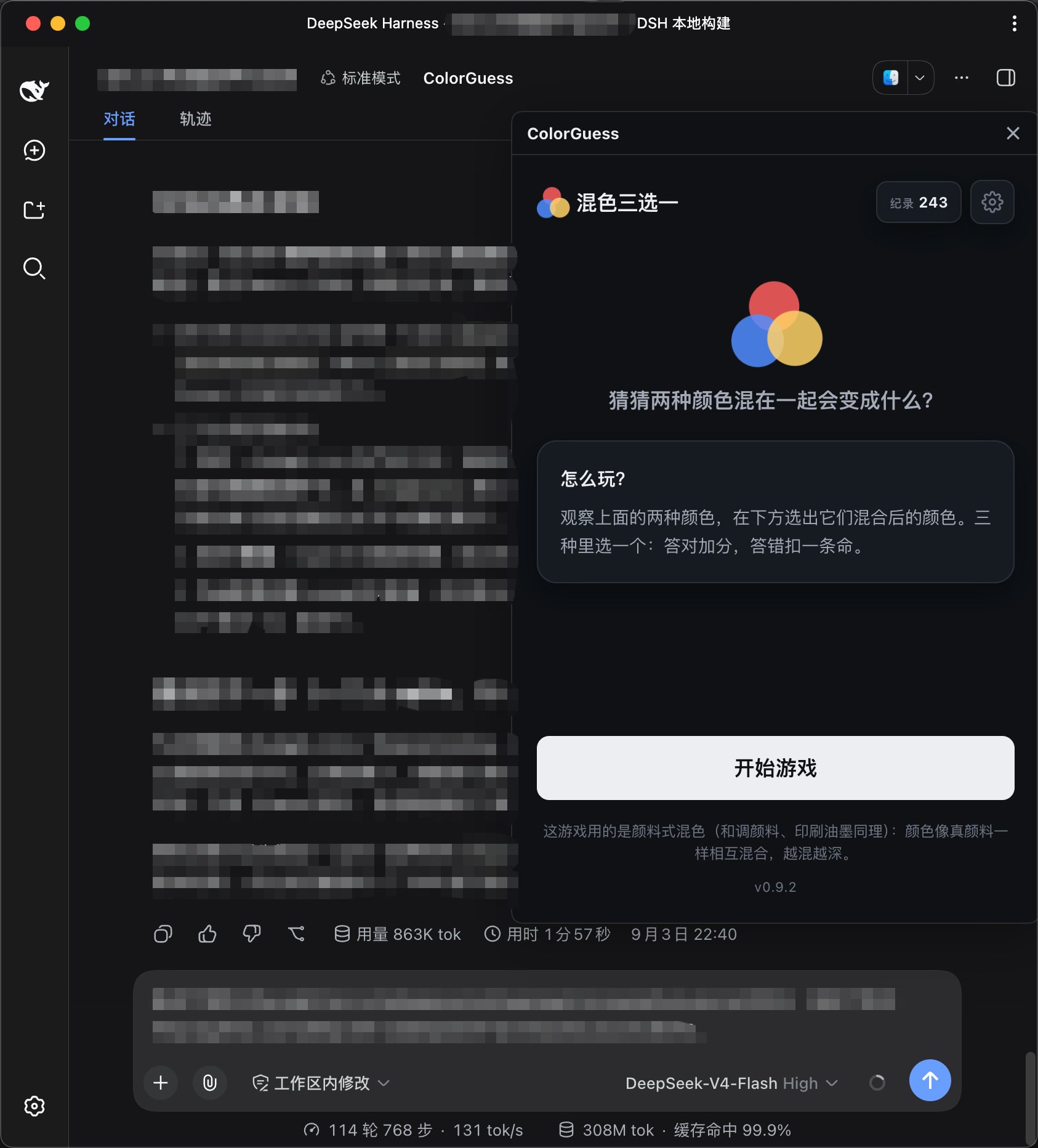
会话头部点开 ColorGuess,等结果的时候来一局;窗口跟随 DSH 的亮/暗主题。
安装 / Install
通过 git 仓库安装(本仓库为 public),profile 用 web:
dsh plugin --profile web add github:HDNRAY/dsh-plugin-colorguess
# 然后重启 dsh web
重启后,在会话头部(聊天页右上角操作区)会出现 ColorGuess 按钮,点击打开悬浮窗内嵌游戏。
更新插件(代码或 lib/ 有新版后):
dsh plugin --profile web update colorguess-dsh-plugin
# 然后重启 dsh web
功能 / Features
- 可拖动的悬浮窗(拖动标题栏移动,左下 / 右下两个角缩放,✕ / Esc 关闭)
- 主题同步:游戏跟随 DSH 的亮/暗主题(postMessage 协议
{ source: 'colorguess-dsh', theme }) - 不占用会话区域:关闭后不留痕迹
权限与外部服务 / Permissions & external services
- 不申请任何特殊权限:不读写本地文件、不访问会话内容、不注入或修改 prompt,只在会话头部渲染一个按钮和一个悬浮窗。
- 外部服务:悬浮窗内的游戏页面从 GitHub Pages 加载,需要联网。
- 匿名统计:游戏页面内含匿名访问统计(Umami),仅记录页面访问与游戏内事件(开始、作答、结束等),不使用 Cookie 做跨站追踪,也不采集账号、会话内容或任何个人信息。
- 主题转发:只把 DSH 当前的亮/暗主题通过 postMessage 传给游戏页面用于配色。
兼容与运行要求 / Compatibility
- DSH:在
0.1.2-alpha.2上开发与验证。 - 平台 / Profile:
web(浏览器端插件,无小程序 / 原生端实现)。 - 运行环境:现代浏览器 + 联网(游戏页面托管在 GitHub Pages)。
开发 / Development
npm install          # 仅安装 esbuild(构建用)
npm run build        # 重新构建 lib/index.js + lib/client.js
lib/ 已提交,直接 git 安装即可用;修改 src/ 后重新构建并提交 lib/。main 分支受保护(PR 审核):改动请走 PR。仓库的 sync-lib workflow 会在 main 更新后自动重建 lib/ 并开一个 "chore: rebuild lib" 的 PR,合并后安装者即可拿到新构建。
贡献 / Contributing
- main 分支禁直推:所有改动通过 Pull Request
- 改动
src/后本地跑npm run build并提交lib/,或交给 sync-lib workflow 自动重建
结构 / Structure
src/index.ts— 宿主端(空 apply,让插件进入 Loader)src/client/— 浏览器端:头部按钮 + 悬浮窗 iframe + 主题转发scripts/build.mjs— 构建脚本(esbuild,产出__ModuleLoader__.load契约的 client bundle)cordis.patch.yml— 插件行配置
No comments yet. Be the first to write one.