READMESource: main@e5f79889
dsh-bailian-voucher
在 DeepSeek Harness 左侧边栏底部显示阿里云百炼学生 300 元代金券余额。
- 余额来自阿里云官方只读接口
QueryCashCoupons(BssOpenApi),用 RAM AccessKey 的 ACS3 签名查询; - 券列表为空时自动改用
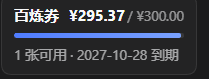
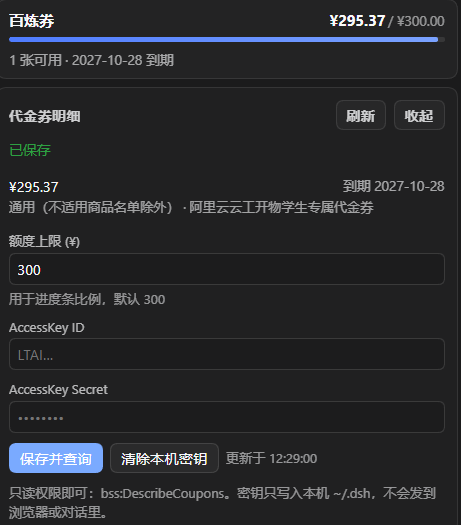
GetFundAccountAvailableAmount(资金账户可用金)兜底; - 卡片显示余额 / 300 的进度条、券张数、最近到期日;点开可见每一张券的明细;
- AccessKey 只写入本机
~/.dsh/storages/bailian-voucher/credentials.json(0600),不会下发给浏览器,也不会出现在对话里; - 查询结果缓存 5 分钟,点「刷新」强制重查;写接口只接受应用本身发起的请求(跨站
http(s)Origin 一律拒绝,桌面壳的自定义协议放行);密钥存在本机,重启后不用重填。
界面
侧边栏底部会出现一张小卡片:
百炼券                 ¥279.50 / ¥300
▓▓▓▓▓▓▓▓▓▓▓▓▓▓▓▓▓░░░░
2 张可用 · 2026-12-31 到期
点一下展开:券明细、刷新按钮、额度上限(默认 300,只影响进度条比例),以及 AccessKey 填写框。
安装
# 已发布到 npm 之后
dsh plugin --profile web add dsh-bailian-voucher

# 或者直接从 GitHub 装(未发 npm 时)
dsh plugin --profile web add github:Gucciy69/dsh-bailian-voucher
装完完全退出并重开 DeepSeek Harness(宿主插件是进程内加载的),侧边栏底部就会出现卡片。
想把它发到插件市场,步骤见 docs/PUBLISH.md。
首次配置(约 1 分钟)
登录阿里云控制台 → 访问控制 RAM → 用户 → 创建用户(勾选「OpenAPI 调用访问」),拿到 AccessKey ID / Secret。
给这个 RAM 用户授权(只读即可):
{
  "Version": "1",
  "Statement": [
    {
      "Effect": "Allow",
      "Action": ["bss:DescribeCoupons", "bss:DescribeBillingAccount"],
      "Resource": "*"
    }
  ]
}
只用代金券接口的话
bss:DescribeCoupons一个就够;bss:DescribeBillingAccount是给 「可用金兜底」用的,不授权也不影响代金券查询。在 DSH 侧边栏点开「百炼券」卡片,粘贴 AccessKey ID 和 Secret,点「保存并查询」。 插件会先验证一次再落盘——填错不会留下一个永远报错的配置。
验证通过后卡片立刻显示余额;之后每 10 分钟自动刷新一次。
常见问题
- 提示
Forbidden.RAM/ 无权限:RAM 用户没被授予bss:DescribeCoupons,或 AccessKey 属于 另一个阿里云账号(券在哪个账号下,就得用哪个账号的 Key)。 - 代金券列表为空:2024-07 之后新发的券并入「优惠券」体系,若
QueryCashCoupons不返回, 卡片会显示资金账户可用金(口径是「可用额度」,含现金与券的抵扣),并在展开面板里注明。 - 数字和费用中心对不上:
Balance是这张券剩余可抵扣金额,不是面额;已过期/已用完的券 会被过滤掉。 - 想换账号:展开卡片 →「清除本机密钥」,再填新的。
文件
| 文件 | 作用 |
|---|---|
index.js |
宿主插件:配置/凭据存储、缓存、/plugins/dsh-bailian-voucher/api/* 路由 |
aliyun.js |
阿里云签名(ACS3 + 经典 RPC 回落)与两个只读查询的解析 |
client.js |
侧边栏卡片(sidebar.footer.action 插槽)+ 错误边界 |
cordis.patch.yml |
安装到 profile 时挂载的 bundle patch |
自检
node test/self-check.mjs    # 签名结构、归一化、路由形状;用假 Key 问一次真实网关
node test/e2e.mjs           # 假 fetch 跑完整链路(含签名回落、缓存、权限自检、写操作防护)
node test/client-render.mjs # 用极简 React 替身渲染各状态,检查文案与进度条
卸载
# 1) 从 profile 的 cordis.patch.yml 删掉 bailian-voucher 那一行 insert
# 2) 从 profile 的 package.json dependencies 删掉 dsh-bailian-voucher
# 3) 删除 profile/node_modules/dsh-bailian-voucher(junction)与本机凭据
rm -rf ~/.dsh/storages/bailian-voucher
隐私
插件只向 business.aliyuncs.com / bssopenapi.aliyuncs.com 发送签名请求,不访问其它域名;
不采集、不上报任何用量数据。余额只在本机进程与浏览器之间传递,密钥不进入浏览器。
No comments yet. Be the first to write one.