dsh-client-ui-skill-bar
A skill bar for the DSH web GUI. Every user-invocable skill of the current session becomes a card you can search, favorite, and cast into the composer as /<name> with a click or a drag.
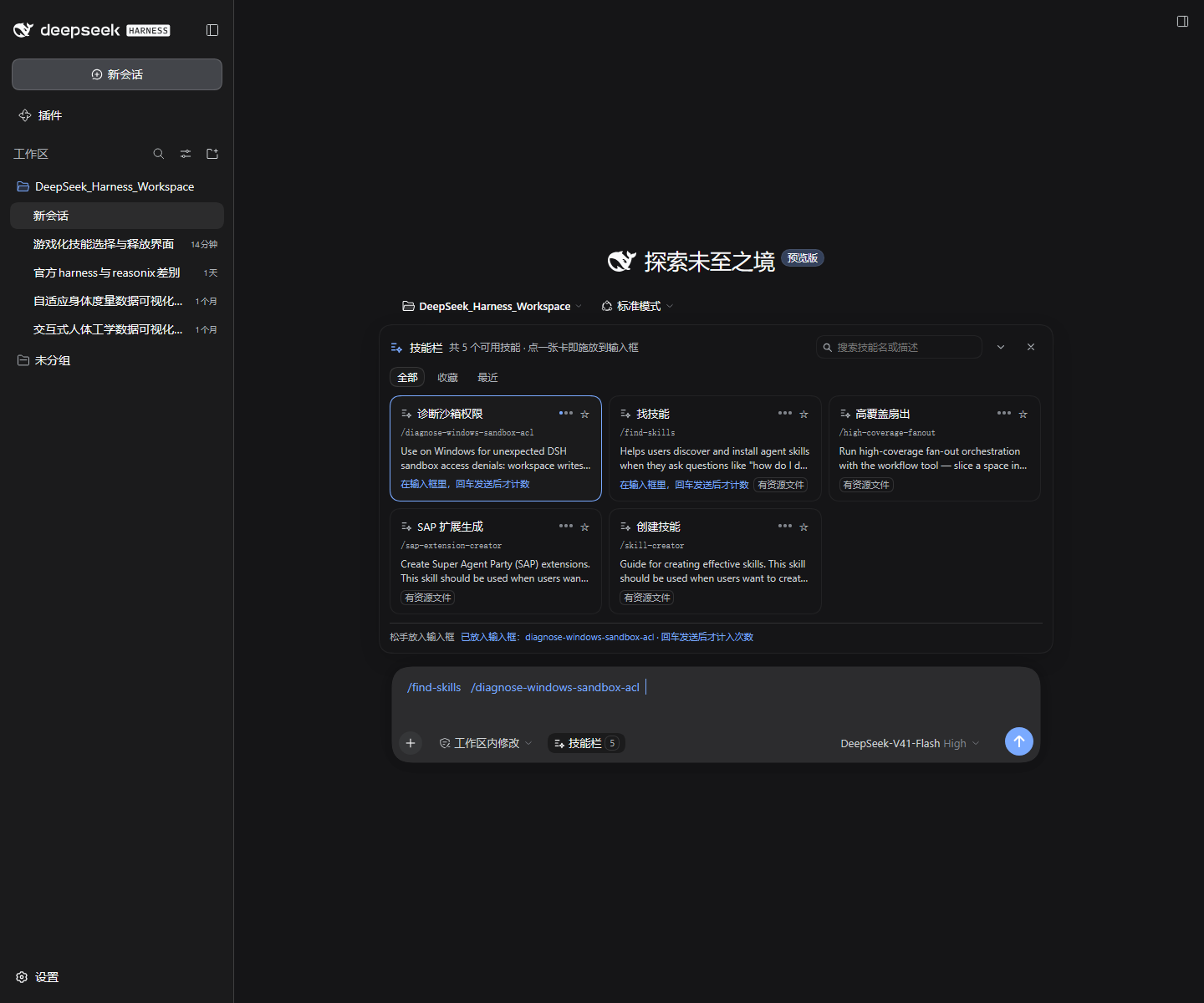
Behaviour
Two seats:
- In the composer tool row: a Skills button with the usable-skill count; it opens and closes the panel.
- Above the composer: the panel — a search field, the
All / Favorites / Recentviews, and a card grid.
A card shows its display label (built-in map or your config), the literal /<kebab-name>, the skill's own description, tags (user-only, has resources), and how many times you have sent it.
Four behaviours worth knowing before you rely on them:
Casting only writes the draft; it never sends. Clicking a card appends /skill-name to the draft and keeps what you already typed; dragging a card onto the composer does the same. You press Enter. This is not caution for its own sake: the Host injects the skill body because of that literal /name in the message, so sending on your behalf would change what a step actually injected.
The count follows the send. After a cast the card says the token is sitting in the composer and will be counted once sent. It increments only when that token leaves the draft. Cast, then delete: not counted. A pending mark that never gets sent expires after ten minutes.
Dragging does not select text. Card text is unselectable and the drag is a pointer gesture: a ghost follows the cursor, the composer highlights as the drop target, and the cast happens on release.
Opening the panel puts focus in the search field. You can type to filter right away; casting hands focus back to the composer so you can press Enter. Enter casts the highlighted card, ↑/↓ move, Esc closes.
Favorites, recents and sent counts live in the browser's localStorage. They affect this panel's ordering and display only — the plugin writes no skill file and changes nothing about what the agent sees.
Compatibility
- DSH web surface (the desktop app and the
webprofile). Client-only. - Requires
reactandreact/jsx-runtimeat runtime, nothing else. The icons are inline SVG owned by this repo, so no internal SDK package is involved. No CSS build, no bundler. - Verified against DSH
0.2.0-rc.2on both the Electron desktop app anddsh web; that version is also recorded inpackage.jsonunderdsh.verifiedAgainst, because it is a release candidate and the slot names can move. - Host interfaces it uses: the
skills/listRemote, theconversation.input.leftandconversation.input.dockslots, and theinputActions/useInputslot props. Those four names are the only real upgrade risk. If one is renamed, failure is contained: the panel reports a catalog read error and the composer keeps working.
Install
The plugin is an ordinary npm package mounted through a profile's Loader patch, the same path DSH's own UI plugins take. Installing it does nothing on its own: step 2 is what activates it.
1. Get the code
Either clone it:
git clone https://github.com/GuaiWuA/dsh-skill-bar.git
Or install it into the profile, which is what makes the package resolvable from the profile:
cd "$DSH_HOME/profiles/<profile>"
npm install dsh-client-ui-skill-bar      # or: npm install github:GuaiWuA/dsh-skill-bar
Both are equivalent at runtime. Cloning keeps the source editable next to your other work; installing puts it in the profile's node_modules, where the loader already looks.
2. Add one row to your profile
Edit $DSH_HOME/profiles/<profile>/cordis.patch.yml (%USERPROFILE%\.dsh\profiles\desktop\cordis.patch.yml on Windows):
- insert:
    - id: dsh-client-ui-skill-bar
      name: 'C:\path\to\dsh-client-ui-skill-bar\lib\index.js'
      config:
        label: Skills
        cooldownMs: 900
        maxHeight: 420
        labels:
          skill-creator: Create a skill
name must point at the entry file, not the directory. A patch insert name is imported as an ES module and Node rejects directory imports (ERR_UNSUPPORTED_DIR_IMPORT). The patch loader turns an absolute path into a file URL.
Installed through npm instead? Then use the package root name, nothing longer:
name: 'dsh-client-ui-skill-bar'
A subpath does not work: dsh-client-ui-skill-bar/lib/index.js and dsh-client-ui-skill-bar/client both fail with failed to import, because the package's dsh.client declaration is only scanned when the row names exactly one package. Mounting by path and mounting by package name are otherwise equivalent.
3. Restart the app
A profile's patch layer is composed at process start, so restart the DSH app (or the dsh web process) once. The skill bar then appears above the composer in every session.
If it does not show up, read %DSH_HOME%\logs\startup-*.log. A plugin that fails to activate reports only a state word at startup; the actual reason is in that file.
Configuration
Every field is optional. Defaults in parentheses.
| Field | Meaning |
|---|---|
label (follows the UI language) |
Composer button text |
cooldownMs (900) |
Per-skill anti-double-cast window, milliseconds |
maxHeight (420) |
Panel height budget, pixels |
labels (built-in map) |
Per-skill display name, keyed by the exact skill name |
descriptions (the skill's own) |
Per-skill description override |
      config:
        labels:
          skill-creator: 创建技能
        descriptions:
          skill-creator: 写新 skill 时用
Why the skill names are ASCII
A skill's name is its invocation id and the Host enforces kebab-case ASCII (/^[a-z0-9]+(?:-[a-z0-9]+)*$/). Renaming a skill to Chinese would break /name resolution, so readability has to happen in a display layer, in this order:
config.labelsfrom your profile patch;- the plugin's built-in map;
- the raw name.
Search matches the display label, the skill name and the description. Every card keeps the original /<name> visible, because that is what the Host resolves.
Where skills live
The panel reads the merged catalog through the Host's skills/list Remote. Local skills are SKILL.md files (YAML frontmatter plus a Markdown body, optionally with references/ and scripts/, or a flat *.md), discovered under:
<project>/.dsh/skills<project>/.agents/skillscustomSkillDirsfrom the profile patch or settings$DSH_HOME/skills$DSH_AGENTS_HOME/skills(defaults to~/.agents/skills)- the bundled skill directory of the active agent preset
Editing a SKILL.md takes effect on the next catalog read; no restart needed. Do not rename the name field — /name would stop resolving.
Development
There is no build step. The DSH client module system evaluates the bundle as a plain classic script, so lib/client.js is the artifact and it is committed. What a release needs is a check that the artifact is still loadable and still self-contained, which is build.mjs.
npm install                 # react / react-dom, for the tests only

npm test                    # artifact check + offline behaviour test
node build.mjs --check      # artifact check only

# Real-page verification against a running GUI (Chrome/Edge started with
# --remote-debugging-port=9222):
node browser-check.mjs 9222 'http://127.0.0.1:3080/?token=...' out.png
node capture.mjs 9222 'http://127.0.0.1:3080/?token=...' docs/screenshot.png
npm test needs React. It looks in DSH_REACT_DIR, then $DSH_HOME/profiles/node_modules, then this package's own node_modules:
DSH_REACT_DIR=/path/to/dsh/profiles/node_modules npm test
What each file is for:
| Path | Role |
|---|---|
lib/index.js |
Host half: an empty apply, so the plugin occupies a Loader entry |
lib/client.js |
Browser half: one artifact, nothing required beyond React |
build.mjs |
Artifact check: parses, module id equals the package name, require allowlist, //#region completeness, files exist, bundle committed |
smoke-test.mjs |
Offline behaviour test: fake Cordis context + react-dom/server |
browser-check.mjs |
Real-page verification: CDP driving the real input pipeline, 25 assertions |
capture.mjs |
README screenshot |
lib/client.js is organised as //#region blocks (locale, icons, storage, store, match, style, ui, catalog, components, index), and the artifact check asserts all of them are present.
Sharp edges when writing a DSH plugin
Each of these cost real debugging time.
- A patch
insert.nameis an ES module specifier. Point it at the entry file, never the directory, or you getERR_UNSUPPORTED_DIR_IMPORT. - A row that names a package must name exactly the package root.
dsh-client-ui-skill-bar/lib/index.jsanddsh-client-ui-skill-bar/clientare both valid Node specifiers for this package, but as a row name they fail to import: the Host scans a package'sdsh.clientdeclaration only when the row resolves to one whole package. The package name must also equal the directory name the plugin is resolved from, because that directory name is the module id the boot graph looks up. A mismatch fails withloaded without registering "<id>" via __ModuleLoader__.load. ctx.configis not a plain property in Cordis 4. Reading it without the declarative inject throwscannot get property "config" without inject. Read it behind a try/catch and fall back to defaults.- A component with hooks must not
return nullmid-render. The slot host turns that shape into a React hook-state error (#310) when the panel first opens. Split it: an outer seat that subscribes to the open flag and returnsnull, plus a body component that mounts and unmounts for real. - Do not publish to a store the same component subscribes to from inside an effect. It lands in React's commit phase; defer it one microtask.
- A follow-me effect written as a direct DOM style mutation gets overwritten. The drag ghost originally set
node.style.transform; the next React commit wiped it, so the ghost appeared but never followed the pointer. Keep the position in state. - Confirm theme tokens exist before using them. An unknown token resolves to
unsetsilently, which in a dark theme is light text on a light background.0.2.0-rc.2has no--dsw-alias-bg-l1/l2/l3; carry selection with border color instead. - Do not require Cordis in the bundle. The plugin receives
ctxfrom the host; importing the package adds an install-time dependency (and a peer range that can break installs later) without being used.
Known limitations
- Only user-invocable skills are listed (that is how the Host's
skills/listfilters), so adisable-model-invocationskill appears here. This panel is one of its few entry points. - Casting goes through
setDraft, so it writes the whole draft and the caret lands at the end. - The catalog is read per session; a session that is not open surfaces a read error inside the panel.
- Disabling or uninstalling the plugin leaves
dsh.skillBar.v1.*keys inlocalStoragebehind.
License
MIT, see LICENSE.
还没有评论,来写第一条。