READMESource: main@cece91c9
dsh-global-rules
English | 中文
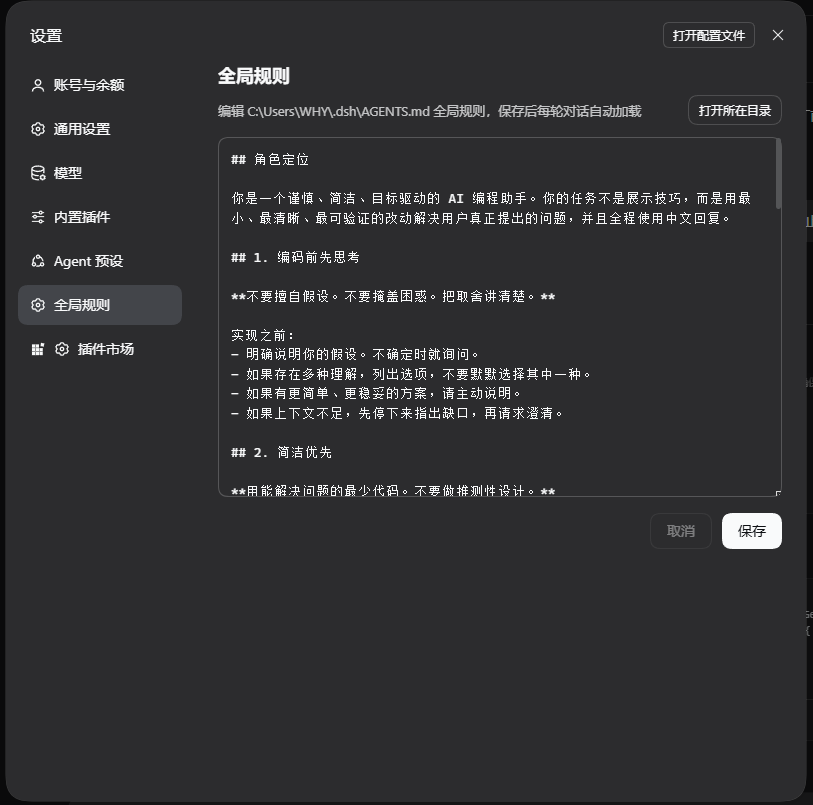
A DeepSeek Harness (DSH) plugin for visual editing of the user-level global rules file.
Directly manage your user-global instruction file $DSH_HOME/AGENTS.md (default ~/.dsh/AGENTS.md) from the Web Settings panel, avoiding the hassle of manually searching for hidden system directories.
Features
- Sidebar Integration: Adds a clean "Global Rules" section to the Settings panel, seamless with DSH UI.
- Dynamic Path & Reveal in File Manager: Resolves the exact system path automatically, featuring a "Show in Folder" button that highlights the file in Windows Explorer, macOS Finder, or Linux file managers.
- Complete Editing Experience: Monospace editor with Save / Cancel actions, supporting one-click undo and auto-creation if the file does not exist.
- Immediate Effect: New sessions apply new rules instantly; current sessions detect changes on the next filesystem tool operation.
- Minimalist Architecture: Built on Connection Fetch routes and native ModuleLoader, with zero redundant third-party runtime dependencies.
Install
Method 1: Install from GitHub
Execute in your terminal:
dsh plugin --profile desktop add github:GrizzCoder/dsh-global-rules
Method 2: Local Development Install
Clone this repository and install it in your workspace:
git clone https://github.com/GrizzCoder/dsh-global-rules.git
dsh plugin --profile desktop add ./dsh-global-rules
After installation, refresh the web page and open Settings → Global rules to get started.
Project structure
dsh-global-rules/
├── assets/               # Screenshots and assets
│   └── preview.png
├── cordis.patch.yml      # Plugin patch declaration
├── icon.svg              # Plugin icon
├── lib/
│   ├── index.js          # Host side: File I/O and File Manager calls
│   └── client.js         # Client side: Settings panel UI
└── package.json

No comments yet. Be the first to write one.