Reverie · dsh-reverie
中文 · English
DeepSeek Harness 的读书笔记插件:把链接扔进来,自动转录或抓取正文,中英对照精读;随手写下想法;再按天、按周、按主题回顾。全程可以让 AI 解读、陪你对话。
这是个人开发的社区插件,不是 DeepSeek 官方插件,也和乔木 RSS 没有隶属关系。部分代码改编自 乔木 RSS · qiaomu-rss-dsh(GPL-3.0-only),详见 致谢与许可。
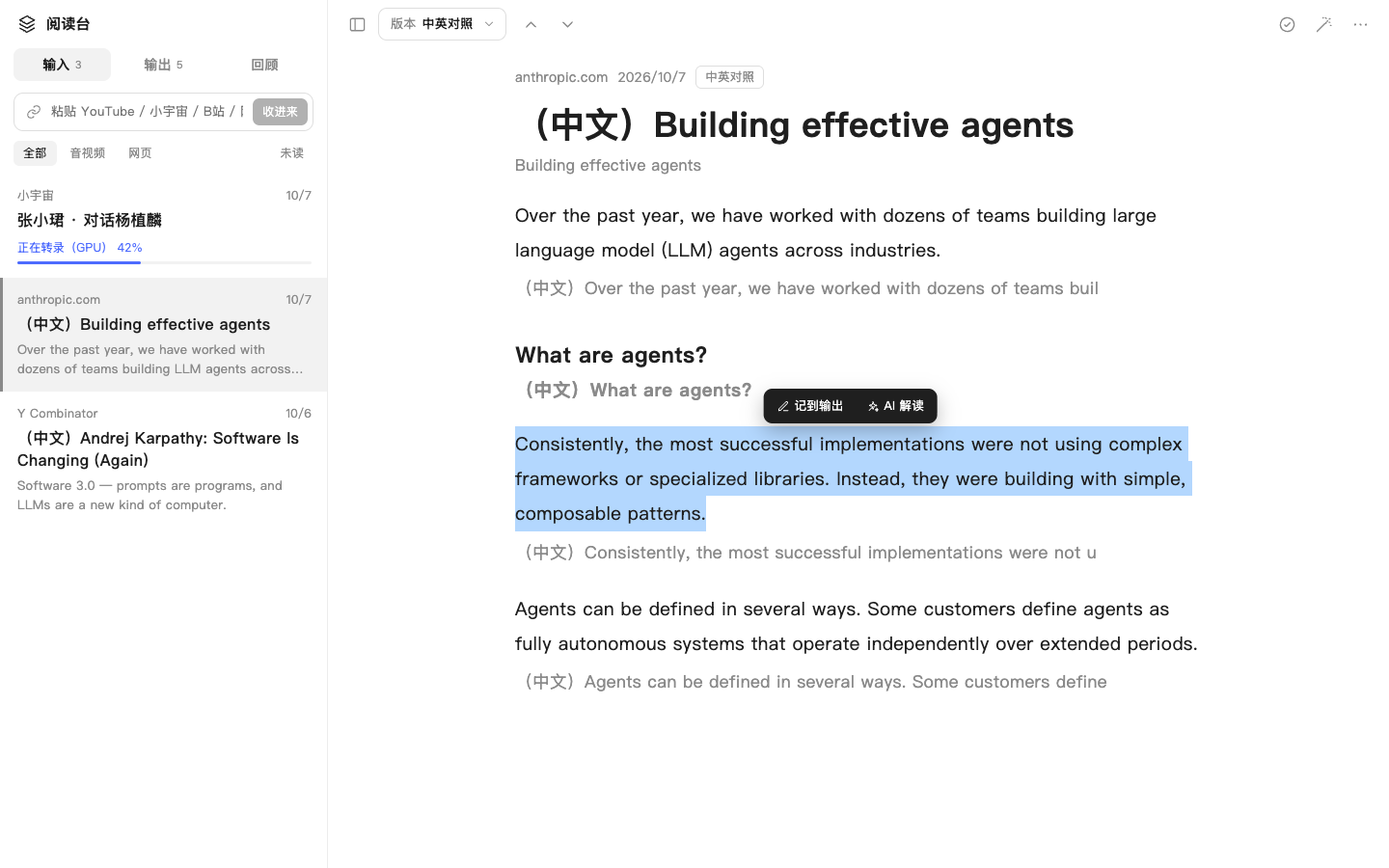
截图来自早期开发版本,当时插件名为「阅读台」,界面与当前版本基本一致。
能做什么
左栏分三块:
- 输入:粘贴链接就行。
- YouTube、B 站、小宇宙单集、Spotify 和苹果播客单集、音视频直链:在本机转录。YouTube 有人工字幕时直接用字幕;没有就用 yt-dlp 下载音频,再用本机 Whisper 转录(Apple 芯片用 mlx-whisper,否则用 faster-whisper)。
- Spotify 的音频是加密的,不能直接下载。Reverie 会读取这期节目的标题和节目名,到 Apple Podcasts 公开目录和节目的 RSS 里找到同一期的公开音频再转录;Spotify 独家节目没有公开音频,会提示换成其他平台的链接。
- 网页:抓取正文。
- 小红书笔记、公众号文章、推特推文:抓取正文和图片(推文走 vxtwitter,失败时退回官方 syndication 接口;小红书需要 App「分享 → 复制链接」得到的新链接)。带视频的帖子会再把音轨转录出来。
- 列表可以按「全部 / 音视频 / 网页 / 小红书 / 公众号 / 推特」筛选。
- 外文内容自动翻成中文。阅读页的「版本」可以切换中英对照、中文、原文。
- 音视频带播放器,每段有时间戳,点一下就跳到那里。
- 选中一段文字,可以「记到输出」,也可以「AI 解读」。
- 魔法棒按钮打开「AI 伴读」,用的是 Harness 原生对话,AI 会自动看到你正在读的内容。
- 插件里发起的对话都放在单独的「Reverie」工作区(文件夹
~/Reverie),不会混进其他工作区;在 Harness 左侧会话列表里也能找到。
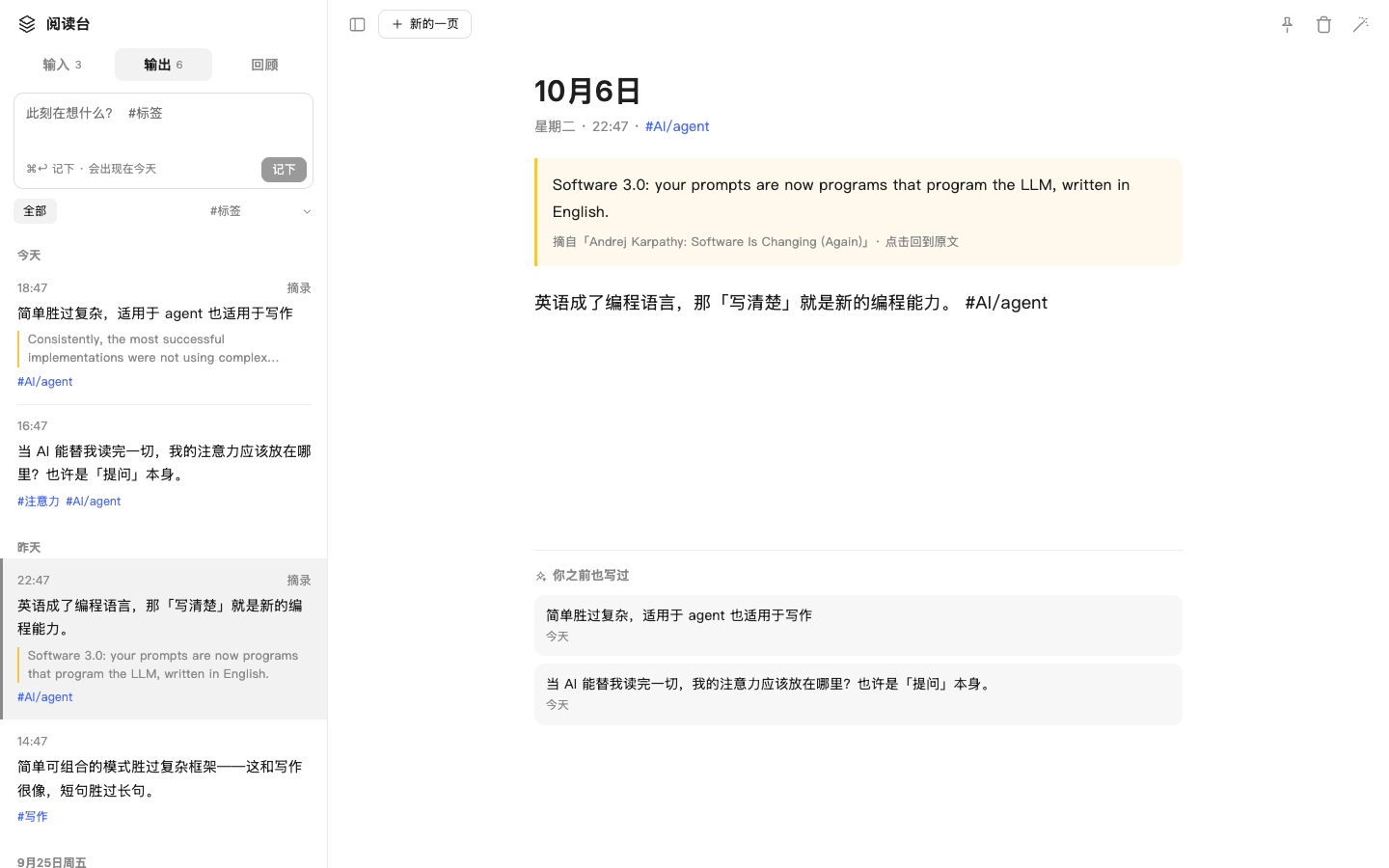
- 输出:日记本、flomo 和备忘录合在一起。
- 左栏顶部随手记,可以打 #标签(支持
#父/子)。下面按日期分组,可以按标签筛选。 - 中间是一页一页的编辑区,自动保存。摘录会带着原文,点一下就回到原文那一段。页面底部列出「你之前也写过」的相关想法。
- 也可以和 AI 对话,帮你追问、展开、找联系。
- 左栏顶部随手记,可以打 #标签(支持
- 回顾:
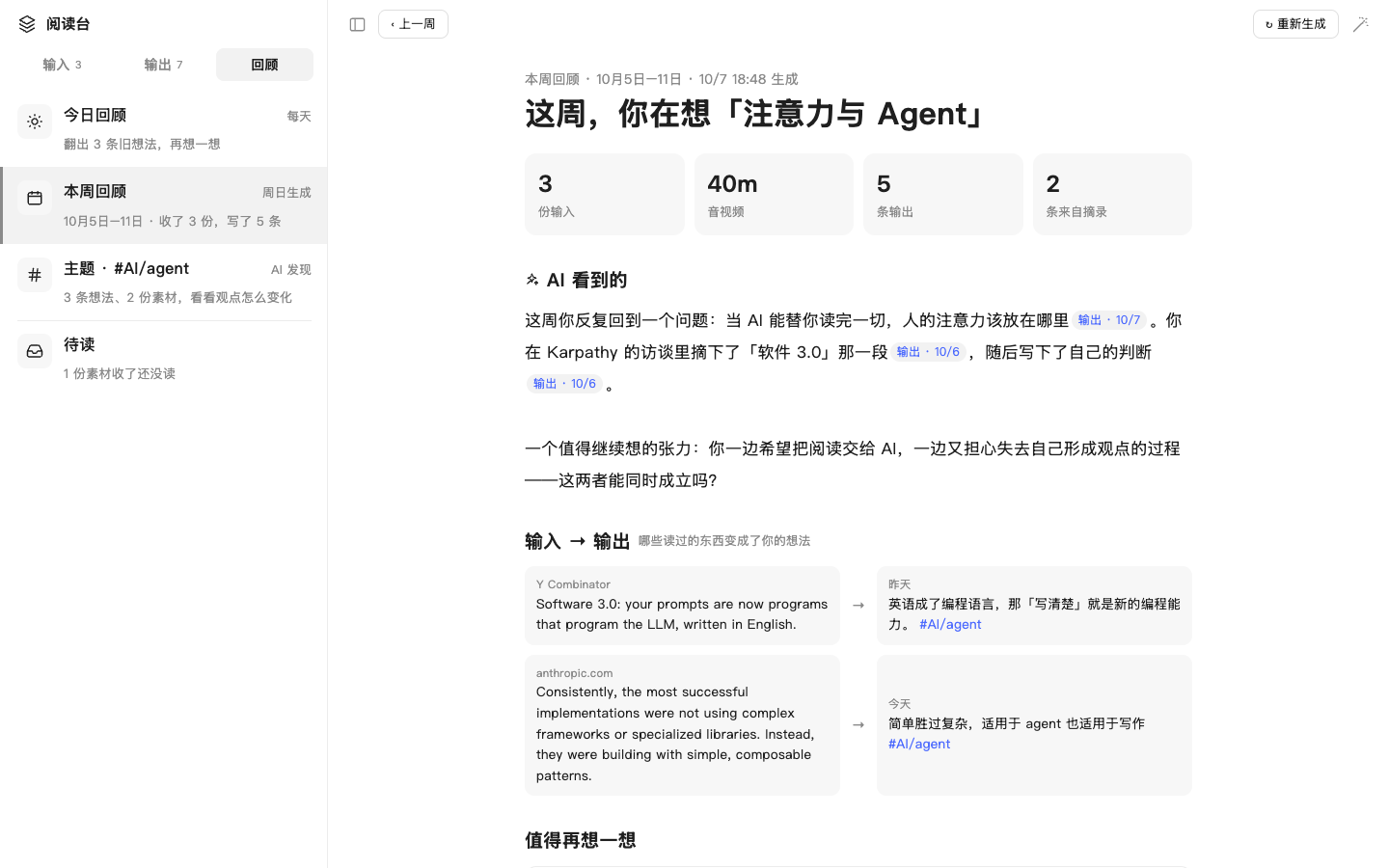
- 今日回顾:每天翻出 3 条旧想法,可以「接着写一条」。
- 本周回顾:本周统计,加上 AI 写的周总结。总结里每句都标了出处,点了能跳转。另外还有「输入 → 输出」、值得再想一想的旧想法和待读。打开时自动生成,周日晚上自动补全整周,可以翻看上一周。
- 主题:按 #标签 串起时间线,由 AI 看你的观点怎么变化。
- 待读:收进来但还没读的素材。
Agent 工具:reader_ingest(扔链接)、reader_add_memo(记一条)、reader_search、reader_read_item。在 Harness 主对话里也能往 Reverie 里扔东西。
| 输出 | 本周回顾 |
|---|---|
 |
 |
安装
需要 DeepSeek Harness 0.2.0-rc.2(Desktop 或 dsh CLI)。
方式一:Release 安装包(推荐)
到 Releases 下载 dsh-reverie-<版本>.tgz 和同名 .sha256,在下载目录执行:
shasum -a 256 -c dsh-reverie-0.6.0.tgz.sha256
dsh plugin --profile desktop add "$PWD/dsh-reverie-0.6.0.tgz"
用命令行 Web 界面时把 desktop 换成 web。装好后重启 Harness,在侧边栏打开「Reverie」。也可以在 Harness 对话里把 .tgz 的绝对路径交给 Agent,让它用插件管理安装。
方式二:直接从 GitHub 安装
仓库里提交了构建好的 lib/,不需要在安装时构建:
dsh plugin --profile desktop add github:Gniy7Ga/dsh-reverie#v0.6.0
从旧包 my-reader-dsh 升级:先在插件管理里移除 my-reader-dsh(两者注册了同名的 Agent 工具,不能同时启用),再安装 dsh-reverie。第一次启动时会把 storages/my-reader/ 里的数据复制到 storages/reverie/,旧目录保留不动。
本机转录环境(可选)
只读网页和带字幕的 YouTube 不需要额外安装。转录音视频需要:
yt-dlp和ffmpeg:插件会在/opt/homebrew/bin、/usr/local/bin、~/.local/bin、/usr/bin里找,例如brew install yt-dlp ffmpeg。- 一个装了
mlx-whisper(Apple 芯片)或faster-whisper的 Python 环境。
插件会自动识别 AI-Video-Transcriber 的安装目录(~/Documents/Codex/*/*/AI-Video-Transcriber)。其他位置可以在 profile 的 cordis.patch.yml 里指定:
- id: reverie
  name: dsh-reverie
  config:
    toolchain:
      ytDlp: /opt/homebrew/bin/yt-dlp
      ffmpeg: /opt/homebrew/bin/ffmpeg
      # 二选一:
      mlxPython: /path/to/venv/bin/python
      mlxModel: /path/to/whisper-large-v3-mlx       # 含 weights.npz 或 weights.safetensors 的目录
      fasterWhisperPython: /path/to/venv/bin/python
      fasterWhisperHfHome: /path/to/huggingface-cache  # 可选
config.chatWorkspaceDir 可以改 Reverie 工作区所在的父目录(默认是用户主目录)。
数据
数据保存在 Harness home 的 storages/reverie/:library.json 存索引、笔记和设置,bodies/ 存正文。不会上传到别处;翻译和 AI 对话用的是 Harness 当前配置的模型。
开发
需要 Node.js 22+ 和 pnpm。
git clone https://github.com/Gniy7Ga/dsh-reverie.git
cd dsh-reverie
pnpm install
pnpm run build      # 生成 lib/ 和 THIRD_PARTY_LICENSES.md
pnpm test           # 离线测试(假模型)
DSH_HOME=/tmp/reverie-e2e node tests/e2e.mjs   # 联网 + 本机转录的端到端测试
pnpm pack
src/ 是源码,lib/ 是构建产物,和源码一起提交,DSH bundle 直接加载它。改了源码请重新构建,并把更新后的 lib/ 一起提交。包名 dsh-reverie 必须和 cordis.patch.yml 里的 name 一致。
致谢与许可
- 本项目以 GPL-3.0-only 发布。Copyright (C) 2026 Ag (@Gniy7Ga)。
- 部分代码改编自 乔木 RSS · qiaomu-rss-dsh(作者 向阳乔木,GPL-3.0-only),包括 XML 解析、HTML 清洗、Markdown 渲染、原生对话桥接、YouTube 播放器和 AI 伴读的对话挂载方式;阅读界面的布局也参考了乔木 RSS。因为使用了 GPL-3.0-only 的代码,本项目同样采用 GPL-3.0-only。每个改编文件的来源和改动见 NOTICE.md 和文件开头的注释。感谢向阳乔木开源乔木 RSS。
- 图标路径来自 Lucide(ISC / MIT),推特 token 公式来自 react-tweet(MIT),打包进
lib/的 npm 包见 THIRD_PARTY_LICENSES.md。 - 抓取第三方平台内容时请遵守各平台的服务条款和版权要求,仅供个人学习与研究。
问题和建议请提交到 Issues。
English
Reverie is a reading-and-notes plugin for DeepSeek Harness. Paste a link (YouTube, Bilibili, Xiaoyuzhou, Apple Podcasts, media files, web pages, Xiaohongshu, WeChat articles, X/Twitter) and it is transcribed locally with Whisper or extracted to clean text, then translated for side-by-side Chinese/English reading. Write flomo-style notes with #tags, and review them by day, week, or theme with AI summaries. A native Harness conversation can sit beside whatever you are reading. Agent tools: reader_ingest, reader_add_memo, reader_search, reader_read_item.
This is an independent community plugin, not affiliated with or endorsed by DeepSeek or Qiaomu RSS. Install the release tarball with dsh plugin --profile desktop add /absolute/path/to/dsh-reverie-0.6.0.tgz, or dsh plugin --profile desktop add github:Gniy7Ga/dsh-reverie#v0.6.0 (built lib/ is committed), then restart Harness. Data lives under storages/reverie/ in the Harness home.
Licensed under GPL-3.0-only. Parts of the code are adapted from qiaomu-rss-dsh by 向阳乔木 (joeseesun), GPL-3.0-only; the reading layout is modelled on Qiaomu RSS. Every adapted file, its upstream source, and the changes made are listed in NOTICE.md and in each file's header. Icon paths come from Lucide (ISC/MIT); bundled npm packages are listed in THIRD_PARTY_LICENSES.md.
No comments yet. Be the first to write one.