dsh-output-style — 输出风格(基调 + 产出双分体控件 + 预设管理)
Two split composer controls for DeepSeek Harness: each pairs an on/off switch with its own preset menu — one for the communication tone, one for the output form; each session's system prompt follows the selections, with a settings page for the preset library.
DSH 输入框里有两个分体控件(开关 + 菜单),作用域都是当前会话:

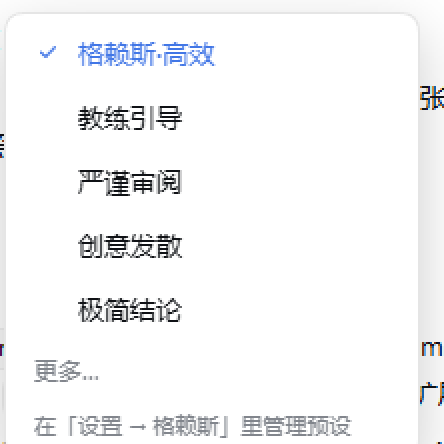
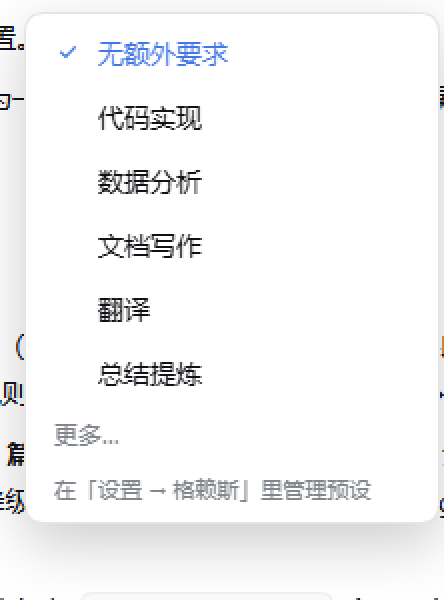
[格赖斯·高效 | ▾]:主按钮是基调开关(单击开/关;按钮文字显示当前基调),小三角打开沟通基调菜单。[无额外要求 | ▾]:主按钮是产出开关(单击开/关;按钮文字显示当前产出预设),小三角打开产出形态菜单。- 两开关互相独立;任一菜单选中一项即生效,并自动打开它自己的开关。每组展示置顶前 5 条 + 「更多…」(展开全部)。
| 沟通基调菜单 | 产出形态菜单 |
|---|---|
 |
 |
预设
- 内置 7 个沟通/思考基调:格赖斯·高效、教练引导、严谨审阅、创意发散、极简结论、苏格拉底追问、均衡自然。
- 内置 7 个产出形态:代码实现、数据分析、文档写作、翻译、总结提炼、教学解释、方案对比。
- 菜单每组显示置顶的前 5 条 + 「更多…」(展开全部)。
- 设置 → 输出风格:两个 tab 管理预设 —— 新增、编辑、删除、置顶(前 5 条)、恢复默认;单条提示词上限 2000 字符。
- 内置预设也可改可删;「恢复默认」会把该分类还原成出厂预设。
提示词注入
三个独立 section,按顺序追加到系统提示词:
deployment:persona-prefix
style:policy   (order 650)  ← 基调开关开、基调为默认(格赖斯)时注入内置格赖斯准则
style:tone     (order 650)  ← 选了具体基调时注入该基调提示词(替换 policy)
style:output   (order 660)  ← 产出开关开、且选了产出形态时注入该提示词
- 两个开关分别控制自己的 section:基调关 → policy/tone 为空;产出关 → output 为空。
- 每个 step 的 assembly 都会重新求值,切换后同一轮的下一个 step 就生效,不需要新会话。
- 状态按 Session 存:
<DSH_HOME>/output-style/state.json({toneEnabled, tone, output, outputEnabled});预设库是全局的:<DSH_HOME>/output-style/presets.json。 - 删除正在使用的预设 → 该会话自动回退(基调回内置格赖斯、产出回无),不会报错。
使用
- 单击两个主按钮分别开关「基调」「产出」;各自的小三角选预设,选中即生效并自动打开对应开关。
- 斜杠命令
/style:/style或/style status— 查看两个开关、基调、产出/style on//style off— 基调开关/style output on//style output off— 产出开关/style tone <id>、/style output <id>;/style tone none、/style output none恢复默认
- 内置 id:基调
gricecoachauditcreativeminimalsocraticbalanced;产出codeanalysisdoctranslatesummarytutorialoptions。
安装
要求:DSH 0.2.x(在 0.2.1-rc.5 桌面版实测),无需构建步骤(纯 JS,无 prepare 脚本)。
方式一:从 GitHub 安装(推荐)
dsh plugin --profile <你的 profile> add github:GinoXiang/dsh-output-style
dsh plugin 会自动把 dsh-output-style 加进该 profile 的 dsh.profile.bundles。
开启 HMR 的 DSH 无需重启、约 1–3 秒内生效;未开启 HMR 时重启 DSH 并刷新页面。
方式二:本地开发安装
git clone https://github.com/GinoXiang/dsh-output-style.git
dsh plugin --profile <你的 profile> add link:<仓库绝对路径>
Windows 且路径含空格时,pnpm 的 link: spec 容易出问题,可先用目录联接换成无空格路径:
New-Item -ItemType Junction -Path "$env:USERPROFILE\plugins\dsh-output-style" -Target "<仓库绝对路径>"
dsh plugin --profile <你的 profile> add "link:C:/Users/<you>/plugins/dsh-output-style"
从旧名 dsh-grice 升级
插件在 0.3.0 改名为 dsh-output-style。旧状态目录 <DSH_HOME>/grice/ 会在首次启动时自动复制到
<DSH_HOME>/output-style/(旧目录保留不动);profile 里旧的 dsh-grice 依赖/bundle 需要换成本包:
dsh plugin --profile <你的 profile> remove dsh-grice
dsh plugin --profile <你的 profile> add github:GinoXiang/dsh-output-style
并把 profile package.json 的 dsh.profile.bundles 里的 dsh-grice 换成 dsh-output-style。
卸载
dsh plugin --profile <你的 profile> remove dsh-output-style
并把 profile package.json 的 dsh.profile.bundles 中的 dsh-output-style 去掉。
维护者发版注意
市场条目使用 releases/latest/download/dsh-output-style.tgz(版本号无关的资产名)。每次发新 release 时,把
npm pack 生成的 tarball 重命名为 dsh-output-style.tgz 并附加到该 release,否则这个链接会在下一次发版后 404。
实现结构
dsh-output-style/
├── package.json              # dsh.bundle.patch + dsh.client(platform: web)
├── cordis.patch.yml          # insert: id=dsh-output-style, name=dsh-output-style
├── index.js                  # Host:会话状态 + 预设库 + 三个提示词 section + HTTP 路由 + /style 命令
├── client.js                 # 浏览器:两个分体控件(开关 + 菜单)、设置页(settings.section)
├── test/host.test.mjs        # Host 行为测试(node:test,无依赖)
├── test/client.test.mjs      # 浏览器注册测试(假 window.__ModuleLoader__ + 假 ctx)
├── docs/composer.png         # 输入框两个控件实拍
├── docs/tone-menu.png        # 沟通基调菜单实拍
├── docs/output-menu.png      # 产出形态菜单实拍
├── docs/icon-180.png         # 市场卡片图标
└── README.md
Host 半边(index.js):
createStore(ctx)—<DSH_HOME>/output-style/state.json,会话 v3 结构{ toneEnabled, tone, output, outputEnabled },v1/v2 与旧字段自动迁移;mtime 缓存 + 原子写。createPresetStore(ctx)—<DSH_HOME>/output-style/presets.json,内置预设播种、正常化、置顶上限 5、恢复默认。registerPrompt— 三个 section 的动态 provider,按assembly.agent.session.id查当前会话选择;基调与产出各由自己的开关控制。registerRoutes—/dsh-output-style/*:state/toggle/set/toggle-output/set-output/select/presets/presets/save/presets/delete/presets/reset,回环 socket + 回环 Host + 同源 Origin 三道校验。registerCommand—/style [on|off|output on|output off|tone <id>|output <id>]。
浏览器半边(client.js):
- 经典 client bundle 协议:
window.__ModuleLoader__.load({ id, factory }),返回{ name, inject, apply }。 - 两个共享 store:按会话的开关/选择状态(轮询 + 订阅)、全局预设库;两个分体控件与设置页共用。
conversation.input.left注册两个分体控件(dsh-output-style120 = 基调开关+菜单;dsh-output-style-output140 = 产出开关+菜单);settings.section注册「输出风格」设置页。
测试
# 无依赖,直接跑(node:test 打印 TAP)
node test/host.test.mjs
node test/client.test.mjs

# 或
npm test
node --test 在部分 Windows 沙箱里会因测试 runner 派生子进程而报 EPERM,所以本仓库 README 使用直接运行的写法。
覆盖:三 section 注入与互斥、两个独立开关、按会话隔离、预设库 CRUD / 置顶上限 / 恢复默认、删除回退、v1/v2→v3 与旧目录迁移、HTTP 三道校验、/style 命令、浏览器三个注册点与卸载清理。
运行中的实例可看 <DSH_HOME>/output-style/state.json 与 presets.json。
设计取舍
- 两个分体控件、各自开关:基调与产出是正交维度,各自有独立开关;小三角选中预设会自动打开它自己的开关,关掉某个开关只停用对应注入。
- 基调替换而非叠加:选了「教练引导」就不该再同时套着「格赖斯极简」,所以 tone 与内置 policy 互斥;产出形态是另一个维度,可叠加。
- 预设库全局、选择按会话:同一套预设在不同对话里复用,但每个对话的当前选择各自独立。
- Host 单写方:浏览器只读/提交,避免多窗口状态漂移;
presets.json损坏时自动重新播种。
已知限制
- 状态/预设文件都在
<DSH_HOME>/output-style/;删除presets.json会重新播种出厂预设。 /dsh-output-style/*路由与 DSH 自带本地插件一样只监听回环地址,没有额外鉴权;不要在把 DSH 暴露到网络的部署里把它当安全边界。- 本地
link:安装时移动仓库路径会使 profile 依赖失效,需要重新add link:。 - 旧名
dsh-grice的状态目录只做一次性复制迁移;旧目录可手动删除。
No comments yet. Be the first to write one.